 (4.9/5) 895 Reviews
Best PST Repair Tool for Severely Corrupted Outlook PST Files

Repair Outlook PST file data, including emails, sent items, contacts, calendars, journals, tasks, attachments, etc., and securely export it to different formats, including PST, MSG, EML, PDF, etc. Additionally, the PST repair tool allows you to transfer Outlook data to Office 365, Exchange Server, or web-based email clients, like Gmail, Outlook.com.
Free Download Outlook PST Repair tool and save first 25 items from each folder.- Repair multiple inaccessible, damaged, or corrupted PST files without any file size restrictions.
- Repair password-protected PSTs and files with Unicode/ANSI characters.
- Retrieve lost or permanently deleted mailbox items from archive PSTs.
- Preview the repaired mailbox folders and emails before saving them.
- Split PST file into multiple small PSTs to manage large-sized Outlook data.
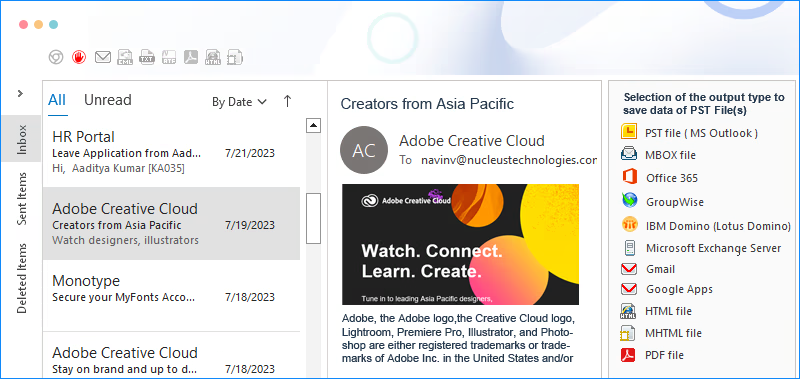
- Export PST data to different formats, including PST, DBX, MSG, PDF, EML HTML, TXT, etc.
- Move PST file data directly to cloud -based servers like Office 365, IBM Domino, Groupwise, and Exchange Server.
- Export PST file to web-based email clients, such as Gmail, AOL, iCloud, Yahoo, Company IMAP Account, etc.
- Advanced filters, such as subject, folder name, item type, and date for selective PST repair procedure.
- Added support for Microsoft Outlook 2024.

- Faster PST repair, conversion, and export process.
- Improved email preview for better clarity.
- Enhanced PST to PDF saving process.
When to Use Kernel for Outlook PST Repair?

Retrieve Emails After Accidental File Deletion
Accidental deletion of PST files or emails due to human errors often makes the mailboxes inaccessible. Use the PST repair tool to fix PST file and retrieve deleted or lost Outlook mailbox data items, such as emails, attachments, etc., within a few minutes.

Repair Corrupt PST Due to Abrupt System Shutdown
Abrupt system shutdown often induces corruption in the PST files. In that scenario, even the Outlook Inbox Repair Tool failed to resolve the issue. But our feature-rich Outlook repair tool performs a deep scan to repair highly corrupted, damaged, or inaccessible PST files without data loss.

Migrate Repaired PST data to Cloud Server
Migrate Outlook mailbox data from old and corrupted PST file to Microsoft 365, Google Workspace, or other cloud server. Additionally, the PST repair tool supports data transfer to web-based email clients, such as Gmail, Yahoo, and AOL.

My IT Team was facing complications in accessing the PST files data of our former employees because of the induced corruption in them. It was then that one of my friends recommended Outlook PST repair software by Kernel Data Recovery. After using this tool, we successfully retrieved data from all the corrupted PST files.
Justin Vendette, MVP
How to Repair Outlook PST File?
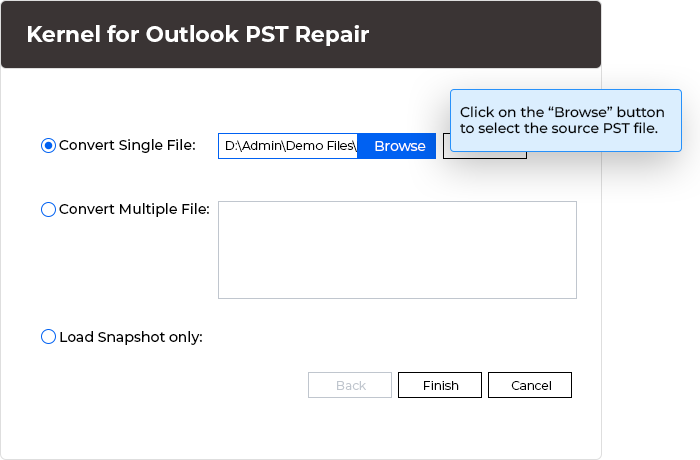
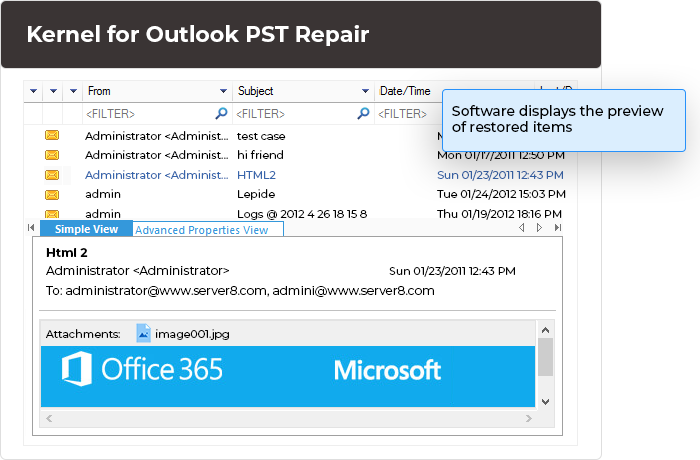
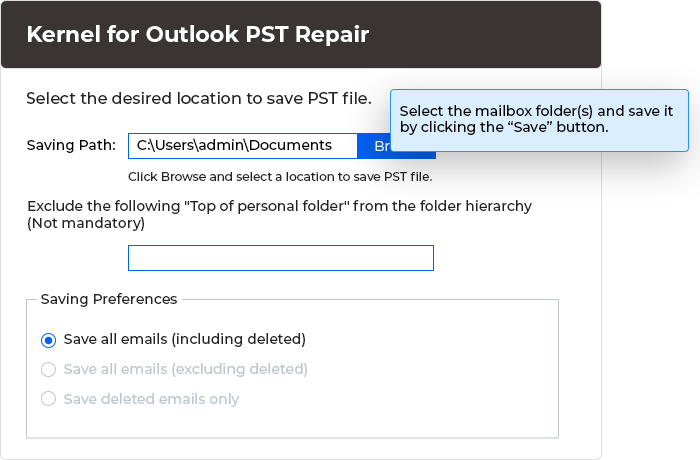
The Outlook PST repair tool performs deep scan to repair the corrupt Outlook PST files and displays its data in a hierarchical structure. Here’s how to execute PST fix process:
Key Features of the Kernel for Outlook PST Repair
The Outlook PST file repair software combines adequate features and capabilities to repair PST files with higher efficiency.

Repair Large PST Files
Use the PST repair tool to quickly repair oversized PST files. Add large, corrupted PST files to repair without any file size limitations or data integrity issues. This feature makes it easy for users to manage the resultant PST file.

Repair Bulk PST Files
Add a single or multiple PST files at the same time to perform bulk Outlook PST repair without any hassle. Repair Outlook PST files without facing any downtime and data loss while keeping all the properties and valuable data intact.

Repair Password-Protected and UNICODE PSTs
Easily add and repair password-protected Outlook PST files with complete data integrity. Also, the PST fix software repairs Outlook data item with the UNICODE/ANSI characters without making any changes to the source PST file.

Retrieve Deleted Outlook Emails
Retrieve permanently deleted Outlook PST emails with attachments. Run thorough scans on the damaged PST file to retrieve deleted email items. Select the deleted Outlook emails appearing in red color and save them to the desired file formats.

Easily Export PST to Microsoft 365
Export email data from repaired PST files to Office 365 tenant effortlessly. Provide accurate Office 365 credentials and move all the repaired PST data to Office 365 mailboxes, utilizing different saving preferences for precise data transfer.

Instantly Transfer PST to Cloud Servers
Save PST file data to Cloud servers like Exchange, Domino, & GroupWise. Export entire mailbox, including emails, appointments, attachments, and contacts, without modifying the integrity of emails and associated attachments.

Securely Save PST File to Web-Based Email Clients
Save the repaired PST file to Yahoo, Gmail, AOL, and many more email clients. No need to export emails to PST and then import PST to email clients. As our PST repair tool transfers emails directly to the selected web-based email client.

Save PST Emails in Different Formats
Perform easy PST repair with the best PST repair tool and save specific emails in various formats. The software allows users to fix PST files and save the Outlook items in DBX, MBOX, MSG, EML, PDF, DOC, DOCX, TXT, HTML, and other formats.

Use Advanced Filters
Use the advanced filters of the PST repair tool to perform selective Outlook mailbox repair process. The Outlook PST file repair tool filters out the email data based on the fields, such as From, To, Subject, Folder Name, Item Type, and Date Range.

Find Specific Items in the File
Utilize the 'Find' feature to locate specific mailbox items from the PST file. Implement the matching parameters, such as From, To, Subject, Date, and Message has attachments to find email messages from the added mailboxes.

Manage Large PST Files
PST file repair tool handles oversized PST files and splits them to save in manageable sizes to make sure smooth functioning of Outlook. Use the Split PST file feature to split large PST files into small, manageable sizes starting from 1GB, 1.5GB, 2GB, etc.

Retain Meta Properties
Free download Outlook PST Repair software to repair emails, attachments, contacts, etc., along with meta properties, such as To, Cc, Bcc, From, Subject, Date, Time, Contacts (email ID, phone number, etc.), Tasks, Calendars, and Journals.

Preview PST File Items
Provides a comprehensive preview of emails and other mailbox items, including email body text, contacts, calendar entries, and attachments. Show all the mailbox items in the original hierarchy, preserving the layout of emails and attachments.

Free PST Repair Tool
Explore the trial version of the free PST repair utility to evaluate compatibility and features. Save the first 25 items from each folder with the demo version. Download the software to fix Outlook PST file corruption using its advanced capabilities.

File Analysis Reports
Generate detailed reports by analyzing the emails in the PST file. Outlook PST file repair tool creates the following graphic reports, including Total item types, Mail flow density by date/ Mail flow density by senders, and Interaction between users.
What Leads to Corruption in the PST File?
Corruption in a PST file can be due to any of the following reasons:
- The Outlook application failed to open even in Safe mode.
- Sudden or abrupt system shutdown or power outages.
- Intrusion of malware, ransomware, or a virus into the system.
- PST file size has grown over the maximum limit.
- Inappropriate termination of the Outlook application.
- Outlook becomes unresponsive or freezes frequently.
- Outlook not syncing with Exchange or IMAP server.
- Email attachments are irrationally large in size.
Frequently Asked Questions - Outlook PST Repair Tool
- Step 1: Download and install Kernel for Outlook PST Repair.
- Step 2: Launch the software, click "Browse" to choose the corrupted PST file, and click "Next."
- Step 3: After repair, preview all PST file data, including deleted and lost emails.
- Step 4: Select all the folders or selected folders from the left pane and click "Save."
- Step 5: Apply filters and output preferences as needed.
- Step 6: A new PST file will be generated on the selected destination path.
Video Tutorial of Kernel for Outlook PST Repair
Get a detailed video guide about the working process of the Outlook PST fix software.

Outlook PST Repair Software: Trial vs Full Version Comparison
Differentiate between the free and full versions of Kernel Outlook PST Repair to get detailed information about features of both versions.
| Software Features | Trial Version |
Full Version |
|---|---|---|
| Add single or multiple corrupted PST files. | ||
| Load snapshot feature. | ||
| Data filters, such as From, To, Subject, Folder Name, Item Type, etc., accordingly. | ||
| Split PST option to break out large-sized PST files into multiple files. | ||
| Find feature to search for specific messages. | ||
| Repair corrupt, damaged, and inaccessible PST files. | ||
| Transfer PSTs to web-based email clients, such as Gmail, AOL, Yahoo, Outlook, etc | ||
| Export PST file to Exchange, IBM Domino, and other email servers | ||
| Import PST to Office 365. | 25 items per folder | Unlimited |
| Save repaired items to PST, MSG, PDF, EML, etc. | 25 items per folder | Unlimited |
| Free Download | Upgrade $69 |
Kernel for Outlook PST Repair Prerequisites & Recommendations
 About Software
Version: 26.0
Version Release Date: Dec 2025
Software Release Date: April 2020
License Type: Home, Corporate & Technician
 Version Support
MS Outlook: Office 365 Outlook, 2024, 2021, 2019, 2016, 2013, 2010, 2007, 2003, 2002, 2000, 98 and 97
 System Requirements
Hard Disk: 1 GB of disk space
Memory: 500 MB Minimum
Processor: Intel® Pentium Processor compatible (x86, x64) or equivalent
Operating System: Windows 365, 11, 10, 8.1, and older versions Windows Server 2022, 2019, 2016, 2012, 2008 R2, 2008, 2003 R2, 2003 OS
 Installation Guide
 What's new
What Customers Say about Kernel Outlook PST Repair
 (4.9/5) 785 Reviews
I used it to get back deleted emails and attachments from PST files, and it worked really well. The support was great too. I am totally happy with how Kernel for Outlook PST Repair performed. Thanks!