Kernel Email Migrator Tool
Easily migrate OST, PST, EML, and MSG files to Office 365 in bulk. Securely transfer your important emails, contacts, calendar, header, attachments, and folders directly from source-to-destination with all original data preserved.
Download Kernel Email Migrator and Try It Free for 15 Days.- Migrate unlimited PST, OST, MSG, and EML files to Office 365.
- Preserves email metadata, attachments, and folder structure.
- Performs email migration between IMAP-supported servers.
- Supports Unicode characters for preserving multilingual emails.
- Apply date-based filters to migrate emails within a specified date range.
- Scheduling option to migrate email messages at your preferred time.
- Incremental migration feature to skip already migrated emails.
- Fast and secure email migration using Microsoft Graph API architecture.
- Pause, Resume or Stop email migration process anytime.
- Monitor real-time migration process with detailed audit reports.



- 4.9/5 Trustpilot Rating
- Safe & Secure
- 2M+ Happy Customers
- Money-Back Guarantee
- Lifetime Free Support
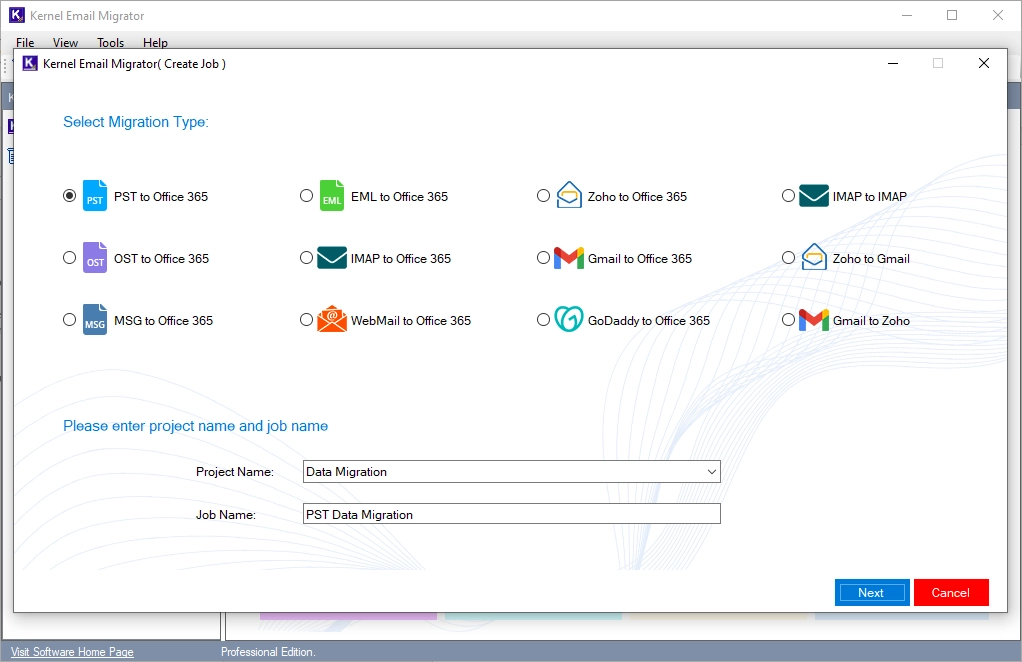
Supported Migration Types
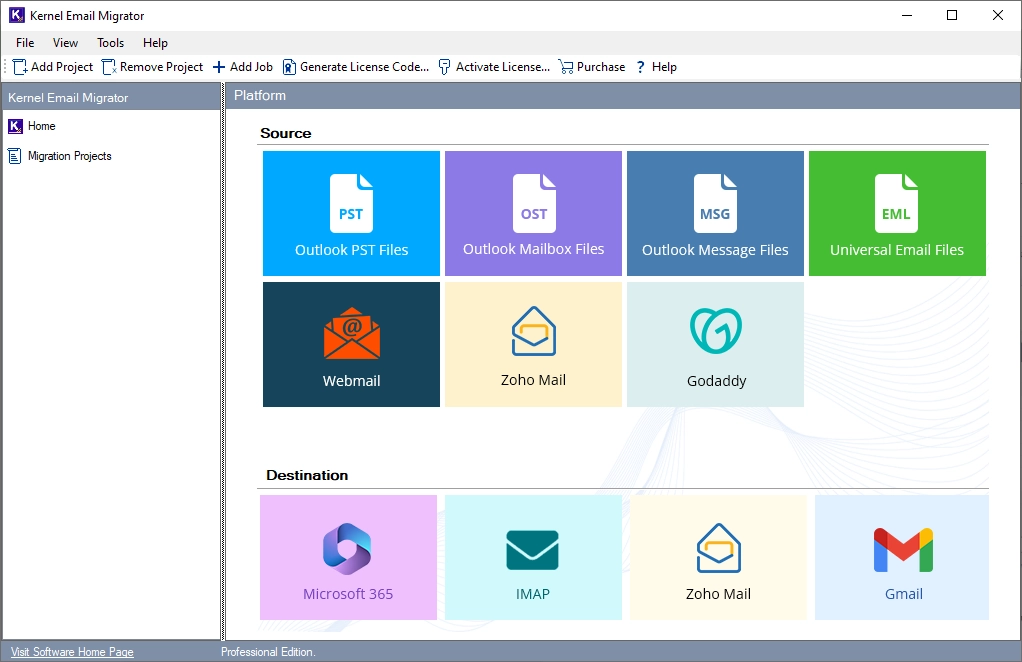
 OST to Office 365
 PST to Office 365
 EML to Office 365
 MSG to Office 365
 Gmail to Office 365
 Zoho to Office 365
 Gmail to Zoho
 Zoho to Gmail
 GoDaddy to Office 365
 IMAP to IMAP
 IMAP to Office 365
 WebMail to Office 365
What Email Items Can You Migrate?
Here is the complete list of items you can migrate with Kernel Email Migrator.
- From, To, CC, BCC, Subject, date & time stamps, digital signatures, Message, hyperlinks, and inline images.
- Audio, Video, Document, and Compressed ZIP files.
- Inbox, Sent, Drafts, Archive Trash, All native and user-created folders & sub-folders.
- Contacts, Calendar, Tasks, Notes, and Journal
Advanced Features of Kernel Email Migrator
Explore the tool’s core capabilities designed to provide a secure and seamless email migration experience.

Migrate Large OST/PST to Office 365
Transfer emails from on-premises mailboxes directly to the cloud server. Migrate OST / PST to Office 365 with emails, attachments, contacts, calendar entries, notes, tasks, journals, and all folders.
Migrate EML and MSG Files
Perform EML / MSG to Office 365 migration to transfer all your individual emails directly to the cloud with original email key attributes.
Multi-Platform Email Migrator
Our Email Migrator tool supports cloud tenant migration with ease. Migrate emails between multiple email servers (Gmail, Zoho, GoDaddy, or any IMAP-enabled servers) or migrate from IMAP to Office 365.
Bulk Email Migration
This Email Migrator tool is designed to handle migration of 1 to 1000+ emails and multiple email accounts. Users can easily create and run multiple cross-platform or domain-to-domain email migration jobs.
Schedule Email Migration
Schedule migration jobs during off-peak hours to avoid server throttling issues. Users can configure multiple migration jobs to run automatically on a daily, weekly, or monthly basis.
Incremental Email Migration
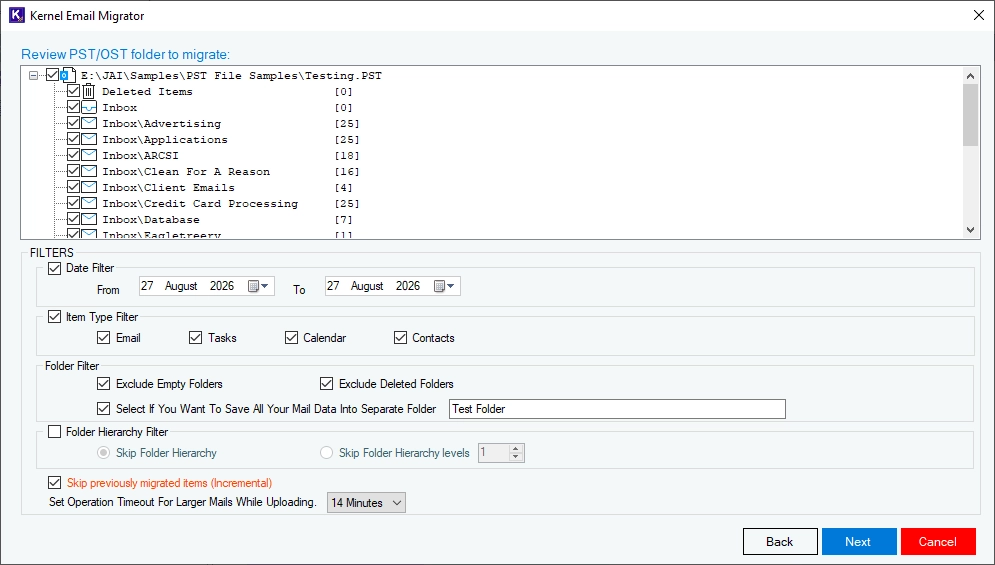
Kernel Email Migrator tool comes with an incremental migration feature. Migrate only newly added data from source and avoid email duplicity in the destination mailbox.
Automatic Mailbox Mapping
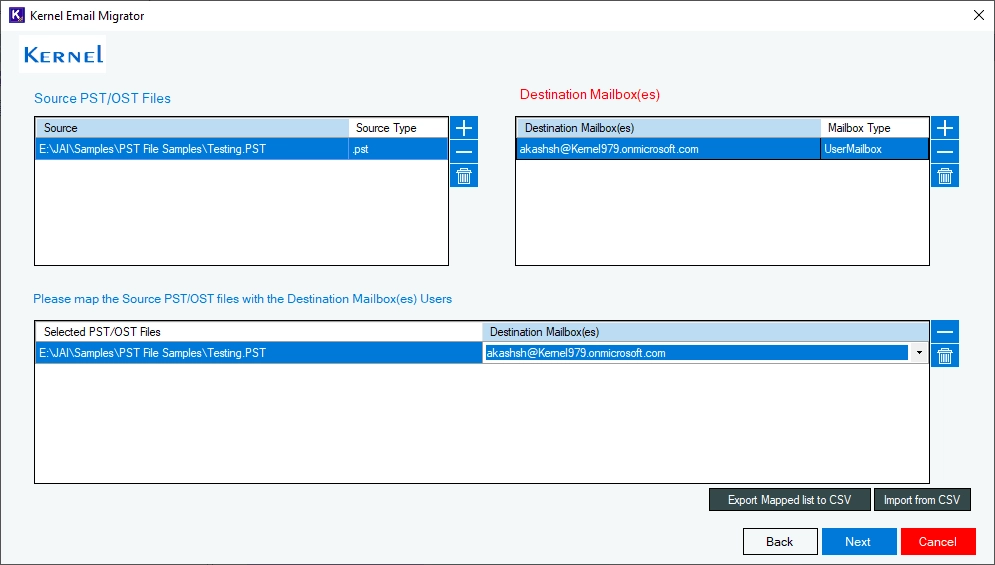
Simplify your email migration with Auto-Mailbox mapping. The Email Migrator tool maps users if they exist in source and destination. For unmapped users, you can map each manually or do bulk mapping with a CSV file.
Selective Email Migration
Kernel Email Migration Software lets you customize your email migration with built-in filters. Include or exclude specific folders, and skip empty or deleted item folders to migrate only the required emails.
Migration Summary
Kernel Email Migrator auto-generates a summary report for each migration job that allows you to track and validate email migration. View the report in the tool or export it to a CSV file for auditing and record-keeping.
Pause/Resume/Stop Migration
Our email migration tool allows users to pause, resume, and stop migration easily. It helps users to manage large-scale migration Jobs.

Flexible Date-Based Filtering
Control the email migration process with the date range filters. This powerful feature allows you to transfer emails for a particular date, month, week, month, or year.

Free Email Migration Software
Try Kernel Email Migration tool free to migrate emails at no cost.
- For Offline File Migration: Move the OST, PST, EML, and MSG files up to 50 files for free.
- For IMAP Email Migration: Migrate Gmail, Zoho and other IMAP Email upto 100 items per folder free.
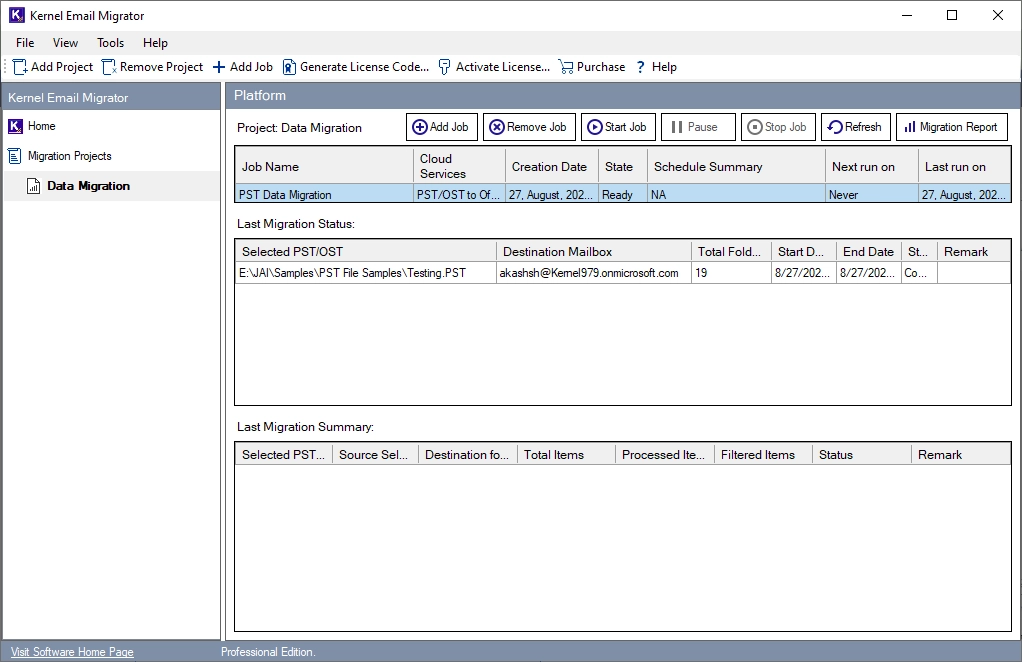
How to Migrate Emails to Office 365 in 5 Quick Steps?
Follow these quick steps to migrate emails to Office 365 with Kernel Email Migrator.
- 5M+ Emails Migrated
- 2TB+ Email Data Migrated
- 50+ Email Platforms Tested
- 1.5M+ Attachments Migrated
- 700+ Users Served
Free vs Full Version Comparison
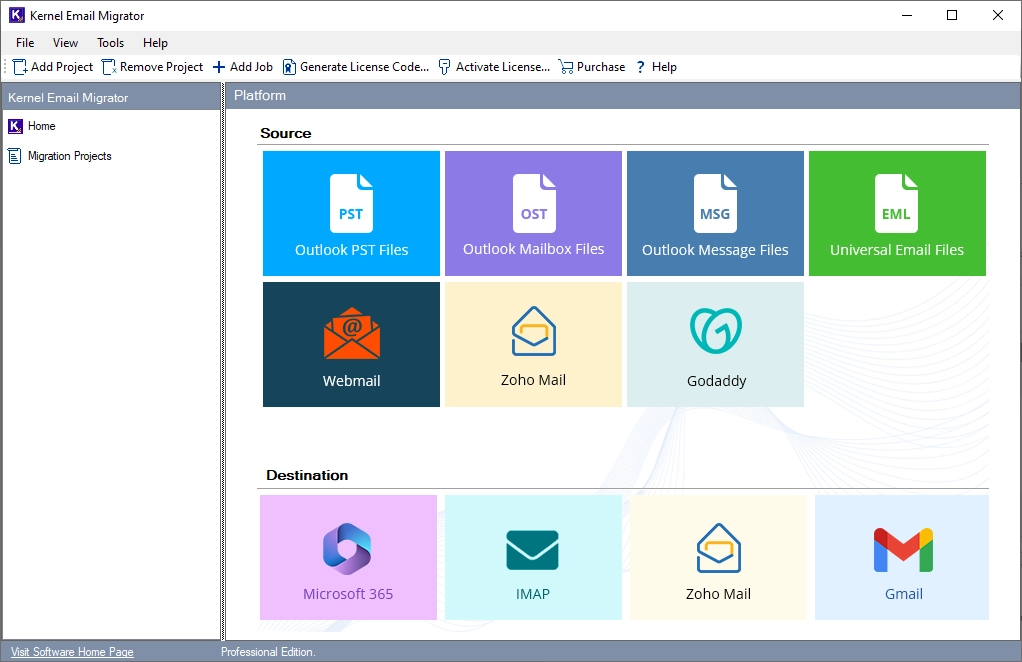
Why Migrate with Kernel Email Migrator?
- Your Data Stays Yours: No emails are retained or routed through external servers.
- No Size Limitation: No email file size restrictions and no data migration capping.
- Safe Email Migration: Migrate emails using admin credentials and advanced migration protocols.
- Keep Your Emails Organized: All emails are migrated to the same folder as they were originally in the source.
- Easy Migration Management: Track and manage different migration jobs from a single screen.
See How Kernel Email Migrator Works
Frequently Asked Questions
What is Kernel Email Migrator?
Kernel Email Migrator is a specialized tool for migrating email files (PST, OST, MSG, and EML) to Office 365 and transferring data between supported IMAP-enabled accounts. It can easily migrate user emails, attachments, metadata, and folder hierarchy. It simplifies email migration from mailbox mapping to schedule migration jobs. It also provides real-time job monitoring through a centralized dashboard.
Is there a free trial version of Kernel Email Migrator?
Yes, Kernel Email Migrator offers a 15-day free trial that allows you to try the software's features. The trial supports:
- PST/OST: Up to 50 items per folder
- EML/MSG: Up to 50 files
- IMAP: Up to 100 items per folder
If you are satisfied with the trial, you can purchase a license with a 30-day money-back guarantee, no questions asked.
How much time does the tool need to migrate emails?
The migration time depends on multiple factors. To know how long the email migration will take for your project, contact our support team. They will assist you with an exact timeline based on email data and business requirements.
Does the tool support incremental migration?
Yes, our tool comes with an incremental migration feature to migrate only newly added emails to the destination.
Can I resume a failed or interrupted migration?
Yes. The email migration tool saves every migration job. You can select the failed job and rerun it.
Will my email attachments also be migrated?
Yes. Attachments of any type, such as images, videos, documents, and compressed files, are migrated along with the emails.
Does the tool migrate contacts and calendars?
Yes. During OST, PST, and MSG to Office 365 migration, all your contacts and calendar items are migrated.
Can I migrate emails between different email clients?
Yes. You can transfer emails between different web-based email clients, like Gmail, Zoho, Yahoo, etc., and between any two IMAP-enabled accounts.
Can I migrate emails from a specific date range?
Our tool allows you to define a start & end date and migrate emails for a specific date range.
Does the tool generate a migration report?
Yes. For every migration job, a detailed report is generated that you can view directly from the tool.
How do I verify migrated mailbox data?
The user can view the migration summary of the job. It will display all the migrated and failed folders with the email item count.
Can I schedule email migration?
Yes. Kernel Email Migrator Tool allows users to schedule migration jobs for any day and at any time.
Can I pause a migration job?
Yes. The email migrator tool allows you to pause and resume any migration job anytime you want.
Can I migrate multiple mailboxes at once?
Yes. Our tool allows you to migrate multiple mailboxes from source to destinations in a single job.
How does the tool handle emails in non-English languages?
Our software supports multilingual emails along with Unicode characters. Your emails will be migrated in the original non-English language.
Kernel Email Migrator Software Prerequisites & Recommendations
 About Software
Version: 26.0
Release Date: Jun 2025
Update Date: July 2026
License Type: Home, Corporate & Technician
 Version Support
Office 365 (Microsoft 365): All plans, including Office 365 (Microsoft 365) Enterprise E1, E3, E5 & Exchange Online Plan 1, 2, Microsoft 365 Business Premium, Office 365 A1, Office 365 A3, Office 365 A5, Office 365 F1, and Office 365 Business Essentials.
IMAP Email Server: All IMAP servers, including Gmail, Microsoft Exchange Server, Zimbra, Dovecot, Courier Mail, Outlook/Hotmail, Yahoo Mail, Proton Mail, Bluehost, GMX Mail, Yandex Mail, FastMail, Mail.ru, Apple Mail Server, iCloud Mail, AOL Mail, Cyrus IMAP, MailEnable, hMailServer, Mail-in-a-Box, Apache James, Citadel, Kolab Groupware, MDaemon Email Server, Modoboa, Zentyal, Zoho Mail, Company IMAP Account, etc.
 System Requirements
Hard Disk: At least 500 MB for installation and 5 GB of free space for storing data and logs.
RAM: Minimum 8 GB recommended
Processor: Intel compatible (x64-based processor), minimum 4 core recommended
Operating System: Windows 11, 10, 8.1, 8, 7 & Windows Server 2025, 2022, 2019, 2016, 2012, 2008 R2, 2008
Prerequisites: Requires Internet Connectivity, .NET Framework 4.6 or later, Microsoft Visual C++ 2015-2022 Redistributable
 Installation Guide
 How to Use