Read time 10 minutes
So, how much does email migration take? 1 hour or 2 hours or maybe 3 days!! There cannot be a single answer to this question. For small firms with 1 to 50 users, it can take around 1 hour to 20 hours and for large scale organizations with 200+ users data, it might take up to 7 days.
Before resolving your query: How Long Does Email Migration Take? Let us see what the overall email migration depends on
- Throttling
- Mailbox size
- Internet speed
- Migration method
- Number of user accounts involved
These factors decide the timeline of your email migration. Get along and decode all the aspects of the total time taken for a successful email migration in different scenarios.
General Email Migration Timeframes
Take a look at the general email migration timeline below.
- Small Organisations (Up to 50 Users): Typically completed within 1–3 days.
- Medium-Sized Organisations (50–500 Users): Usually takes 1–2 weeks.
- Large Enterprises (500+ Users): May require several weeks or longer, but it depends on data volume and configuration requirements.
Note: The above info. is just an estimate that can vary based on network performance, source and destination platforms, and the migration strategy used.
Email Migration Time Estimation Formula
Estimate how long your email migration will take with this tool using the given formula.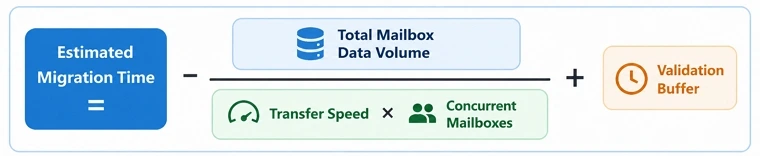
Formula Components
- Total Mailbox Data Volume: All mailboxes, archives, calendars, contacts, and attachments.
- Transfer Speed: Data transfer rate.
- Concurrent Mailboxes: Number of mailboxes migrating simultaneously.
- Validation Buffer: Extra time for account mapping, synchronization, verification and post-migration checks.
Email Provider Throttling Limits That Affect Migration Speed
| Provider | Throttling Category | Current Limit | What It Means For Migration |
|---|---|---|---|
| Google Workspace | Gmail API requests per user | 15,000 quota units per minute | Large mailbox exports may pause or queue when API usage reaches the limit. |
| Google Workspace | Gmail API requests per project | 1,200,000 quota units per minute | High-volume migrations across many users may require staged batches. |
| Google Workspace | SMTP send quota | Up to 2,000 messages per user per day | Mail relay tasks and coexistence periods may face daily restrictions. |
| Google Workspace | SMTP recipients | 100 recipients per message through IMAP/SMTP clients | Distribution lists with many recipients may require segmentation. |
| Google Workspace | IMAP connection duration | Approximately 24 hours per session | Long-running migrations may need automatic reconnection. |
| Microsoft 365 | Microsoft Graph API per application | Migration tools must regulate request rates across all tenants. | Microsoft Graph API per tenant |
| Microsoft 365 | Microsoft Graph API per tenant | 350 requests every 10 seconds | Large tenant migrations often run in smaller batches to avoid delays. |
| Microsoft 365 | SMTP client submission rate | 30 messages per minute | Mail flow synchronization may proceed more slowly during migration. |
| Microsoft 365 | EWS throttling policies | Dynamic and workload-based | Migration speed varies according to tenant activity and server load. |
| IMAP-based Platforms | Concurrent connections per mailbox | Usually 10 to 20 connections | Excessive parallel requests can trigger temporary blocks |
| Most Cloud Email Providers | API backoff rules | Temporary delays after quota limits | Migration tools reduce speed automatically until limits are reset. |
Factors That Affect Email Migration Speed
Check out all the prime factors that will affect your migration time while transferring your data from one email client or server to another. Know why your mailbox migration is taking long time then expected, and get instant solutions to minimize your migration time.
Factor 1: Total Mailbox Data Size
Your email server’s mailbox size is one of the biggest factors behind migration speed.
| Mailbox Size | Migration Speed Per Hour | Total Time Taken |
|---|---|---|
| 60 GB | 2 GB to 3 GB per hour | 20 hours to 1 day |
| 200 GB | 1 GB to 2 GB per hour | 1 to 3 days |
| 500 GB | 0.5 GB to 2 GB per hour | 3 to 4 days |
Note: When your migration project includes large data then the email migration timeline fully depends on the endpoint servers.
Large mailboxes contain more data elements, like emails, attachments, calendars, contacts, and other mailbox items take more time than small data migration times.
Important to Know: To reduce migration time, organizations can remove obstacle data from their mailboxes.
Factor 2: Number of User Mailboxes
Another important factor is the total number of users and mailboxes. Even when your organization has smaller mailboxes and multiple large numbers of accounts, the mailbox migration will take much more time than expected. Because each mailbox requires validation, synchronization, and verification, that takes lots of time.
Let’s understand this with an example:
- If an organization has only 20 GB mailboxes of data, but they have 200 user accounts, then they need to permit all permissions to the admin account and enable migration for all users. That will take more time.
Instant Tips for Quick Mailbox Migration
- Try to migrate only the necessary users’ mailboxes.
- If you have more than 500 users, then migrate them in multiple batches.
- Remove unnecessary or garbage data from your mailbox.
Factor 3: Internet Performance
Your network speed directly affects your mailbox transfer rates. Even the most advanced migration tools cannot move data faster without a fast internet connection.
There are many kinds of internet connection issues, such as slow upload speeds, network congestion, packet loss, or unstable connections that can delay the transfer process.
To cope with this, try to get a stable or faster internet connection and schedule your migration during free time, so you don’t need to face downtime.
Factor 4: Source and Destination Platforms
The email providers can also halt your migration duration. As I told you previously, a provider’s throttling may delay your data transfer. Each provider’s throttling has a different way to work and transfer data units per minute.
Best Way to Minimize Email Migration Time
An email migration solution can be your best bet when you want a quick and hassle-free migration. Kernel Email Migrator tool can help you to minimize your email migration time.
The software is built with algorithms that can easily sync and map all your source and destination accounts and transfer your data with precision.
Wrapping Up
When businesses ask, “How Long Does Email Migration Take?” The answer depends on the above mentioned technical and operational factors. However, you can minimize your migration time by:
- Running users’ data transfer in batches
- Getting a stable internet connection
- Remove unnecessary mailbox data
- Schedule your migration in free time
- Using the Best Kernel Email Migrator tool
In case, your migration is still stuck with no results, get in touch with our experts at any time.