Kernel MSG Viewer Free
Open and view MSG files without Microsoft Outlook. Kernel MSG Viewer lets you auto-locate MSG files from any location, browse multiple messages together, view complete email content and quickly find specific emails using built-in filters.


- Open multiple MSG files with their attachments.
- View small and large MSG files together without Outlook.
- Automatically locate MSG files or add them manually from your PC.
- Read Plain Text, HTML, and RTF email content with available formatting.
- Set Start Date and End Date to find emails from a specific period.
- Preview MSG files with or without attachments from the dashboard.
- Find specific emails by sender, recipient, subject, read/unread status, and more.
- View multilingual emails and Unicode characters without losing special symbols.
- 4.9/5 Trustpilot Rating
- Safe & Secure
- 2M+ Happy Customers
- Free to Use
- 24/7 Support
How Does Kernel MSG Viewer Work?
Download Kernel MSG Viewer and follow a few simple steps to open and view MSG files for free.
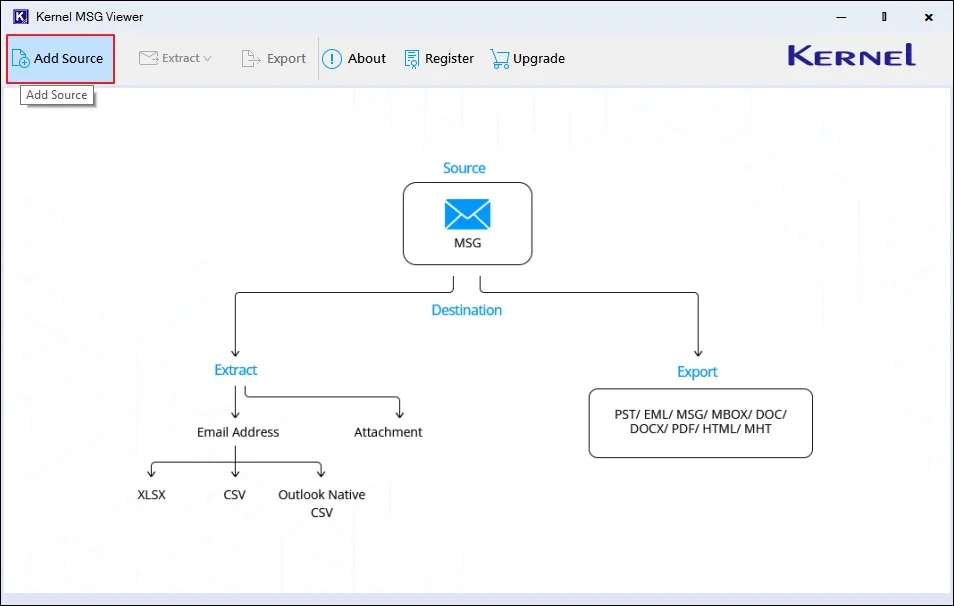
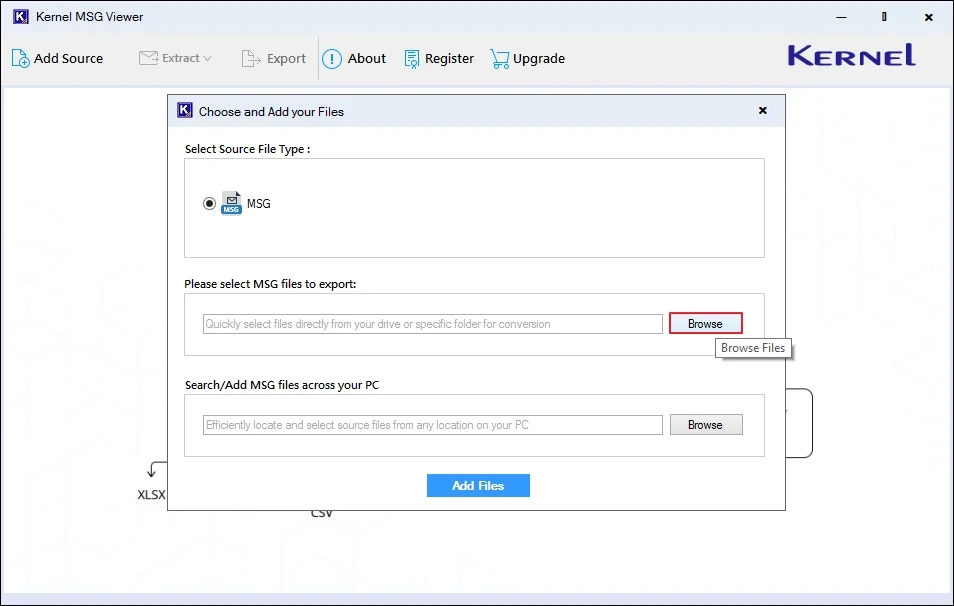
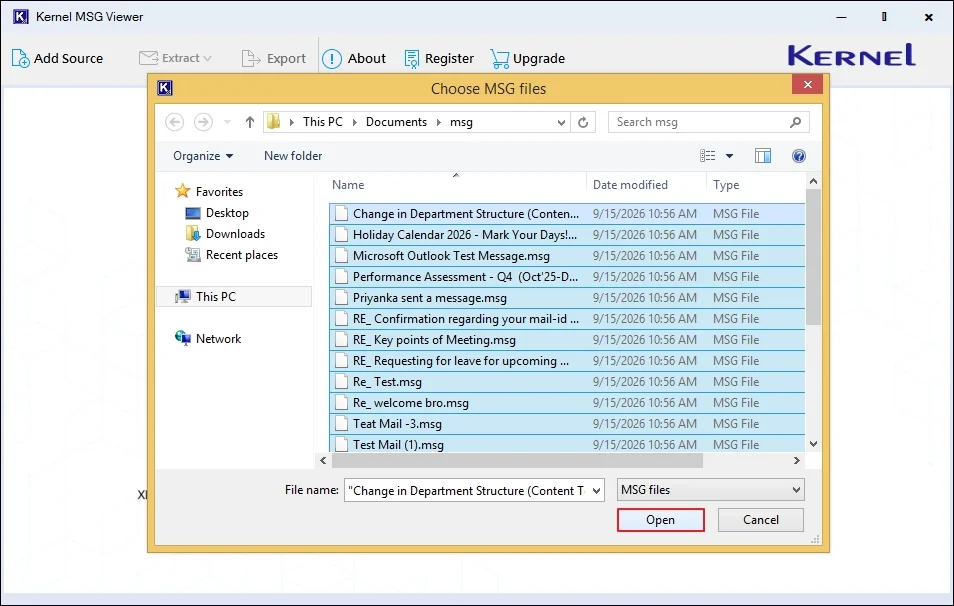
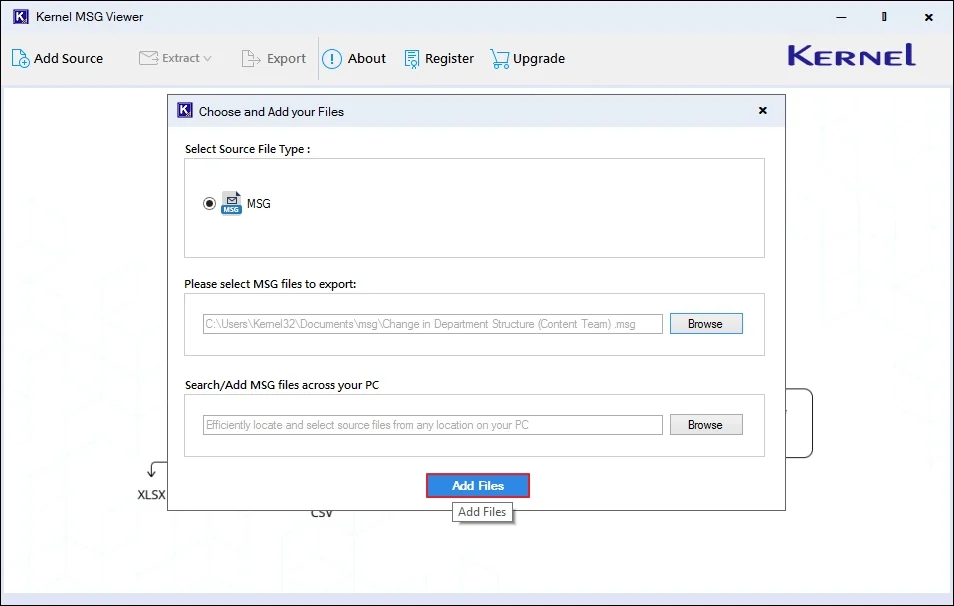
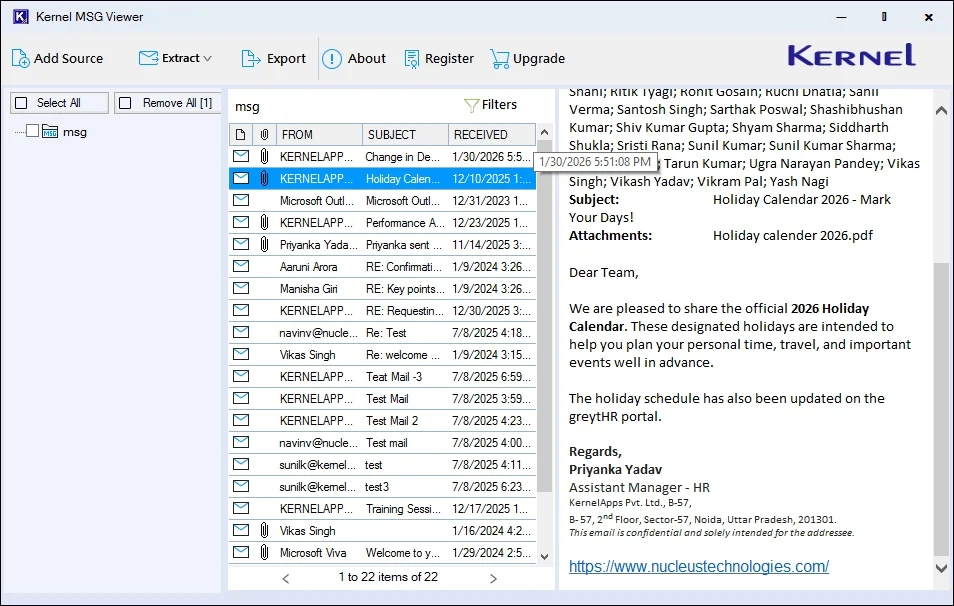
Features & Capabilities of Kernel MSG Viewer
The free MSG viewer software is loaded with efficient features that make the MSG file viewing experience smooth.

View MSG Files Without Outlook
Open and read Outlook MSG files directly without installing Microsoft Outlook or importing MSG files in Outlook for Web. Access MSG files from a dedicated MSG viewer for free.

Open and View Multiple MSG Files
Add multiple MSG files and browse them together in the MSG viewer. Review small and large email collections without opening each MSG file separately.

View Complete MSG File Data
With the free MSG viewer software, review complete MSG files, including email headers, message body, attachments, hyperlinks, embedded content, and available message properties.

Add MSG Files Easily
Manually browse MSG files or select a folder and let the freeware MSG viewer automatically locate them. This makes it easier to work with MSG email archives scattered across different folders on your PC.

Find a Specific MSG File
The free MSG viewer lets you find and view specific messages using various filters like From, To, CC, BCC, Subject, Body, Attachment, Read/Unread status, and Date range.

View MSG Attachments & Email Data
With the free MSG viewer software, view email attachments, including documents, zips, images, hyperlinks, and other content embedded within the message body in the main dashboard.

View MSG Email Properties & Metadata
The MSG viewer tool preserve original email formatting (Plain Text, HTML, and RTF) properties such as sender details, timestamps, message attributes, routing information, and other metadata.

Read Unicode and Multilingual MSG Emails
Open MSG messages containing Unicode and multilingual text with the freeware MSG viewer software. Throughout the process, the tool keeps the special symbols within email content intact.

Browse MSG Files in Folder Hierarchy
The free MSG reader software displays loaded folders in a tree-like hierarchy in the left-side dashboard. Navigate loaded MSG files in an organized structure to locate and review email messages.

View MSG Files for Free
Kernel MSG Viewer is free to use. The tool does not require any subscription or charge to view MSG files. Simply add your MSG files to the tool and start viewing their content.

Export MSG Files to 8+ Formats
Use the upgraded version, Kernel MSG Viewer Pro, to export MSG files to formats such as PST, EML, MBOX, DOC, DOCX, PDF, and more. You can also export email addresses and attachments as separate files.

Windows & Outlook Compatibility
The Outlook MSG viewer is compatible with all major Windows versions, including Windows 11, 10, 8.1, and 8. It also supports major Outlook versions, including New Outlook, Outlook 2021, Outlook 2019, and earlier versions.
What Data Can You View in an MSG File?
Kernel MSG Viewer lets you view all the data stored in MSG files, including email content, properties, attachments, and other Outlook items.
- View From, To, CC, BCC, Reply-To, Subject, sent/received dates, and other available email header information.
- Read the stored Plain Text, HTML, or RTF message content with available formatting, tables, hyperlinks, and signatures.
- View files attached to MSG messages, including documents, PDFs, images, spreadsheets, ZIP files, and other supported file types.
- View images embedded in the message body and access hyperlinks included in the original MSG content.
- View available appointment, meeting, attendee, and calendar information when an Outlook calendar or meeting item is saved as an MSG file.
- Access available contact information and task details when Outlook contact or task items are saved as MSG files.
- View available notes and other supported Outlook item data stored in MSG format.
- Preview supported Outlook messages or other Outlook items embedded within an MSG file.
Need to Save MSG Files? Upgrade
Want to Save MSG files? Upgrade to MSG Viewer Pro to convert them into multiple formats.
Freeware
Free $0
- Scan & View Outlook MSG Files
- Read all Components of MSG Files
- Smart Auto-search Feature
- View MSG File without MS Outlook
- Sort MSG Files with To, CC, BCC, Subject, Body, etc.
- License Validity – 1 Year
- No. of Machines – 2
- All Free Version Features Included
- Extract Attachments and Email Addresses into CSV
- Save MSG Files to PDF, PST, EML, MBOX, and more.
Frequently Asked Questions
What is Kernel MSG Viewer?
Kernel MSG Viewer is a free desktop tool that lets you open and view bulk MSG files of all sizes at once without needing Outlook.
What is an MSG (.msg) file?
MSG file (.msg) is a saved individual item from Microsoft Outlook, such as an email, calendar appointment, contact, or task.
Can I view multiple MSG files without using Outlook or Outlook for Web?
Yes, you can. Use the best Kernel MSG Viewer tool to add and view multiple MSG files for free, along with all attachments, headers, and metadata.
Is there any MSG file size limitation specified with free MSG Viewer?
No, there is no such MSG file size limitation. Users can add any-size MSG file to the best free MSG viewer tool for viewing their content.
Does the tool keep all MSG file data, including attachments, safe?
Yes. The free MSG viewer software keeps all your MSG data, including email messages, attachments, headers, contacts, calendar invitations, etc., safe and the same as the original.
Can I filter out MSG messages based on a specific date range and attachment availability?
Yes, with the given filter options in Kernel MSG Viewer, you can find your desired emails with the specific date ranges and attachment availability. Moreover, the tool also provides other filter options like To, From, BCC, Subject, Read/Unread status, etc.
Is Kernel MSG Viewer free to use?
Yes, the Kernel MSG Viewer is completely free to use. You can add and open your MSG files without any cost or subscription.
Can MSG viewer open non-email Outlook MSG items?
Yes, Kernel MSG Viewer can open non-email Outlook MSG items such as calendar appointments, contacts, tasks, and meetings.
What information can I see inside an MSG file?
With a free MSG viewer tool, you can view email headers, message body, formatting, attachments, inline images, hyperlinks, calendar information, contacts, tasks, notes, and other Microsoft Outlook items saved inside MSG files.
Can I search MSG files by sender, subject, or date?
Yes, you can search and find your specific MSG files by sender, subject, date, or other filter options using our MSG reader software.
Can MSG Viewer open Outlook items other than emails?
Yes, you can open Outlook items other than emails, such as calendar events, contacts, tasks, notes, and journal entries, with MSG Viewer.
Kernel MSG Viewer Video
Kernel MSG Viewer Prerequisites & recommendations
 Installation Guide
 System Requirements
Hard Disk: 512 MB of disk space
Memory: 1 GB RAM Minimum
Processor: Intel® Pentium Processor compatible (x86, x64) or equivalent
Operating System: Windows 11, 10, 8.1, 8, 7, Vista, XP, 2000, 98, NT, 95 ; Windows Server 2022, 2019 & older versions
Outlook: New Outlook, Outlook 2021, 2019, 2016, 2013, 2010, 2007 & older versions