 (4.9/5) 493 Reviews
Office 365 Migration Tool to Move Bulk Mailboxes and Data
Migrate Office 365 mailboxes with emails, contacts, calendars, and other data. Move Exchange Online, SharePoint Online, OneDrive, and other supported Microsoft 365 workloads between Microsoft 365 tenants. Run the Office 365 to Office 365 migration tool for a structured and automated migration backed by smart filters, delta pass migration, and real-time progress tracking.
- Easy data transfer between Microsoft 365 workloads.
- Migrate primary mailboxes, shared mailboxes, archive mailboxes, and public folders.
- Multiple data filters to run selective Office 365 data migration.
- Migrate in-place archive mailboxes between Microsoft 365 tenants.
- Quickly migrate single or multiple Microsoft 365 mailboxes.
- Automated user mapping for secure Microsoft 365 tenant migration.
- Advanced Incremental Migration to migrate newly added data.
- Free trial available to preview the migration.
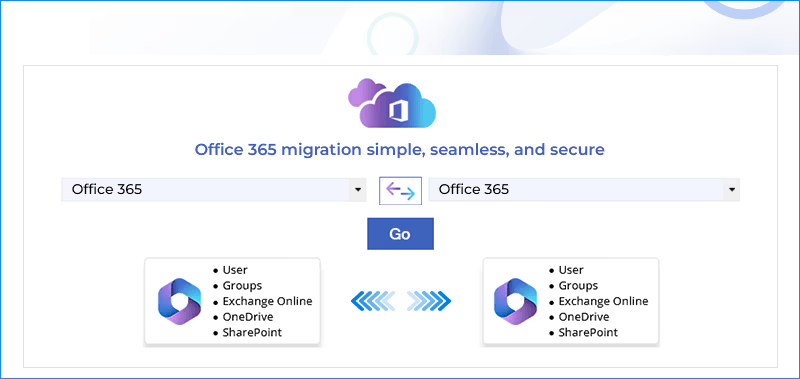
What's new in Kernel Office 365 Migration Pro
Common Scenarios to Use Microsoft 365 Migration Tool
Explore common scenarios for migration between Office 365 tenants, including mergers, acquisitions, and domain changes.
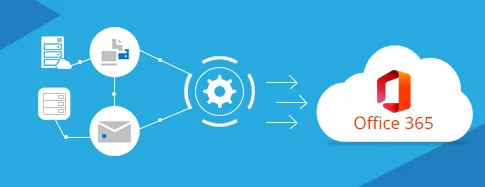
Multiple Sources to Microsoft 365
Migrate data from multiple sources to consolidate mailboxes into a centralized environment for infrastructure upgrades or tenant consolidation.
- Migrate data from Hosted Exchange to Microsoft 365
- Transfer emails from Hybrid Exchange environments to O365
- Migrate On-Premises Exchange server data to Microsoft 365
- Migrate bulk mailboxes between Microsoft 365 tenants

Mergers and Acquisitions
Supports mergers, divestitures, acquisitions, and organizational restructuring by migrating data between Microsoft 365 tenants. Maintains business continuity and reduces hassle via staged and incremental migration.
- Combine multiple tenants post company acquisition
- Changing domains for business reorganization
- Migrate different businesses into separate tenants
- Restructure departments within the new licensing models

Data Security and Compliance
Migrate data between Office 365 tenants to address issues like poor permission structures, outdated tenant configurations, redundant data, and orphaned user accounts.
- Retain Litigation Hold, eDiscovery settings & other compliance configurations
- Secure sensitive data throughout the migration process
- Preserve mailbox data and metadata to support compliance requirements
- Resolve legacy tenant inconsistencies to establish a unified Microsoft 365 environment
Microsoft 365 Migration in Just 3 Easy Steps
Follow the Office 365 migration process in 3 simple steps to move data with reduced downtime.

Step 1: Add Source and Destination
The Office 365 migrator securely connects both Microsoft 365 tenants using Modern Authentication. It automatically fetches available mailboxes and helps you accurately map source mailboxes to their destination counterparts.
Step 2: Select what data to migrate
Apply advanced filters such as Date Filter, Item Type Filter, Exclude Deleted Folders, Exclude Empty Folders, etc. for selective migration. Use the Skip Previously Migrated Items feature to counter duplicate data issues and improve migration efficiency.

Step 3: Migrate and authenticate data
Start the migration and trace the real-time migration progress of data migration. Upon completion, the O365 migration tool saves the migration summary to a CSV file for your records on your local storage. Log into the destination Office 365 account to confirm that all data has been migrated properly.
Customer Reviews for Kernel Migrator for Microsoft 365








Top Features of the Best Office 365 Migration Software
Take a look at the high-end features of our Office 365 to Office 365 migration tool for instant and safe Microsoft 365 data transfers.

Migrate to Office 365
Migrate data between Microsoft 365 tenants during mergers, acquisitions, etc. with the advanced Microsoft 365 Migration tool. Transfer Exchange Online, Exchange Server, and Hybrid Exchange to Microsoft 365 and upgrade from traditional systems.

Bulk Office 365 Users’ Migration
Migrate multiple user mailboxes with CSV-based user mapping. The Office 365 data migration tool retrieves users from the connected Microsoft 365 tenant to perform enterprise-scale migrations with ease.

Migrate Office 365 Groups
Implement the Microsoft 365 to Microsoft 365 migration tool to move supported Microsoft 365 Group mailbox data between tenants. Integrated with the feature "Migrate to Office 365 Groups," the tool migrates Office 365 Groups with no hassle.

Shared Mailbox Migration
Move shared mailboxes between Microsoft 365 tenants with the mailbox structure and hierarchy. Helps to simplify execution of processes like tenant consolidation and domain change by providing continued access.

Public Folder Migration
Transfer Public Folder data, including emails, attachments, contacts, and more, to an O365 account. The software offers a separate Mailbox Migration window to migrate Public Folder of selected Office 365 accounts.

Archive Mailbox Migration
Quickly Migrate Office 365 Archives to another account to clean up full mailboxes, free up space, and preserve historical email data. Allows in-place archive mailbox migration to fulfill the data retention, legal, and compliance requirements.

Selective Office 365 Email Migration
Office 365 email migration tool is integrated with advanced Filters for Selective Office 365 Mailbox Migration. Allows granular control to transfer selective files, folders, emails, and calendar entries for quick migration of only the required data.

Multiple Domain Email Migration
Use the Microsoft Office 365 migration tool to migrate multiple Microsoft 365 accounts or domains securely. Move mailboxes between Microsoft 365 tenants, including Exchange Online and Shared mailboxes, from one domain to another within the same or different tenants.

Batch Microsoft 365 Migration
Run batch migration of O365 mailboxes to manage multiple migration jobs. Easily configure migration as per your project’s needs and Microsoft 365 service limits. Handles all migration jobs without interrupting processes or overlapping the data being transferred.

Cross Tenant Migration
Move mailbox data between different Microsoft 365 tenants using the Microsoft 365 cross tenant migration to target business continuity or organizational restructuring. Migrate complete mailbox data including large-sized cross-tenant/domain mailboxes.

Supports Hybrid Environment
Use Office 365 migration software to break down complex hybrid Microsoft 365 migration into straightforward steps. Migrate data from Hybrid Exchange environments (a single Exchange Server between on-premises Exchange and Exchange Online).

Free Trial Version
Download the Office 365 migration tool demo version to carry out the migration with no upfront cost needed. Test all the basic features of the tool and check if it fits the migration requirements.
Why Choose Kernel Office 365 Migration Tool?
Want to know why our O365 migration tool is one of the preferred solutions in the market? Take a look at the extraordinary functionalities of the tool.

Incremental Migration
Use the "Skip previously migrated items" option to resume interrupted migrations and migrate only newly added data, preventing duplicate transfers and improving migration efficiency.

Free Office 365 Migration Demo
Kernel Office 365 Migrator tool features a free demo version to allow users to transfer 10 items per folder to another account and test the functionality prior to the final license purchase.

Secure Migration
Protect your essential Office 365 data by connecting through a secure connection using Modern Authentication and OAuth 2.0 Authentication. The tool lets you boost your authentication security and supports MFA.

Automated User Mapping
Automatically map multiple Office 365 mailboxes using a pre-mapped CSV file to transfer data to the intended users only. Great help for simplified transfer, reduced manual efforts, and minimized user mapping errors.

Customizable Filters
Microsoft 365 migration tool is integrated with options to sort out data transfer like Date Filter, Item Type Filter, Exclude Deleted Folders, Incremental Migration, etc. for selective transfer.

Preserve Metadata
Office 365 migration tool migrates data with the mailbox attributes to provide a digital audit trail to keep your files organized. The tool preserves supported email properties, folder hierarchy, attachments, and other mailbox metadata.

Compatibility
The tool is fully compatible with the Exchange Server, Windows OS versions, and Microsoft 365 Business and Enterprise subscription plans.

Reporting
Generates and saves the detailed Microsoft 365 migration reports in a CSV file. Highlight missing data, show migration errors, and provide a clear review of pilot migrations before running large migrations to help administrators prepare for future migrations.

Dedicated Migration Project Support
Get 24/7 support from our technical experts to run a smooth Microsoft 365 migration. We simplify the process and answer all your questions, which makes your migration journey less complicated.
All-in-One Office 365 Migration Software Suite
Your complete solution for a secure and automated migration of SharePoint, Teams, Exchange, OneDrive, Planner, and more. Trusted and reliable Office 365 tenant-to-tenant migration tool to migrate data within the same or different tenant.

Secure SharePoint Migration
Migrate SharePoint data sites & libraries, including documents, images, videos, links, and more.


Microsoft Teams Migration
Migrate Teams channels and conversations with attachments, stickers, emojis, and GIFs.

Teams Chat Migration
Migrate Microsoft Teams chat (Direct Messages) with all the attachments and metadata.

Exchange Online Migration
Move Exchange Online mailboxes, such as emails, contacts, calendar entries & attachments across tenants.

M365 OneDrive Migration
Easily switch OneDrive to a new Microsoft 365 tenant, including all folders, sharing links, and permissions.

Microsoft Planner Migration
Our tool transfers plans, tasks, attachments & work progress to new tenants and maintains data integrity.
Office 365 to Office 365 Migration Tool - FAQs
Get answers to all the commonly asked questions related to Microsoft 365 migration.
Here is the step-by-step process to migrate Office 365 data safely.
- Step 1: Download and run the Kernel Office 365 Migration tool.
- Step 2: Add the source and destination Microsoft 365 admin accounts.
- Step 3: Select Mailbox, Archive Mailbox, and Public Folder accordingly.
- Step 4: Apply different filters to migrate specific data as per your needs.
- Step 5: The software will start the migration process.
- Step 6: Once the process is done, download a detailed migration report.
Yes, this migration tool supports a free Office 365 Mailbox migration demo version. You can migrate up to 10 items per folder at no cost. To migrate the entire mailbox, upgrade your license and enjoy a hassle-free migration.
If, due to any circumstance, a migration job gets halted or completed with errors, full data isn’t migrated. You can re-run the migration process from the start, taking advantage of the delta pass migration feature, which will skip data that is already migrated.
The Office 365 mailbox migration tool is compatible with all major Windows OS and Windows Server versions.
- Mailbox: Inbox, Attachments, Contacts, Appointments, Tasks, Journal entries, Sent items, Deleted Items, etc.
- Archive Mailboxes: Inbox, Attachments, Drafts, Outbox, Deleted Items, Contacts, Tasks, and more.
- Public Folders: Email messages, Journal entries, Appointments, Journal entries, Distribution Lists, etc.
- Meta & hierarchy: From, To, Subject, Date, Time, Cc, Bcc, etc., and Delegate full access rights.
The software includes features like Date Filter that allow you to migrate data for a specific date range.
The Office 365 tenant migration tool allows you to select the specific users from the admin account. After that, you can start the migration process to move data only from the selected users.
Yes, you can run pilot migration on a small batch of user mailboxes to verify user mapping, permissions, transferred metadata, and identify potential issues. This lowers the migration failure risks and data loss. Moreover, you can refer to the Office 365 pre & post migration checklist to achieve successful migration.
The tool lets you migrate small and large-sized mailboxes, but the mailbox size might affect the speed of the migration. You can add any large-sized Office 365 mailbox(es) to the software and perform a successful data transfer.
Yes, the tool supports secure migration with OAuth 2.0 authentication for account authorization and encrypted data transfer during migration. It does not store your mailbox data or credentials and protects your privacy throughout the migration process.
Video Tutorial of Office 365 to Office 365 Migration Tool
Watch the product video tutorial to learn Office 365 mailbox migration

Office 365 to Office 365 Migration Software Prerequisites & Recommendations
 About software
Version: 25.0
Release Date: July 2024
Update Date: Jan 2026
License Type: No. of Mailbox
 Version support
Exchange Server: 2019, 2016, 2013, 2010, 2007, 2003, 2000
Windows Operating System: Windows 11, 10, 8.1, 8; Windows Server 2025, 2022, 2019, 2016, 2012, and 2008 R2
Virtual Environments: Microsoft Virtual PC, Hyper-V Server , VMware ESXi Server, VMware ESX Server
Microsoft 365: All plans, including Office 365 (Microsoft 365) Enterprise E1, E3, E5 & Exchange Online Plan 1, 2, Microsoft 365 Business Premium, Office 365 A1, Office 365 A3, Office 365 A5, Office 365 F1, and Office 365 Business Essentials.
SharePoint Online: Plan1 and Plan 2
 System requirements
Hard Disk: 100 GB free storage space for software installation
Memory: 8 GB RAM (Recommended 16 GB)
Processor: Intel® Pentium 4 Class Processor (or higher)
 How to use
 EULA
EULAWhat Customer Says About Kernel Office 365 Migrator
 (4.9/5) 493 Reviews
We needed a Microsoft 365 migration tool to move emails from our old tenant to a new one. The Kernel Office 365 migration tool made my migration simple and easy. It migrates all my files and folders to the destination in the original hierarchy without any data loss.