 (4.9/5) 453 Reviews
All-in-One PDF Repair to Fix Corrupted, Broken & Damaged PDFs
Fix broken, damaged or corrupt PDF files with the all-in-one PDF Repair tool. It allows you to save the repaired PDF files as a new PDF document without altering data. Restores text, hyperlinks, graphs, watermark, and digital signatures from corrupt PDFs in no time.
Download the trial version to preview PDF file for free and save it with watermark.- Quickly detect issues and repair corrupted or damaged PDF files.
- Add bulk PDF files at once without any size restrictions.
- Restore corrupted PDF files in the original format with complete accuracy.
- Get back data from password-protected PDF files.
- Save resultant PDF files in user-defined location for easy accessibility.
- Shortcut keys to Add (Ctrl+N), Remove (Ctrl+O), & Repair (Ctrl+S) PDFs.
- Repair and extract text, layout, graphics, and images from PDF Files.
- Works independently without requiring Adobe Acrobat Reader.
- Auto-detects PDF files from users' local system for batch processing.
- Compatible with all PDF format versions and Windows OS.
- Faster and automated PDF repair process.

- Support batch processing to repair multiple corrupt files.
- Enhanced compatibility across all PDF versions and platforms.
- Improved software’s functionality to preserve PDF formatting.
When to use Our PDF Repair Software?

Fix PDF File Corruption Issue
If you encounter severe corruption in your PDF document, then you can choose the best PDF Repair tool. It performs automated process to accurately fix all types of corruption issues and makes the PDF file healthy again. The advanced algorithm of the PDF repair utility easily detects and resolves PDF corruption issues in no time.

Repair PDF Documents Without Restrictions
If you have multiple corrupt or broken PDF files and you wish to restore them at once, then you can use the PDF fixer tool. You can effortlessly open multiple PDF documents in one cycle and get them back without restrictions and data loss. Moreover, the tool follows a powerful algorithm that rebuilds the PDF document in the actual format.

For Retrieving Data from Damaged PDF Files
When PDF files get severely damaged, it becomes impossible to restore data from them. This tool repair damaged PDF file information and save it into a new PDF file. Restore corrupt PDF file data, including text, images, hyperlinks, digital signature, and other data to a specific location.
How to Repair Corrupted PDF Files?
Have a look at the detailed steps to repair damaged PDF files with our tool.
- Step 1: Download and install Kernel for PDF Repair software.
- Step 2: Open the tool and click on the Add File(s) button.
- Step 3: Press the Repair button and provide the saving location.
- Step 4: The tool will execute the process to repair corrupted PDF.
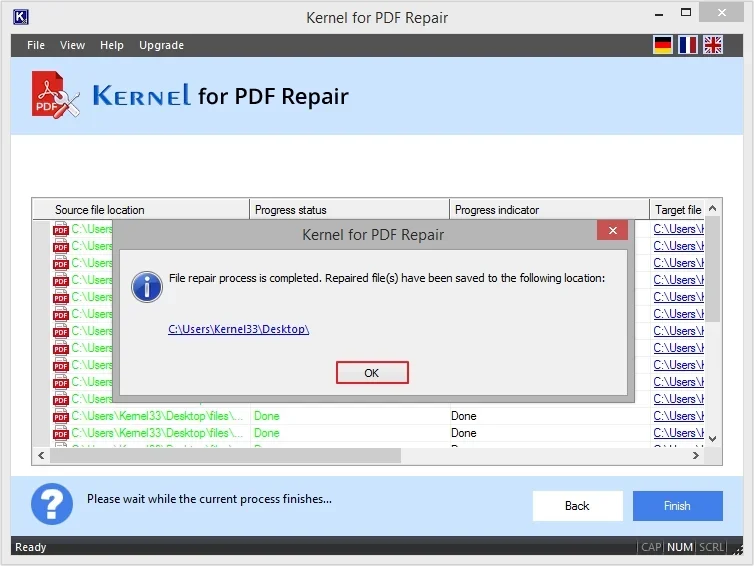
- Step 5: After the process gets completed, you will receive a success message.
Prime Features of PDF File Repair Tool
Look at the top features of our PDF file Repair tool that allows you to manage PDF file issues without hassle.

Repair Multiple PDF Files Simultaneously
The software allows you to repair multiple files at once and can even support large PDF files. The Adobe Repair toolbox is highly functional and auto-locates bulk PDF files from the system for quick processing. If you want to remove unnecessary files, then you can use the Remove File(s) option given in the software.

Customized User Interface
It is the best tool with a user friendly and customizable interface. You can personalize the application’s look from the given options, including Windows 2000, Office XP, Windows XP, etc., according to your preferences. Additionally, it offers shortcut keys to add, remove, and repair PDF files.

Fix Corrupted or Damaged PDF Files
You can easily rebuild and open corrupted PDF files with the PDF file Repair tool. The tool works with advanced technology and completely removes corruption from the PDF file. It fixes all kinds of corruption issues, even if it has severe damage or glitches in it.

Save Corrupt PDF File as New PDF
After processing the highly corrupt PDF file, you can save it as a new PDF document. Restore PDF text and image to safeguard all the essential data in a new file. It is the best software which provides ease in repairing the PDF files with intact formatting.

Restore PDF File to Suitable Location
With PDF repair utility, you get the benefit of selecting the desired saving location. Repair PDF file and save it to the destination of your choice. By self-defining the location, you can easily access or share PDF files with others.

Enhanced Compatibility with PDF Versions
PDF fixer tool works across various PDF versions, including PDF 1.0 - 1.3, PDF 1.4 - 1.5, PDF 1.6 - 1.7, etc. You can fix PDF files created with any version of Adobe Acrobat and other applications. You just need to select the PDF file and add it to the software, and it will make it accessible within a few easy steps.

Monitor Repairing Progress
Keep an eye on the repair progress with Windows PDF file repair tool based on Done/Pending status. When you begin the process, the tool displays the overall progress of the ongoing repairing process.

Restore Corrupted PDF files in Original Form
Restores text, images, and layout with accuracy from corrupted PDF file and preserve the data in actual format. This tool does not hamper the data structure and preserves formatting of the PDF file data. The PDF file repair utility makes sure that the authenticity remains intact and untouched.

Compatible with all Windows versions
The PDF repair software is compatible with all Windows operating systems including Windows 365, 11, 10, 8.1, 8, 7, Vista, XP, 2000, 98, NT, 95 (FAT 16, FAT 32, NTFS, NTFS5) & Windows Server 2022, 2019 & older versions.

Get back Data from Password-Protected PDF
The software guarantees fast and secure data restoration from corrupt password-protected PDF files. The software takes very little time and provides excellent results, even with encrypted files.

Complete PDF Data Restoration
This tool restores all the data of PDF file and saves it back to the original format. All the elements such as images, tables, charts, and others get saved in their actual order into a new PDF document.

Experience Features with Trial Version
Download the trial version to know about the features and working of the PDF repair software. The free version allows you to add and repair corrupted PDF files. However, to access the repaired data, you need to purchase the software’s full version.
What Errors can be Fixed with Our PDF Repair Tool?
Here is the list of some of the most common errors which can be fixed with this tool:
- PDF file is damaged and cannot be repaired.
- There was a problem reading this document (131).
- There was an error processing this page. There was a problem reading this document (109).
- PDF file freezes after download when opened in any PDF reader.
- Bad parameter error
- There was an error opening this document. The root object is missing or invalid.
- Google Chrome failed to load the PDF document error.
- An error exists on this page. Acrobat may not display the page correctly. Please contact the person who has created the PDF document to correct the problem.
- “The file is damaged and could not be opened” error.
- Invalid Function resource error when opening the file.
- A font contains a bad cmap-encoding error when opening the file.
- There was an error processing a page. Too few operands.
- An unrecognized token token_name found.
- File is corrupt or damaged.
- This file contains information not understood by the viewer.
- File does not begin with %PDF.
- PDF file is not readable with Acrobat Reader.
- Format error: not a pdf or corrupted.
- PDF Files Won’t Open in Windows 10.
Frequently Asked Questions
Still have doubts? Check out the most frequently asked questions along with their answers about our software’s features and usage.
To do so, you just need to follow the below mentioned steps of the PDF repair utility:
- Step 1: Download and launch the tool.
- Step 2: Click Select File(s) to upload the PDF files.
- Step 3: Provide a location to save the PDF file.
- Step 4: Click Repair and the software will automatically start the process and make PDF new.
There are multiple reasons behind PDF file corruption issue. Some of them are:
- Improper transfer of PDF files between devices.
- The PDF reader software is outdated.
- Overloaded or damaged hard drive.
- Abrupt device shutdown due to power failure.
Best PDF Repair Tool: Trial vs Full Version Features Comparison
Know the detailed features comparison between trial version and licensed version of our tool.
| Software Features | Trial Version |
Full Version |
|---|---|---|
| Add single/multiple PDF files | ||
| Repair password-protected PDF files. | ||
| Retain original data structure. | ||
| Repair PDF file from external sources. | ||
| No file size restrictions. | ||
| Support all PDF versions. | ||
| User-defined saving location | ||
| Access repaired PDF file | ||
| Price | Free | $49 |
| Free Download | Upgrade $49 |
Video Tutorial of Kernel for PDF Repair Tool
Have knowledge of the working procedure of repairing corrupt and inaccessible PDF files with PDF Repair tool.

Kernel for PDF Repair Software Prerequisites & Recommendations
 About Software
 Version Support
All versions of PDF files
System Requirements
Hard Disk: 500 MB of disk space
Memory: 1 GB RAM
Processor: Intel® Pentium Processor compatible (x86, x64) or equivalent
Operating System: Windows 365, 11, 10, 8.1, 8, 7, Vista, XP, 2000, 98, NT, 95 (FAT 16, FAT 32, NTFS, NTFS5) & Windows Server 2022, 2019 & older versions
 Installation Guide
What Customer Says About Kernel for PDF Repair
 (4.9/5) 453 Reviews
I was in a panic after knowing my PDF file become inaccessible. It contains all my crucial information, which I cannot afford to lose. Then I came across Kernel for PDF Repair tool. This software helped me a lot and recovered all my data from an inaccessible PDF file.