Kernel IceWarp Converter
Best tool to convert IceWarp emails to 9+ versatile file formats for enhanced data accessibility. Save IceWarp emails, contacts, calendars, notes, attachments, and other data locally in bulk. Our all-in-one IceWarp Converter solution allows you to access IceWarp data in Outlook, Thunderbird, Apple Mail, and other email clients.
Download IceWarp converter tool & export 25 emails per folder for free.- Export IceWarp mailboxes to PST, PDF, EML, MSG, and multiple other file formats.
- Auto-locate IceWarp files for bulk data conversion without file size restrictions.
- Extract IceWarp email attachments in raw format with or without extensions.
- Easily extract IceWarp email addresses to CSV and XLSX formats.
- Multiple filters and export options for selective and precise IceWarp mailbox data conversion.
- Save IceWarp data to local, network, flash, or external hard drives.
- Provides a free trial version to save up to 25 items per folder without any cost.
Why Choose Kernel IceWarp Converter?
Explore the top practical use cases of our software that help manage IceWarp data efficiently, making it a trusted and dependable solution.
Convert IceWarp data to 9+ file formats
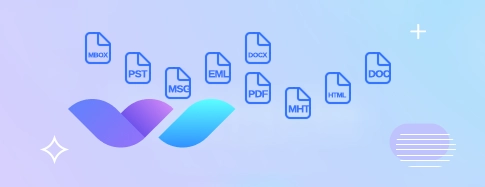
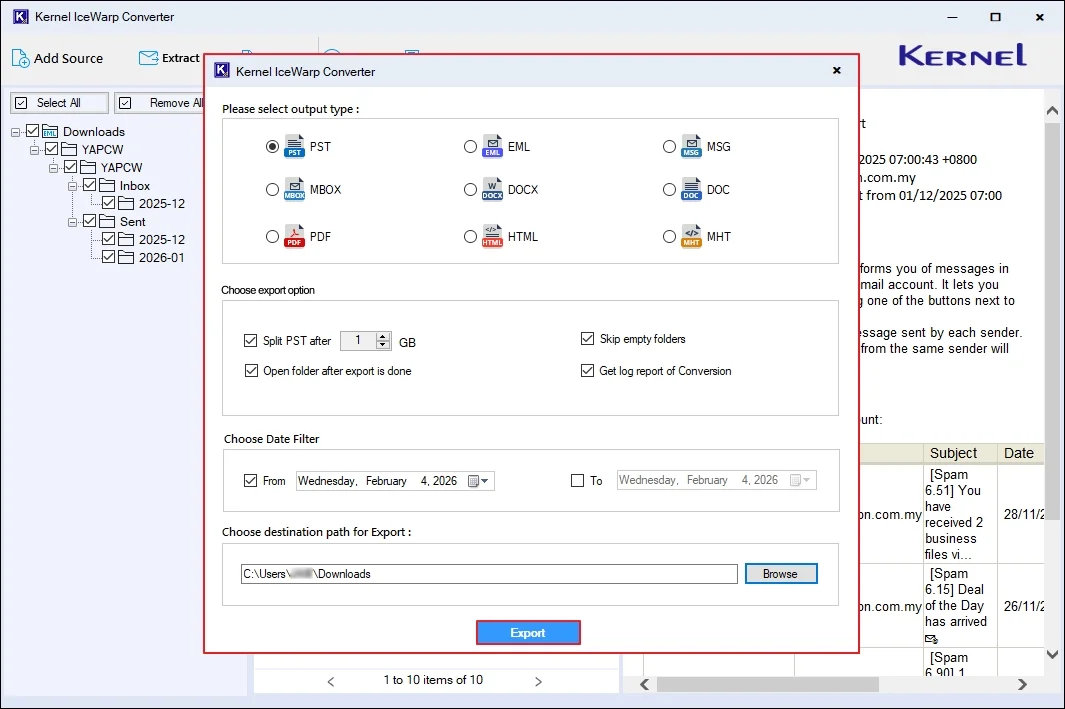
Our IceWarp Converter tool allows you to convert IceWarp files in multiple formats within a few easy steps. Quickly move data to PST, EML, MSG, MBOX, DOCX, DOC, PDF, HTML, and MHT formats, with multiple export options for error-free conversion.

Extract Email Addresses from IceWarp
The IceWarp Converter tool offers a separate option to extract all the email addresses from the IceWarp files and list them in the preview Pane. Save all listed email addresses in XLSX (.xlsx), CSV (.csv), and Outlook Native CSV (.csv) formats.

Extract Attachments from IceWarp
Extract attachments from IceWarp and save them in a raw format, with extensions or without extensions. The IceWarp Converter offers folder filters to include or exclude attachments from specific folders to get full control over all your attachment files.
Convert IceWarp data into multiple formats and platforms
The IceWarp Migration Tool is the best for converting IceWarp files into various output file formats, web-based email clients, and servers.
File Formats
 PST
PST EML
EML MSG
MSG PDF
PDF HTML
HTML MBOX
MBOX DOC
DOC
Online Email Clients
 IMAP Account
 Outlook.com
 Office 365
 Lotus Notes
 Zoho
Zoho Gmail
Gmail
Prime Features of Kernel IceWarp Converter tool
Explore all the robust features of our IceWarp Converter tool to secure and save your IceWarp emails locally with complete accuracy.

Convert entire IceWarp data
Convert IceWarp emails, contacts, calendar, notes, and appointments with complete integrity. Kernel IceWarp Converter allows you to safeguard your entire IceWarp mailbox data locally in different accessible file formats.

Validate files before conversion
Preview IceWarp data before exporting to make sure error-free conversion. Simply select any email and access all its data in detail. Convert only necessary emails with accuracy and avoid unwanted files in the final output.

Filters for selective conversion
Customize IceWarp data conversion with advanced filters. Convert selective data using a robust date filter and skip converting empty folders in output file format. Apply filters and save time by selecting the only required data for conversion.

User-defined saving options
The IceWarp Converter software offers multiple saving locations to download output data to the desired system location. Safeguard your output file in a specific folder in the drives, like local, network, flash, and external hard drives.

Auto-locate IceWarp files
The IceWarp Migration Tool lets you detect IceWarp (.imap) files automatically to avoid manual search and effort. It performs deep scans of the selected folder or drive and adds all IceWarp (.imap) files to the tool for bulk data conversion without downtime.

Sort emails via search filters
Easily find specific emails from your IceWarp mailbox via sorting filters. The software finds emails using various parameters, including From, To, CC, BCC, Subject, Body, Read or Unread status, Attachment presence, and Date filter.

Maintain folder hierarchy
Precise folder hierarchy maintenance keeps the original mailbox structure intact after export process. Our software lets you save emails with To, CC, BCC, Subject, Content, Signature, and metadata intact. All folders and subfolders stay in the original hierarchy.

Free IceWarp Converter – Trial Version
The IceWarp Converter software comes with a trial version that allows you to save up to 25 items per folder for free. Evaluate its robust features using the trial version and upgrade to the full version for the limitless IceWarp mailbox conversion.

Wide Windows Compatibility
The IceWarp Converter tool is compatible across all Windows Operating Systems for easy access. Download and install it on all Windows versions, such as 11, 10, 8.1, 8, 7, Vista, XP, and Windows Server 2022, 2019, 2016, and 2012 R2.
How to Convert IceWarp Files in Few Steps?
The IceWarp converter is equipped with advanced algorithm that can easily export IceWarp data to various output formats in a few steps:
- Step 1: Download, install, and launch the IceWarp Converter tool.
- Step 2: Add multiple IceWarp (.imap) files from your system.
- Step 3: Select any specific file and preview its content.
- Step 4: Click on Export to convert your IceWarp mailboxes.
- Step 5: Select the output file format and apply the required filters.
- Step 6: Provide a desired saving location and start conversion.
Comparison Table | Free Version vs Full Version
Get a detailed comparison of the trial and full versions of IceWarp Converter tool to know their key differences
| Software Features | Free Version |
Full Version |
|---|---|---|
| Bulk IceWarp mailboxes (.imap) conversion | ||
| Extract Email Addresses from IceWarp | ||
| Extract Attachments from IceWarp | ||
| Export IceWarp data to PST, EML, MSG, MBOX, DOCX, DOC, PDF, HTML, and MHT formats. | ||
| Multiple filters for selective IceWarp data conversion | ||
| Maintain complete data integrity in the original hierarchy | ||
| Convert and save IceWarp data locally | 25 items per folder | Unlimited |
| Free Download | Purchase Now |
Frequently Asked Questions
Check out commonly asked questions about our IceWarp migrator to better understand the software’s usage and features.
- Step 1: Download, install, and launch the IceWarp Converter tool.
- Step 2: Add multiple IceWarp (.imap) files from your system.
- Step 3: Preview the added files and click on Extract and select Attachments.
- Step 4: Browse and select attachments saving location.
- Step 5: Apply necessary options to save attachments with or without extension.
- Step 6: Apply folder filters to include or exclude attachments extraction from those folders.
- Step 7: Start extracting attachments from the IceWarp files.
The software supports PST, EML, MSG, MBOX, PDF, DOC, DOCX, HTML, and more to access IceWarp data in multiple platforms.
Yes, our IceWarp Converter comes with a user-friendly interface that suits beginners and non-technical users to easily convert their data without any complex steps.
Yes, the IceWarp Converter tool offers a separate Extract Attachments option for attachment extraction in raw format (with extensions or without extensions) as per your choices.
Yes, you can apply date filters and skip empty folders to export only required data into the output file.
Yes. Our software provides a free trial version to access all its advanced features. However, with the free version, you can only save up to 25 items per folder. To get unlimited data conversion capabilities, upgrade to the full version.
You can save the converted data to local systems, network drives, flash drives, or external hard drives.
Yes, you can use our IceWarp Migrator tool and simply save your IceWarp files to PST, EML, MSG, and MBOX, to easily access them in Outlook, Thunderbird, and Apple Mail email clients.
Kernel IceWarp Converter Prerequisites & Recommendations
 About Software
 System Requirements
Hard Disk: Minimum 500 MB for installation and 5 GB of free space for storing data and logs.
RAM: Minimum 128 MB (512 MB recommended for best performance)
Processor: Intel® Pentium Processor compatible (x86, x64) or equivalent
Operating System: Windows 365, 11, 10, 8.1, 8, 7, Vista, XP, 2000, 98, NT and 95 and Windows Server 2022, 2019, 2016, 2012, 2008 R2, 2008, 2003 R2, 2003
Prerequisites: Requires Internet Connectivity, .NET Framework 4.6 or later, Microsoft Visual C++ 2015-22022 Redistributable (x86)
 Installation Guide
 How to Use