Read time: 4 minutes
PST files or Personal Storage Folder files (.PST extension) comprise the entire data of your Outlook account. It includes emails, contacts, tasks, etc. After some time, the PST file starts piling up with email messages, and the file becomes so large that MS Outlook starts crashing frequently; eventually, the entire PST file becomes corrupt. This corruption in PST files can eventually cause data loss or make the file inaccessible.
Therefore, it is recommended to backup and archive Outlook PST files. Keeping a backup of your data every day is the only way to keep your data secure from any corruption issues affecting your data. Therefore, old emails are archived to decrease the size of PST files. This way, all old emails are maintained in an archive.pst file.
What are the Advantages of Archiving Outlook Mailboxes?
Here are some advantages associated with archiving old emails in Outlook:
- Archiving creates more storage space in the PST data file, as the file has a limited space.
- The burden on the email server is reduced with the lower client-server activity.
- Archiving does not remove the data, but it places the mailbox data in different location, and it increases the security aspects for Outlook.
- Outlook PST archiving allows the email server to quickly respond to the user queries.
- Outlook application can load the account swiftly.
- Many businesses must follow the industry compliance and save their emails communications in archives.
How to Archive Outlook PST File? Easy Steps
Outlook PST archiving proves to be the safest bet to improve performance of MS Outlook and avoid corruption issues. In order to archive old emails in Outlook and keep PST file small & manageable, follow the steps mentioned below:
Step 1. Open Outlook application and click on the File tab.
Step 2. Now, go to Info, then Tools and click on Clean Up Old Items.
Step 3. Chose Archive this folder and all subfolders and select the desired folder to archive.
Step 3. Enter the preferred date in Archive items older than and click Browse to provide the location to save file. Click OK.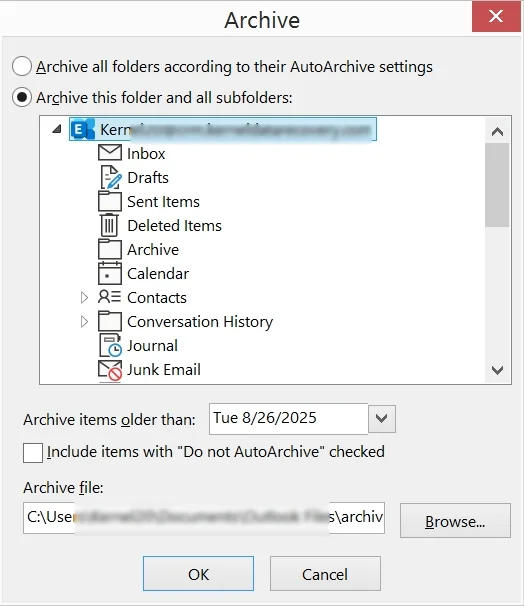
This way you can protect your PST files from corruption and maintain the performance of Outlook application.
How to Prevent PST Corruption in Outlook? (Basic Tips)
Apart from archiving Outlook mailboxes, there are different ways to guard your Outlook PST file against possible corruption issues. They are:
- Never shut down your system or PC while Outlook is in running mode. Exit MS Outlook correctly before shutting down the system.
- Never store large amount of data within a single PST file – it can bloat the PST file.
- Never store your PST file over a network or on a server – it can damage the PST data.
- Choose the best antivirus to protect your PC because virus attacks can also damage PST files.
Automated Solution to Repair Corrupted PST Files
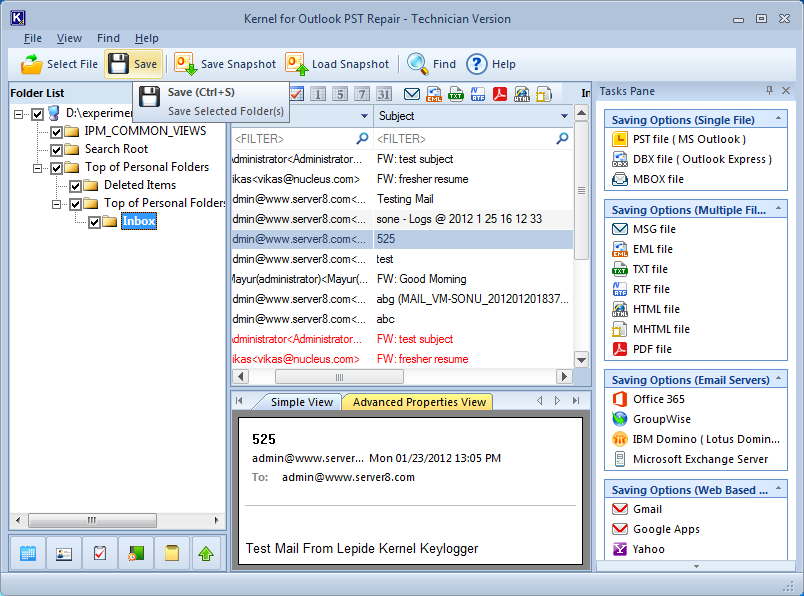
A corrupt PST file means inaccessible data and disrupted business operations. Most businesses use the methods as described to archive Outlook PST files. However, the process can also result in a damaged PST file. In such a case, you need to repair the file before accessing it in Outlook again. We recommend the Kernel for Outlook PST Repair solution for repairing and archiving Outlook mailboxes.
The PST repair tool helps to repair corrupt and inaccessible PST files and perform a result-oriented email recovery. It is useful in repairing severely damaged PST files, including large & encrypted ones. After recovery, you can save the file to a new PST, Exchange Server, Office 365, Gmail, or many other formats as per your need.
Conclusion
With the process to archiving old emails in outlook, you can protect your emails from corruption. This helps to increase the safety of your Outlook accounts, but corruption can occur in any PST file. If you have a corrupt PST file, use Kernel for Outlook PST Repair software. It will help you recover the complete mailboxes without impacting the integrity of the data. The tool is fully-fledged and integrated with features that improve productivity, keeping your email data safe.
Frequently Asked Questions
A. The corruption in the PST file can be due to oversized PST, abrupt shutdown of Outlook, a hard disk with bad sectors, viruses, or malware attacks, etc.
A. To repair a corrupt PST file, you can use the ScanPST.exe utility that will help you handle the minor corruption issues effortlessly. To find the tool within your computer, go to C:\Program Files\Microsoft Office\root\Office16\.