Related Posts
How to fix DBCC CHECKDB job failed in SQL Server?

Written By
Sarthak Poswal

Published On
October 04, 2024
Read time: 6 minutes
The database administrators (DBA) run the DBCC CHECKDB command to check the physical and logical integrity of database objects. It lets the DBA validate contents of all index views in database. The command can also be used to check consistency between table metadata and file system directories. Examining the database routinely helps to keep it in a healthy & consistent state.
However, sometimes, the DBCC CHECKDB command fails to execute in the right order and throws an error. These errors suggest that the SQL database has developed a critical fault. Therefore, in this blog, we will understand what DBCC CHECKDB command is and how to “fix DBCC CHECKDB job fails in SQL Server” issue.
Running DBCC CHECKDB regularly helps administrators detect and fix database corruption caused by hardware or software failures. It is a crucial part of database maintenance to prevent data loss and ensure the integrity of the database.
The DBCC CHECKDB command is an integration of 3 SQL commands, which are:
Several elements can constitute the occurrence of “DBCC CHECKDB job fails in SQL Server” issue. The database administrator must check for the following factors to identify the root cause:
The database administrators and experts have listed certain guidelines to ensure your database avoids any data inconsistency. The major points to follow are:
Resolution of the above problem is a topmost priority and must be done on an immediate basis. Apart from verifying any hardware level issues experts suggest curing any data inconsistency in the database. Therefore, we will be discussing a manual approach to remove inconsistency from your database. Alternatively, you can try to recover SQL database from backup file manually.
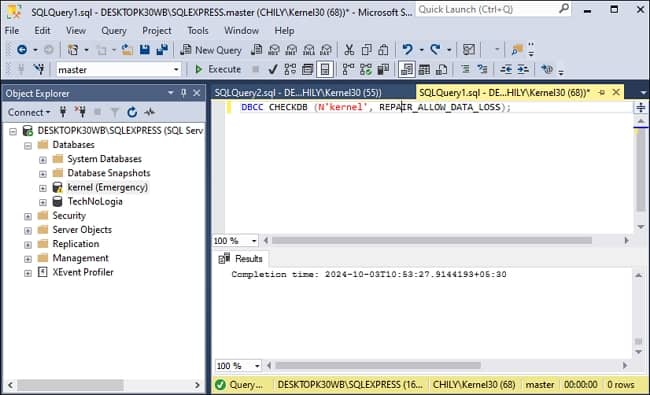
Inconsistency in database can happen due to various reasons like sudden power crashes. Therefore, SQL allows users to find and repair these issues with DBCC CHECKDB repair command. However, these commands may result in data loss. So, be sure to create your SQL database backup before executing the queries. To repair database corruption, we will use REPAIR_ALLOW_DATA_LOSS command. The steps to use it are given below:
ALTER DATABASE dbName SET SINGLE_USER
DBCC CHECKDB (N’ dbName’, REPAIR_ALLOW_DATA_LOSS);
ALTER DATABASE dbName SET MULTI_USER
You can also use DBCC CHECKDB (N’dbName’, REPAIR_REBUILD) command. This command will not delete any data but can only perform repairs like fixing nonclustered indexes and rebuilding indexes. But it will not help with severe inconsistencies.
The manual method will solve your issue and may also bring the database to a physically consistent state. However, it should only be used as a last resort due to the risk of data loss. To recover your data from a damaged database without losing any data, you must try a third-party tool like Kernel for SQL Database Recovery.
The SQL database recovery tool is embedded with highly optimized algorithms to deeply scan and recover every database object. After recovery, the tool also enables users to preview the recovered data and save only the required data objects or tables. The tool offers dual scanning mode – Standard Scan & Advanced Scan, choose any to repair the corrupt SQL database.
The step-by-step process to repair SQL Server with the tool is given below:
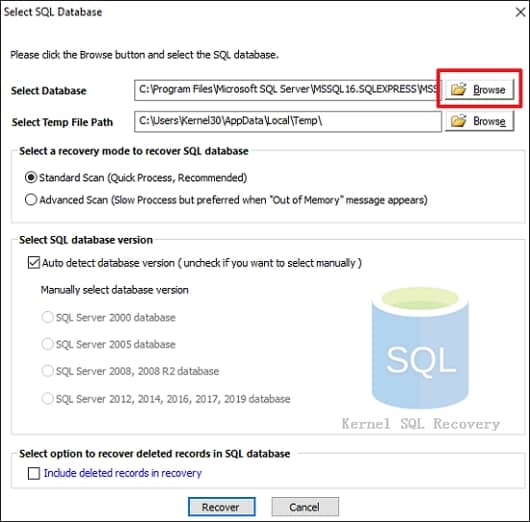
Note: To recover deleted records in SQL database, you must select the option – Include deleted records in recovery.
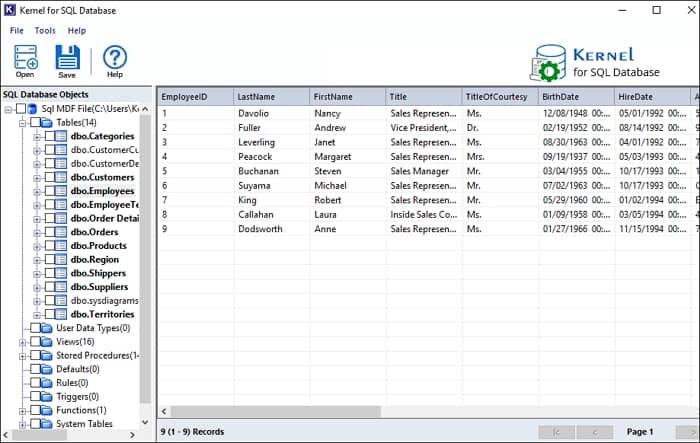
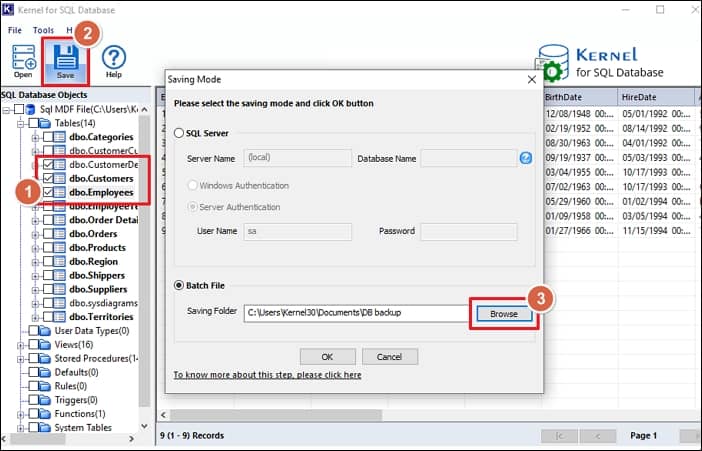
Inability to access database information with DBCC CHECKDB command can be the outcome of database damage. Try to repair SQL Server database with the methods discussed above. Due to the possibility of data loss, the manual process is not feasible. Therefore, we recommend employing Kernel for SQL Database Recovery software to safely recover database. With such a professional tool, you can recover SQL database without backup.
A. The database console commands (DBCC) allow the database administrator to test the various attributes of the database, such as integrity, indexing, etc. This helps in database maintenance and finding any database issues.
Yes, you can if you have a backup file or a database snapshot. Database administrators often restore database from a snapshot.
A. Using log LSN and FULL RECOVERY MODE, the database administrator can restore the database to a specific point in time.