 (4.9/5) 545 Reviews
Recover passwords of locked MS Access files accurately
Recover lost or forgotten MDB files password, despite of its length or the complexity. The software provides an interactive user interface to perform quick password retrieval process without making any changes to the existing or allocated file password.
Download trial version and preview recovered Access file password- Recovers passwords of protected MDB files.
- Supports recovery of multilingual passwords of Access database files.
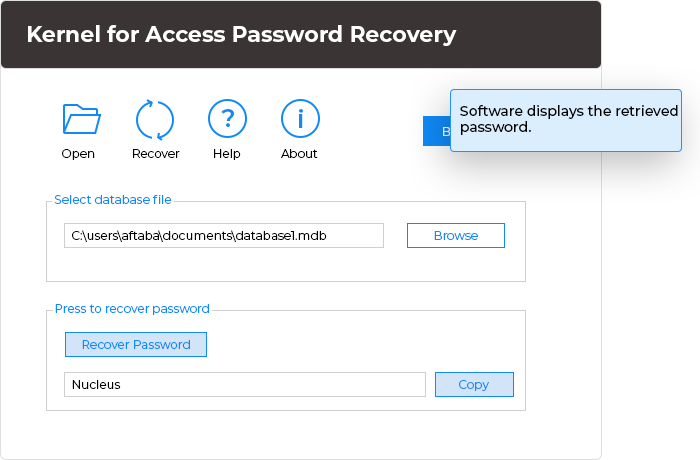
- Displays the recovered password on the software interface.
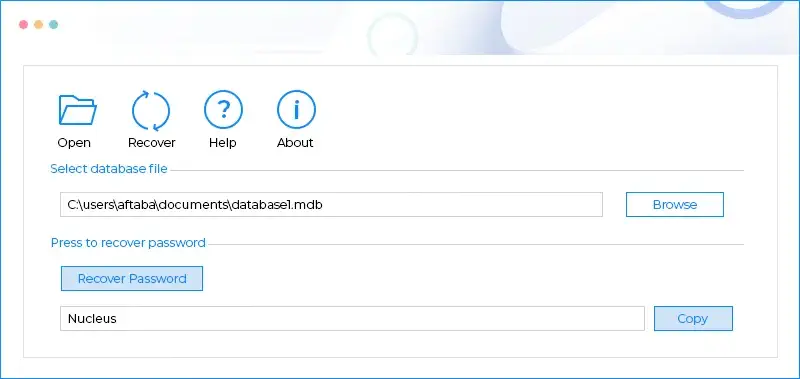
Top use cases for Kernel for Access Password Recovery

Regain password of protected MS Access files
When encountered with locked or protected MS Access MDB files and the need to regain access, our Kernel for Access Password Recovery tool is your solution. Tailored for Access password recovery, it effortlessly retrieves passwords of secured MDB files. Notably, it supports the recovery of multilingual passwords, ensuring versatility in handling various Access database files. Trust this tool for swift recovery process, providing seamless access to protected Access databases.

Recover lost or forgotten MDB files passwords
For situations where MS Access MDB file passwords are lost or forgotten, rely on our Kernel for Access Password Recovery tool. It ensures the retrieval of lost or forgotten MDB file passwords under almost any circumstance. Importantly, the tool operates without making any changes to the existing or allocated file password during the retrieval process. Trust this software for a secure procedure in recovering passwords for MDB files without any compromise.

Compatible with all versions of MS access
When faced with the challenge of forgotten passwords across different MS Access versions, trust our Kernel for Access Password Recovery tool. This versatile tool supports all MS Access programs, including 2021, 2019, 2016, and earlier versions. Moreover, it seamlessly integrates with various Windows operating systems, covering Office 365, Windows 11, 10, and previous versions. The software ensures a reliable and consistent password recovery experience across diverse MS Access environments.
How to recover Access Database password?
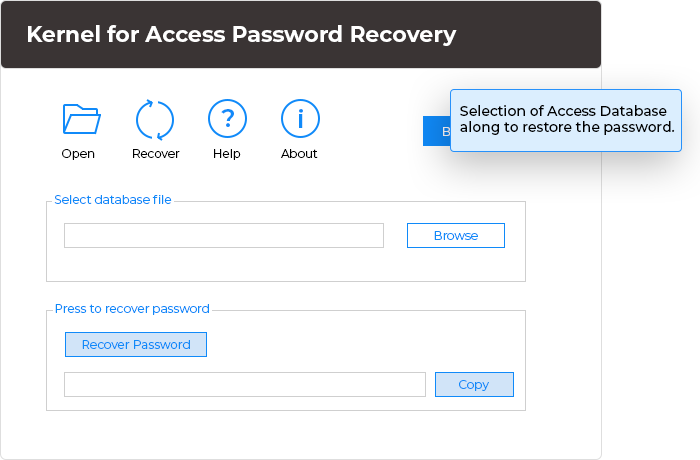
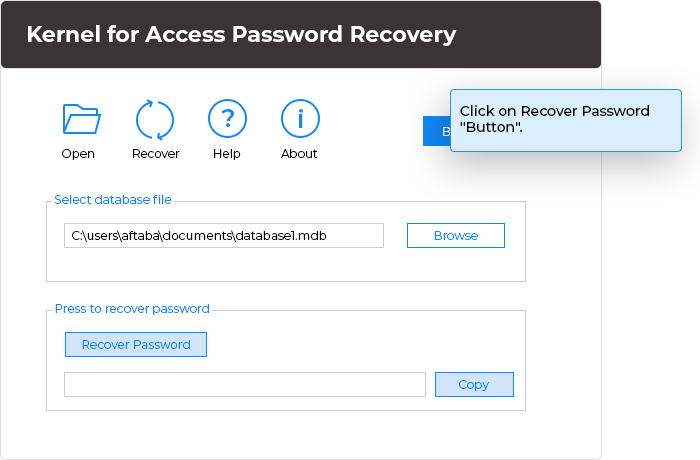
Kernel for Access Password recovery allows users to recover Access Database MDB files with ease. You can complete this task in 3 straightforward steps.
Explore software’s key capabilities
Explore all the advanced features and functionalities of the Access Database password recovery for efficient and secure recovery of MDB files with complete integrity.

Instant password decryption
Ensure instant recovery of password-protected MS Access MDB files with Access Password recovery software. It lets you unlock any MDB file password in just 3 simple steps without altering the structure and integrity of the MDB file data.

Unlock multilingual passwords
This software is facilitated with a highly advanced algorithm that helps you to recover multilingual MDB passwords. You can easily decode passwords including numeric, Unicode, ANSI, or alphanumeric easily.

Utilize the advanced Copy password option
Use the software’s advanced Copy option to copy your MDB file password in clipboard. You can easily copy your MDB file password and then input that password to access your encrypted MDB file.

Interactive user interface
Utilize the software’s interactive and user-friendly interface to recover the Access Database MDB file password with ease. Even a non-technical user can recover the MDB file password without issues.

Wide Windows compatibility
Use this robust Access Password Recovery software in all Windows OS versions, including Windows 10, 8.1, 8, and earlier editions. This wide support allows you to recover MDF files passwords on any Windows versions in your system.

Support all MS Access versions
This software is compatible with almost every MDB file created by any MS Access version, including 2021, 2019, 2016, 2010, 2007, and previous editions, to restore passwords.
Frequently asked questions
- Install and launch Kernel for Access Password Recovery on your system.
- Click Browse to select the specific MDB file.
- Hit the Recover Password for password recovery.
- Preview your password and click on Copy to copy the password on clipboard.
Software Prerequisites & recommendations
 About Software
Version: 4.02
Release Date: 20 May 2006
License Type: Home, Corporate & Technician
 Version Support
MS Access: 2021, 2019, 2016, 2013, 2010, 2007, 2003, XP, 2000, 97, 95
 System Requirements
Hard Disk: 50 MB of disk space
Memory: 128 MB Minimum
Processor: Intel® Pentium Processor compatible (x86, x64) or equivalent
Operating System: Windows 11, 10, 8.1, 8, 7, Vista, XP, 2000, 98, NT, 95, Windows Server 2022, 2019 & older versions
 Installation Guide
What customers say about Kernel for Access Password Recovery
 (4.9/5) 545 Reviews
An absolute necessity for Access users! Effortlessly and swiftly recovered my password, making it a must-have tool. Highly recommended!