Kernel Outlook Attachment Extractor Tool
 (4.9/5) 440 Reviews
Extract attachments from Outlook, including images, text documents, ZIP files, videos, etc., in original quality. Add offline OST & PST files and Outlook profiles of Office 365, Exchange, IMAP, etc., to extract attachments directly. Find the specific email with multiple filtering options, including To, From, Subject, Attachments, etc. and save them at the desired location easily.
Download the tool trial version and save 10 attachments per folder for free.- Save bulk attachments in a single operation cycle with rapid speed.
- Extract attachments from multiple OST & PST files along with Outlook profile.
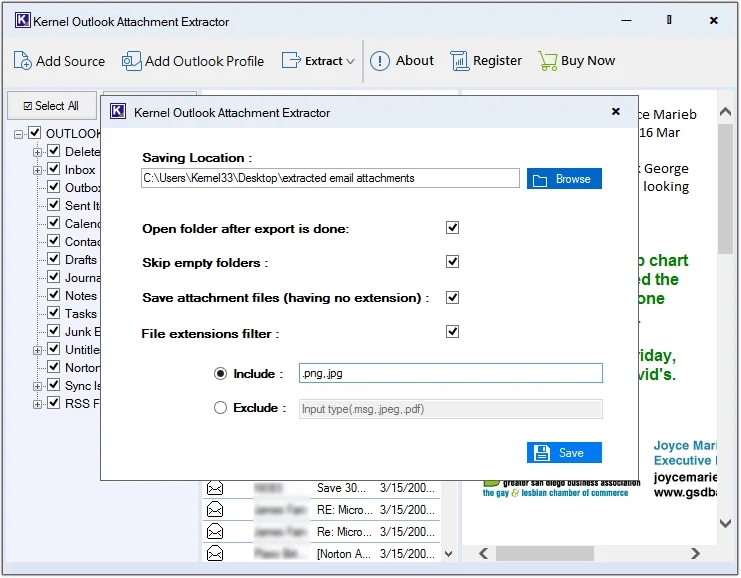
- Skip empty folders to reduce the attachment extraction time.
- Easily save Outlook email attachments having no extension.
- Extract attachments from individual email messages without issues.
- Extract specific attachment extensions with the Include/Exclude option.
- Extract email addresses and save them in Excel sheet.
Top Benefits of Outlook Attachments Extraction
Extracting email attachments from Outlook benefits users in many ways, such as:

Easily manageable
Keep all the Outlook attachments in one place and categorize them for easy and hassle-free management.

Offline accessibility
Easily access attachments offline by extracting them from emails and saving them locally on the system.

Save storage capacity
Reduces Outlook’s mailbox size as all the extracted attachments can be stored separately on your system.

Easy shareability
Post-extraction, you can smoothly share Outlook attachments with employees, colleagues, clients and others.

Secure backup
Create a secure backup copy of Outlook attachments on local system and save from loss and virus attacks.

Boosts performance
Reducing mailbox size automatically speeds up the Outlook performance and enhances the user experience.
What Experts say
Check expert reviews of this tool and learn how it makes extracting Outlook attachments simple and fast for everyday users.

I needed to access attachments from an old PST file on a system without Outlook installed. I had issues accessing attachments until I found this Outlook attachment extractor tool. This tool worked perfectly, allowing me to extract all the attachments directly from the orphaned PST file in the same hierarchal order.”
Paul P. Bogen, System Administrator
My Outlook mailbox constantly exceeded its storage limit due to years of accumulated emails and attachments. This tool extracted all attachments and helped me reduce my mailbox size and improve Outlook's performance. It saved countless hours of manual work and my data from loss and corruption.”
Gabrielle Morron, Software Engineer
Extracting attachments from Outlook has never been easier. Conditional filters, offline accessibility, and zero file-size limitations and what not to process large volumes efficiently.”
Elena García, Project Coordinator
The Kernel Outlook Attachment Extractor made handling our email attachments effortless. Extracting files from multiple PSTs is fast, precise and preserves original quality. We definitely improved our storage management and team efficiency.”
Sofia Petrov, IT Manager
This tool has transformed our Outlook workflow. Filtering emails for attachments is quick, and bulk extraction worked flawlessly across Office 365 profiles without any file corruption.”
Rajesh Nair, System Administrator
This software exceeded our expectations. We extracted from Exchange, Office 365, and local PST files smoothly, and the ability to include or exclude specific attachments is a game-changer.”
Amara Diallo, Email AdministratorKernel Outlook Attachment Extractor - Best Features
Know about the top features of the Kernel Outlook attachment extractor tool to quickly extract Outlook attachments in the original hierarchy.

Extract attachments from PST & OST files
Use the Add Source option to upload multiple offline OST and PST files simultaneously. Extract attachments from PST files and OST files, including images, videos, documents, presentations, etc., with zero data loss.

Extract email attachments from Outlook Profile
Add Outlook profiles of Office 365, Exchange server, Gmail, IMAP, POP, etc., with the Connect Outlook Profile feature. It lets you extract email addresses and attachments without needing to install Outlook on the system.

Extract attachments from MSG files
Outlook attachment extractor freeware allows you to extract attachments from MSG files as well. Use the smart filters for quick extraction and save all attachments at a user-defined location in a matter of seconds.

Preserve attachments in original quality
This attachment extractor tool is equipped with a user-friendly interface and exceptional features, making the entire process smooth and secure. Save multiple attachments from multiple emails in Outlook with complete folder hierarchy retention.

Zero file size restrictions
Add multiple OST & PST files and Outlook profiles without worrying about the file size restrictions. Whether files are small or large, our Outlook attachment extractor processes them efficiently without slowdowns or failures.

Save attachments from individual emails
The Outlook attachment extractor software provides an option to retrieve attachments from individual email messages. Right-click the desired email message(s) and select the Extract Attachments option.

Filter options to search specific emails
Search specific emails among thousands with the Filter Options on different criteria like From, To, CC, BCC, Subject, Body, Read/Unread, Has Attachments, Has no Attachments, and Date.

Conditional filters for precise extraction
Use conditional filters like Skip empty folders, Save attachment files (having no extension), Include/Exclude file extension filters, and save extracted attachments as per requirements.

Free Outlook attachment extractor
Download the free Outlook Attachment Extractor trial version to get hands-on experience with the top-quality features and extract 10 attachments per folder without any cost at the original quality.
What Types of Attachments Can You Extract with our Tool?
Here is a list of Outlook email attachments which can be extracted using the attachment extractor tool:
Extract all types of text documents from Outlook (plain text format, text-based, etc.), which are lightweight and universally compatible.
- Word Documents (.docx, .doc)
- Text Files (.txt)
- Rich Text Format Files (.rtf)
- OpenDocument Text (.odt)
- HTML Files (.html, .htm)
- XML Files (.xml)
- JSON Files (.json)
- CSV Files (.csv)
This software can easily extract spreadsheets attached to an email, embedded in the email body, etc.
- Excel Spreadsheets (.xlsx, .xls)
- OpenDocument Spreadsheet (.ods)
Our tool can extract and save all slide-based files linked via cloud storage or embedded as thumbnails in Outlook.
- PowerPoint Presentations (.pptx, .ppt)
- OpenDocument Presentation (.odp)
Save all visuals and interactive content files, whether images or videos, to your desired location with the best attachments extractor tool.
- Images (.jpg, .jpeg, .png, .gif, .bmp, .tif, .tiff)
- Audio Files (.mp3, .wav, .aac, .flac)
- Video Files (.mp4, .avi, .mov, .mkv)
Outlook attachment extractor software efficiently extracts and stores every compressed file data in its original form.
- ZIP Files (.zip)
- RAR Files (.rar)
- 7z Files (.7z)
- ISO Files (.iso)
How to Extract Outlook Attachments?
Follow the steps below to extract email attachments from OST or PST files and Outlook profile easily:
- Step 1: Download and install Kernel Outlook Attachment Extractor tool.
- Step 2: Launch it and click the Add Source or Connect Outlook Profile option.
- Step 3: Upload the required OST or PST file or connect the Outlook Profile.
- Step 4: Get a detailed preview of emails, then click Extract and select the Attachment option.
- Step 5: Click Browse to provide the saving location and apply conditional filters accordingly.
- Step 6: Click Save and all the attachments will get saved instantly.
What more features does the Outlook Attachment Extractor tool provide?
To provide fast and secure email attachment extraction, the tool provides additional benefits, such as:
Supports password-protected files
Kernel Outlook Attachment Extractor software also supports email attachment extraction from password-protected files.
No need for Outlook installation
It does not require Outlook to execute the attachments extraction. Easily extract attachments with or without Outlook.
Unlimited attachments extraction
Add any number of files to this tool and extract attachments from Outlook without any drop in performance.
Quick file preview and navigation
Select and view any email content in a hierarchical order with quick navigation before initiating attachment extraction.
Outlook and Windows compatibility
Kernel Outlook Attachment Extractor software is compatible with all Outlook and Windows OS versions (32-bit and 64-bit).
Supports UNICODE and ANSI PST files
This Outlook Attachments Extractor freeware software supports all types of PST files, including UNICODE and ANSI files.
Compare Features of the Trial Version and Licensed Version
Here is the comparison table of the Kernel Outlook Attachment Extractor Tool with a detailed list of features available in the trial version and licensed version.
| Features | Trial Version |
Licensed version |
|---|---|---|
| Add OST files and PST files | ||
| Connect Outlook profile | ||
| Upload single or multiple files and mailboxes | ||
| Allows extraction from individual email | ||
| No file size restrictions | ||
| User defined saving location | ||
| Preserves attachments in original form | ||
| Support for all Outlook versions | ||
| Extract all attachments | Only extracts 10 attachments per folder | Unlimited attachments extraction |
| Free Download | Upgrade Now |
Frequently Asked Questions about Our Attachment Extractor
Have doubts? Clear all your queries regarding Kernel Outlook Attachment Extractor software with these commonly asked questions.
- Keep all attachments in one place and categorize them for hassle-free management.
- Easily access attachments offline by saving them locally on the system.
- Extracting attachments helps in reducing Outlook’s mailbox size.
- Smoothly share Outlook attachments with employees, colleagues, clients, and others after extracting them.
- Speeds up Outlook performance and enhances the user experience.
- Create a secure backup copy of Outlook attachments on local system and save from loss and virus attacks.
Video tutorial of Kernel Outlook Attachment Extractor
Detailed video guide on the working process of extracting attachments with Kernel Outlook Attachment Extractor.

What customers say about Kernel Outlook Attachment Extractor
 (4.9/5) 440 Reviews
I was struggling with managing my Outlook email attachments. However, the incredible features of this software made my work easy and systematic. I highly recommend using this tool to extract attachments.
Software Prerequisites & recommendations
 About Software
Version: 25.2
License Type: Home, Corporate & Technician
 Version Support
MS Outlook: Office 365, 2021, 2019, 2016, 2013, 2010, 2007, 2003, 2002, 2000, 98, 97 (32-bit)
 System Requirements
Hard Disk: 50 MB of disk space
Memory: 128 MB Minimum
Processor: Intel® Pentium Processor compatible (x86, x64) or equivalent
Operating System: Windows 365, 11, 10, 8.1, 8, 7, Vista, XP, 2000, 98, NT, 95 Windows Server 2022, 2019, 2016, 2012, 2008 R2, 2008, 2003 R2, 2003.
 Installation Guide