Read time: 6 minutes
SharePoint Online has become an unavoidable part of Office 365 subscription plans specially designed to provide all the services to businesses. Earlier, the companies used on-premises versions of all the software separately. Now, Office 365 has accumulated all practical applications in one place with options for collaboration between all the apps.
Microsoft has upgraded SharePoint Online with several new features and a modern user interface for creating sites, lists, and libraries where users can manage their documents, web contents, and portals. You can purchase SharePoint Online independently and buy an Office 365 subscription with SharePoint in it.
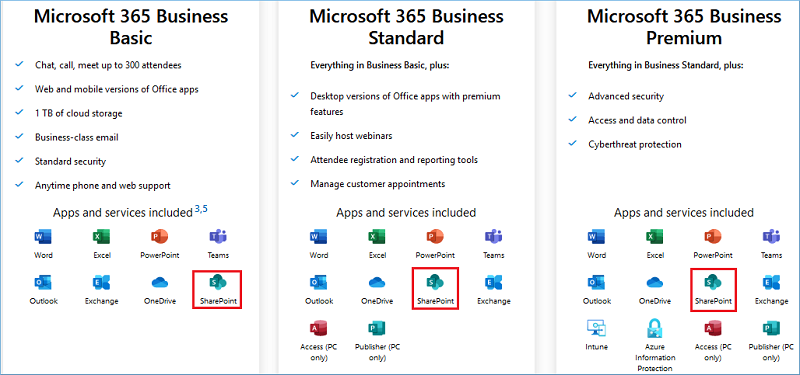
You can see that SharePoint is common in all the versions of Business plans, and you can purchase any plan suitable for your business. Now, let’s learn about the major reasons and an automated SharePoint migration tool to quickly migrate to SharePoint Online.
What are the reasons to migrate to SharePoint Online?
Suppose you are still sticking with on-premises SharePoint. Then, it is high time to migrate to SharePoint Online, as the latest additions will bring positive changes in your business processes in multiple ways.
Budget-friendly
A business looks for all possible situations where it can save money on resources. SharePoint Online saves money and gives the flexibility to increase or decrease usage based on the number of users. The plan’s cost is set for a single user, and the price will increase for each user. The advantage is that you can upgrade or downgrade the plan at any time without any long-term commitment.
Access anytime, anywhere
As SharePoint Online is a cloud-based service, it does not need hardware or software prerequisites. Any device with an internet connection can open a SharePoint account through Office 365 credentials. It helps the employees to work from their homes or remote teams working in different geographical locations.
Access to latest features
For on-premises SharePoint, the business requires a SharePoint administrator responsible for updating the application manually, protecting data in site collections, lists & libraries, etc. In SharePoint Online, Microsoft is responsible for providing you with the most updated version of the application with the latest features and user interface.
No need for manual updates
You do not have to perform manual updates or upgrades when working with SharePoint Online. Microsoft provides regular updates automatically, which means you do not have to worry about updating the platform every time a new feature or security update is released.
Easy to scale the license
SharePoint is quite a robust platform and allows businesses to scale their accounts up and down to accommodate their requirements. Businesses can adjust their license according to their evolving storage needs, team size, etc.
Top features of SharePoint Online
Here are a few features of SharePoint Online that make it superior to other versions of SharePoint server:
Delivers higher productivity
SharePoint Online allows you to create communication and team sites using custom-tailored layouts. It means you can customize your site according to your project or business requirements. With easy accessibility, it allows users to be productive even if they’re not near the workstations.
It also provides users with superior experience with easy lists and libraries customization. Navigating through the SharePoint Online environment is easy because of its interactive interface.
Storage in OneDrive for Business
OneDrive for Business in Office 365 gets a storage space of more than 1 terabyte. SharePoint is the biggest beneficiary of such enlarged cloud space as it can save unlimited documents that can be loaded to SharePoint whenever required. The owner of the documents can also set access permission levels for the other users. One feature called ‘Sync client’ syncs SharePoint sites and a folder in OneDrive for Business. The data present in the selected site will be synced to OneDrive automatically. If you check SharePoint Online storage information for a site, then it will show that it has ample space for creating a useful site.
SharePoint Online security
For a higher level of security, the security aspects of SharePoint Online are divided into multiple levels. Actually, the cloud platforms follow a shared dependency model where the service providers are liable to provide you with the platform, environment, and a secure atmosphere to work. The user is responsible for maintaining the accessibility and user credentials. There are separate settings for using sites, SharePoint groups, Active Directory Groups, site sharing, access requests, multi-factor authentication, security & compliance, etc. Many settings are on SharePoint Online Admin Center, and others are at Office 365 subscription level.
Hybrid functional model
Working on SharePoint Online does not mean you must skip working on SharePoint on-premises. You can follow a hybrid functional model where both versions of SharePoint are present, and you are sharing resources and data between them. As the security levels of SharePoint on-premises are more appealing, you can keep your most important files and share the rest of the data in SharePoint Online. Like you can import Excel files to SharePoint list for analyzing their content.
Conclusion
With this article, it is quite clear that SharePoint Online provides many revolutionary features that on-premises SharePoint does not provide. Now, the users looking to migrate to SharePoint Online will need a solution that will simplify migration and transfer with complete accuracy. Kernel Migration for SharePoint is a prime choice for many SharePoint administrators to move their data. The SharePoint Migrator tool can migrate site collections, libraries, and several lists to SharePoint Online. All the selected data will move along with properties, features, versioning, and metadata.
Frequently Asked Questions
A. On-premises SharePoint, as the name suggests, requires the server arrangement hardware, security, etc., deployed on-premises. The upfront investment for managing such an environment is quite high and also requires regular involvement of resources to monitor and maintain it. Apart from this, it will require you to spend more on physical hardware, in case you plan to scale your operations.
However, SharePoint Online, on the other hand, comes as a better choice as you do not have to worry about managing the server, updates, and patches. Sites created on SharePoint Online are easily accessible from anywhere, that’s why it is more preferred for remote work. SharePoint Online tenant is easy to scale and flexible enough to accommodate the user’s requirements.
SharePoint on-premises vs SharePoint Online explains why the demand for SharePoint Online is increasing.
A. Since there are not many native and reliable methods available to migrate to SharePoint, a feasible solution to migrate data to SharePoint Online would be using Microsoft’s SharePoint Migration Tool, also known as SPMT. However, the only issue with this is that it doesn’t support tenant to tenant migration and faces obstacles in handling complex metadata.
To avoid this, you can try out a professional SharePoint migrator that supports efficient migration of data to SharePoint.