Read time: 8 minutes
User Query – I heard about Kerio Mail a few years ago and chose it for my email needs. It worked well for a long time, but now it feels outdated and limited. I want to migrate Kerio to Microsoft 365 because it offers robust features, better security, and seamless tools for daily work. I look for a safe and simple way to migrate from Kerio to Microsoft 365 without data loss.
What is Kerio Mail?
Kerio Mail, also known as GFI Kerio Connect, is an all-in-one email and collaboration server designed for small to medium-sized businesses (SMBs) as a powerful alternative to Microsoft Exchange, offering features like email, calendar, contacts, and chat with easy deployment and management on Windows, Mac, Linux, or virtual appliances.
What are the prime features of Keiro Mail?
Explore all the top features of Kerio Mail that make it unique and facilitate users to manage their email communication using this platform.
- External Device Support: Kerio Connect from GFI software offers hassle-free and seamless mobile device support. It comes with the best synchronization method so that all the device information is well synced with the information on the system.
- Supports all mailbox items: Supports emails, calendars, contacts, tasks, notes, folders, and all the mailbox items. It is a perfect solution for all the medium-sized and small businesses that are otherwise unable to meet their requirements. It has an integrated communication feature wherein you can organize as groups and easily communicate with employees.
- Assured Security: Offers multiple security levels that protect the users and network from malicious and virus attacks. The spam filtering feature of the tool reduces the layers of unwanted messages, blocks IP addresses of suspicious accounts, and blocks entry of suspected attachments.
- Easy installation: Kerio Mail can be installed in 10 minutes, and the user can begin using it in the next 10 minutes. Its easy installation is one of the attractive features for small and medium-sized firms.
What is Microsoft 365?
Microsoft 365 is a cloud-powered subscription service that offers multiple productivity apps like Word, Excel, PowerPoint, Outlook, and Teams, plus cloud storage (OneDrive), security features (Microsoft Defender), and AI tools (Copilot). It is built for PCs, Macs, tablets, and phones, replacing the older Office 365 to reflect its broader cloud scope. It provides continuous updates, collaboration features, and constant access across devices to make sure you always have the newest software and services.
What are the prime features of Microsoft 365?
Know all the major functionalities of the Microsoft 365, which clarifies your confusion and insists you migrate Kerio Mail to Microsoft 365:
Cloud Access Anywhere: Microsoft 365 lets users open emails, documents, and apps from any device, which helps people stay connected and productive even outside the office.
Advanced Security Protection: Keeps your business data safe with strong security tools, threat alerts, and compliance support that reduce risks and protect sensitive information.
Easy Team Collaboration: Helps teams share files, chat, and work together through Teams and SharePoint, which improves communication and supports better teamwork./
Always Updated Apps: Provides the latest versions of Outlook, Word, Excel, and PowerPoint, so users always access modern features without manual updates.
Reliable Data Backup: Microsoft 365 offers built-in backup and recovery options that help businesses protect important emails and files from accidental loss or system issues.
Differences between Kerio Mail and Microsoft 365
|
Feature |
Kerio Mail |
Microsoft 365 |
|
Platform Growth |
Feels outdated and suits only small teams with limited business needs. |
Scales easily for small, mid, and large businesses without limitations. |
|
Email Experience |
Basic email features with fewer smart options for modern workflows. |
Smart email with advanced search, rules, and productivity-focused tools. |
|
Security Level |
Offers standard security but lacks advanced enterprise-level protection. |
Provides strong security, threat detection, and compliance-ready features. |
|
Collaboration Tools |
Limited collaboration options with basic file sharing support. |
Powerful collaboration through Teams, SharePoint, and real-time document access. |
|
Updates and Support |
Receives fewer updates and slower feature improvements over time. |
Regular updates with modern features and reliable Microsoft support. |
Why migrate from Kerio mail to Office 365?
As the above section explains, the core difference between Kerio and Microsoft 365. Still, if you are in doubt about why to change your email client, then go through these reasons:
- Enhanced Collaboration & Productivity: Access integrated tools like Teams, OneDrive, SharePoint, Word, Excel, and PowerPoint for seamless teamwork, which Kerio lacks.
- Access Anywhere and Anytime: Cloud-based platform allows access to email, calendars, and files from any device, improving flexibility.
- Superior Security & Compliance: Benefit from Microsoft’s advanced security, encryption, and compliance features.
- Reduced IT Overhead: Microsoft manages servers, backups, and updates, eliminating the need for on-premises server management.
- Scalability: Easily scale users and resources up or down as your business grows.
- Modern Functionality: M365 offers more modern solutions, including online PDF editing, which Kerio doesn’t provide.
Automated solution to migrate Kerio to Microsoft 365
Kernel IMAP to Office 365 is an advanced software that allows you to migrate IMAP emails (Kerio Mail) to Office 365 without any hassle. It can easily migrate entire data from Kerio to Microsoft 365 with complete data accuracy. You can easily select, map, filter, and start your Kerio to Office 365 Migration in a few easy steps. This IMAP to Microsoft 365 migration tool supports all email servers, making the migration process easy. This Kerio Mail to Office 365 tool comes with a free trial version where you can migrate and download 10 items per folder without any cost.
How to migrate Kerio Mail to Office 365 using this software?
Here is the detailed step-by-step guide to migrate Kerio emails to Office 365 using our IMAP migration tool:
Step 1: Download, install, and launch the IMAP to Office 365 Migration tool.
Step 2: Click on the Add Source and enter Kerio Mail credentials, like Server Name/IP, User Email/Login id, Password, and Port Number. Click Add.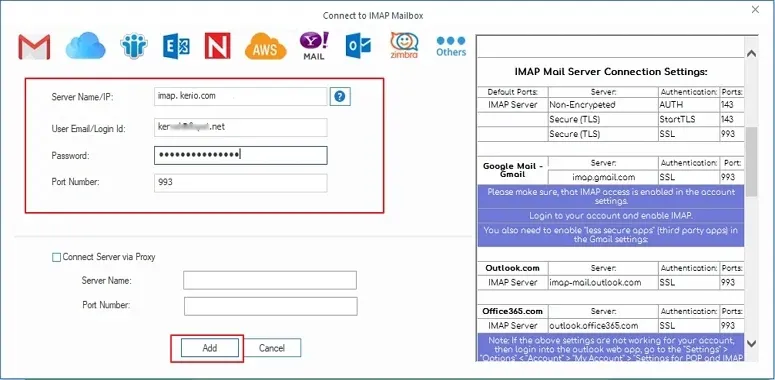
Step 3: Click on Add Destination tile, and enter Office 365 credentials, like Tenant ID, Client ID, and Client Secret Value. Click Add.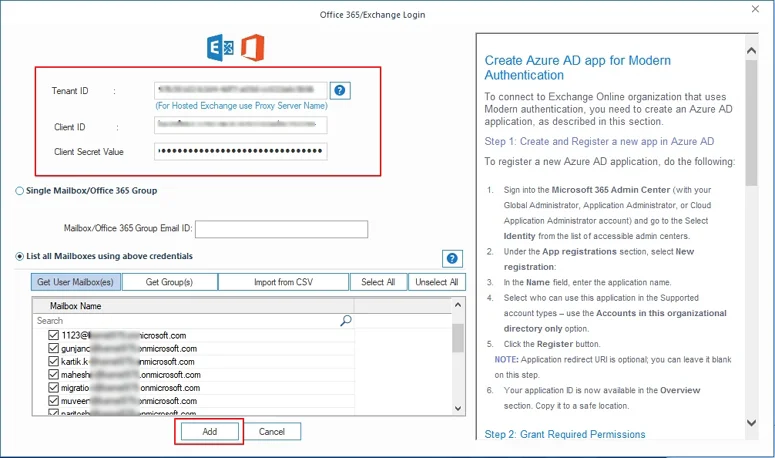
Step 4: Map source Kerio Mail users to destination Office 365 users and click Set Filter and Migrate.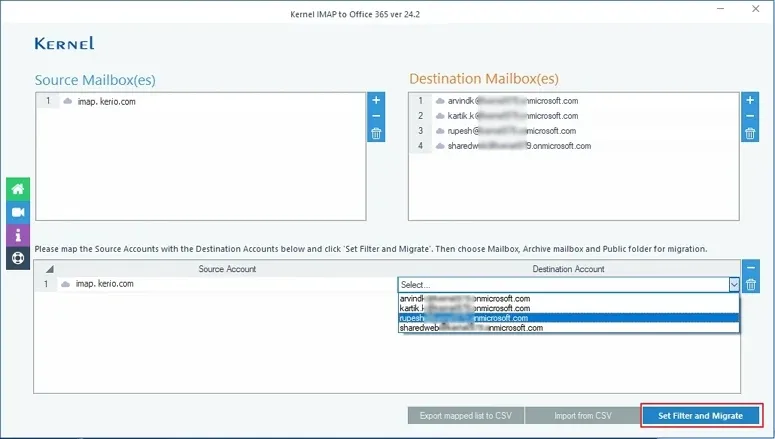
Step 5: Select your preferred Mailbox in To Destination column and click Migrate.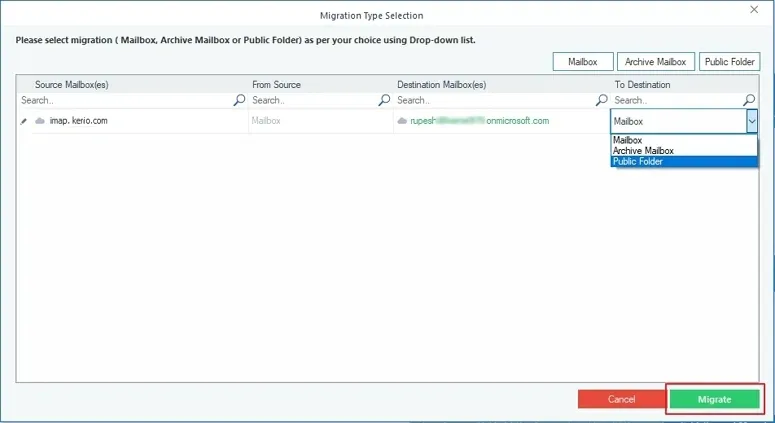
Step 6: Apply necessary filters to migrate required data from Kerio Mail to Office 365 and click on I am OK, Start Migration.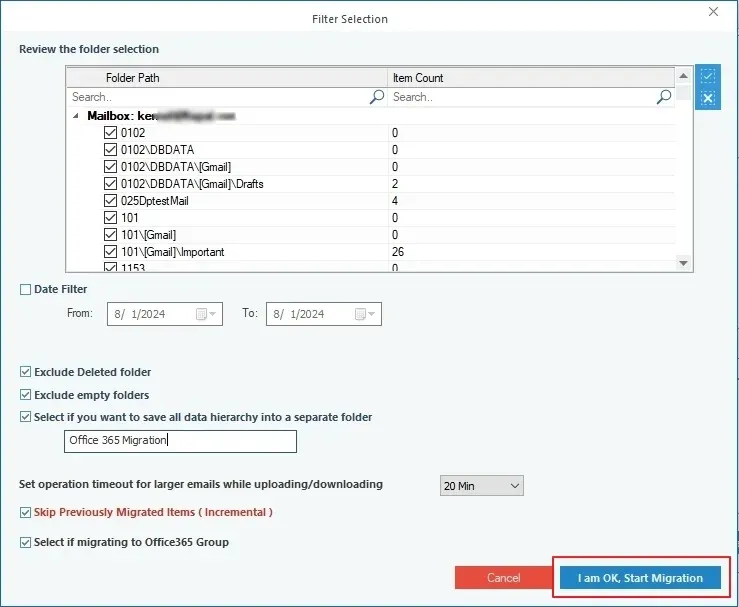
Step 7: After a successful Kerio Mail to Office 365 Migration, click OK and download a detailed migration report in a CSV file locally.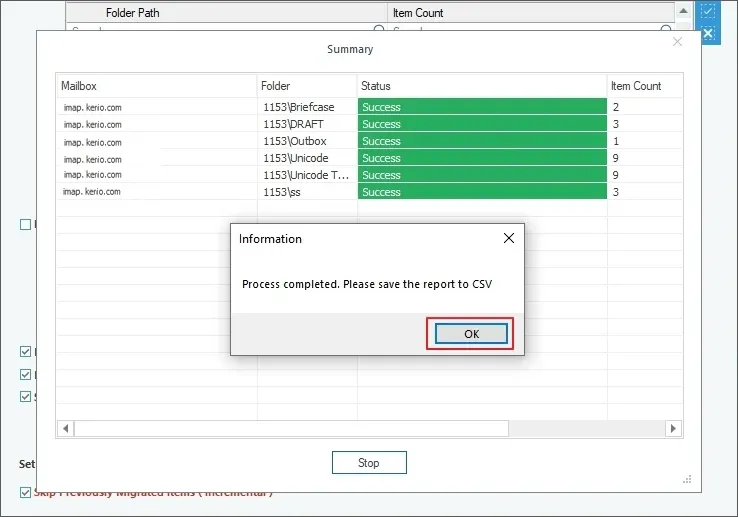
In this way, you can easily perform Kerio Mail Migration using our software. Apart from this, there is also a free manual method available to migrate Kerio Mail to Office 365. However, the manual method contains multiple limitations, and we don’t recommend you opt for it.
How to Migrate from Kerio Mail to Microsoft 365 using manual method?
There is no direct, straightforward method to migrate Kerio Mail to Microsoft 365. However, you can migrate Kerio to Microsoft 365 by connecting an email client like Kerio to Outlook. Here’s is how to perform it:
Step 1: Launch Kerio Mail and log in to your account.
Step 2: Go to the Integration with Windows and download Kerio Outlook Connector.
Step 3: Open your Microsoft Outlook on your system.
Step 4: Go to File > Info > Add Account.
Step 5: Select Manual Setup or Additional Server Types.
Step 6: Select Other and Kerio Connect (Kerio Offline Edition). Click Next.
Step 7: Input your Kerio account details to establish the connection.
With this method, you can easily synchronize your Kerio Mail account to Outlook. After that, you can easily migrate emails to Office 365 Mailbox with the complete mailbox hierarchy.
Limitations of the manual method
- Requires manual effort, which increases chances of errors or incomplete transfers.
- Feels complex and slow for users without technical knowledge.
- Does not allow customization or preference setup for specific results.
- Does not suit bulk mailbox transfers or large data volumes.
- Needs Microsoft Outlook setup and proper configuration before use.
- Poses a risk of data loss or file damage, especially with large attachments.
Conclusion
With the Kernel IMAP to Office 365 migrating tool, you can successfully migrate the entire Kerio Mail mailbox data to Office 365 without any hassle. The software is a perfect solution for instant and effective data migration. Moreover, it is also helpful equally when Gmail is out of space. You do not have to worry about Keiro Mail data getting lost or deleted because this tool maintains data integrity and also does not save any password and login credentials.