Read time: 9 minutes
User Query: One of my client is using Yahoo Mail since their business was established. Now, they want each email in EML file to backup their data for wide compatibility in Microsoft Outlook, Mozilla Thunderbird, Apple Mail, and Windows Live Mail. I’m looking for a reliable solution to export bulk Yahoo emails into EML file with all the mail attributes and attachments.
To export Yahoo Mail to EML, set up your IMAP-based Yahoo Mail account in Thunderbird, Apple Mail, or Outlook, and go through the methods below:
- Drag and Drop emails to the local computer.
- Export Yahoo emails to EML using ImportExportTools NG.
- Save Yahoo Emails in EML using Apple Mail’s saving feature.
- Drag and Drop Yahoo emails from Outlook to your desktop.
Yahoo Mail doesn’t allow you to convert Yahoo emails to EML directly. That’s why you need to go through alternative methods to access Yahoo emails in an EML file. Let’s go through each method in detail. But before that, have a look at the reasons that encourage users to convert their data.
Why Convert Yahoo Mail to EML?
- EML files give you the freedom to access Yahoo Mail in Microsoft Outlook, Apple Mail, and Mozilla Thunderbird with all the email formatting.
- When you want to switch your email client from Yahoo Mail to another email client.
- EML files store all the emails and their attachments in a single file. You can even access them without having a proper internet connection.
How to Export Yahoo Mail to EML Manually?
As mentioned, Yahoo doesn’t offer any direct way to export emails to EML format. Thus, you need to go through alternate multi-part processes to save Yahoo Mail to EML files.
Method 1: IMAP synchronization with Thunderbird
Yahoo Mail supports IMAP-based account setup, which makes it more compatible with other email clients that support IMAP protocols. Follow the three-part process, which includes synchronizing Yahoo Mail with Thunderbird and using ImportExportTools NG to export Yahoo Mail to EML files.
Part 1: Add Yahoo Mail in Thunderbird
Step 1: Open Mozilla Thunderbird and click on Account Settings.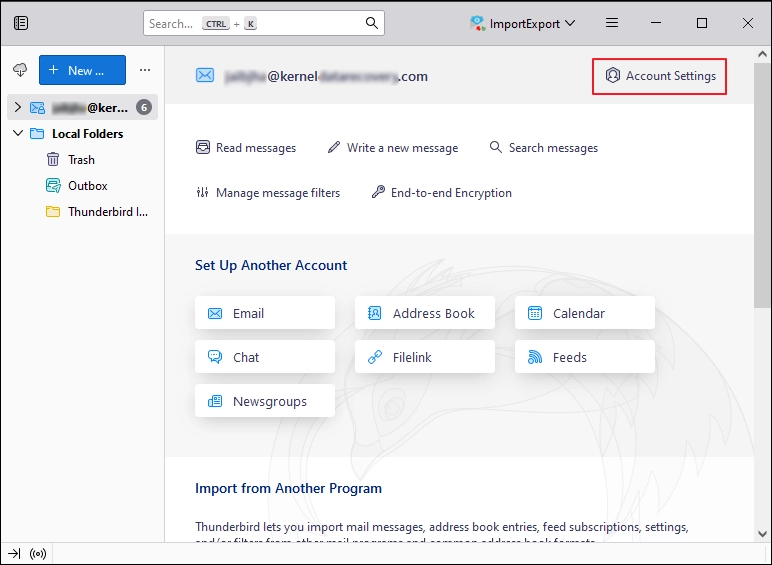
Step 2: Click on Account Actions and hit Add Mail Account.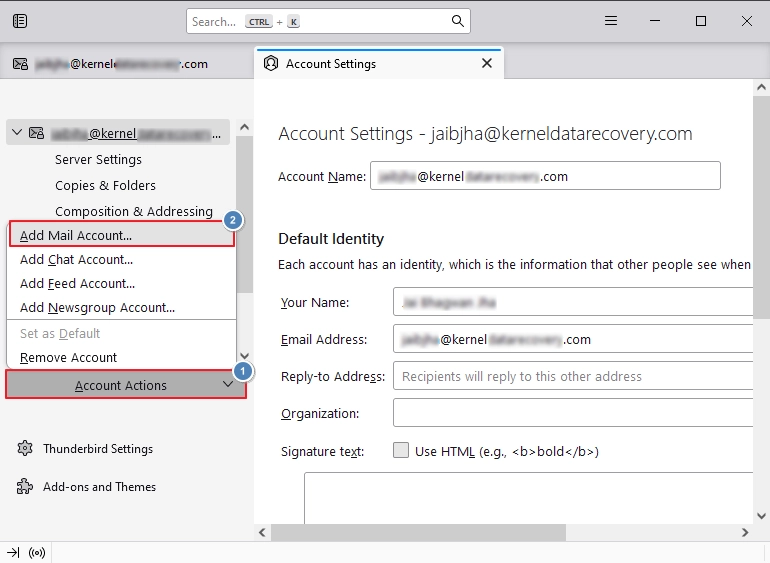
Step 3: Enter your Yahoo Mail Credentials, like Your full name, Email address, and Password. Click Continue.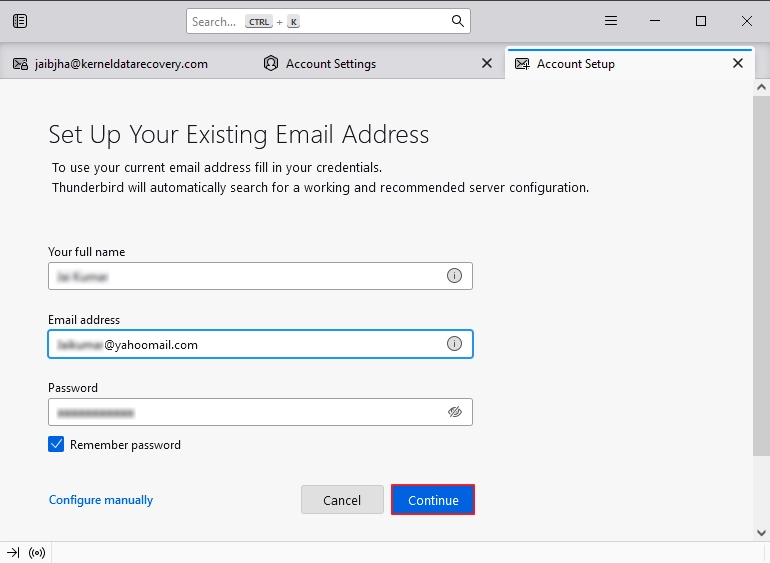
Part 2: Add ImportExportTools NG add-on
Step 1: Open Thunderbird, click Menu > Add-ons and Themes.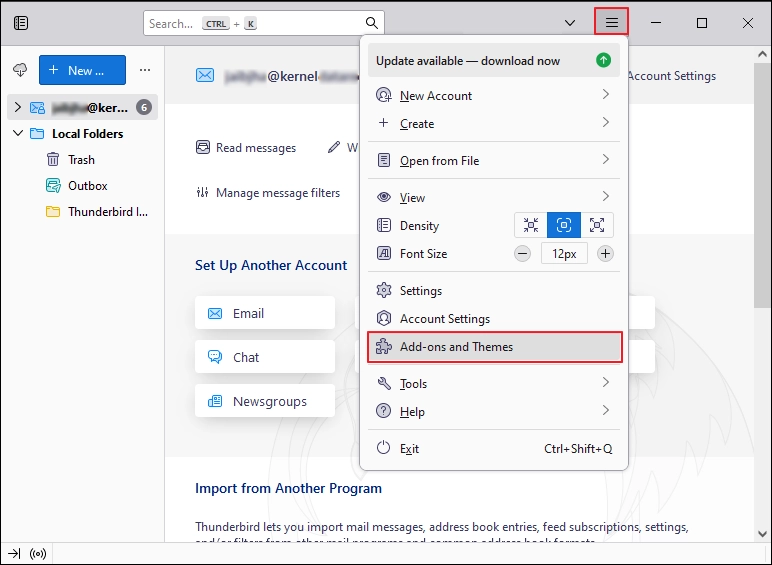
Step 2: Search for ImportExportTools NG add-on and add it to your Thunderbird.
Part 3: Export Yahoo Mail to EML
Step 1: Open Thunderbird, left-click on folder > ImportExportTools NG > Export All Messages In Folder > EML Message Format.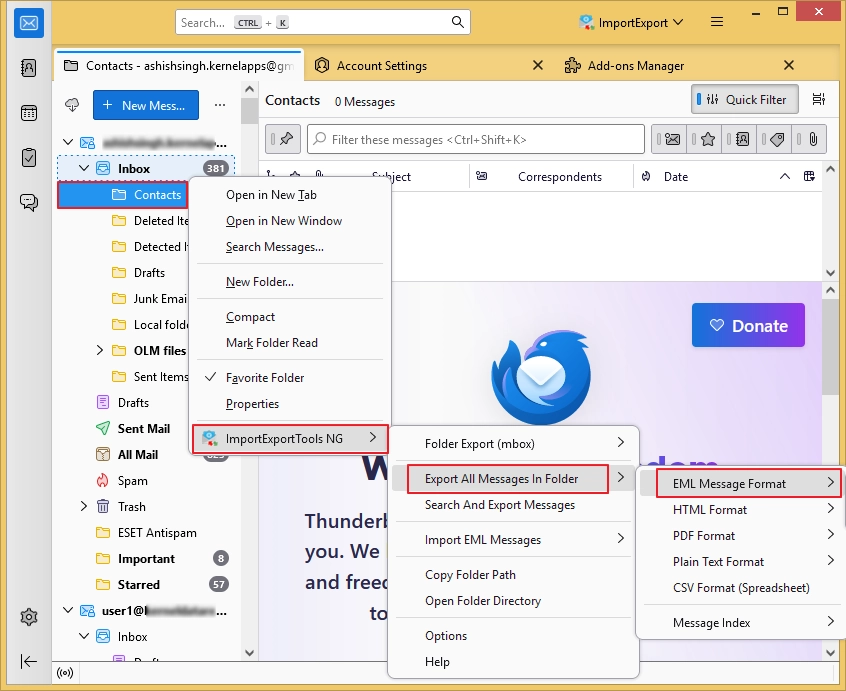
Step 2: Browse and select the desired saving location and convert Yahoo emails to EML.
Method 2: Drag & Drop Yahoo Emails
Mozilla Thunderbird (Windows and Mac) software offers a drag-and-drop option to convert Yahoo emails to EML files. You just need to select, drag any email, and drop it in your local drive (any folder). It will save your emails in EML files.
Method 3: Export Yahoo Mail to EML using Apple Mail
Yahoo Mail supports IMAP-based accounts, which makes it accessible on all the IMAP enabled emails clients. That means you can add your Yahoo Mail account to Apple Mail. Here’s how to export Yahoo emails in EML format using Apple Mail
Step 1: Add your Yahoo account to Apple Mail using IMAP method.
Step 2: Wait until your Apple Mail syncs all your Yahoo emails.
Step 3: Select any specific email, click on File > Save As > Raw Message Source (.eml). Finally, click Save.
Method 4: Export Yahoo Emails using Outlook
As I told you previously, Yahoo Mail offers IMAP based accounts creation. Same Outlook also supports IMAP-based account creation and synchronization. Configure Yahoo Mail in Outlook 2019 / 2016 and try to drag-and-drop your emails locally. All the dragged and dropped emails will be saved in EML file format.
The above-mentioned methods are the ideal solution to export Yahoo Mail to EML file. However, these methods come with certain limitations.
Limitations of Manual Methods
- No direct export process with multiple manual steps.
- Require integration of third-party email clients for the export process.
- Not suitable for large mailboxes.
- It is not usable for large enterprises and IT administrators.
Direct Way to Export Yahoo Emails to EML Format
To overcome the limitations associated with the manual methods and get a direct, simple way to export Yahoo mail to EML, I personally suggest using a Yahoo IMAP backup tool. One such software is Kernel IMAP Backup and Restore that allows you to backup emails from all the IMAP-based accounts, including Yahoo Mail, to EML, PST, MSG, HTML, MHT, DOCX, DOC, and PDF formats. Some of the features of the IMAP backup tool are as follows:
- Backup Yahoo emails to PC with proper email formatting.
- Multiple advanced filters for selective Yahoo Mail data export.
- Incremental backup option to save only newly added data and avoid duplication.
- Save a detailed Yahoo mail backup report to verify the process.
How to export Yahoo Mail to EML using this tool?
Follow the step-by-step process to convert and save Yahoo emails in EML file format:
Step 1: Download, install, and launch the tool.
Step 2: Click on Backup in the IMAP Backup tile.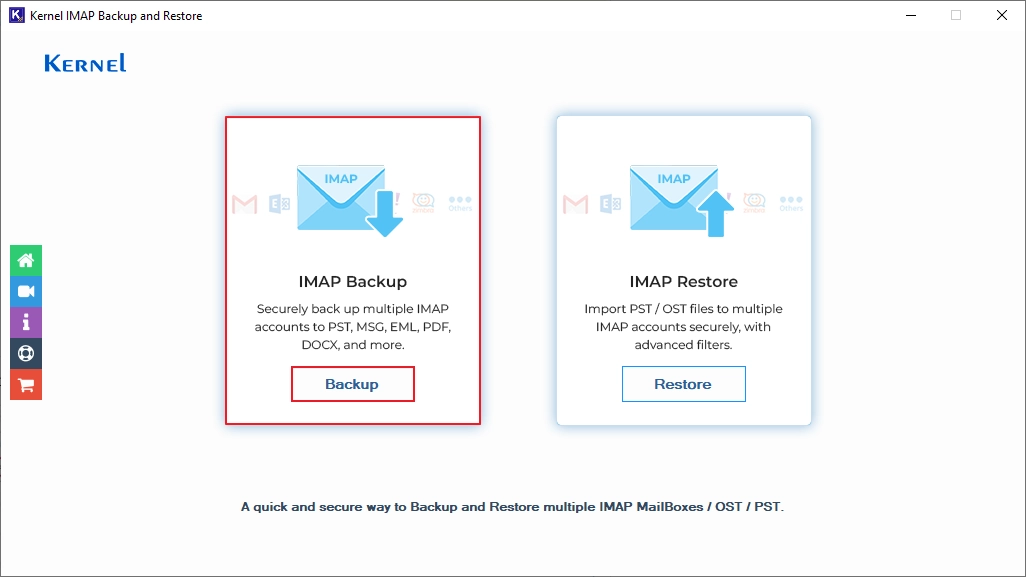
Step 3: Click Add to connect your Yahoo Mail account.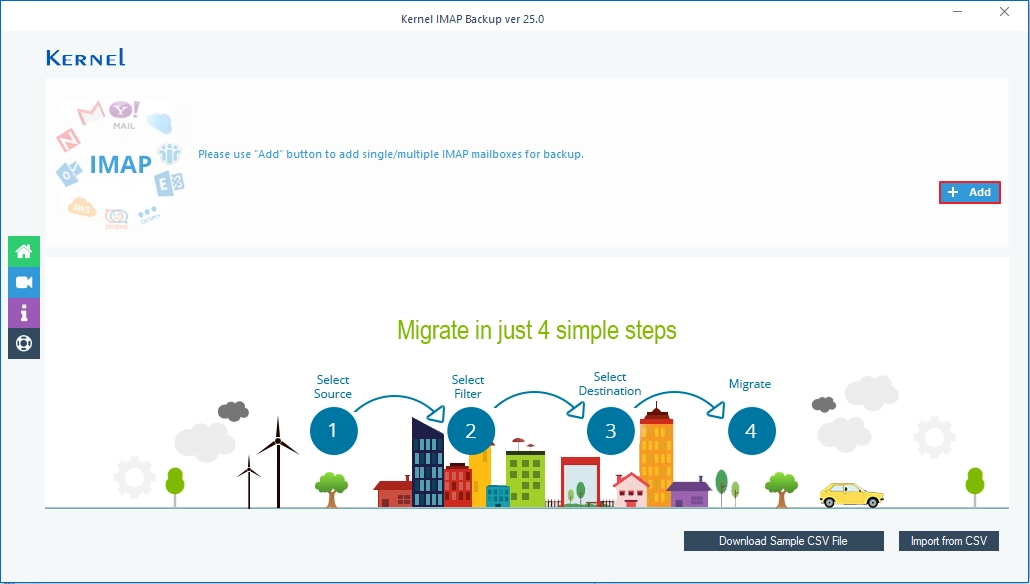
Step 4: In the Connect to IMAP Mailbox window, enter Yahoo Mailbox credentials, including Server Name/IP, User Email/Login ID, Password, and Port Number. Click Add.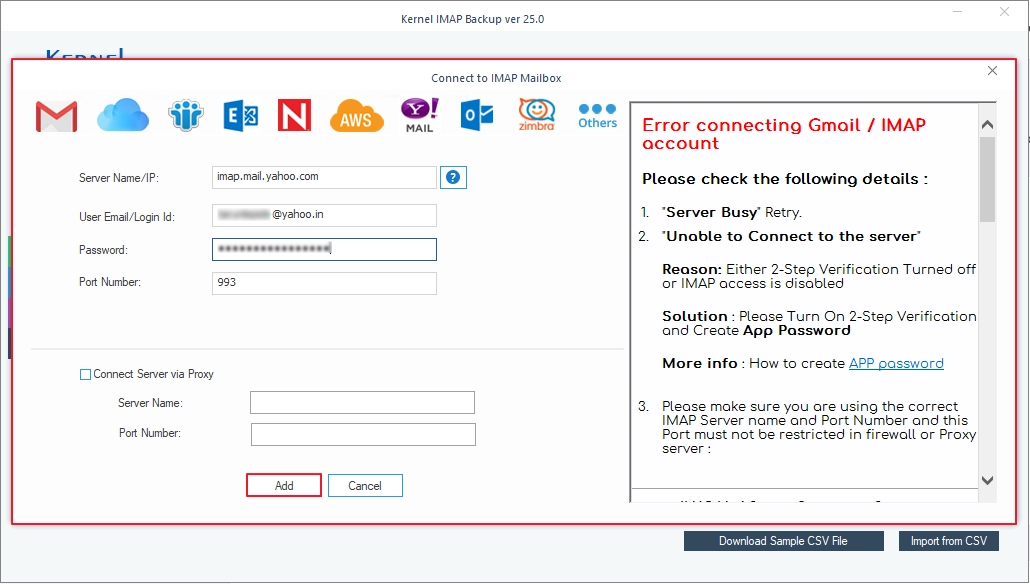
Step 5: In the following window, verify your mailbox and proceed further.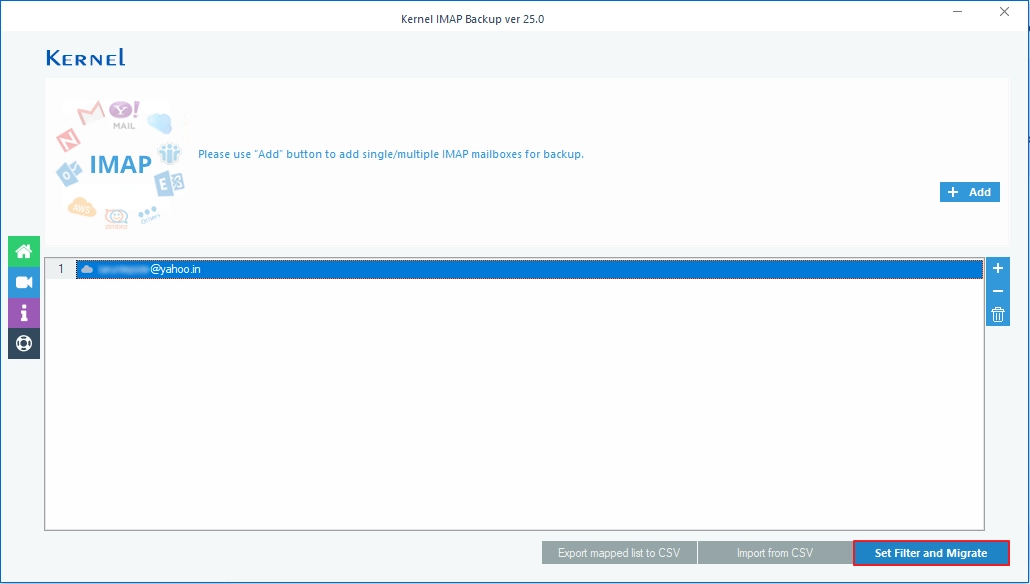
Step 6: The software will start Enumerating Folders from the Yahoo Mail account.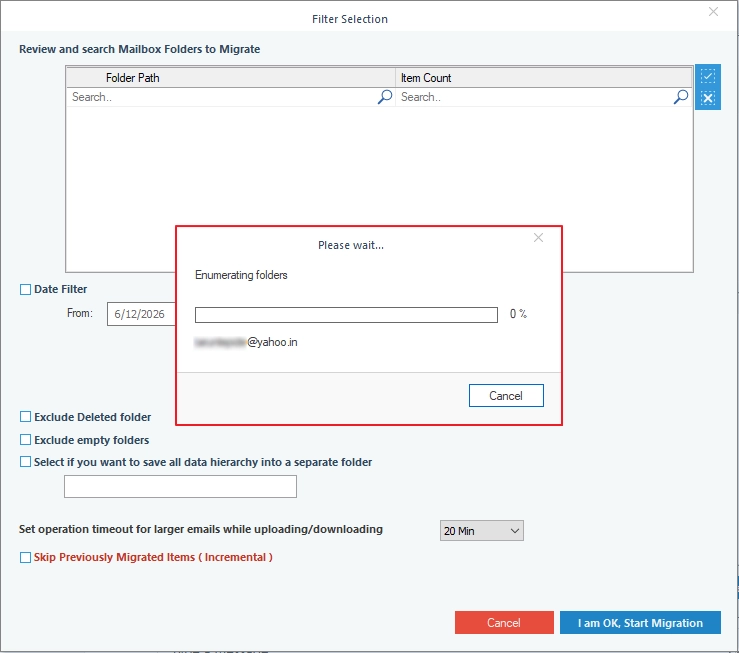
Step 7: Review the mailbox folders, apply filters to export only needed data, and click OK to proceed.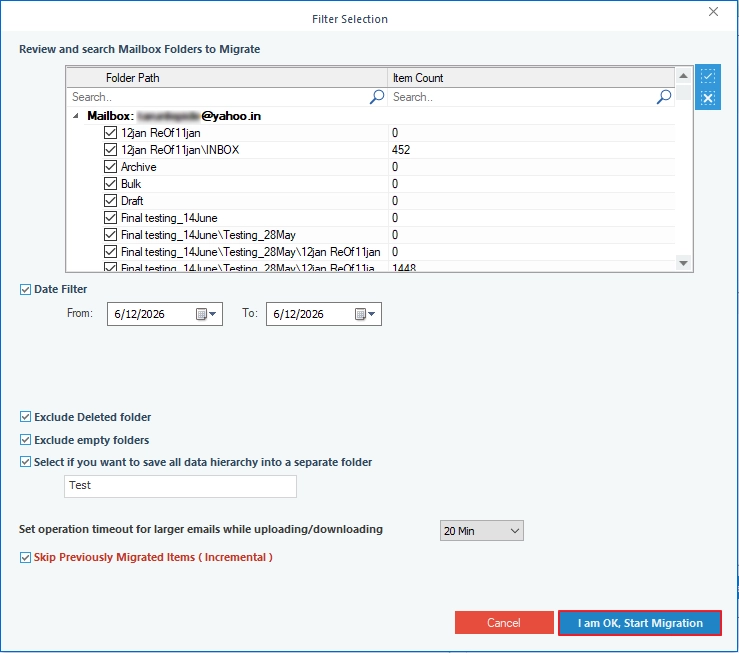
Step 8: Select output type as EML and click OK.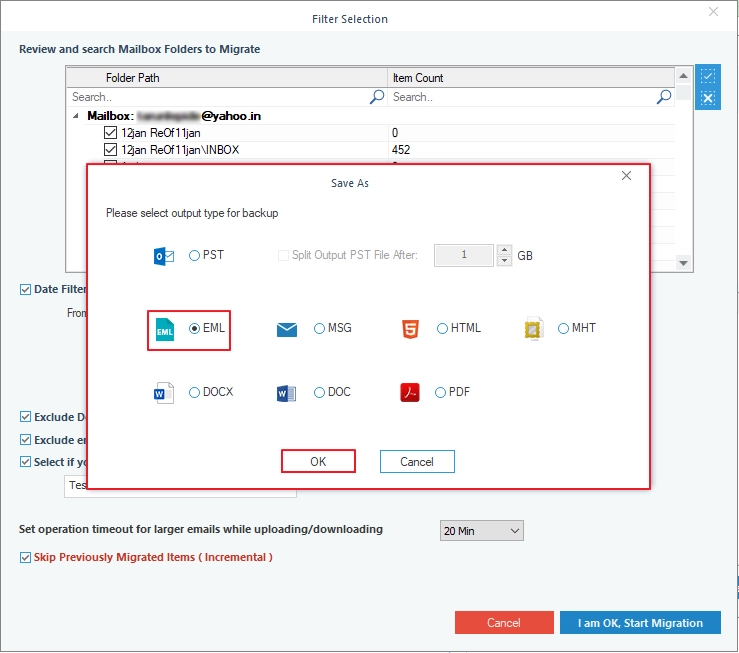
Step 9: Provide the location to save the files and click OK.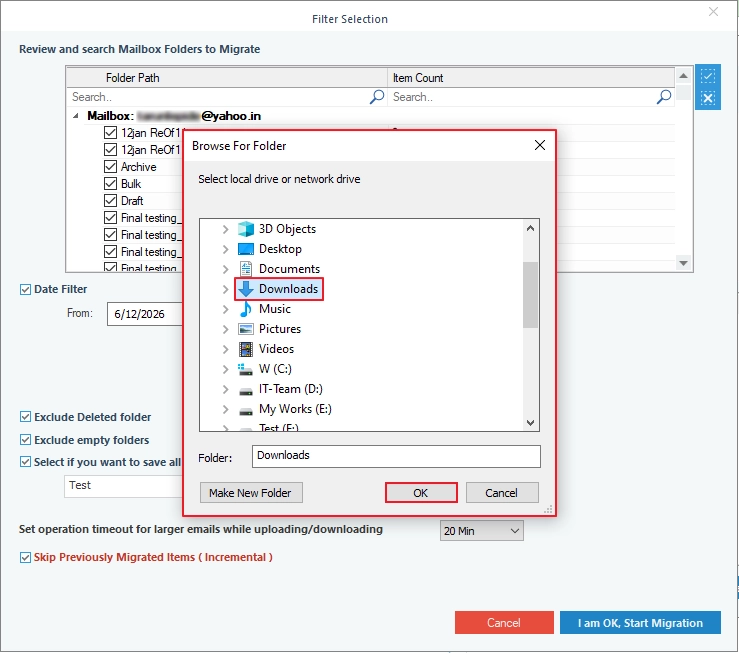
Step 10: The software will start exporting Yahoo emails to EML file format.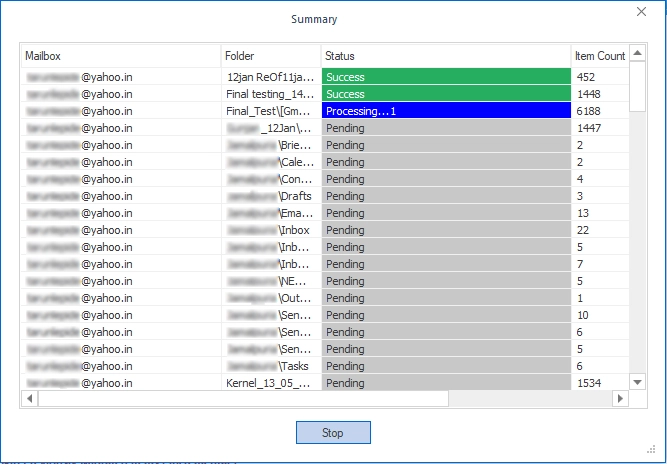
Step 11: After a successful export, the tool will show Process completed. Please save the report to CSV message. Click OK.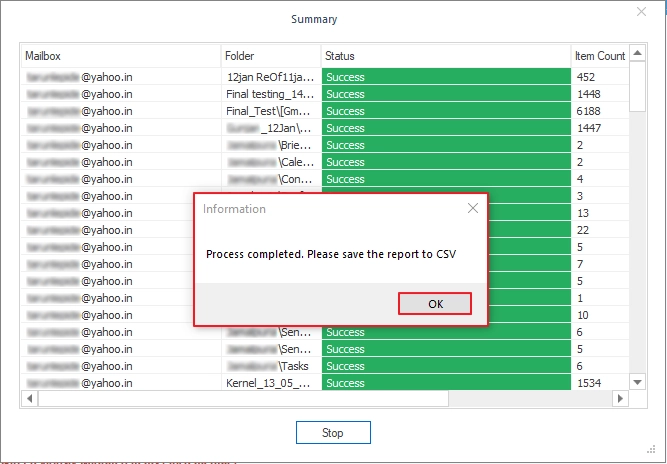
Final Words
Exporting Yahoo emails in EML format manually is not an easy task because it requires technical understanding and hands-on experience with major email clients, like Outlook, Thunderbird, and Apple Mail. That’s why it is recommended to go with the given Yahoo mail backup tool to directly export Yahoo Mail to EML format without depending on multiple steps and tools.
Frequently Asked Questions
Answer: No. To keep the attachments and other data intact during the export process, make sure to use the professional IMAP backup tool.
Answer: No, Outlook doesn’t offer any direct way to export bulk Yahoo emails to EML format. However, you can convert Yahoo emails to EML one-by-one by dragging and dropping Yahoo Mail to your local computer.


![How to Export Yahoo Contacts to Outlook? [Easy Steps]](https://www.nucleustechnologies.com/blog/wp-content/uploads/2026/06/yahoo-mail-contacts-to-outlook-featured.webp)