

Do you want to access EMLX files on a Windows system? EMLX files can only be opened and accessed using Apple Mail, which creates hindrances for Windows users in accessing the data. The best way is to convert EMLX files to EML format. The process is not straightforward, but also not impossible.
Through this guide, we will provide the best solutions to convert EMLX files to get error-free results. First, let’s discuss the reasons to convert EMLX files into EML format.
Why do users need to convert EMLX to EML?
Read out the reasons listed below to know why users convert their EMLX files into EML format:
- EML files can easily be opened and accessed on Windows and Linux systems.
- EMLX files can only be accessed with Apple Mail, whereas Multiple email clients support EML files.
- Preserves email formatting, hyperlinks, images, and font during the conversion.
- EML is a universally acceptable and easy-to-share file format.
- EML files are ideal for creating long-term backups and archives.
Quick Methods to Convert EMLX File to EML
In this section, we are going to discuss two methods to convert EMLX to EML files on macOS and Windows. You can perform any according to your needs:
Convert EMLX to EML Files Manually on macOS
Here are the detailed steps to convert EMLX to EML file format on macOS. Follow them properly to get a secure conversion:
Method 1. Renaming Extension (Single File)
Step 1. Right-click on the EMLX file in Finder and click Rename.
Step 2. Change .emlx to .eml and press Return, then click Use .eml.
Method 2. Change File Extension (Multiple Files)
Step 1. Select multiple EMLX files at once in Finder and click Rename.
Step 2. In the pop-up menu, type .emlx in Find field and .eml in Replace with field.
Step 3. Finally, click Rename.
Method 3. Using Terminal
Step 1. Open Terminal app through Spotlight or Application folder.
Step 2. Go to the folder containing your .emlx files using cd command.
Step 3. Then, run the following command to change extension of all files at once:
for f in *.emlx; do mv “$f” “${f%.emlx}.eml”; done
Method 4. Using Apple Mail
Step 1. Open Apple Mail on your system and drag the .emlx file into the Apple Mail folder (if you don’t have the required .emlx files in your Apple Mail).
Step 2. Open the .emlx file >click File >Save As >Raw Message Source.
Step 3. Provide a location to save the data and click on the Save button.
Convert EMLX to EML Files Manually on Windows
You need to change the file extension to convert EMLX to EML file format on Windows. Here is how to do it:
Step 1. Open File Explorer, then go to the location where EMLX files are stored.
Step 2. Click on the View button at the top, then enable File name extensions.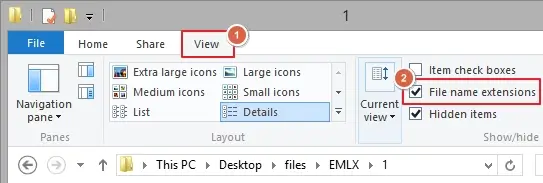
Step 3. Right-click on the EMLX file and click Rename.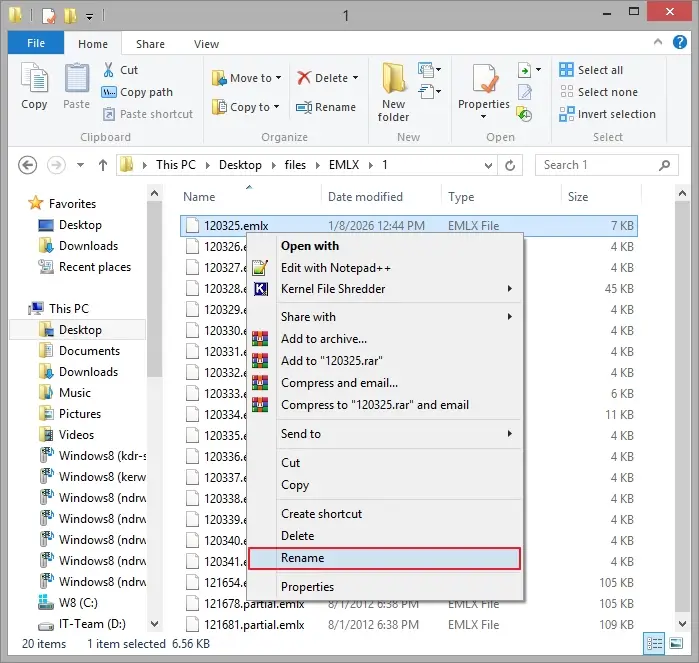
Step 4. Change the extension from .emlx to .eml and hit Enter.
Step 5. A warning prompt will appear on your screen; click Yes to continue. You can see that your EMLX file has been converted into EML format.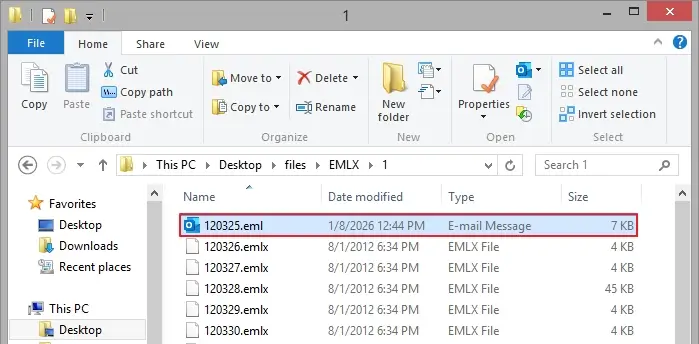
Limitations of the manual method
The manual method comes with many limitations, such as:
- Converts a single email at a time.
- It is prone to errors.
- Time-consuming process
- Does not guarantee success.
- Chances of data loss risks.
Convert EMLX to EML Format in Bulk
To avoid risks of the manual method, it is recommended to use a specialized software, i.e., Kernel EML Converter tool. This tool allows users to convert bulk EMLX files into EML format at once without disrupting the email structure. Moreover, it is an ideal solution for individuals and businesses looking to convert their EMLX files without hampering email structure.
What more does EML Converter tool offer?
The EML Converter software offers numerous features to make the conversion easy. Some of them are listed below:
- Allows users to convert multiple/unlimited EMLX files with zero loss guaranteed.
- Provides smart filtering options to convert only the required data into the resultant file.
- Shows a detailed preview of source EMLX files with all metadata and attachments before conversion.
- The software also allows you to extract email addresses and attachments separately.
- The software keeps the EMLX file’s structure, meta properties, and attachments intact.
- Convert EMLX to PDF, PST, MSG, DOC, MBOX, HTML, and various other formats.
- Skips empty folders from being converted to let go of any clutter and confusion.
- Comes with a demo version to convert 25 items for free.
Steps to convert EMLX files using our software:
Step 1. Launch the EML Converter software and click on the Add Source button.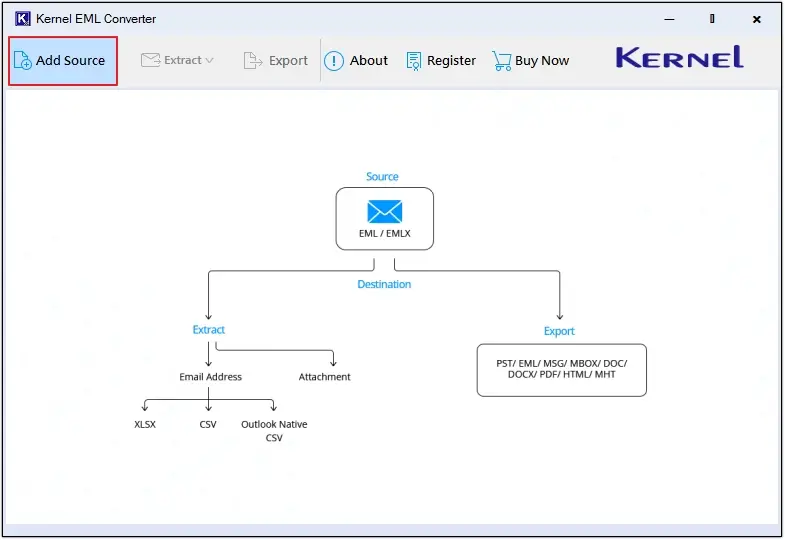
Step 2. In Select Source File Type, choose EMLX, then click on Browse to upload files, and click on the Add Files button to move forward.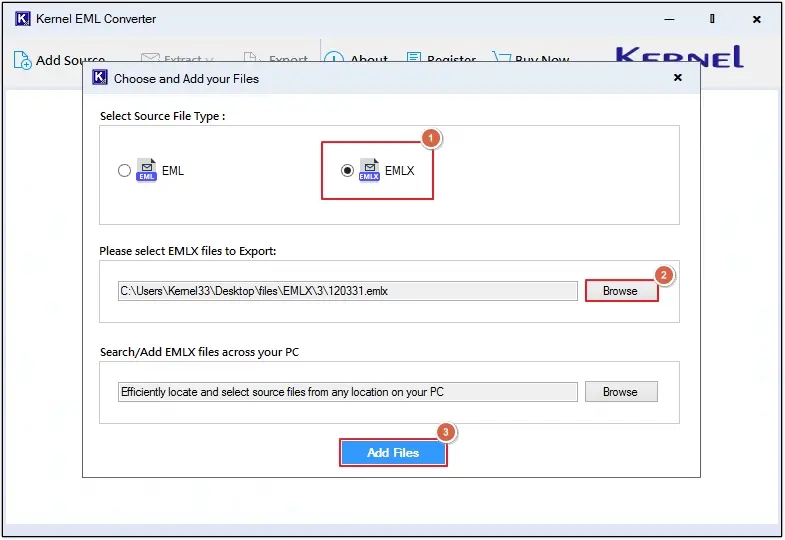
Step 3. Preview emails, then click on the Export button.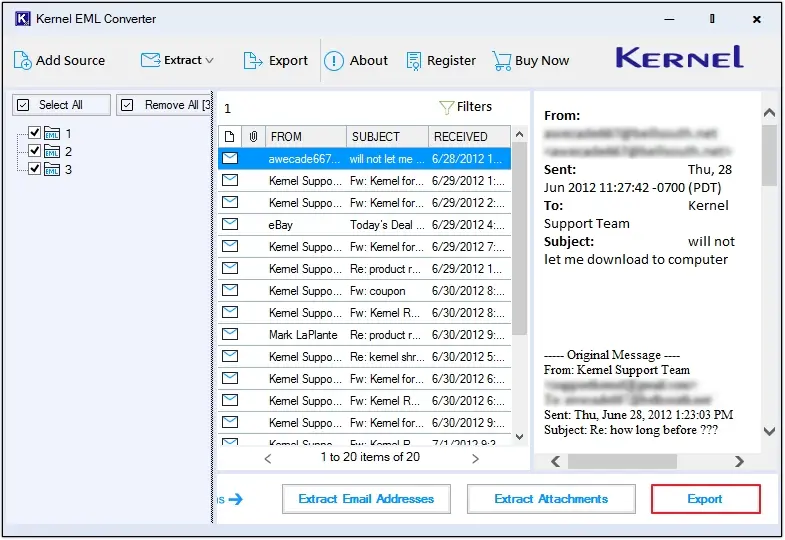
Step 4. Select EML as the output type and apply specialized filters to convert only the needed data.
Note: The software offers various specialized filters such as File Naming Convention, Extract Attachments in Separate Folder, get log reports of conversion, and Skip empty folders.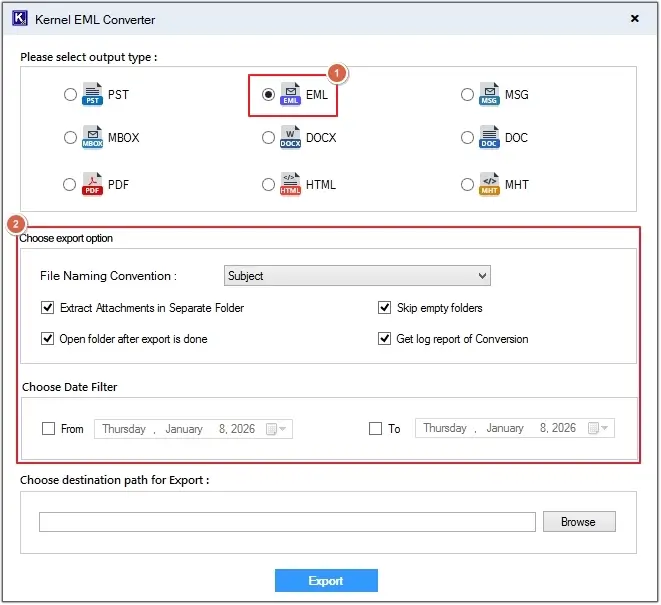
Step 5. Click on the Browse button to define the destination, then click on the Export option.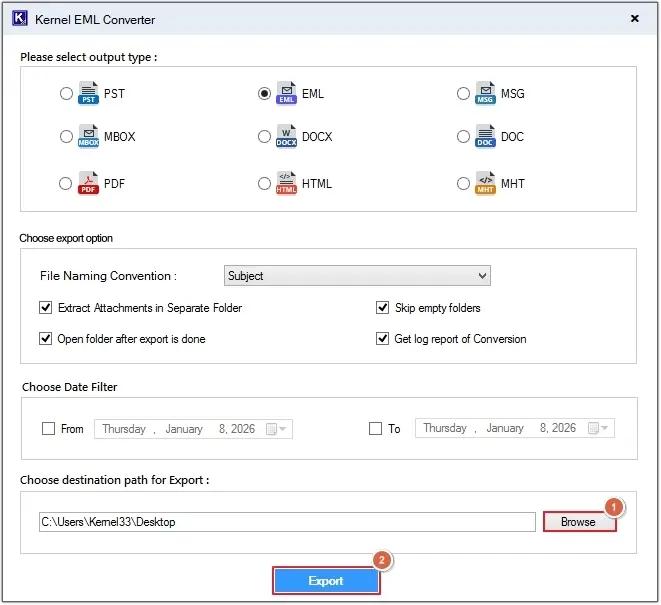
Step 6. The EML Converter tool will start the conversion process. You can view the Export Status.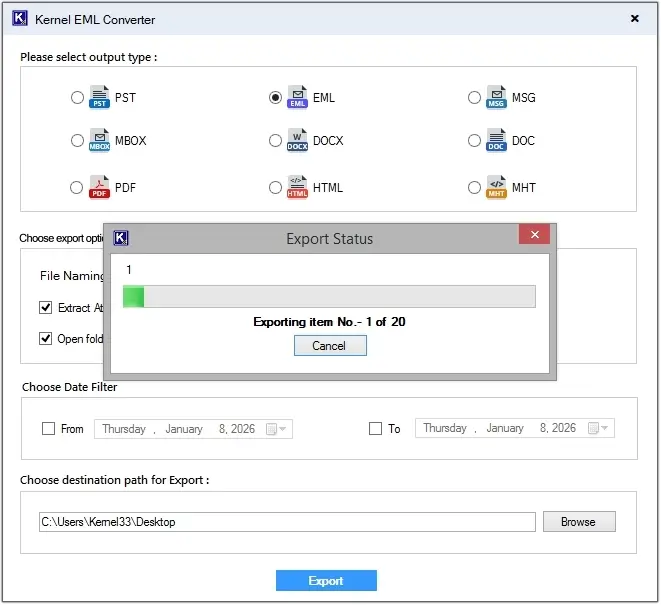
Step 7. Upon completion, the tool will show the Export Completed message, click on the Done button, and you’ll be directed to the saving location of the files.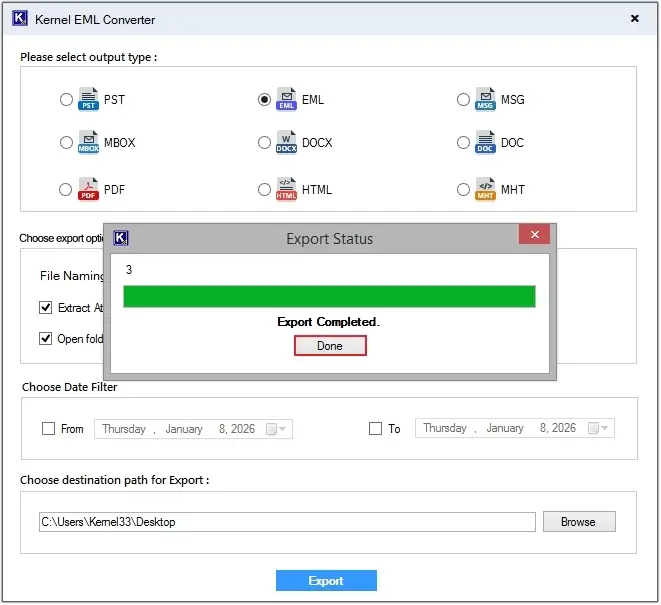
Step 8. Here, click on any EML file to get a preview of saved content.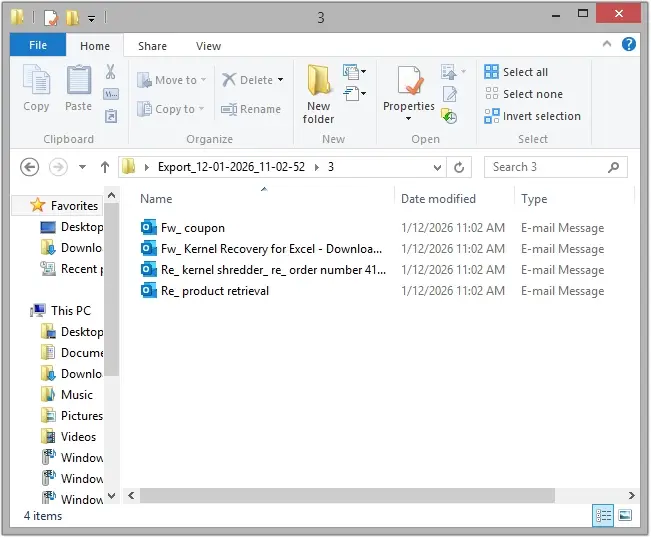
Conclusion
To get better data management and accessibility, users convert EMLX to EML files. But with the manual method, it is a bit challenging as you must repeat the process again and again. We have shared a reliable solution to convert EMLX files without loss. However, the choice of method depends entirely on your conversion needs. You can choose any of the methods as per your requirements.
People Also Ask
A. Yes, you can use this EML Converter tool on both Windows and Mac systems.
A. No, you cannot open directly an EMLX file on a Windows system. You need to convert EMLX to EML file to access data on Windows.