

Read time: 7 min
EML files are email message files that store a single email with all the details, like sender, receiver, subject, date, and message body. These files also keep attachments and email format safe. Many email apps, such as Outlook, Thunderbird, and Apple Mail, support EML files.
You can choose EML files for easy email access, transfer, and long-term email record use. But there are multiple scenarios where you need to convert EML to MHT. Before converting EML to MHT, let’s know what an MHT file is and why users want to convert their EML files to MHT.
What is MHT file?
MHT file (MIME HTML Archive) is a single-file format that bundles an entire web page that contains HTML code, images, stylesheets, scripts, and other media. MHT files can be easily accessed by any web browser, MS Word, and other document editor apps without internet access.
Now you know both EML and MHT files are good, so why are users converting their EML files to MHT? Let’s know the difference between EML and MHT.
EML V/S MHT: Major Differences
Here is a detailed comparison between EML and MHT that clarifies your thoughts on which file format is good for you.
|
EML |
MHT |
|
Stores a single email message |
Stores complete email or web content in one file |
|
Saves email text and attachments separately |
Saves text, images, and attachments in a single file |
|
Needs an email client to view EML data |
Opens easily in web browsers |
|
Shows basic email layout |
Shows original layout with better visual clarity |
|
Needs an active internet connection to access email content |
Full offline access without email clients or apps. |
This table shows the actual benefits of MHT files. Now, it’s time to know the top trends why users are switching towards MHT files.
Why convert EML to MHT?
Check out all the prominent reasons to convert EML to MHT for accessing your email content.
- Better content layout: MHT files keep the original email design and structure. You will get your email content exactly as it appears in the email.
- Archive old emails: You can choose MHT files to save email files for long-term email records, audits, and legal use. The MHT file format offers better accessibility and reliability.
- Simple share process: You can quickly share MHT files across teams and devices. You do not need any special tools to view the content.
Now you know why you should switch to the MHT file. It’s time to convert EML to MHT files using free methods.
How to convert EML to MHT using Manual Solutions?
Check out all the free manual methods to initiate EML to MHT conversion with all the email’s structure intact:
Method 1: Convert EML to MHT using Outlook
Outlook is a robust email client that can open EML files and convert them into MHT files. This method works in two parts. Let’s understand each part one-by-one.
Part 1: Import EML to Outlook
Step 1: Right-click on EML files > Open With > Outlook.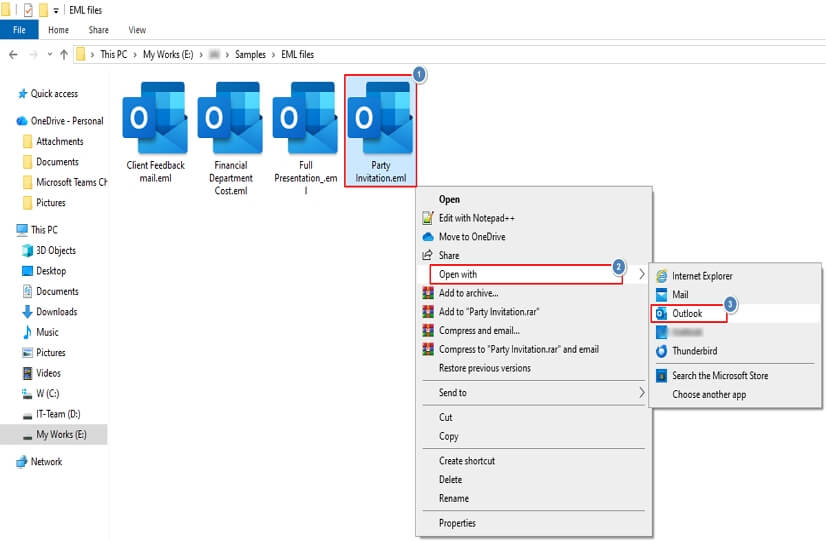
Part 2: Convert EML to MHT
Step 1: Now open your email file (EML) in Outlook and click File.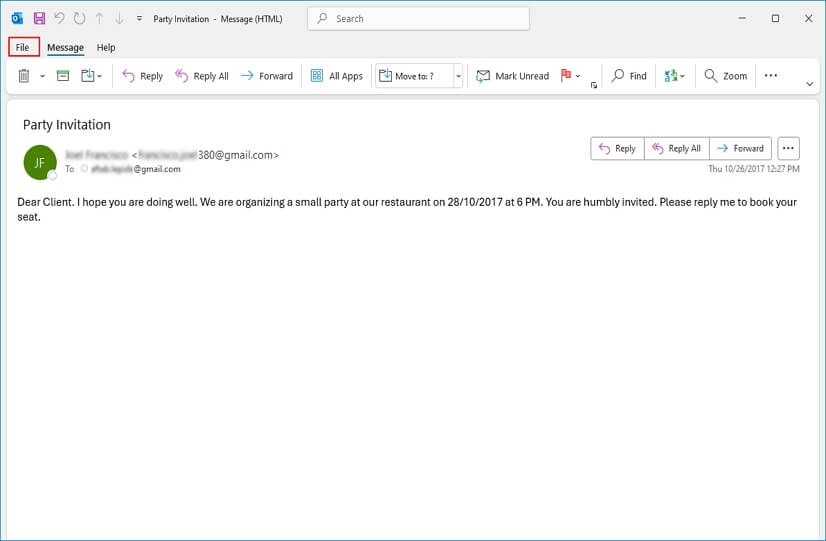
Step 2: Click on Save As in the left panel.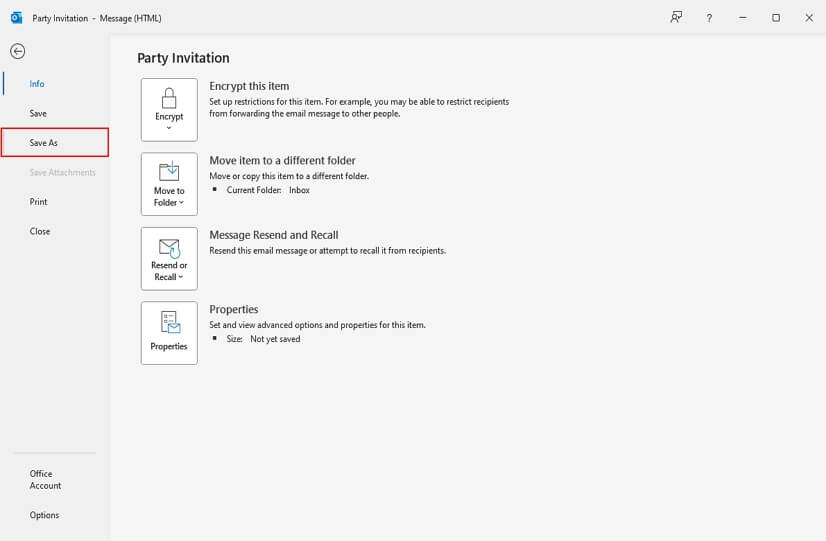
Step 3: Select saving location, and MHT as output format. Click Save.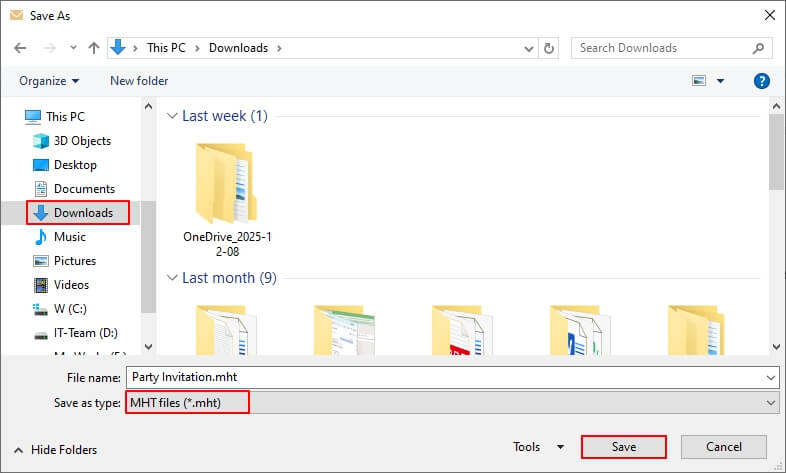
Step 4: Your EML file is saved in MHT in your selected location.
Method 2: Use Microsoft Word to save EML file as MHT
You can easily convert EML file to MHT using Microsoft Word. Follow this step-by-step guide to convert EML to MHT:
Step 1: Launch Microsoft Word and click Open > Browse.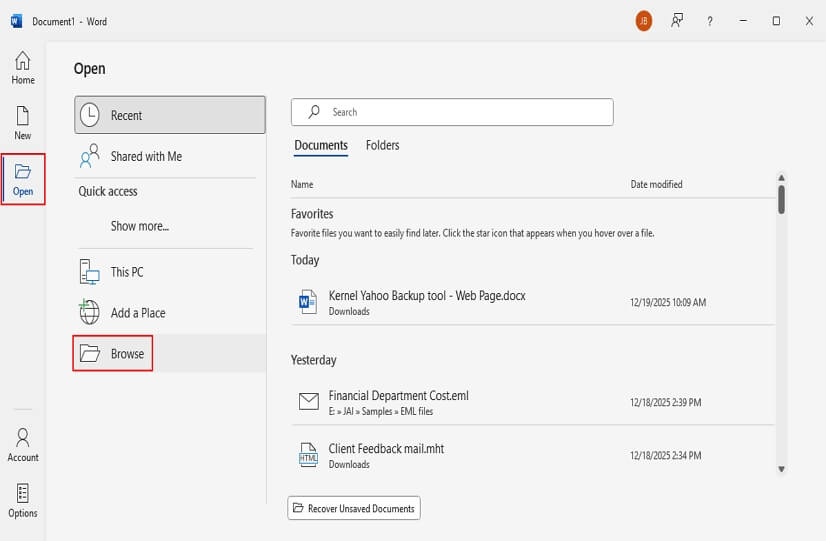
Step 2: Select EML file from your local drive and click Open.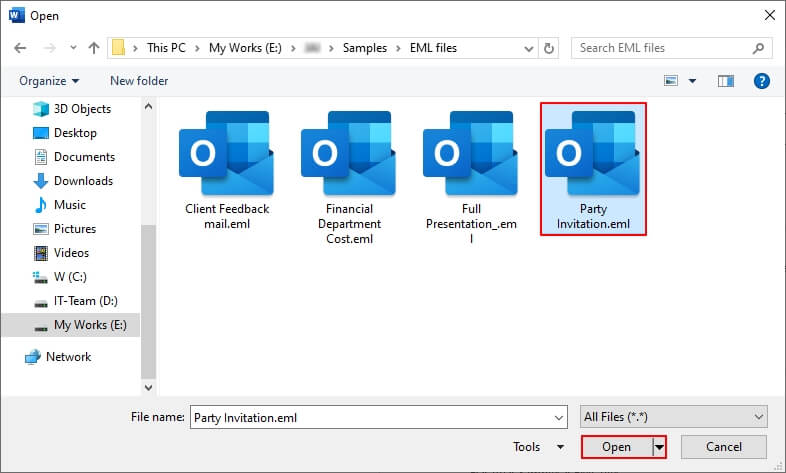
Step 3: Word will display all content of the EML file and click File.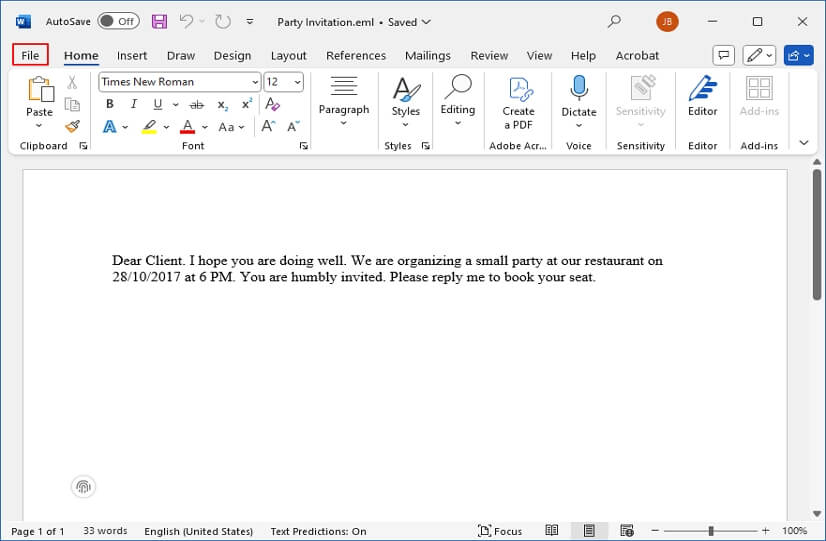
Step 4: Now, click on Save as and Browse.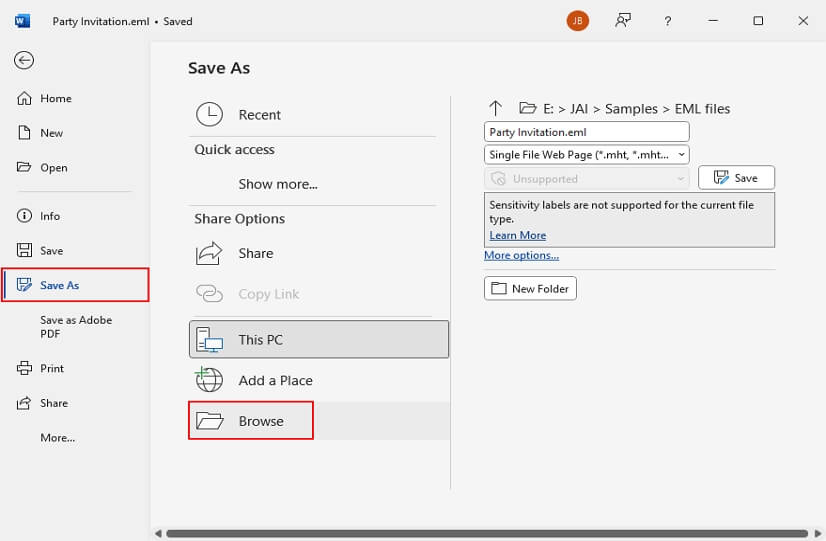
Step 5: Select saving folder, output option as MHT or .mht, and click Save.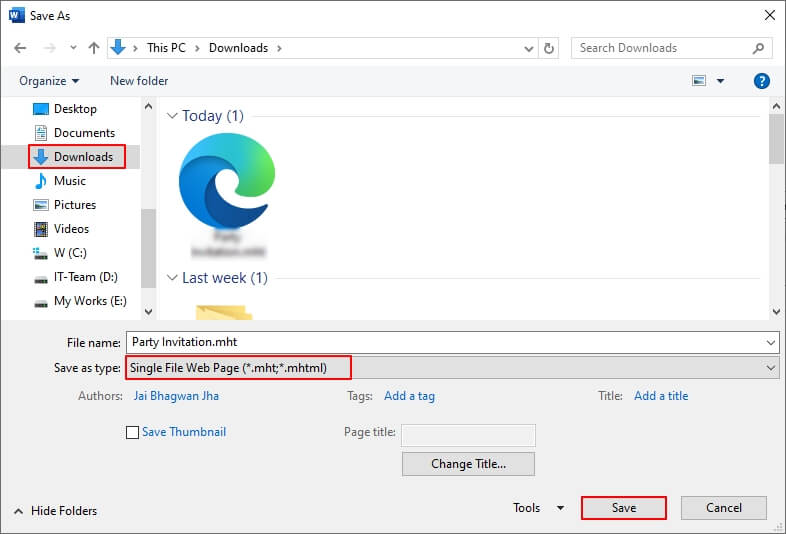
Step 5: Congrats! Your EML to MHT conversion is successful.
Limitations of manual methods
Manual methods are free and deliver quick results, but are you sure that they will convert your entire mail with all the information intact? Maybe you are in doubt. Let me clarify your doubts in just these bullet points.
- You cannot initiate bulk EML to MHT conversion.
- Outlook and Word will take much time in case of large EML files.
- You can lose your data, like images, links, or formatting.
- MS Word will alter your EML file’s original layout.
- Not suitable for business or enterprise needs.
With these drawbacks, a question comes to mind: how reliable are manual methods for EML to MHT conversion? This is the right moment to rely on a top-rated EML converter tool that ensures a smooth and secure conversion process.
Professional Tool to Convert EML to MHT – Recommended Solution
Kernel EML Converter Tool is a reliable solution that allows you to convert your EML files to MHT. This software converts bulk EML files to multiple formats, like PST, MSG, MBOX, DOCX, DOC, PDF, HTML, and MHT without data loss. It keeps email structure, headers, attachments, and layout intact.
Advanced features of our EML to MHT Converter tool
- Convert bulk EML files to HTML, MHT, and multiple other formats.
- Preview full email content with To, CC, BCC, Subject, Body content intact.
- Apply advanced filters to export only specific email content.
- Extract all email attachments and save them to local folders.
- Extract email addresses and save them in CSV or XLSX formats.
- Auto-locate EML files from selected drives for fast EML access.
- Support both Windows and Mac operating systems without limitations.
- Utilize our trial version to convert 25 items per folder for free.
Step-by-Step Process to Convert EML to MHT using Tool
Step 1: Download, install, and launch the tool.
Step 2: On the software’s home screen, click on Add Source.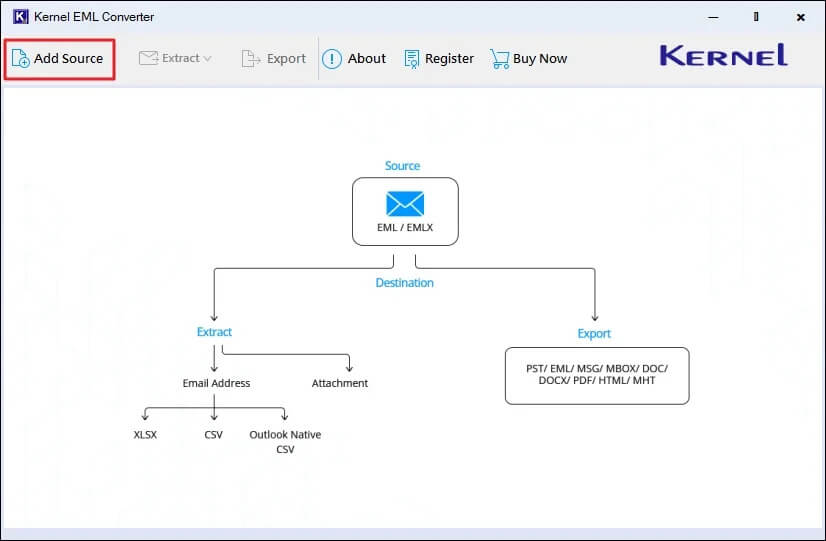
Step 3: Browse and add EML files to the software and click Add Files.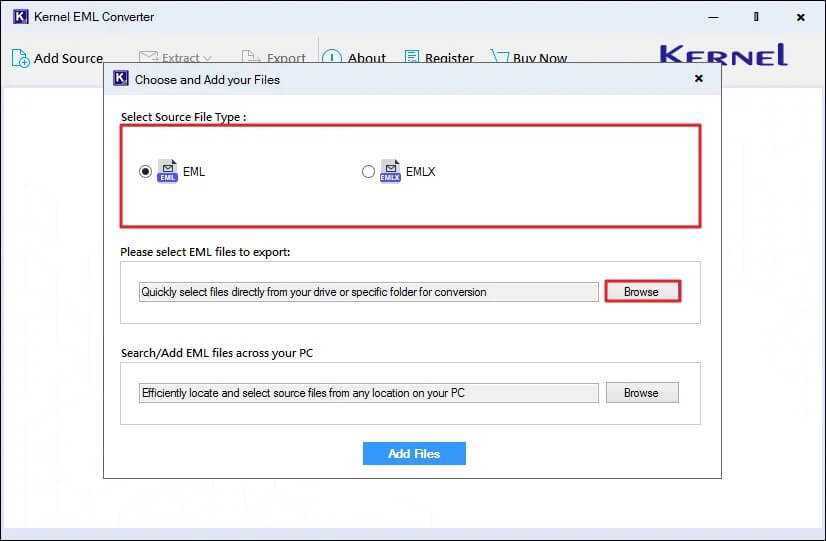
Step 4: The software will list all the EML files, select any EML file, view its content, and click Export. 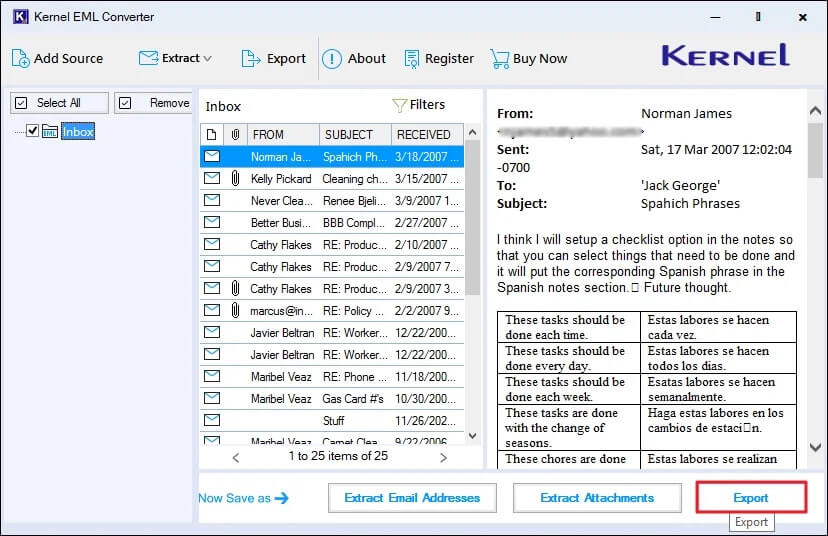
Step 5: In the following window, select output format as MHT, apply filters, and click on Browse to select a preferred saving location. Finally, click Export to start converting EML files to MHT.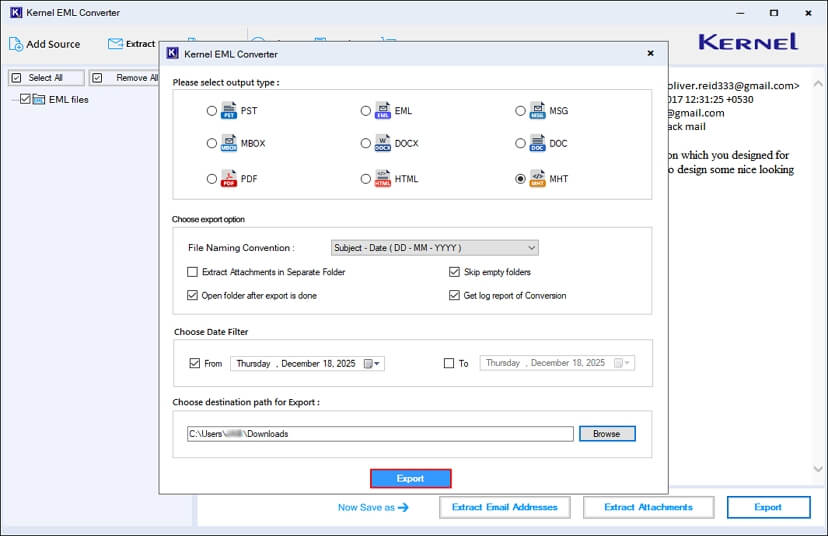
Step 6: After a successful export process, the software will pop up “Export Completed” message, click Done.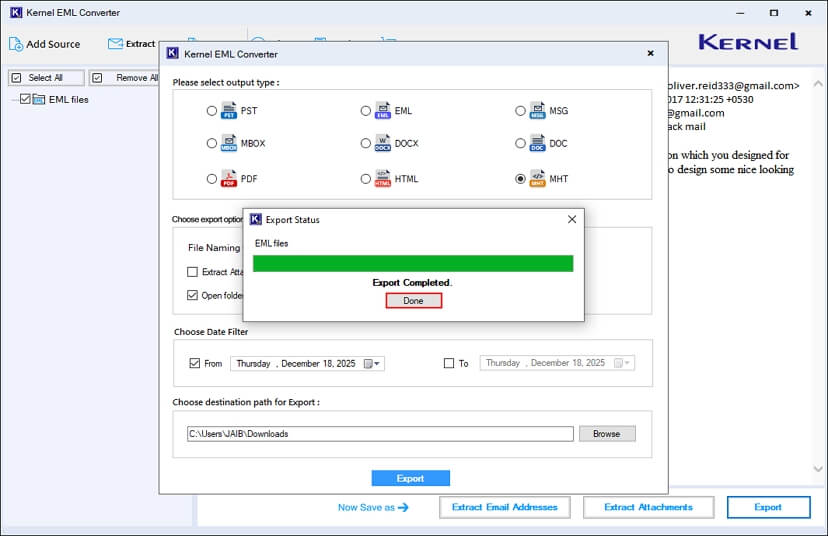
Congrats, you have successfully converted all your EML files to MHT with complete email integrity.
Conclusion
As we discussed, EML and MHT are different file formats and offer distinct functionalities. An EML file is excellent, but you cannot access its data without an email client or a proper internet connection. Check out the top solutions discussed in this blog to easily convert EML files to MHT format. However, Kernel EML Converter Tool stands out as a perfect choice to safely convert EML to MHT with all the email attributes intact.
Frequently asked questions
Answer: MHT files offer better layout, easy browser access, and are easily accessible without an internet connection.
Answer: Yes, but manual methods require Outlook or Word and often cause data issues. That’s why EML to MHT Converter is required to safeguard your email data.
Answer: No, manual methods do not support bulk file conversion. For that, you must utilize an advanced EML to MHT converter tool.
Answer: Yes, MHT files keep attachments, fonts, links, and other data in a single package.