
Have you ever had an EML file that was inaccessible outside of your email client or challenging to send to someone who lacks the software to open it?
An EML file stores all the data of an email, such as attachments, contacts, calendars, etc. The only way to open such files is through Outlook, Mozilla Thunderbird, and others. However, what if you wish to, for instance, visualize this email in your browser? Or maybe, you want to share the message content over the web so someone with a basic HTML viewer might access it? In any case, you need to convert EML to HTML.
Why Convert EML to HTML?
There are many reasons why users might want to open EML files without Outlook. Some of them are:
- Flexibility: HTML is a highly compatible file format to integrate with multiple platforms & browsers as compared to EML.
- Accessibility: EML files are restricted to email clients for accessing the data, but HTML files support any device & platform to open and edit the files.
- Easy to edit: HTML files can be edited easily on any HTML-compatible device, which is impossible in EML format.
- Customization: Changing files from EML to HTML file format provides the option to edit and add CSS, Graphics, Images, etc., to improve the presentation.
- Data archive: Converting EML files to HTML with all its data helps to secure data as a backup or archive at your preferred destination.
Is There Any Manual Method to Convert EML Files to HTML?
Yes, you can convert EML to HTML format manually, but you will be able to convert only one message at a time. You can change the file extension to .mht and then open the file in a web browser, or open the EML file in Word and save it as HTML.
However, there is not an option to convert multiple files at once. So if you have thousands of emails that need to be converted, opening a single file won’t solve your problem. In that case, you need to use reliable software that can convert EML files to HTML faster.
How to Convert EML to HTML in Bulk?
Kernel EML Converter is the ultimate utility offering easy EML file conversion to multiple formats, including HTML. The robust features of the tool can perform easy and fast conversion of multiple EML files to HTML, while maintaining its hierarchy. With the EML Converter tool, you can convert your EML files with complete data integrity. It’s equipped with advanced algorithms that convert your file quickly & deliver accurate results.
- Supports bulk conversion of EML files without any hassle.
- It allows you to select specific emails for conversion with the help of various filters.
- Lets you save and convert EML to PST, HTML, MSG, DOC, DOCX, etc.
- Preserves email attributes such as sender, recipient, date, attachments, and more.
- You can search for a specific message with the ‘Find’ option.
- Comes with a free trial version that allows you to save 5 EML files per folder.
Step-by-step process to convert EML to HTML
Find out the detailed process to perform quick EML to HTML conversion using Kernel EML Converter. Follow the steps mentioned below:
Step 1: Download and install the Kernel EML Converter tool.
Step 2: Launch the tool and click on Add Source in the software’s home screen.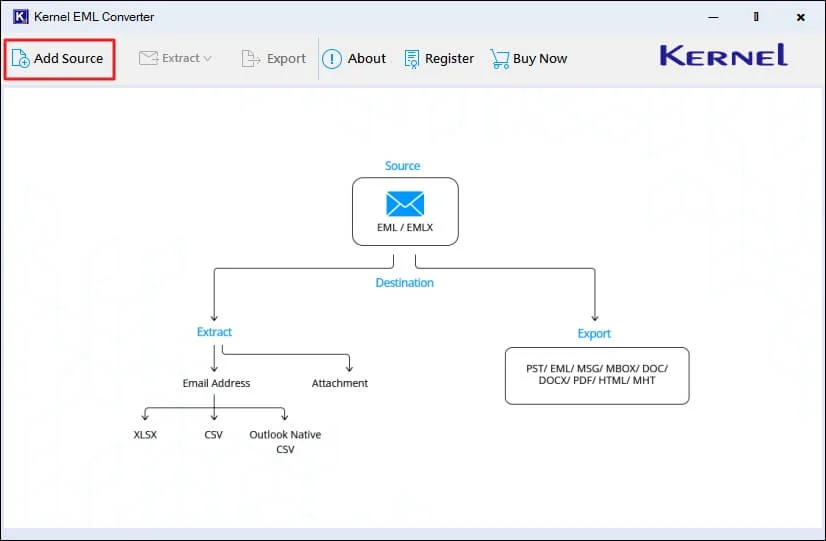
Step 3: Select source file type as EML and Browse all the necessary EML files from your system. Click Add Files.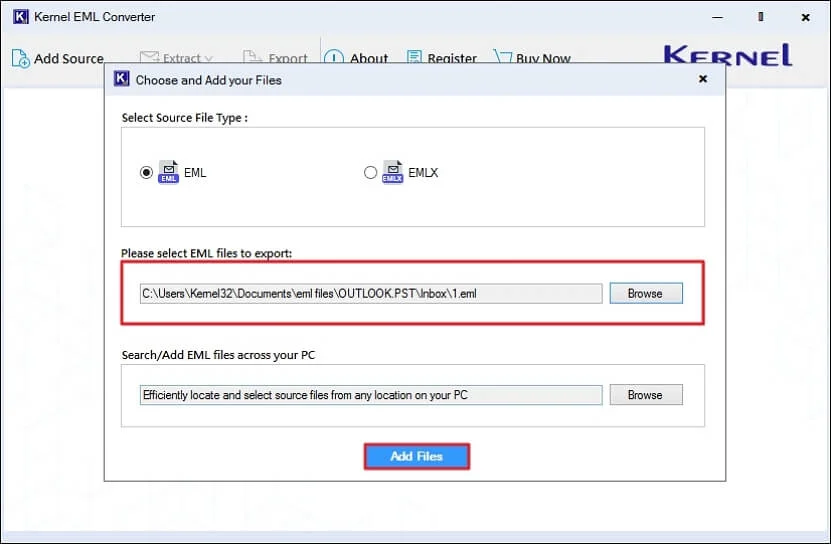
Step 4: The software will list all your EML file data, select a specific email, and view your data in the Preview tab. Now, click Export to proceed.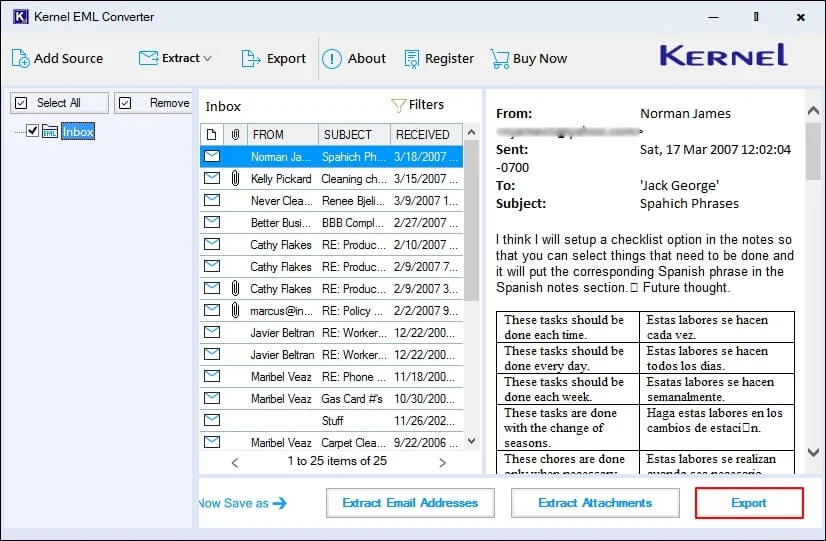
Step 5: In the following window, select output file as HTML, apply necessary options and filters for specific data conversion. Browse the output saving location and click Export.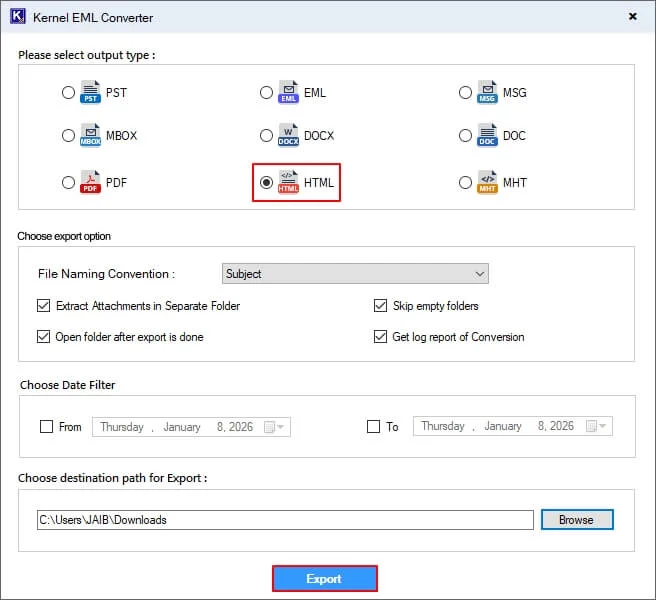
Step 6: The software will start the conversion process. Once completed, you will get the Export Completed message. Finally, click Done.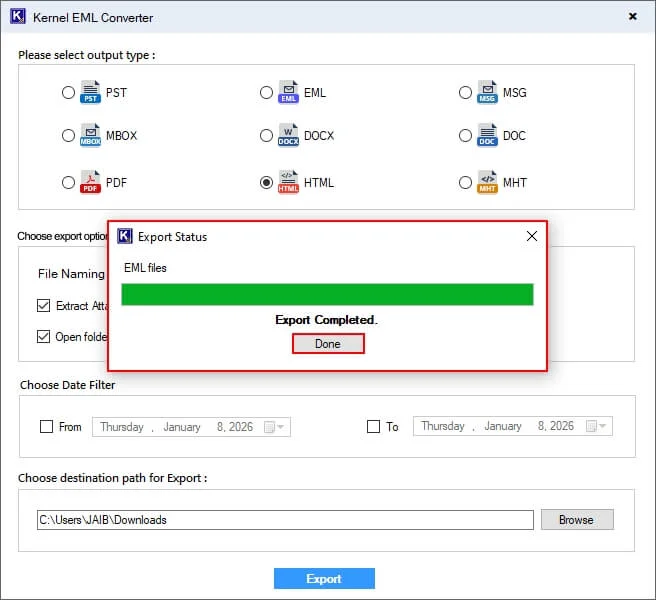
Conclusion
An EML file stores valuable email data that should not be lost with temporary solutions. To prevent such situations, we have shared with you the best way to export EML files to HTML files, i.e., Kernel EML Converter. The tool integrates various features that allow you to recover corrupt EML files, import EML files to Office 365, and perform EML to MSG conversion.
Frequently Asked Questions
Is the data secure during the EML to HTML conversion?
The tool protects the EML file data while converting it to HTML file format. So, your data will be safe even after converting the EML file to HTML.
Can we see the EML file data items before conversion?
Yes, you can check the selected EML file on the tool’s display that shows details of the EML file, such as From, Subject, Data/Time, To, and Folder.
Can I convert multiple EML files at once?
Yes, you can convert EML files in bulk at once, just select files from the local drive and proceed to convert.
Do we have the option to select specific files to convert EML to HTML?
After selecting the EML files, you can view the details to decide which file to convert. Then, choose any file and click on Export and select the output type as HTML file to start conversion.