Why Convert PST to MBOX?

Convert PST files to MBOX to access Outlook data file in versatile email clients. Access Outlook data in these email clients:

Key Capabilities - Kernel PST to MBOX Converter

Explore all the advanced features of our PST files to MBOX tool for batch conversion of PST to MBOX without Outlook.

Convert PST Files to MBOX

Convert PST Files to MBOX

Export Outlook emails to MBOX format for smooth email access in Thunderbird, Apple Mail, Eudora Mail, and other email clients. The Outlook PST to MBOX tool preserves folders, emails, and metadata intact without data loss.

Supports Bulk PST File Conversion

Supports Bulk PST File Conversion

Convert multiple PST files at once into separate MBOX files with complete data integrity. Our Outlook PST file to MBOX software supports unlimited large or oversized PST files without any limitation.

Extract Email Addresses from PST File

Extract Email Addresses from PST File

Extract all email addresses from selected PST files. Get all the email addresses from Contacts, Calendar, Tasks, Journal, and from Email Items. Save email addresses in multiple file formats, such as XLSX format (.xlsx), CSV format (.csv), and Outlook Native CSV (.csv).

Extract Attachments from PST File

Extract Attachments from PST File

The Outlook to MBOX Converter tool can easily extract all attachments from your selected Outlook PST file. Save attachments having no extension in the raw format as they were in your Outlook. Customize your data backup via advanced attachment filters.

Preview PST File Data

Preview PST File Data

View entire PST file data before converting them into MBOX file. The PST to MBOX Exporter tool shows all the emails, contacts, calendars, and attachments in the preview pane. Check out your essential email before PST to MBOX conversion.

Advanced Filter Option

Advanced Filter Option

Customize your Outlook to MBOX conversion process with an advanced filter option. Refine your output data by utilizing a date filter and excluding empty folders. With its Open folder after export is done option, you automatically access your data after a successful export PST to MBOX process.

Save Output Data in Multiple Locations

Save Output Data in Multiple Locations

Save output data in multiple locations, like the local system, network, flash drive, or external hard drive. Access your output data in any preferred location as per your needs. Get easy access, better control, and secure data storage with 100% data accuracy.

Offers a Detailed Log Report

Offers a Detailed Log Report

Generate and download a detailed log report that helps users to review all failed data exports with proper reasons. Get your log report in TXT format in the installation folder of the Outlook PST files to MBOX software for audit and easy troubleshooting of errors.

Free Trial Version

Free Trial Version

Try the PST to MBOX Exporter Tool free trial version that allows you to convert and save up to 25 items per folder at no cost. Assess our best PST to MBOX file converter tool features and get your data with complete data integrity.

Kernel PST to MBOX Converter: Convert Different Data Types

Our PST files to MBOX tool helps users easily convert PST files to MBOX format while keeping all related data types safe and well-organized.

Emails

Export PST file emails from these folders with all the formatting and metadata intact.

  • Inbox, Drafts, Sent, Deleted, Junk, Archive, Address Book, Appointments, Meetings, Events, Custom folders, and many more.
Email Addresses

Get all the email addresses in XLSX format (.xlsx), CSV format (.csv), and Outlook Native CSV (.csv) from these PST data.

  • Contacts, Calendar, Tak, Journal, and Email Items, like [To, CC, From, BCC]
Attachments

Extract PST file attachments (with or without extension) in the original raw format, similar to the source.

  • Images, Presentations, Words, PDFs, Audios, Videos, and many more (with or without extension) in raw file format.

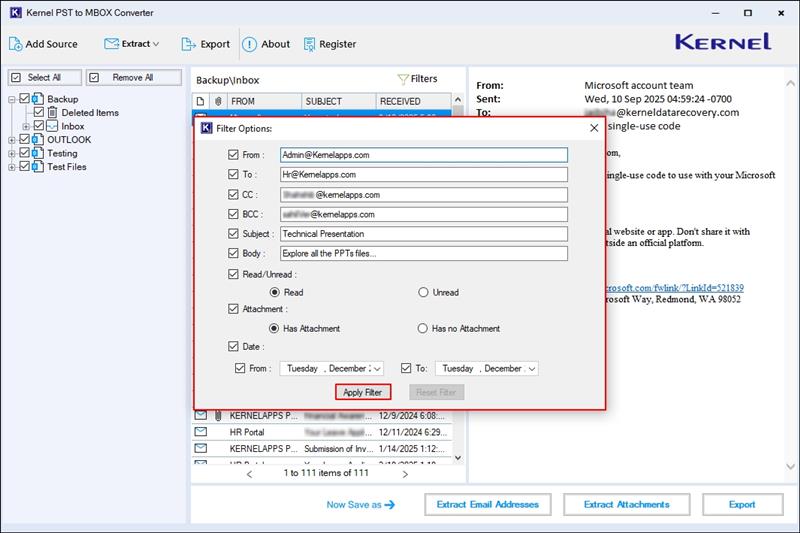
Powerful Filters for Precise Email Search

Get your exact email with ease by using the advanced filter feature of PST to MBOX software for quick, accurate, and hassle-free results.

  • From: Find emails sent by a specific sender email address.
  • To: Locate emails delivered to a particular recipient address.
  • CC: Search emails where a specific address appears in CC field.
  • BCC: Identify emails that include a specific address in BCC field.
  • Subject: Filter emails based on exact or partial subject text.
  • Body: Search emails that contain specific keywords or phrases in message body.
  • Read/Unread: Get separate read or unread emails with ease.
  • Attachment: Find emails that include or exclude attachments.
  • Date: Select emails within a specific date range for accurate results.
Powerful Filters for Precise Email Search

Frequently asked questions

The Outlook PST to MBOX software allows you to convert Outlook PST files to MBOX using these steps:

  • Step 1: Download, install, and launch the Kernel PST to MBOX Converter tool.
  • Step 2: On the software’s homescreen, click on Add files.
  • Step 3: Browse and add single/multiple PST files.
  • Step 4: Preview PST file data and click Export.
  • Step 5: Select the MBOX file and apply the necessary filters.
  • Step 5: Browse and select a preferred saving location.
  • Step 5: The software will start converting PST to MBOX.

After a successful export PST to MBOX process, the Outlook to MBOX converter software will automatically navigate you to the output file.

You need to convert PST to MBOX for better data accessibility in different email clients. Easily Export Outlook PST files into MBOX for Thunderbird, Apple Mail, Google Vault, Entourage, Opera Mail, SeaMonkey, and many more.
Yes, our PST to MBOX converter tool is the best software to convert PST file to MBOX. It’s equipped with advanced algorithms that can easily support large or unlimited PST files without any limitation or data size restrictions.
Yes, the Outlook PST to MBOX Converter software preserves all attachments, email properties, and folder hierarchy during the PST to MBOX conversion process. Additionally, you can export attachments (having no extension) separately.
Yes, the preview option lets users view emails, attachments, contacts, and folders before conversion to ensure accurate PST to MBOX conversion results.
Yes, the software allows you to extract email addresses from the source PST file and save them in XLSX, CSV, and Outlook native CSV formats.
The Kernel PST to MBOX converter software generates a detailed TXT log report that shows failed data export with a proper reason to clarify all the failed items' remarks.
Yes, the Kernel PST to MBOX Converter tool offers a free trial version that allows users to convert PST to MBOX (25 items per folder).
You can save output data on your local system, network drive, flash drive, or external hard drive as per your requirement. The software will redirect you automatically to the output file after completing your export PST to MBOX process.
Yes, our Outlook PST to MBOX Converter tool allows users to save PST as MBOX, PDF, EML, HTML, MSG, DOCX, and multiple other formats.
Yes, the software ensures complete data safety and you can export Outlook emails to MBOX without Outlook.

Software Prerequisites & Recommendations

About SoftwareAbout Software

Version: 25.1

Release Date: Jan 2026

License Type: Home, Corporate & Technician

Version SupportVersion Support

MS Outlook: Office 365, 2021, 2019, 2016, and previous versions

System RequirementsSystem Requirements

Hard Disk: 1 GB of disk space

Memory: 512 MB minimum

Processor: Intel® Pentium Processor compatible (x86, x64) or equivalent

Operating System: Windows 365, 11, 10, 8.1, 8, 7, Vista, XP, 2000, 98, NT, 95 & Windows Server 2022, 2019 & older versions

Live Chat