 (4.9/5) 441 Reviews
Import OST to Thunderbird & multiple MBOX email clients
Import OST files to Thunderbird and other MBOX email Import effortlessly. Preserve email properties, including From, To, Subject, and Cc, throughout the import process. The tool also previews mailbox data and saves it to various destinations, including Exchange, Office 365, Gmail, etc.
- Import all OST email folders, such as inbox, sent items, and deleted items.
- Import OST/NST files to Apple Mail, Eudora, & Opera.
- Migrate selective OST file data using advanced filters.
Top use cases for Kernel Import OST to Thunderbird software

Import OST files to Thunderbird and various MBOX email clients
When you need to import OST files into Thunderbird and major MBOX email clients like Eudora, SeaMonkey, Opera, Netscape, Spicebird, PocoMail, and more, rely on Kernel Import OST to Thunderbird. This tool offers a streamlined solution, ensuring a smooth transition and compatibility across various MBOX-supported platforms. Additionally, it facilitates the conversion of OST files to MBOX, supported by Apple Mail and Entourage, providing a comprehensive and versatile OST migration experience.

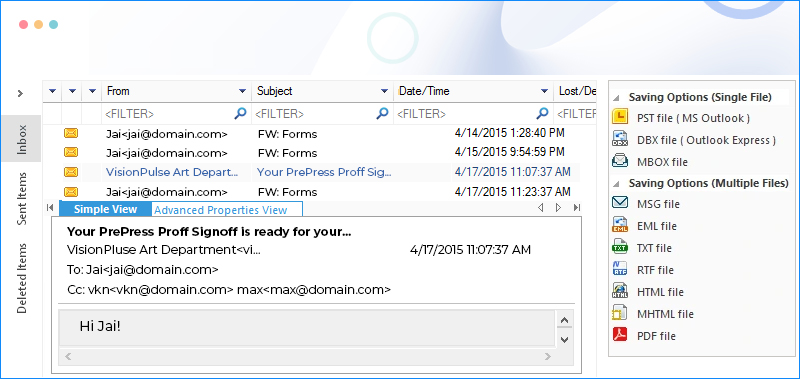
Save OST files to multiple destinations, including Exchange/Office 365, Gmail, etc.
Unlock a variety of saving options with Kernel Import OST to Thunderbird. This tool offers the flexibility to save OST files to live Exchange Server, Office 365, Gmail, Outlook, and various other applications, platforms, and file formats. Whether migrating to the cloud or opting for different applications, this tool empowers users with diverse choices. Expand your OST file utility by saving to multiple destinations, ensuring adaptability to various email platforms and formats.

Precise and selective email migration with advanced filters
When seeking a precise email migration, rely on Kernel Import OST to Thunderbird. This tool offers advanced filters for selective email imports, enabling users to transfer data based on specific criteria. Whether filtering by date range, sender, or recipient, this feature ensures a targeted migration, eliminating unnecessary data clutter. Streamline your migration by importing only the essential emails, enhancing efficiency, and providing a focused and targeted transfer to Thunderbird.
How to Import OST to Thunderbird?
Effortlessly import OST files with all email folders to Thunderbird in three simple steps using our reliable Kernel Import OST to Thunderbird software.
Explore software’s key capabilities
Explore the advanced features of the tool, allowing for a detailed examination and efficient utilization of functionalities to ensure a smooth migration experience.

Import OST files to Thunderbird
Convert OST files to MBOX using the tool, granting access in Thunderbird. The streamlined process completes in three steps, supporting both Exchange OST files and those generated by IMAP account configurations in Outlook.

Import all OST emails
Access all OST email folders, such as inbox, sent items, outbox, and deleted items, in MBOX clients, such as Thunderbird. The tool ensures the preservation of email properties, including From, To, Subject, and Cc, throughout the import process.

Import specific OST emails
Customize your email import using advanced filters with the OST to Thunderbird tool. Selectively import emails based on specific criteria, such as date range, sender, or recipient, for a tailored and efficient migration.

Import inaccessible OST items
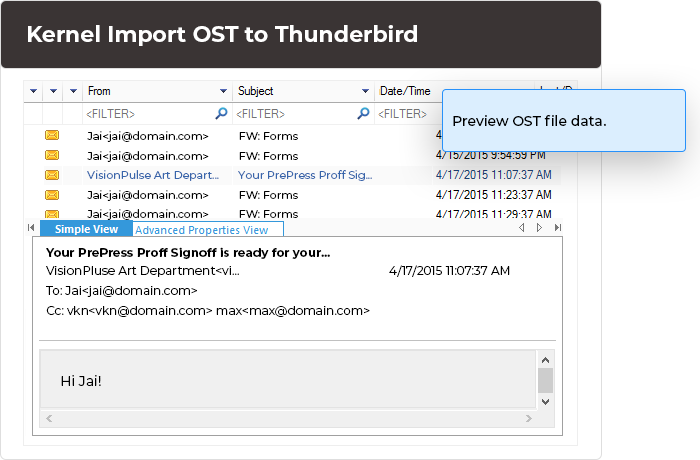
Import corrupt or damaged OST files using this tool. After adding the OST file, verify emails in the preview pane before importing to Thunderbird or any destination. This method extends support to importing orphaned OST files as well.

Easy OST to Thunderbird import
Simplify your OST file import with the tool's user-friendly GUI. The intuitive buttons and interface make the process easy, enabling even non-technical users to import OST files independently without requiring assistance from others.

Import OST to all MBOX email clients
Expand your import options by transferring OST files to prominent MBOX email clients, such as Eudora, SeaMonkey, Opera, Netscape, Spicebird, PocoMail, and more. Additionally, convert OST files to MBOX format compatible with Apple Mail and Entourage clients.

Import to multiple destinations
Extend beyond basic OST to Thunderbird import functionality with this tool. Seamlessly save OST files to live Exchange Server, Office 365, Gmail, Outlook, and a plethora of other applications, platforms, and file formats.

Import to all Thunderbird versions
Ensure seamless compatibility with our tool, covering all versions of Mozilla Thunderbird, from Thunderbird to Thunderbird 31, and staying updated with the latest releases. Similarly, it offers support for all versions of popular MBOX email clients.
Frequently asked questions
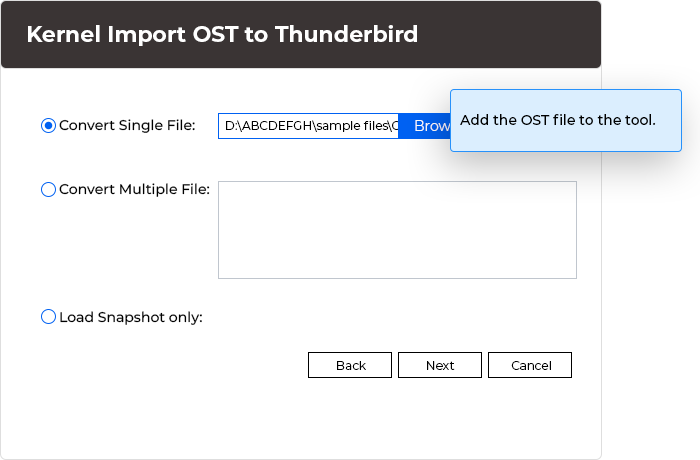
- Step 1: Add the OST file to the tool for scanning.
- Step 2: Preview the OST file data in detail.
- Step 3: Choose MBOX as the saving option and apply filters if needed.
- Step 4: Select Thunderbird as the email client and specify the MBOX file saving destination.
In a few seconds, the tool converts OST files to MBOX. You can easily import this MBOX file to your Thunderbird application.
- Email clients – MBOX email clients, Outlook Express, MS Outlook
- Email Servers – Exchange Server, Office 365, GroupWise, Domino
- Web Mails – Gmail, G Suite, Yahoo, AOL, Hotmail, iCloud, Company IMAP
- File Formats – MSG, EML, TXT, RTF, HTML, MHTML, PDF, DOC, DOCX
Software Prerequisites & recommendations
 About Software
Version: 26.0
Release Date: Dec 2025
License Type: Home, Corporate & Technician
 Version Support
MS Exchange Server - 2019, 2016, 2013, 2010, 2007, 2003, 2000, 5.5 and 5.0
MS Outlook - Office 365, 2024, 2021, 2019, 2016, 2013, 2010, 2007, 2003, 2002, 2000, 98 and 97
Outlook Express - 6.0, 5.5, 5.0 and 4.0
 System Requirements
Hard Disk: 50 MB of disk space
Memory: 128 MB Minimum
Processor: Intel® Pentium Processor compatible (x86, x64) or equivalent
Operating System: Windows 365, 11, 10, 8.1, 8, 7, Vista, XP, 2000, 98, NT, 95, Windows Server 2022, 2019, 2016, 2012, 2008 R2, 2008, 2003 R2, 2003
 Installation Guide
What customers say about Kernel Import OST to Thunderbird
 (4.9/5) 441 Reviews
An exceptional tool with numerous advanced features. I particularly appreciate the filter and saving options. It proves to be an incredible tool for file conversion.