Benefits of Splitting Large CSV Files with Kernel CSV Splitter

Take a look at the advantages of using Kernel CSV Splitter for splitting CSV files into multiple smaller files.

Fast and Efficient CSV Processing

Fast and Efficient CSV Processing

Runs multiple files in a single batch to save users’ time. The smaller CSV files support quick data processing without crashing the application.

Minimize the Risk of CSV Data Corruption

Minimize the Risk of CSV Data Corruption

Oversized files often cause spreadsheet applications to freeze. Splitting CSV with Kernel helps minimize the chances of corruption caused by massive files.

Windows OS Compatibility

Windows OS Compatibility

Kernel CSV Splitter for Windows works with all major OS versions, including Windows 365, 11, 10, 8.1, etc., and Windows Server 2022, 2019 & earlier versions.

User Specified Saving Path

User-Specified Saving Path

The CSV file splitting tool allows the users with the ease to define their preferred path to save the smaller CSV files after splitting the large source CSV file.

Organized Business Data

Organized Business Data

Businesses usually store their data, such as sales reports, product inventory, etc., within CSV files. Splitting large CSV files helps to keep the data organized.

Improved Database Import

Improved Database Import

Due to large file sizes, CSV imports can often take several hours or days. Small CSV files support smooth database imports, minimizing processing time.

What Are Our Customers Saying?

clientsquote Carter Peera, System Administrator

Dealing with large CSV files was a hectic task. Kernel CSV splitter made my work easy by splitting the files into smaller files. After using this software, I can easily manage my data without confusion. Thanks to the company for making such a useful and feature-rich software.

clientsquote Guanio Benzo, Software Engineer

This tool streamlined my workflow very well. My system used to crash every time I opened the CSV file due to its size. Then I came across this CSV Splitter. It separated my files according to my needs and saved my system from crashes afterwards.

clientsquote Greta Project manager,

Recently, I was tasked with working on reports for an important project. There were a lot of CSV files but the real challenge was working with large CSVs that took forever to load. I wanted to split these large CSVs into smaller ones. I used the Kernel CS Splitter that made my splitting task easier. Must-use tool for CS splitting.

Key Features of Kernel CSV Splitter Tool

Explore the advanced features of the tool to perform a simplified splitting process of the CSV files.

Split Bulk CSV Files

Split Bulk CSV Files

CSV Split software can process single or multiple CSV files in a single batch. It eliminates the need to split files one by one and simplifies processing of bulk CSVs, including oversized files.

Split CSV by Rows

Split CSV by Rows

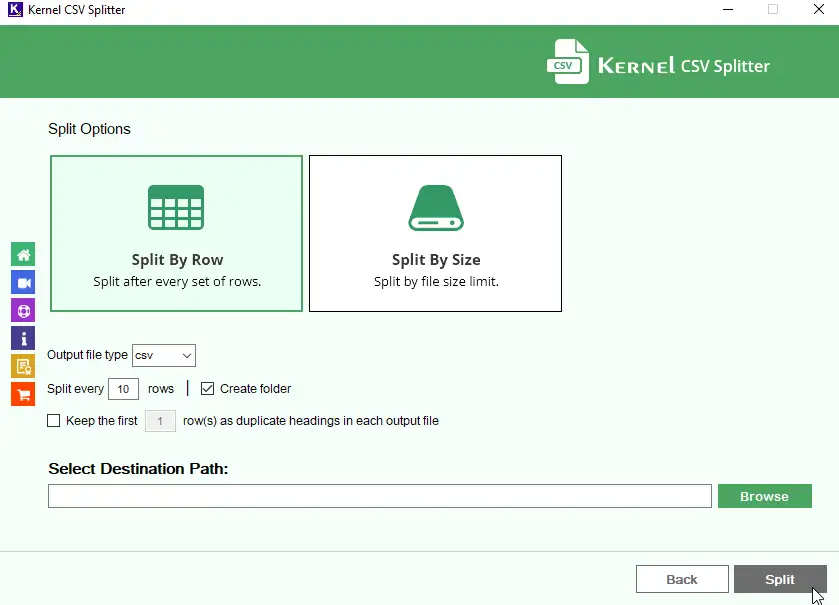
The CSV file splitting tool splits the source CSV files into multiple files based on a user-defined row count. It allows users to select the maximum number of rows to include in each output CSV file for easier management of large datasets.

Split CSV by File Size

Split CSV by File Size

Kernel CSV Splitter lets users split large CSV files into smaller CSV files based on custom file sizes. It supports the output file size, ranging from 1024 KB to 10 GB according to the user’s requirements.

Export CSV Data to Multiple Formats

Export CSV Data to Multiple Formats

The CSV file splitter by Kernel provides multiple output file formats to save the split files. It allows export to CSV, XML, ODS, XLSX, and XLS files for easier compatibility across multiple platforms or devices.

Compatible with All CSV Files

Compatible with All CSV Files

CSV splitter software supports CSV files generated by Google Sheets, Outlook, Excel, and other platforms. It also works with CSV UTF-8, CSV comma-delimited, or semicolon-delimited, ANSI, or ASCII CSV files.

Retain Headers on Output CSV

Retain Headers on Output CSV

The software allows users to select or unselect the rows to split CSV without losing headers in all the resultant files. This feature makes the file header available across all output CSV files to keep them organized.

Preserve CSV File Structure

Preserve CSV File Structure

Kernel CSV Split tool preserves the CSV data structure, including rows, columns, delimiters, character encoding, etc. It helps to retain the structure to avoid issues caused by incorrect delimiters and encoding mismatches.

Save CSV Split Logs

Save CSV Split Logs

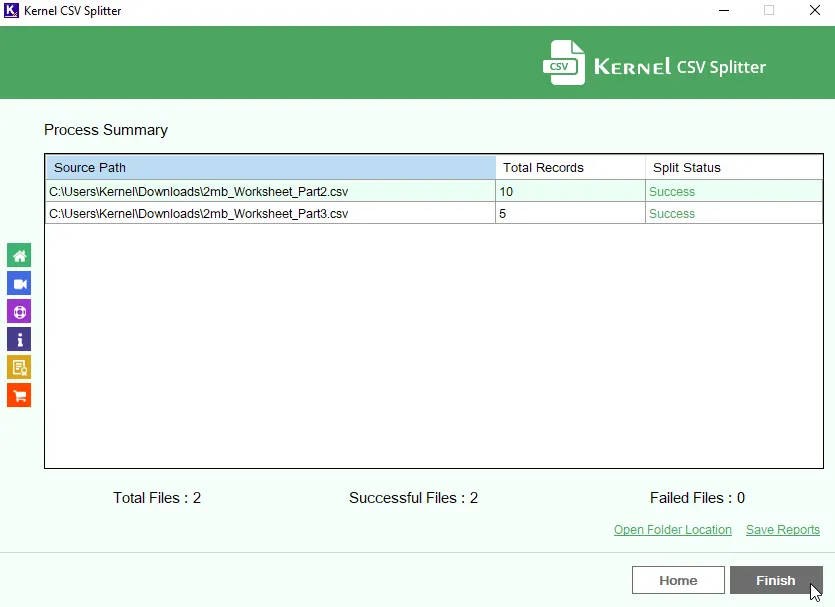
Generates a detailed and structured log report after the split process is complete. The report includes details like Source Path, Destination Path, Record Count, and Split Status.

Download Free CSV Splitter

Download Free CSV Splitter

Kernel CSV Splitter tool provides a demo version that lets users split 25 records per CSV file for free. It provides users with a first-hand experience to evaluate the features before buying a license.

Manual Ways vs Kernel CSV Splitter Software

Go through the comparison table, explaining the differences between manual ways and Kernel software to split CSV file.

Download Free Trial - Test Before Purchase

How to Split CSV File into Multiple Files

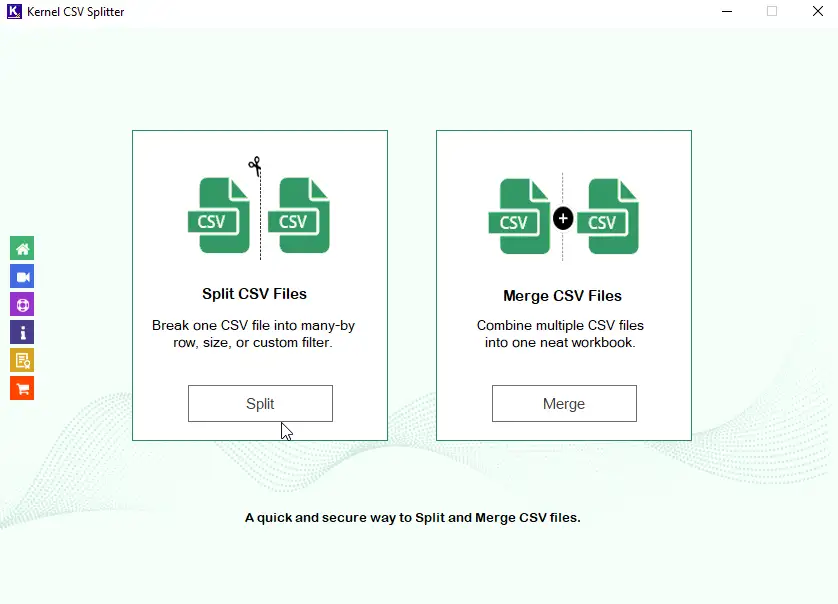
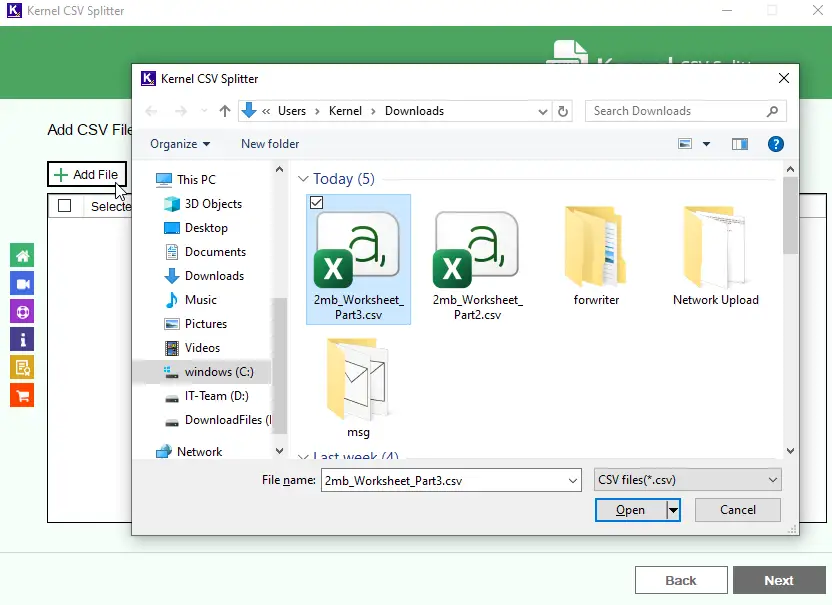
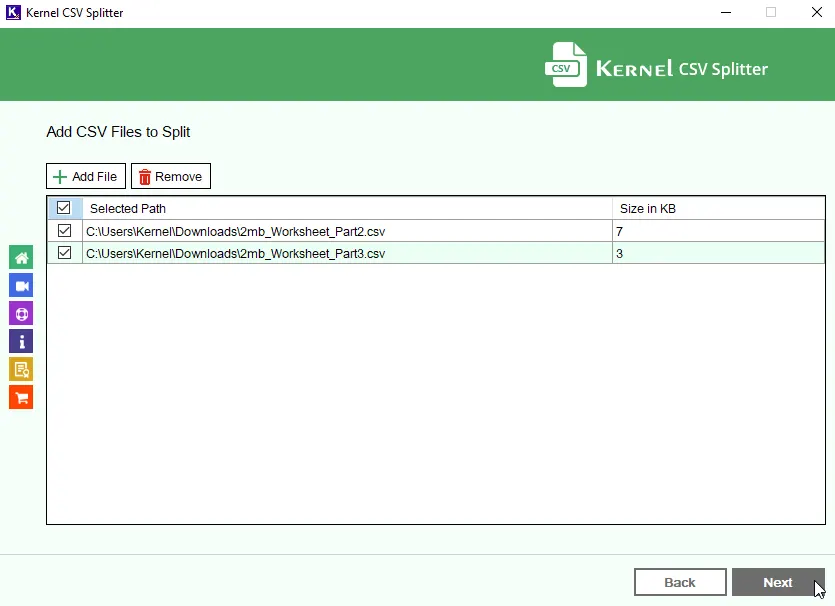
Here’s how to split large CSV into multiple files with the CSV file splitter:

Compare Features of the Trial Version and Licensed Version

See what’s included in the free trial and the licensed version of the CSV Splitter tool for a clear choice.

Frequently Asked Questions

How to split a CSV file into smaller CSVs?

To split the CSV file, follow the given 3-step process:

  • Add source CSV: Select to add a single or multiple source CSV files.
  • Divide into multiple CSVs: Select to split CSV by rows or file size and click Split.
Can I split a 50 GB CSV file using this tool?

Yes, you can split a CSV file of 50 GB into smaller file sizes ranging as low as 1024 KB up to 10 GB. It can process CSV files containing up to millions of records.

Which output formats are supported by this splitting tool?

The software provides multiple output formats to save the resultant CSV file, including CSV, XML, XLS, XLSX, and ODS.

What is the maximum file size supported by this CSV splitter?

There are no file size restrictions with this software. The tool allows you to add CSV files having millions of records.

Is Kernel CSV Splitter tool free?

Yes, with the free trial of the CSV Split tool, you can split the first 25 items from each CSV file added.

Can I add multiple CSV files at once?

Yes, you can add various CSV files to the tool at once to split using this software.

Are headers retained in the split CSV files?

Yes, the tool provides an option to keep the first few rows as the headers in all the split files to organize the resulting files.

How can I locate saved CSV files?

The software permits you to access saved CSV files with its built-in Open Folder Location option.

Can I save split CSV data in XLSX or XLS format?

Yes, the CSV Splitter software splits CSV data to XLSX and XLS formats.

Watch Kernel CSV Splitter Tutorial

Watch the video tutorial to learn how to use our tool for splitting your CSV files.
Kernel CSV Splitter

Software Prerequisites & recommendations

About SoftwareAbout Software

Version: 26.0

Release Date: Aug 2025

Update Date: Feb 2026

License Type: Home, Corporate & Technician

Version SupportVersion Support

MS Excel: 2021, 2019, 2016, 2013, 2010, 2007, 2003, XP, 2000, 97, 95 files

System RequirementsSystem Requirements

Hard Disk: 512 MB of disk space

Memory: 1 GB minimum

Processor: Intel® Pentium Processor compatible (x86, x64) or equivalent

Operating System: Windows 11, 10, 8.1, and older versions, Windows Server 2022, 2019 & older versions.

↑