Read time: 9 minutes
Quick Answer: Recover deleted emails from your Yahoo account using these methods:
- Emails available in Trash: Select the messages and restore them to your Inbox. Yahoo usually keeps deleted messages in Trash for up to seven days.
- Recover email using Request: Submit a Yahoo Mail restore request if the loss occurred within the last seven days.
- Emails permanently deleted: Check existing mail app copies, local archives, and backups. Yahoo does not guarantee recovery of permanently deleted messages.
Are you worried about your deleted Yahoo email and searching for a reliable way to recover it? Yahoo is a prominent email account, and millions of users are using it. With daily tasks, many users accidentally delete their essential emails.
So, how to recover deleted Yahoo emails? This guide shares every method that works, so you can recover your Yahoo emails. Let us get started.
Why Do Yahoo Emails Get Deleted?
Before you try to recover deleted emails, you need to know why your emails disappeared. An email may be missing from the Inbox even if it has not been permanently deleted.
- Accidental deletion: You may have deleted an important email by mistake.
- Trash cleanup: Yahoo automatically removes messages from Trash after a limited period.
- Email filters: A filter may have moved a message to another folder.
- Third-party mail apps: When you add your Yahoo mail account in third-party application. Any action in that third-party app may also affect your Yahoo mailbox.
- Mailbox inactivity: Yahoo permanently deletes mailbox content after 12 months without mailbox activity.
Working Methods to Recover Deleted Yahoo Emails
Check out some of the reliable working methods to retrieve deleted emails from Yahoo:
Method 1: Recover Deleted Emails from the Yahoo Trash Folder
It is one of the easiest ways to recover deleted Yahoo emails when the messages are still in Trash. You can use Yahoo Mail on a desktop browser:
Step 1: Sign in to your Yahoo Mail account.
Step 2: Now go to the Trash folder in your account.
Step 3: Find your deleted email and left click on it.
Step 4: Click on Move and select the Inbox folder.
Step 5: Your deleted email will be automatically recovered in the Inbox folder.
Note: Act quickly. Yahoo’s Trash folder is temporary, and messages that remain there beyond seven days may be permanently deleted.
Method 2: Submit a Yahoo Mail Restore Request
Yahoo is an advanced email communication platform that offers a Restore Request to retrieve recently deleted emails. If your deleted messages are not in the Trash, then you can request Yahoo to restore them.
Step 1: Open the Yahoo Help Central page.
Step 2: Click on Send a Restore request.
Step 3: Click the Recover lost or Deleted Email option.
Step 4: Fill out the following page and enter all the essential information.
Step 5: Send the recovery request to Yahoo and wait till your emails are recovered.
Note: Yahoo does not provide a 100% recovery result. You may not get your deleted drafts and spam emails.
Method 3: Search for Emails in Other Yahoo Mail Folders
Sometimes, you do not need to recover deleted emails that Yahoo has removed. There is little chance that the email exists in your mailbox but sits in an unexpected folder.
Try these checks before you submit a restore request:
- Archive: Look for emails that you may have archived by mistake or willingly.
- Spam: Check whether Yahoo’s spam filter moved the email.v
- Custom folders: Review folders that you created for specific contacts or topics.
- Search filters: Search by sender address, subject, or a phrase from the email.
- Mail filters: Review your Yahoo Mail settings for rules that may move messages automatically.
Fact: Yahoo notes that Spam and Trash messages may not appear in normal search results, so open these folders and check them manually.
Method 4: Check Other Email Apps and Existing Backups
If Yahoo cannot restore the messages, check whether a copy exists outside your Yahoo mailbox or not. This method is helpful if you previously used an email client or created a mailbox backup.
Check a Connected Email App
If you use Outlook, Thunderbird, or Apple Mail with Yahoo, open the app and look for the missing email. A locally saved copy may still exist, depending on the app’s account settings and download history.
Note: Keep in mind that many mail apps use IMAP, which syncs actions across the app and Yahoo Mail. If you deleted a message and then emptied Trash, the app may no longer have a separate copy.
Search for a Saved Mailbox Copy
Look for a previous Yahoo Mail export, backup file, or archive on your computer, external drive, or backup location. If you find a copy, make sure to access that backup file and get back your missing email from it.
Method 5: Ask the Sender for Another Copy
If a message is permanently deleted and no backup exists, make sure to contact your sender. Ask them to resend the original email or forward the conversation, including its attachments.
Can I Recover Permanently Deleted Yahoo Emails?
You can recover permanently deleted Yahoo emails if you have that email in a local copy, another email client, or if it’s tagged in another recipient’s mailbox. However, if Yahoo has permanently removed the messages from its servers, its standard restore request does not guarantee recovery.
If you have configure your account in Thunderbird, then you can export Yahoo emails in EML file format.
Keep these Points in Mind:
- Yahoo’s standard restore request covers email loss from the previous seven days.
- Emails that remain in Trash may be restored before Yahoo removes them.
- Existing backups may contain messages that no longer exist in Yahoo Mail.
Author Advice for Email Prevention
Once you recover your important emails, take a few simple steps to protect them.
- Save copies of important messages and attachments outside Yahoo Mail.
- Make sure to review your Trash before you empty it.
- Check your email filters if messages disappear from your Inbox.
- Keep an up-to-date mailbox backup for important personal or business records.
- Sign in to your Yahoo Mail mailbox regularly to avoid account inactivity.
PRO Tip: Always Backup Your Yahoo Mailbox for Instant Recovery Anytime
There is no chance to recover permanently deleted emails from your Yahoo account. But you can protect it from future deletion with professional Kernel Yahoo Mail Backup software. It allows you to save your entire mailbox into PST, DOC, DOCX, EML, MSG, MHT, HTML, and PDF file formats. With this tool, you can back up Yahoo emails to a PC with all attributes.
How to Back up Yahoo Emails?
Here is the step-by-step process to back up Yahoo emails to a local computer:
Step 1: Download, install, and launch the Kernel Yahoo Backup tool.
Step 2: On the software home screen, select Backup tile.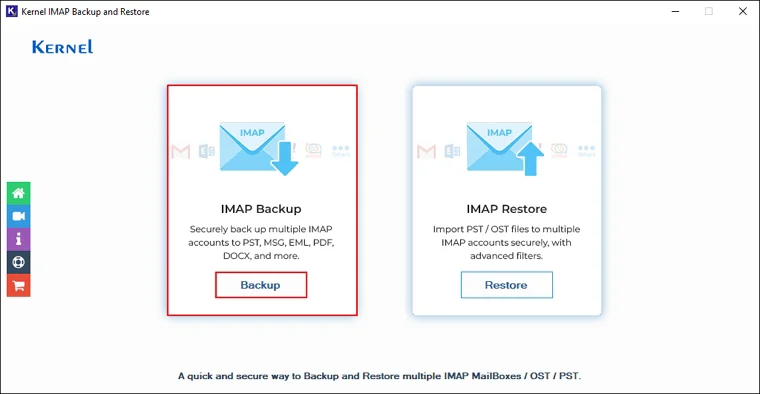
Step 3: Click on Add to sync your Yahoo account.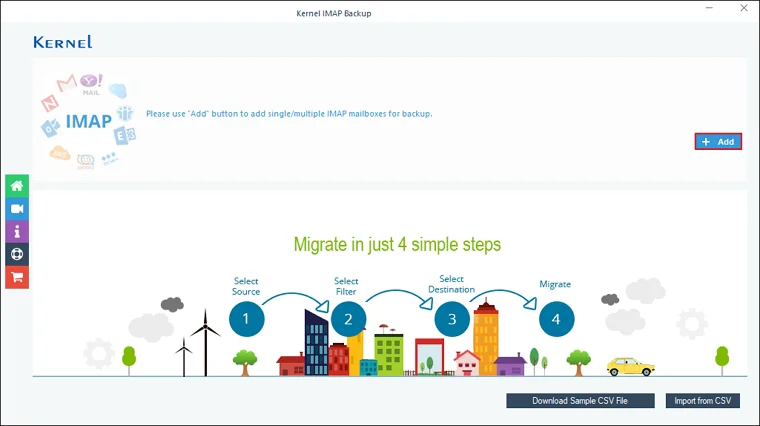
Step 4: Enter Yahoo credentials and click Add.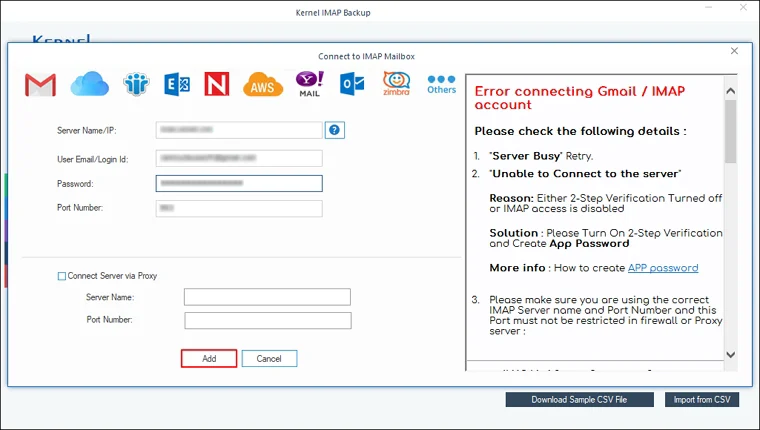
Step 5: Review your added mailbox and click Set Filter and Migrate.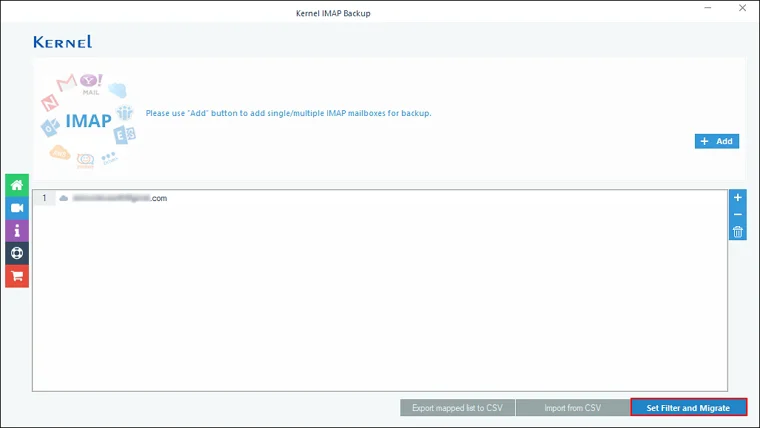
Step 6: The software will start enumerating all the folders from the selected mailbox.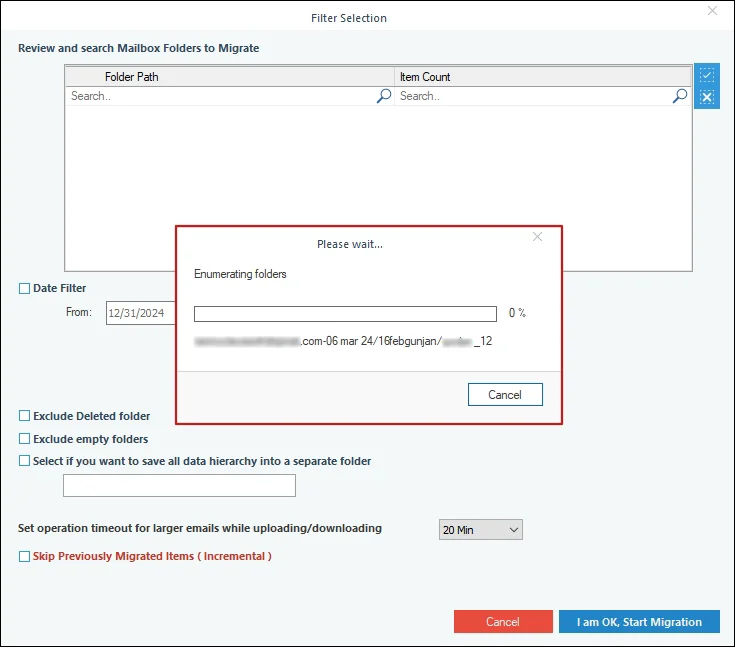
Step 7: Apply necessary filters and click I am OK, Start Migration.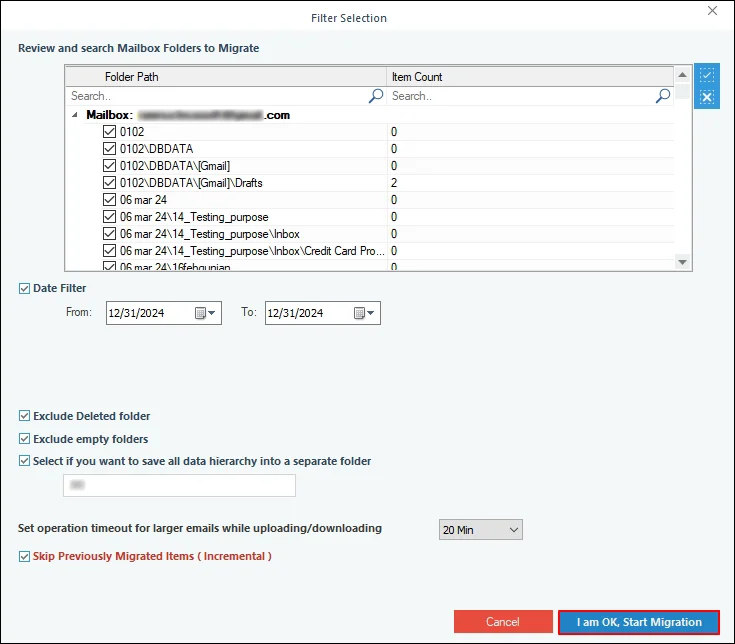
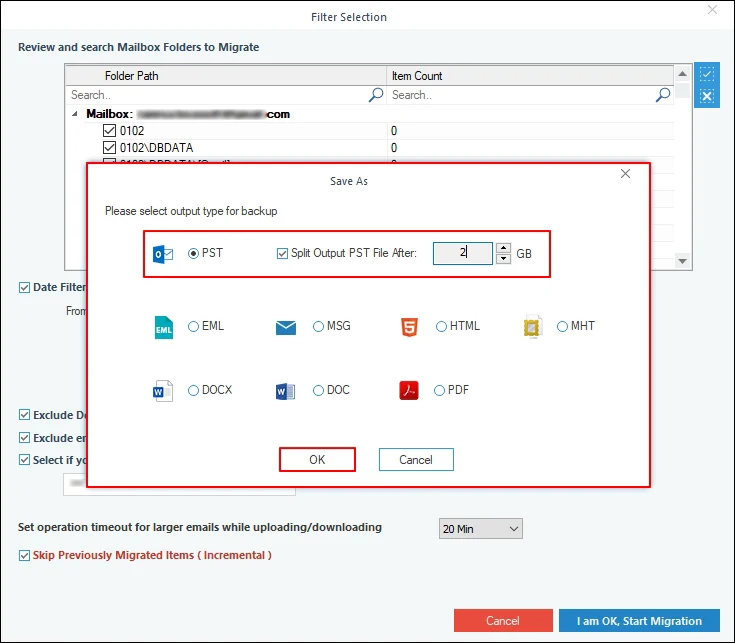
Step 8: Select output file as PST and click OK.
Note: Check the Split Output PST File After option to divide a large-sized Yahoo mailbox into multiple small PST files.
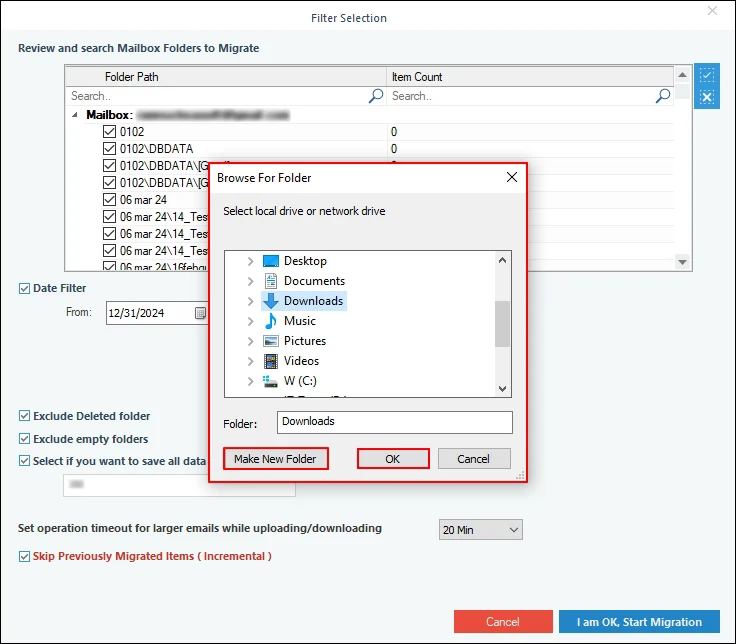
Step 9: Select the desired saving location and click OK.
Note: If you want to save all the backed-up data in a new folder, then click on Make New Folder and save your data in it.
Step 10: The software will start backing up all your Yahoo emails.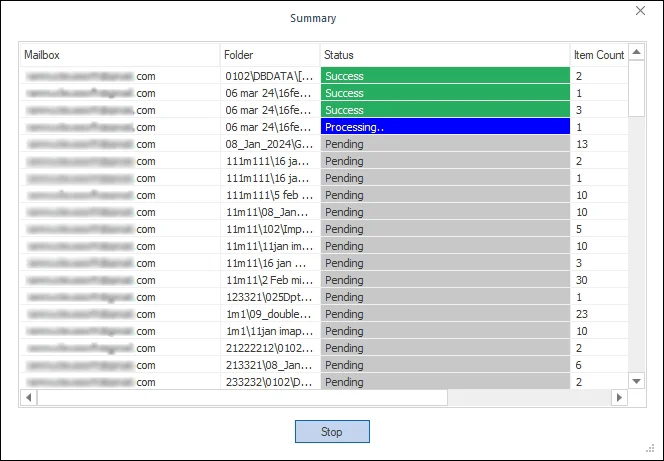
Step 11: After a successful backup, you can see the message “Process completed. Please save the report to CSV”. Click OK.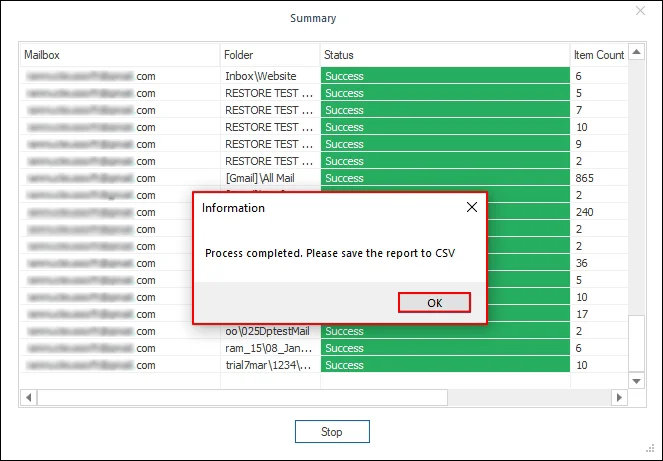
Conclusion
You can easily recover deleted Yahoo emails by following the above-mentioned methods. If these methods fail, check other mail apps, saved archives, and existing backups for a copy of your emails. To protect your emails from deletion, make sure to take a backup of your entire Yahoo mailbox using the Kernel Yahoo Backup tool.
Frequently Asked Questions
Answer: Yahoo generally keeps deleted emails in Trash for up to seven days. After that, Yahoo may permanently delete them, which makes recovery more difficult.
Answer: Your emails may have moved to Archive, Spam, Trash, or another folder. Filters and actions in connected email apps may also affect their location. Check these folders before you assume the messages are permanently deleted.
Answer: Yahoo states that after 12 months without mailbox activity, it permanently deletes mailbox content, including emails, folders, and contacts. Signing in again can restore mailbox access, but it does not restore the deleted content.