Read time: 7 minutes
SiteGround is a well-known web hosting company that provides services like shared hosting, cloud hosting, email hosting, WordPress hosting, enterprise solutions, and more. As of now, it provides hosting for 2.5million+ domains worldwide. When it comes to speed, safety, and ease, SiteGround offers several advanced features to meet users’ desires.
But the rise of Office 365 in the last few years changed the whole scenario with its bunch of advanced applications and matchless security. It promoted organizations to migrate to Office 365 from their current email client application. That’s why now many users are looking to migrate from SiteGround email to Office 365.
Here in this post, we will get to know the reasons to migrate SiteGround webmail to Office 365 and discuss the best way to migrate it effectively. So, read this blog carefully.
Why migrate SiteGround email to Office 365?
Though SiteGround provides personalized email accounts and extraordinary features like secure email protocols, spam protection, and cPanel-based mail management, still it can’t match the capabilities of Office 365. Some significant reasons to migrate SiteGround to Office 365:
- Ability to Work from Anywhere
Office 365 is a cloud-based system that allows you to connect to your Office from any location at any time. It provides you and your workforce access to emails, files, and Office programs on any device from any corner of the world. Overall, it enhances the collaboration with remote and flexible working. - Advanced Security Features
Office 365 negates all the wrong perceptions made by people that the Cloud is not safe, as Microsoft itself takes all the responsibility for the security and reliability of Office 365. It offers advanced built-in security features like email encryption, data loss prevention, mobile device management, and advanced threat analytics. - Better and Efficient Collaboration Tools
Office 365 comes with several collaboration tools such as SharePoint, Office Online, Microsoft Teams, OneDrive, etc., allowing organizations to operate with their team members and clients effectively. It will enable multiple users to edit and update files, spreadsheets, documents, and presentations stored in Office apps in real-time.So, all these are some significant reasons organizations migrate from SiteGround to Office 365. Now, let’s move to the process of migration.
How to migrate SiteGround email to Office 365?
SiteGround supports IMAP migration and provides a native method of migration to transfer SiteGround emails to Office 365 in batch using MS Outlook. Here are the steps:
- Go to your SiteGround email account.
- Choose any email you want to migrate and click on More dropdown.
- Select the Export option and your emails will be downloaded in EML file format.
Repeat the process to save as many emails as you want. To migrate this EML file data to Office 365, you will need to first convert EML to PST and then import this PST file to Office 365 for easy access.
However, we can’t consider it a practical and optimal solution for migration because this method requires a lot of technical knowledge; secondly, the migration must be done individually for each account, making the process long and hassled. Apart from this, you will keep receiving emails on your old account.
Hence, the best method to migrate SiteGround to Office 365 is the use of a professional third-party tool. Through such a tool, you can effectively and quickly perform a migration, even without technical knowledge. Let’s discuss one such professional tool below to migrate IMAP emails to Office 365.
A professional tool for SiteGround to Office 365 migration
No other platform can beat the features and reliability offered by Office 365, and that’s why now most organizations want to switch to Office 365 at some point.
Undoubtedly, there are some methods to migrate SiteGround Emails to Office 365, but any of these methods don’t guarantee the successful migration of complete data. So, to ensure a quick and successful migration, you need to switch to a professional tool named Kernel IMAP to Office 365. It is one of the advanced migration tools specially designed for easy and quick transfer of IMAP emails to Office 365 without any limitations. The IMAP to Microsoft 365 migration tool comes with several advanced features such as:
- Efficient IMAP mailbox migration with multiple filtering options
- Provision to migrate to mailboxes, archive mailboxes, and public folders
- Provides advanced filters for selective migration
- Supports incremental mailbox migration
- Provides quick and successful migration to Office 365 and other versions of the Exchange server
- Maintain data integrity without any loss of data during migration
- Compatible with all IMAP email servers and Office 365 plans
- Provides migration summary report
Process for migration from SiteGround to Office 365
Here is the process to migrate SiteGround emails to Office 365 using the tool:
Step 1: Launch the Kernel IMAP to Office 365 Migration tool and click Let’s Connect in IMAP to Office 365 tile.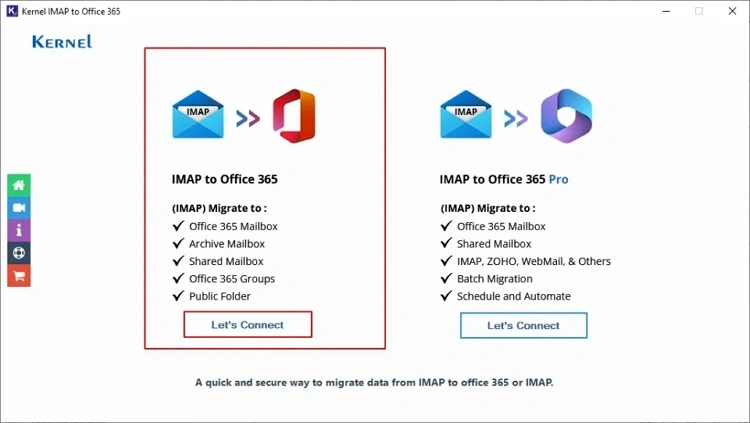
Step 2: Click Add on source and select authentication method, then provide the IMAP login credentials. Click Add.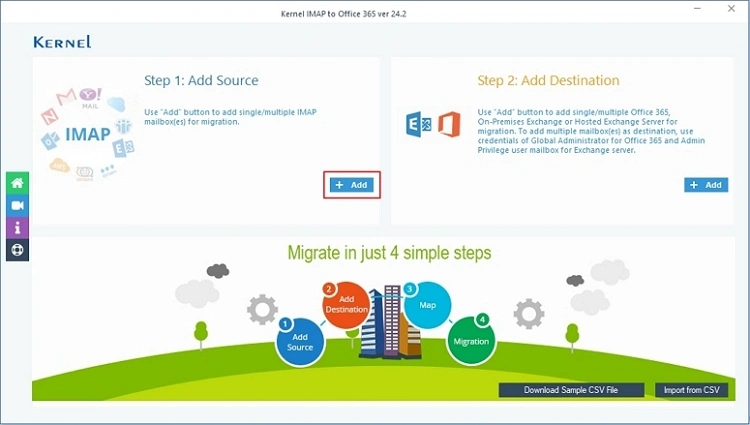
Step 3: Similarly add the destination (Office 365) using the authentication method.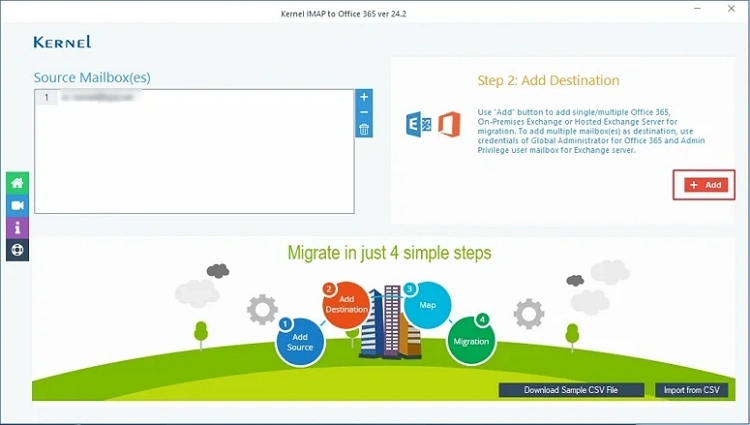
Step 4: Click Get User Mailboxes or Get Groups to fetch mailboxes, select desired ones, and click Add.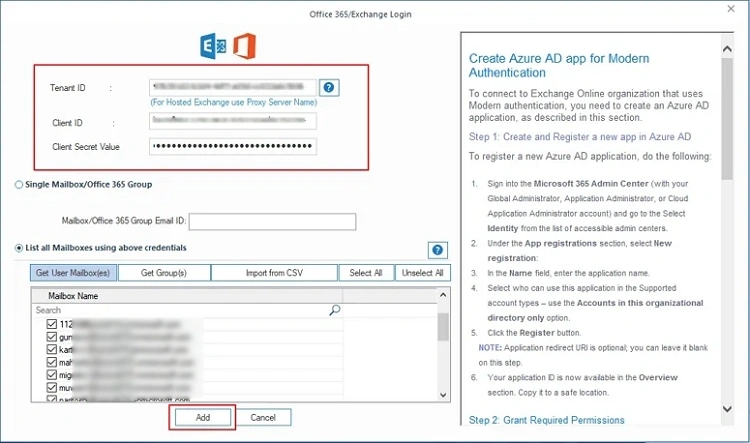
Step 5: Map the source mailboxes to the destination account using the dropdown menu. Click Set filter and Migrate.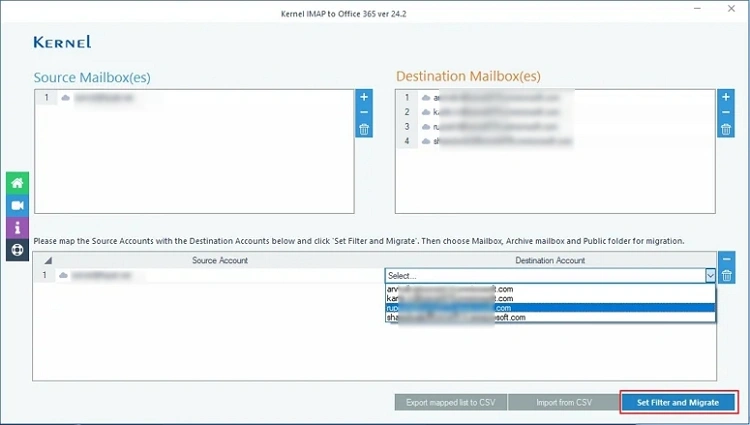
Step 6: Select the Migration Type and then click Migrate.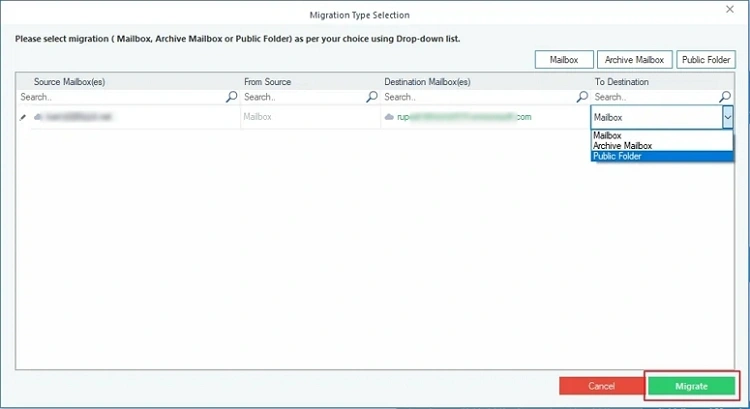
Step 7: Review the folders, select the desired ones, and apply the suitable filters. Tap on I am Ok, Start Migration.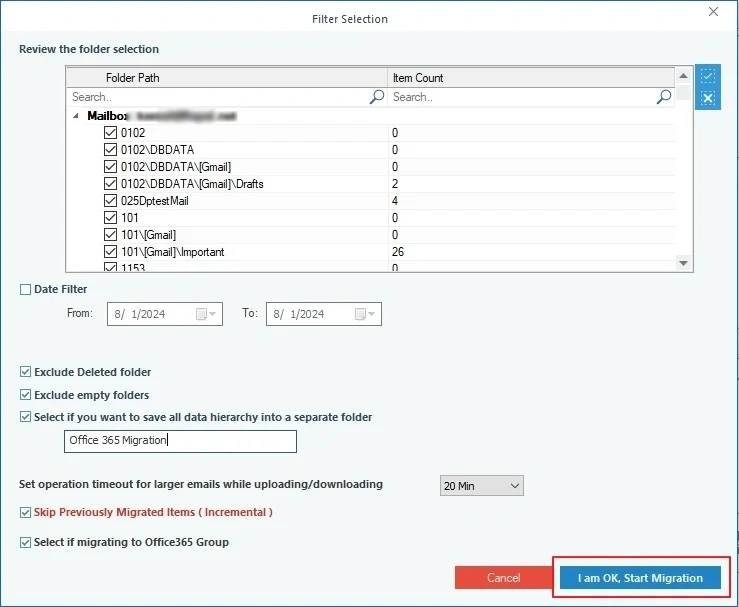
This will initiate the migration process showing the detailed migration summary and after completion, save the report to CSV file and click OK.
Conclusion
In the end, we would like to say it’s a great move to migrate SiteGround emails to Office 365 because of the matchless and advanced features offered by Office 365. The migration process can become challenging if you are trying manual methods.
But with a professional IMAP to Office 365 tool, you can successfully migrate IMAP mailboxes to Exchange Online & On-Premises. Overall, it’s a perfect solution for instant, effective, and complete data migration. Use its free trial version to understand the tool better.