Read time: 8 minutes
User Query: I have a team of 10 members, and I am planning to double our staff. For the last five years, we have been using Rediffmail Pro. But now I want to permanently migrate Rediffmail to Zoho Mail. How can I safely move the mailboxes of all my team members without losing any emails?
Solution: To migrate a team of 10+ members from Rediffmail to Zoho Mail, I recommend using the native Zoho IMAP migration from the Admin Console. It allows direct email transfer from IMAP-based accounts to the Zoho account. Alternatively, you can go with a professional IMAP migration tool.
When your current email service provider’s user interface starts feeling laggy, and you often hit storage limitations, consider these as hints for switching. For a growing organization, these signs state that it is time to look for a better emailing platform.
The same is the case with most of the people who are looking for methods to migrate Rediffmail to Zoho Mail. Absence of modern features, advanced spam filtering, fast searching, and a dedicated Office suite in Rediffmail is compelling users to shift to Zoho Mail.
Moving further, I will tell you how to migrate emails from Rediffmail to Zoho Mail while minimizing the errors and data loss. Let’s start with the prerequisites for the migration.
Things to Do Before You Start to Migrate Rediffmail to Zoho Mail
I have seen a lot of admins jumping directly to the migration and skipping a few critical steps. They regret it later. Make sure you take care of these pointers for a worry-free email migration.
- Backup Rediffmail Emails: During a mailbox migration, a number of things can go wrong. Just to be safe, I always recommend backing up Rediffmail emails. Use either native methods or a specialized IMAP backup software.
- Enable IMAP and Disable 2FA: Contact your admin and enable IMAP for your Rediffmail account. Also, if two-factor authentication is active, disable it until the migration is over.
- Export Contacts and Calendars: The method we will be discussing in the next sections relies on the IMAP protocol, which can only migrate your emails from Rediffmail to Zoho Mail. You have to manually move the Contacts and Calendar data.
- Set Up the Destination: Verify if the target Zoho Mail account is active with enough storage to accommodate the incoming emails. Also, create new user mailboxes as per your team size.
- Prepare a User Mapping List: Obviously, you will not be dumping the data of 10 users into a single mailbox. Make a list that clearly says which source user mailbox data goes to which destination user mailbox, along with the account’s passwords.
- Run a Test Migration: It is not necessary, but running a test migration helps to identify any potential issues that could surprise you later.
Pro Tip: Go through your Rediffmail mailbox. Archive and export data that you don’t need. Trimming the mailbox size will reduce the time needed to move from Rediffmail to Zoho Mail.
Methods to Migrate Rediffmail to Zoho Mail
There are three different ways to move your emails. For bulk mailbox migration, either use Zoho Mail’s Admin Console or a specialized IMAP migration tool. In case you want to move selective folders, use an email client that supports IMAP accounts. Let’s see all three one by one.
Method 1. Use Zoho Mail Admin Console
Using the Admin Console of the Zoho Mail, you can move emails from any IMAP or POP-enabled servers. Follow these steps to migrate your emails from Rediffmail to Zoho Mail.
1. Add the migration
- Go to Zoho Mail’s Admin Console and log in with admin credentials.
- Select the option Data Migration from the left pane.
- Click on the option Start data migration and provide a name.
- Choose Add new server details option for the Select saved server details drop-down.
- Select the IMAP option for the Select protocol drop-down. Then, use the following details to configure the IMAP:
- IMAP Server: imap.rediffmailpro.com
- Port: 993
- Security: SSL
- Then, click Add.
2. Configure migration settings
- Provide a name for the setting and specify the folders to migrate.
- Select to migrate all emails or only the emails within a specific date range and click Add.
- Enter a value for the Maximum Connection Limit parameter.
- Choose to pause the migration or not. Finally, click Create.
3. Add the users manually or import a CSV file containing the user account information (username, password, and the destination email address).
4. Once user addition is done, go ahead and click the Start Migration button to start migration.
Method 2. Move from Rediffmail to Zoho Mail with an Email Client
For users who only want to migrate specific emails or a folder, I suggest you use an email client. You can choose any email client that supports IMAP accounts, be it Outlook, Thunderbird, or any other. Then, download and install the email client and follow the steps below to migrate emails from Rediffmail to Zoho Mail.
- Open the email client and configure Rediffmail and Zoho Mail in it.
- Select emails or folders from Rediffmail, drag and drop them to the Zoho Mail folder.
- If supported, you can also right-click and choose the copy option to migrate your emails.
Note: Avoid moving 100+ emails or multiple folders together. Moving data in large quantities can make the email client unresponsive or even cause migration failure due to an IMAP server timeout issue.
Method 3. Use a Professional IMAP Migration Tool
The above two methods are great, and for 99% users, they are enough. But you can make things even more straightforward with a dedicated IMAP migration tool. The tool saves you hours if you don’t want the trouble of setting up two IMAP accounts in an email client and copy paste emails. Additionally, when you have multiple users with years of data, there will be many nested folders as well. Manually specifying the names of folders to move will take considerable time, and there is a chance you will miss a few.
You can avoid it with Kernel Migration for IMAP. Before you begin to migrate emails from Rediffmail to Zoho Mail, the tool will list all the folders (nested folders as well). You can choose which folder to skip and which to move. In less than a minute, you can customize the migration of multiple user mailboxes. The native methods also allow customization, but with a professional tool, things are smoother.
Follow these steps to migrate Rediffmail to Zoho Mail with the tool Download, install, and open the
Step 1. Download, install, and open the tool. Select the option IMAP to IMAP.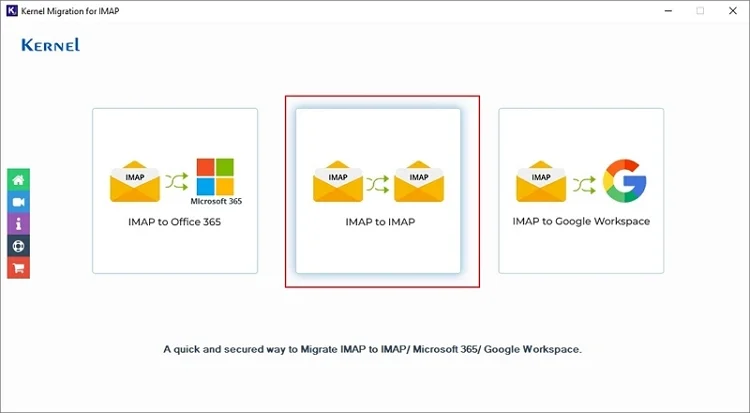
Step 2. Connect to the source Rediffmail account. Then, add the Zoho Mail as the destination.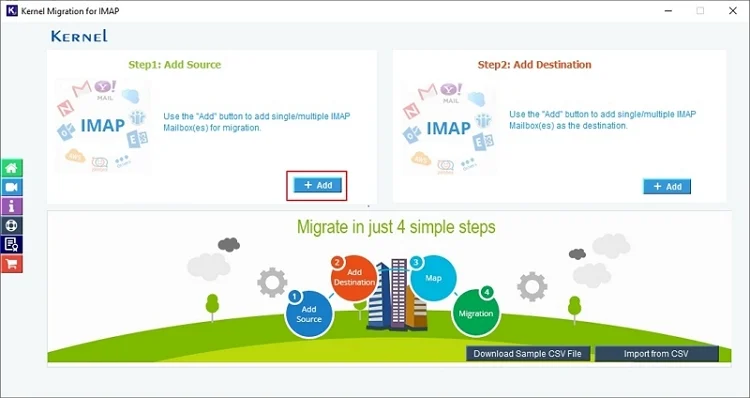
Step 3. Map the Rediffmail mailboxes to Zoho Mail user mailboxes and click Set Filter and Migrate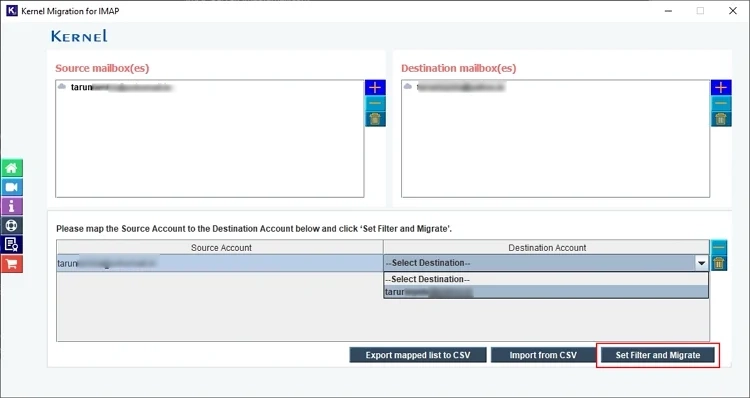
Step 4. Apply filters as per your requirement and click Start Migration.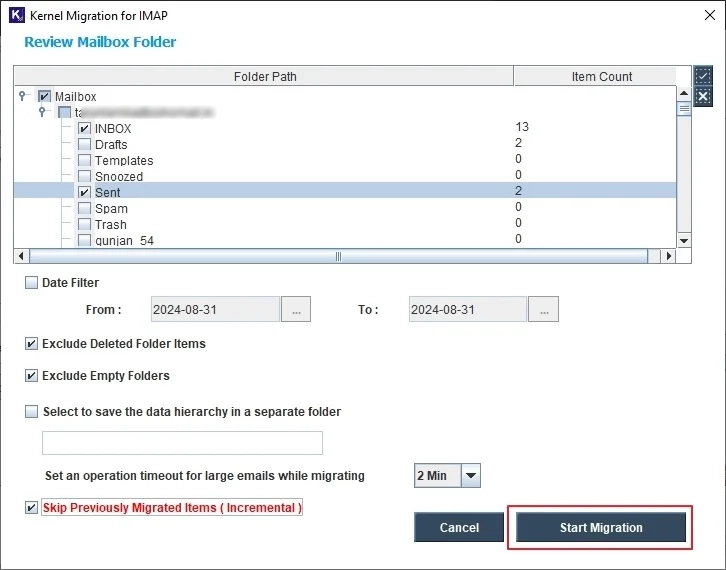
Step 5. Migration started with live status.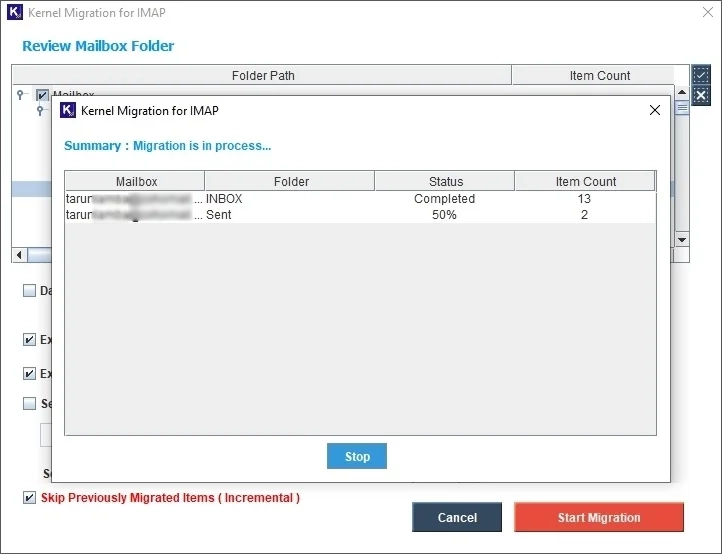
What to Do After Rediffmail to Zoho Mail Migration?
After the email transfer is completed, you must do the following things, so you don’t get an issue later.
- Update Records: Update the SPF and MX records so that whenever someone emails you on your Rediffmail email, the email is actually delivered to your new Zoho Mail account. Additionally, share your new email address with your contacts.
- Audit Folders: Verify if all the folders and emails are migrated from Rediffmail to Zoho Mail. If anything is missing, move it. When complete data is moved, decommission the Rediffmail account.
- Import Contacts and Calendars: In the prerequisites section above, I asked you to export contacts and calendars. Now, you import these to the destination account.
- Train Your Team: Don’t expect your team members to be at their 100% working capacity when you hand them their new email and password. Train them to avoid human errors and minimize delays.
Author’s Verdict
Experience a complete workspace environment with Zoho Mail. Pick any method as per your requirement to migrate Rediffmail to Zoho Mail. Remember to update your MX records and import the contacts and calendar separately later to avoid a communication breakdown. Additionally, if your team uses a mobile app to access emails, ask them to reconfigure the IMAP account details.
Frequently Asked Questions
A. If you cannot wait for the destination server to be ready, configure your account in Outlook and export the Rediffmail emails in a PST file. Later, you can migrate Outlook PST into Zoho Mail using the Migration Wizard.
A. This happens when your destination Zoho Mail account’s storage is 80% full, and you have checked the migration Pause filter when setting up the migration. To fix it, you have to increase the storage quota of your Zoho Mail account.
A. It’s hard to say. But as per the Zoho Mail official documentation, moving around 50 GB of data takes about 11 to 12 hours. Judging by this, you can expect anywhere between 20 and 30 hours of time to move from Rediffmail to Zoho Mail when you have 100 GB of data.