Read time: 5 minutes
Whenever we talk about images, what comes to our minds first are JPEG, PNG, or GIF formats. However, beyond these general file formats, there is a complex imagery (DICOM Files) used within the complicated software of the hospital systems.
DICOM or Digital Imaging and Communications in Medicine file is an international standard set for a file format that stores medical images, such as CT scans, PET scans, MRI, sonography, mammography, etc. DICOM files don’t just store images, but it is a complete mapping of human anatomy in multiple dimensions. A DICOM file contains patient demographics, such as name, ID, age, etc., study data (referring physician, study date, etc.), equipment data, and actual image data. To open DICOM file, you need to know the appropriate methods, but before proceeding to that, let’s decode the DICOM files a little bit more.
How to Open DICOM Files: Quick Steps
Step 1: Launch Kernel DICOM Studio and click on Add.
Step 2: Select the desired DICOM file(s) and click Open.
Step 3: The DICOM viewer will open all the files.
Step 4: Select anyone to preview DICOM file.
Why Open DICOM Files on Windows PC?
Here are situations that might require you to open DICOM files on your Windows-based computer:
- View MRIs, CT-scans, ultrasound, or other medical images stored on a CD or shared by the medical services.
- Manipulate image by adjusting brightness, orientation, panning, zooming, etc., to focus on specific areas.
- Easily use medical images as references for learning, teaching, or research purposes.
- Read patient demographics, scanner settings, or the equipment details from the files.
- Store or check out the medical history and minimize the risk of losing crucial medical images.
How to Open DICOM Files on Windows?
Here are some methods that you can use to open and preview DICOM files on your Windows PC:
Using Photoshop to Open Files
Step 1: Open Adobe Photoshop and select File, then click Open.
Step 2: All the frames of the DICOM file will display on the screen.
Step 3: Click on Select All to view all the frames or use Ctrl + Click to select the desired frames.
Step 4: Under Frame Import options, select how to import frames, and then click Open.
This will help you open DICOM file to easily study as required. However, it doesn’t allow you to edit the medical metadata, and there is no support for Windowing tools.
Using a Professional DICOM Viewer Software
Another method to view DICOM images is using a professional Kernel DICOM Studio. It is a feature-rich app to open DICOM files that helps to open and review medical images with basic and detailed tags. The tool allows you to run multiple instances to preview multiple images simultaneously.
With the feature to open duplicate windows, you can compare specific areas of the image and review effectively. It also includes features like anonymization and windowing for better understanding. Moreover, you can also get a better preview of the images with zooming, panning, and flip & rotate options.
Here is how to open a DICOM file on Windows PC within a few steps:
Step 1: Launch the DICOM viewer and click Add dropdown to add a single file, a directory, or a zip file.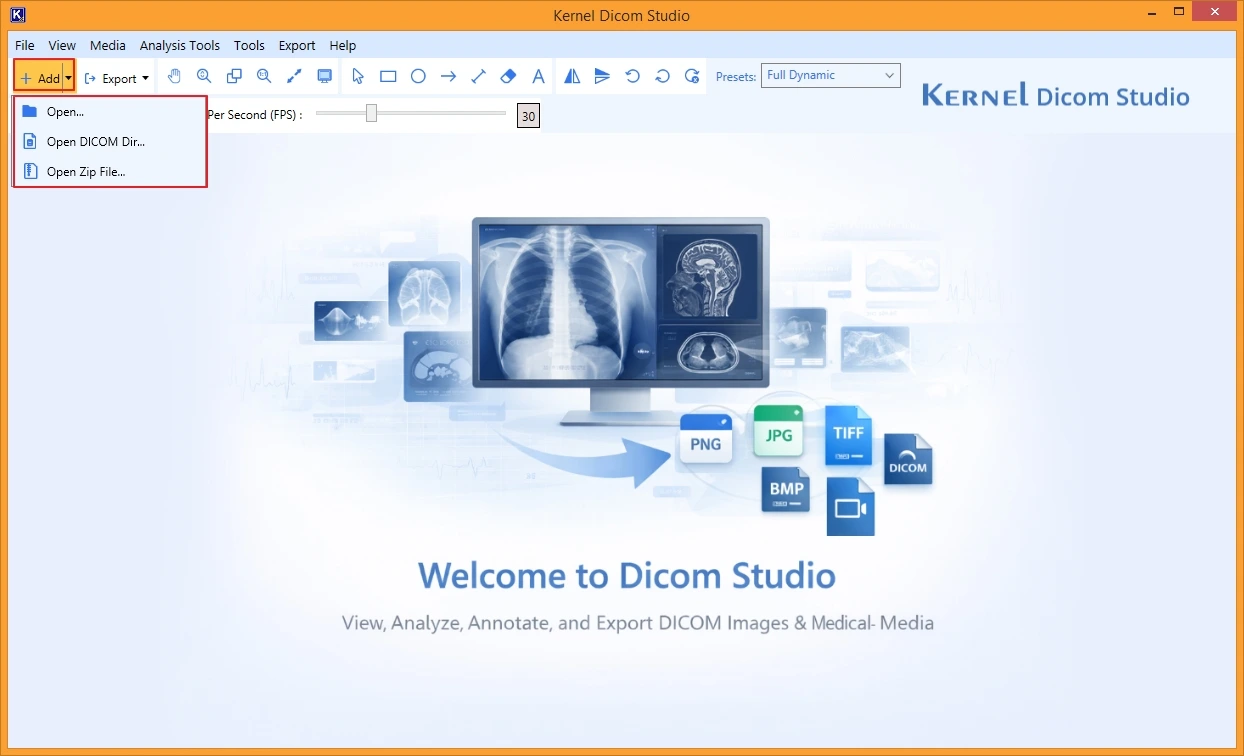
Step 2: Select the files with .dcm or .dicom extensions and click Open.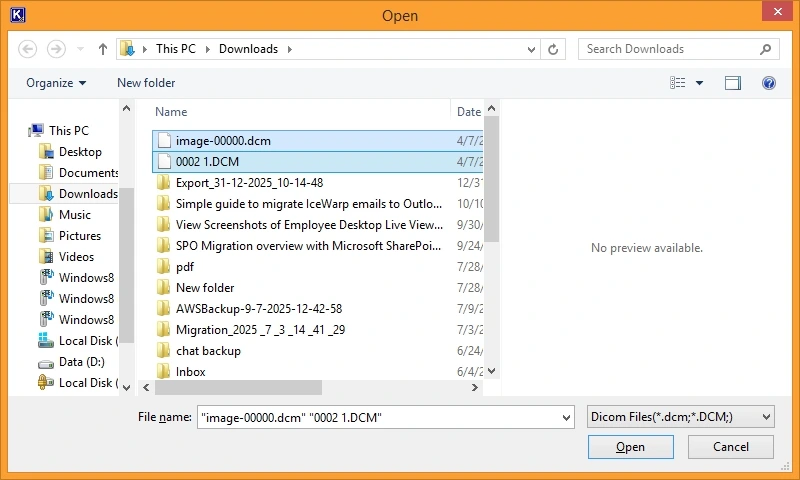
Step 3: The selected files will be shown in the DICOM browser.
Step 4: Select the image from the added files and view it in the adjacent pane.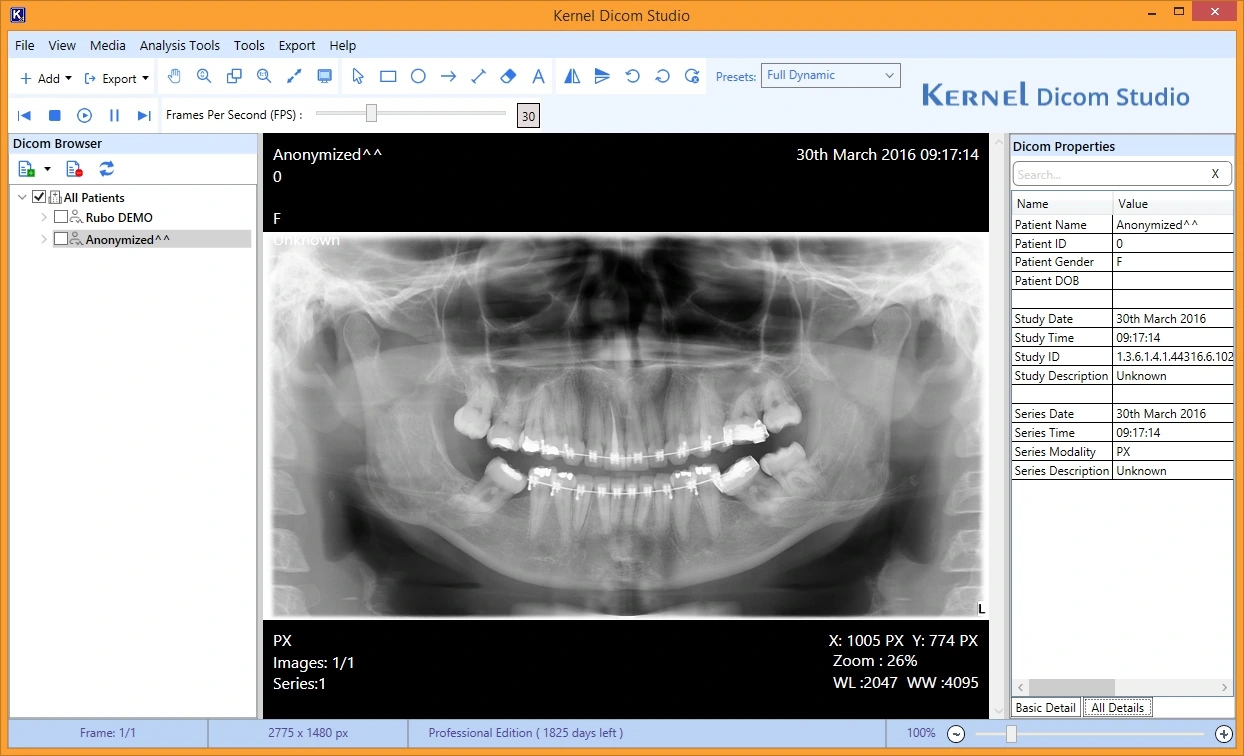
Step 5: Use options like Windowing, Zooming, Panning, and other image Analysis Tools to review image precisely.
You can use the Anonymization feature to hide patient identifiers, and the export option in the upgraded version will allow you to export DICOM images to JPEG, PNG, AVI, or MP4 file formats.
Final Words
There are not many reliable methods to open DICOM files; therefore, using a professional tool will be more helpful. Try our DICOM file viewer to easily handle all your files on Windows PC. However, it would be better if you store multiple copies of a file in different locations to prevent data loss in case of hardware failure or system crashes.
Frequently Asked Questions
A: Yes, you can edit or adjust a DICOM image, but it is possible only with specialized software like Kernel DICOM Studio. It will allow you to anonymize an image by hiding the patient identifiers, adjusting frames per second, adjusting orientation, etc.
A: DICOM files typically store high-resolution and non-compressed medical images along with metadata containing a lot of critical information. All this data is stored within a single file, which increases the file size, often larger than 30 MB.