Read time: 7 minutes
In SQL Server, MDF file is a primary file that stores all the information about the database including tables, indexes, stored procedure, and views. Sometimes, that file gets corrupted due to various reasons, leading the database to become inaccessible. The corruption of MDF files could be major or minor, depending upon the reason for the corruption. In this blog, we will look at the common reasons why MDF files get corrupted and how to recover MDF file data in SQL Server.
What Causes Corruption in MDF Files?
Here are some common reasons listed why your SQL MDF file can become corrupted:
- Bad sectors on the hard drive.
- Defective disk controllers and drivers.
- Sudden power loss.
- Corrupted or damaged file headers.
- Independent LDF corruption.
- Insufficient disk space.
- Network disruptions.
- Live file mishandling.
- Malware or ransomware.
- Storing SQL inside a compressed folder.
- Poorly configured file encryption layers.
How to Recover MDF Files: Corrupted & Damaged Files?
Corruption in MDF files can happen due to any reason. Therefore, repair corrupt SQL database MDF files and retrieve SQL database objects smoothly, you can take into consideration the two well-known and doable methods for MDF Recovery.
- Retrieve Corrupted Data from Backup
- Recover Data from Corrupt MDF via DBCC CHECKDB
Method 1: Recover Corrupt MDF File From Backup
Always try to recover MDF file from the most recent valid backup first, as it minimizes data loss. But it will only recover that data which is present in the backup file.
In case the differential or transaction log backups are available, you must restore them in the right sequence. This way you can recover the most recent changes. Post-backup, do verify that the database opens correctly and check that tables, records, views, and other MDF objects are available. If no backup exists, proceed to the next recovery method.
Method 2: Repair MDF File Corruption via DBCC CHECKDB
Here are the steps that you need to follow to run DBCC CHECKDB to repair corrupt MDF file in a SQL server database:
Step 1: Set the database status to emergency mode if the database is in problematic state and you attempt emergency-level recovery or access.
ALTER DATABASE [Your_DB_Name] SET EMERGENCY
Step 2: Run DBCC CHECKDB on your corrupt SQL database with the help of following command:
DBCC CHECKDB (Name of the corrupt Database) WITH ALL_ERRORMSGS, NO_INFOMSGS
Step 3: Now, change the database mode to single user with:
ALTER DATABASE [YourDatabaseName] SET SINGLE_USER WITH ROLLBACK IMMEDIATE
Step 4: Moving ahead, run the repairing query.
DBCC CHECKDB (‘YourDatabaseName’, REPAIR_REBUILD);
(For minimum level repair = repair_rebuild)
ALTER DATABASE [YourDatabaseName] SET MULTI_USER
Step 5: If DBCC CHECKDB commands suggests using REPAIR_ALLOW_DATA_LOSS, then execute the below command:
ALTER DATABASE [YourDatabaseName] SET SINGLE_USER WITH ROLLBACK IMMEDIATE
DBCC CHECKDB ([YourDatabaseName], REPAIR_ALLOW_DATA_LOSS) WITH ALL_ERRORMSGS, NO_INFOMSGS;
ALTER DATABASE [YourDatabaseName] SET MULTI_USER
Drawbacks of Using Manual Methods
- Manual methods are a little bit risky and time-consuming. Users who don’t have proper time to finish the manual methods as described cannot get the oriented result.
- SQL Server is a technical thing, and users with no technical background cannot manage it. So, users should have the technical knowledge of SQL Server. Non-technical background users can face some interruptions while using manual methods.
- However, most users complain that they don’t get any oriented results with these manual methods. After completing these manual methods, they didn’t arrive at any results.
When SQL Server Cannot Repair or Access a Database
If you don’t have a usable backup and SQL Server cannot successfully repair or access the corrupted database, a specialized SQL recovery tool can be considered for extracting recoverable data from the database files. Kernel for SQL Database Recovery is specifically designed to repair corrupt MDF files caused by SQL database corruption issues.
It restores tables, records, views, keys, and other supported objects from the corrupted MDF file safely. Additionally, it scans the corrupted files and provides a preview without live SQL Server connection.
Here are the detailed steps of the software to repair SQL MDF file and recover data accurately:
Step 1. Click on the Browse button to add the corrupted MDF file that you want to repair and click Recover.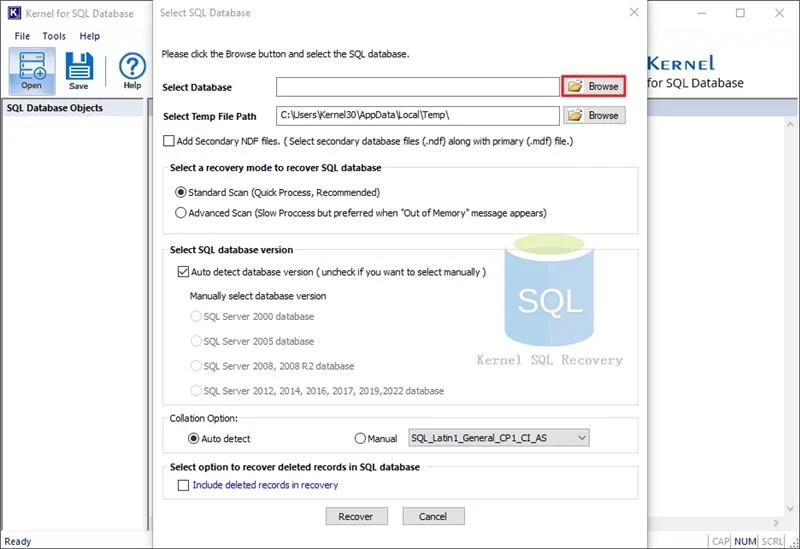
Step 2. The tool will start recovering the MDF file. Once it is complete, you can see the MDF file data in the left pane of the tool.
Step 3. You can click any folder to preview its content in the software. Select the desired data that you want to recover and click Save.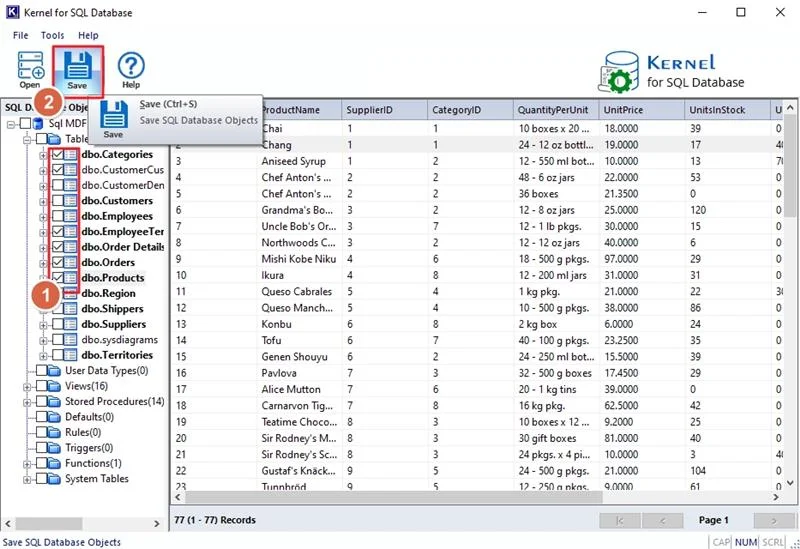
Step 4. The saving mode will appear on the screen. From here, you can save the MDF file to SQL Server, save SQL as Script, or CSV file format. If you wish to save to SQL Server, then enter the details for SQL Server and click OK.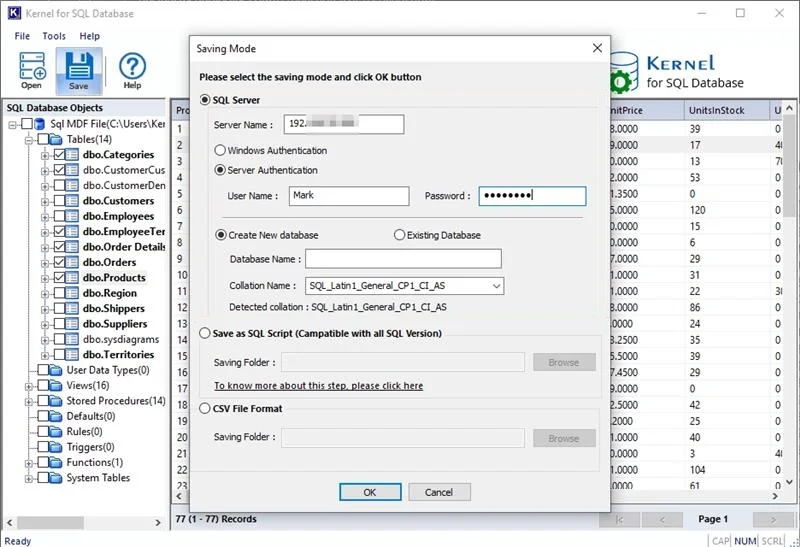
Step 6. The software will start saving the MDF file. Once the process is complete, a notification will display on the screen confirming the same. Click OK to end the process.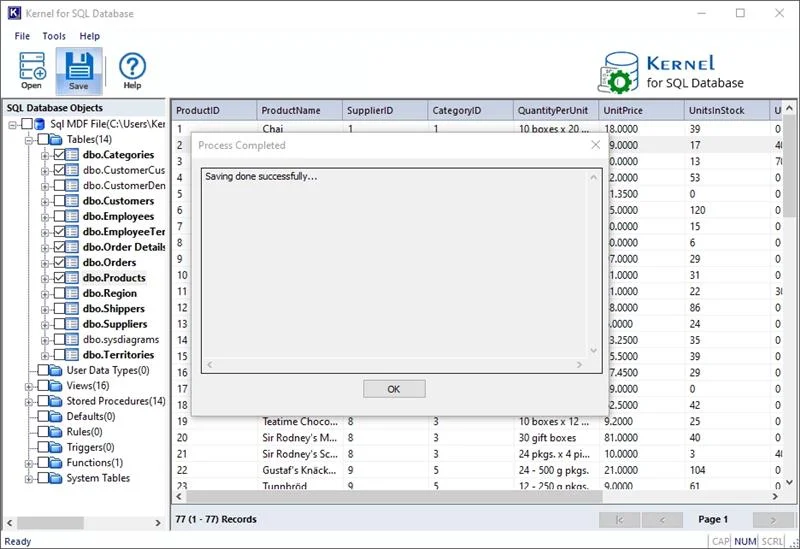
Suggested Measures to Prevent MDF Files from Corruption
Following precautionary steps can be taken to save the MDF file from corruption:
- Maintain transaction-log, full, and differential backups as appropriate.
- Monitor storage health and disk space regularly.
- Address all I/O, hardware, and storage errors promptly.
- Always keep SQL Server and relevant drivers/firmware updated according to your environment.
- Avoid moving SQL Server database files and manually modifying it while the database is online.
- Use appropriate storage and high-availability/recovery configurations for critical databases.
Final Words
If your MDF files are corrupted, we hope you are now well-aware of the best ways to counter MDF corruption issues. When dealing with minor corruption, using the DBCC CHECKDB command with the SQL Server is the ideal approach to repair corrupt MDF file. For major corruption, you must look to use reliable SQL software that could help recover and repair MDF files. For any more assistance on the tool, you can download the trial and take the hands-on experience.
FAQs
Yes, in some cases because DBCC CHECKDB can identify database consistency errors and may repair certain types of corruptions. Do remember that recovery is not guaranteed without backup.
In most cases you cannot attach a corrupt MDF file to another Server. If the MDF file is corrupted, SQL Server may not allow you to attach it and will show an error.
It is the last resort. This command repairs corruption by deleting the corrupted database pages, which means you may lose some data.




![Resolve SQL Server Error 18456 [100% Working Solutions]](https://www.nucleustechnologies.com/blog/wp-content/uploads/2009/10/error-sql-server-error-starting-esri_sde-service-93-dbms-error-code-18456.jpg)