Top Use Cases for Kernel for Linux Data Recovery

Recover files from EXT2, Ext3, and Ext4 file system

Recover files from EXT2, Ext3, and Ext4 file system

When important files are lost from an Ext2, Ext3, or Ext4 partition, our Linux Data Recovery software can scan the storage and recover available files and folders. Recover data from deleted, formatted, and inaccessible partitions and lets you preview the recoverable data before saving it. It also supports ReiserFS and JFS file systems for broader Linux file recovery.

Linux Hard Drive Recovery from Different Storage Devices

Linux Hard Drive Recovery from Different Storage Devices

Perform Linux hard drive recovery from supported internal and external storage devices. The software supports storage devices connected through SATA, SCSI, EIDE, USB, and FireWire interfaces. It also helps recover files from supported removable and external storage devices. Save recovered files to a separate healthy storage location to avoid overwriting the source data.

Preview Linux Data Before Recovery

Preview Linux Data Before Recovery

Preview scanned files and folders before you save them. The preview helps you identify the required data and select specific files or folders for recovery. You can select the files and folders you want to recover instead of saving the entire scan result.

How to Recover Linux OS Data

Follow the below-given steps to recover deleted, lost, and inaccessible Linux OS files:

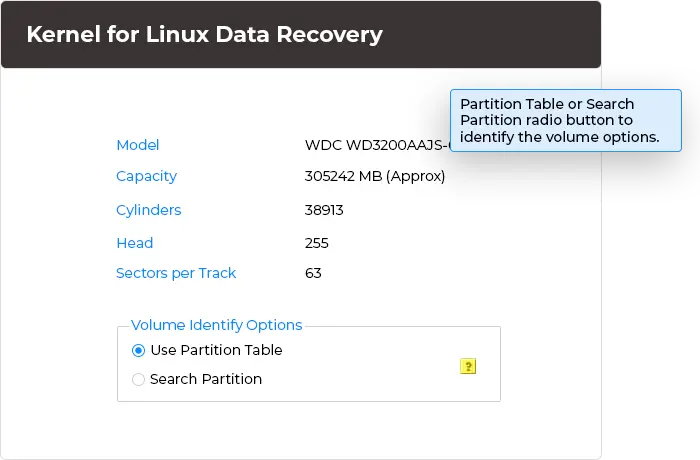
Browse storage, and select between click Use Partition Table or Search Partition
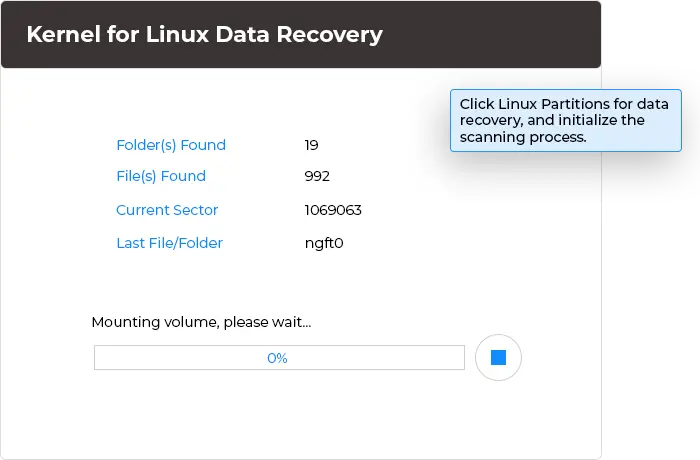
Scan the Linux partitions
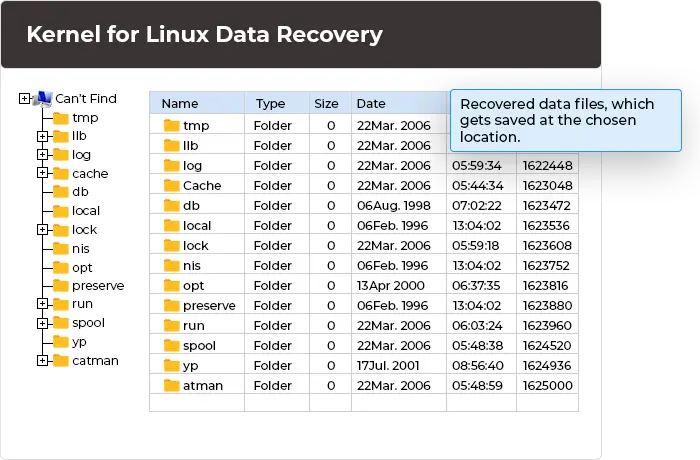
Save the recovered files in desired destination folder

Linux Data Recovery Software Key Capabilities

Look at the key features of the Linux Recovery tool to scan, recover, and save all your data from Linux drives:

Recover Lost, Deleted, and Formatted Partitions

Recover Lost, Deleted, and Formatted Partitions

Recover damaged, corrupted, and inaccessible Linux data files with this tool. Repair corruption from Group Descriptor Block, Super Block, or damaged Inode Table and recover files from Linux file systems.

Recover Data from Different Drives

Recover Data from Different Drives

Perform Linux recovery from different storage devices, such as SATA, SCSI, EIDE, USB, and FireWire drives. The Linux Recovery tool uses the same recovery workflow across supported storage devices.

Deleted Files Recovery Options

Deleted Files Recovery Options

Customize the recovery process with three different options: include deleted files with existing data, recover only deleted files, or exclude deleted files from the recovery results.

Manage Duplicate Files

Manage Duplicate Files

Recover data files from Ext2, Ext3, ReiserFS, and JFS file systems with this tool's three options. With its dynamic algorithms, it scans intricate damaged partitions and ensures effective recovery of valuable information.

Normal and Extensive Scanning Modes

Normal and Extensive Scanning Modes

The Linux Recovery tool offers Normal Search for standard recovery and Extensive Search for deeper scans when Normal Search fails to find the required files or the partition structure is unavailable.

Search and Filter Files

Search and Filter Files

Use search and file filter options to locate specific recoverable files and folders. Select the required data from the scan results and preview it before you save it to another storage location.

Recover Ext2, Ext3, Ext4, ReiserFS, and JFS Data

Recover Ext2, Ext3, Ext4, ReiserFS, and JFS Data

Recover files and folders from multiple Linux file systems, including Ext2, Ext3, Ext4, ReiserFS, and JFS. The Linux Ext2/Ext3/Ext4 Data Recovery for Windows software scans supported partitions and displays the recoverable data for preview before recovery.

Save Recovery Snapshot

Save Recovery Snapshot

Save the recovery snapshot to preserve scan information for later use. You can use the saved snapshot to resume the recovery process from the previous point instead of starting the scan again.

Recover Linux Data Through Windows

Recover Linux Data Through Windows

Use the Windows-based Linux Recovery software interface to perform Linux Ext2/Ext3/Ext4 data recovery from Windows OS. You do not need to navigate the Linux command line to scan and preview recoverable files through the software interface.

Frequently Asked Questions - Linux Data Recovery Software

What is Kernel for Linux Data Recovery?

Kernel for Linux Data Recovery is a software that allows users to recover lost, deleted, formatted, or inaccessible files from Linux storage devices and partitions. It supports Ext2, Ext3, Ext4, ReiserFS, and JFS file systems and provides a Windows-based interface for scanning and recovering Linux data.

If my computer's hard drive fails, how do I execute Kernel software for Linux data recovery?

Connect an external drive or USB drive as the secondary port, which should have the Kernel software installed. After connecting the secondary drive, you can proceed with the recovery of any damage or corruption from Linux OS.

What is the difference between Normal Search and Extensive Search?

Normal Search is the recommended option for a standard recovery scan, whereas Extensive Search performs a deeper scan and can help locate data when the normal scan does not find the required files or when partition information is unavailable.

Can I recover deleted files from an Ext4 partition?

Yes, our Linux Data Recovery supports Ext4 partition recovery. Simply select the required Linux partition, run a scan, preview the recoverable files, and save the required data to another storage location.

What is the chief function of Save Recovery Snapshot in the Kernel for Linux Data Recovery tool?

The Save Recovery Snapshot saves the recovery logs containing the information of recovered files with date and time. It saves recovered data on the system and uploads it later to save time in the next recovery process.

What types of drives are supported by the Kernel for Linux Data recovery software?

The Kernel for Linux Data recovery software supports IDE, SCSI, EIDE, SATA, PAN, USB, and Firewire drives. The functionalities and operations performed by the software remain the same irrespective of the type of drive you are recovering.

What are the duplicate file recovery options in this Linux Recovery tool?

The Linux File Recovery software provides three duplicate file options: Rename duplicate file, Overwrite duplicate file, and Skip duplicate file. Select the option that matches your recovery requirement before you save the recovered data.

Can I perform Linux hard drive recovery from Windows?

Yes, our Linux Data Recovery software is compatible with all Windows OS and allows you to recover Linux Hard Drive data from Windows.

How would I upgrade my licensed version of the Kernel for Linux Data Recovery software?

You don’t need to be worried about the update thing, as the software itself has an inbuilt Live Update technology that enables the flow of updates from the centralized server to the Kernel software. So, purchase the software and live tension-free.

Video Tutorial of Kernel for Linux Data Recovery Software

Get a detailed video guide to know the working procedure of Kernel for Linux Data Recovery software.
Kernel for Linux Data Recovery software Video
play icon

Linux Data Recovery Software Prerequisites & recommendations

About SoftwareAbout Software

Version: 4.02

Release Date: Aug 2005

License Type: Home, Corporate & Technician

Version SupportVersion Support

All editions of Linux - Ext2, Ext3

System RequirementsSystem Requirements

Hard Disk: 50 MB of disk space

Memory: 64 MB Minimum

Processor: Intel® Pentium Processor compatible (x86, x64) or equivalent

Operating System: Windows 11, 10, 8.1, 8, 7, Vista, XP, 2000, 98, NT, 95 (FAT 16, FAT 32, NTFS, NTFS5), & Windows Server 2022, 2019 & older versions

Kernel for Linux Data Recovery

box
Home License

Ideal for home users with complete feature accessibility.

YOU SAVE $20
$69 $49
Buy Now
Corporate License

Comprehensive for business use within an organization.

YOU SAVE $50
$179 $129
Buy Now
Technician License

Designed for organizations providing services to customers.

YOU SAVE $100
$299 $199
Buy Now

We accept: inline cards payments

Kernel for ReiserFS Data Recovery

Bundle box
Corporate License

Comprehensive for business use within an organization.

YOU SAVE $50
$299 $249
Buy Now
Technician License

Designed for organizations providing services to customers.

YOU SAVE $100
$529 $429
Buy Now

We accept:

Kernel for JFS - Data Recovery

Bundle box
Corporate License

Comprehensive for business use within an organization.

YOU SAVE $100
$459 $359
Buy Now
Technician License

Designed for organizations providing services to customers.

YOU SAVE $100
$599 $499
Buy Now

We accept:

↑