What Data Can Be Viewed by This SQLite Viewer?

Explore all the data components that users can easily view and read using our advanced free SQLite viewer software.

Persistent Storage Components

Persistent Storage Components

Database File (.db, .sqlite, .db3, etc.), Tables, Rows (Records), Columns (Fields), INTEGER, REAL, TEXT, BLOB, Indexes, Views, Triggers, Schema Metadata, Foreign Key Constraints, User-Defined Functions (UDFs).

Temporary Components (Non-Persistent)

Temporary Components (Non-Persistent)

WAL file, Rollback journal, Temporary Tables (temp schema), Statement Cache, Page Cache (In-Memory Buffer), Virtual Components (Generated at Runtime).

Virtual Tables

Virtual Tables

FTS (Full-Text Search), RTREE, Eponymous Virtual Tables, JSON Virtual Table, Series Virtual Tables, E-mail Virtual Tables, CSV Virtual Table, Common Table Expressions (CTEs), Cursors.

How to Open and View SQLite Files?

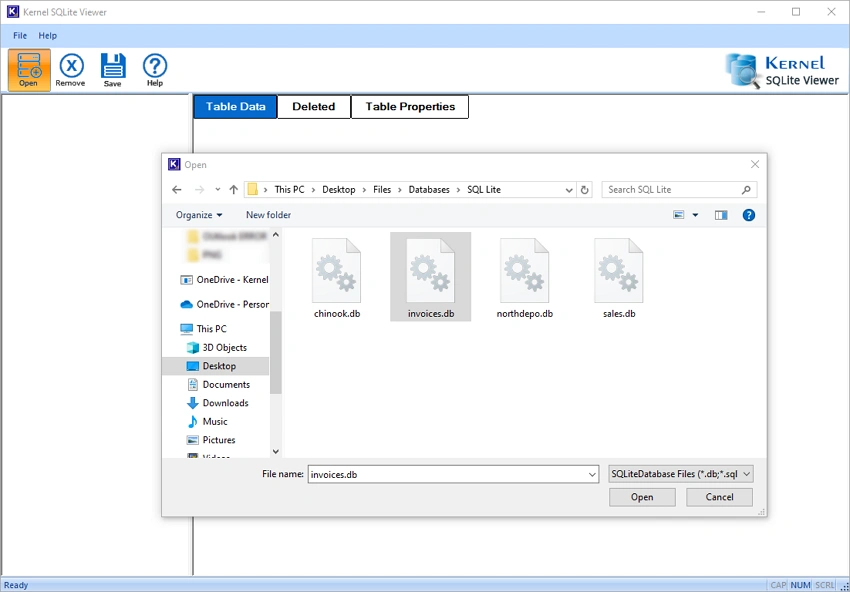
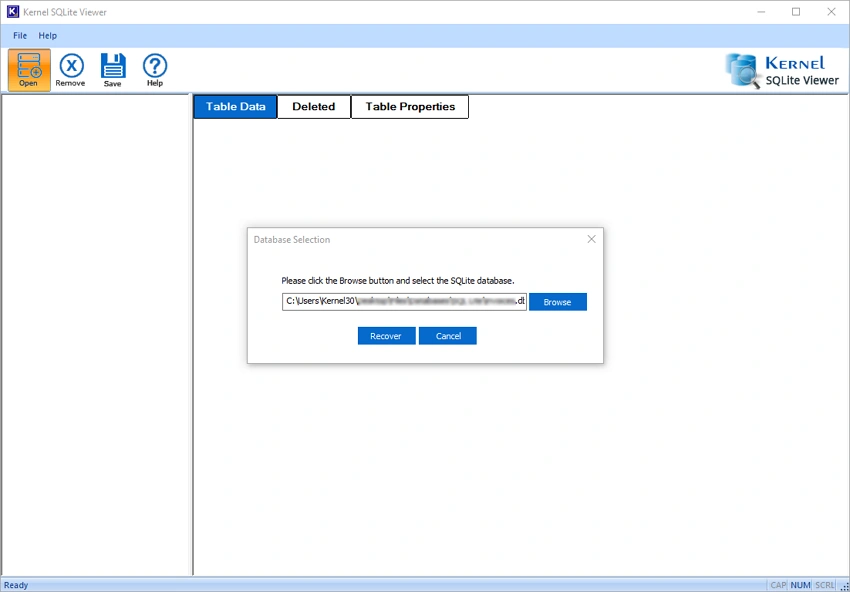
The SQLite Viewer allows users to view and read DB files content of healthy and corrupt SQLite files in just 3 simple steps.

Explore SQLite File Viewer Software’s Key Capabilities

Check out all the advanced features of the free SQLite viewer tool to recover and preview SQLite databases without any hassle.

Scan SQLite database file

Scan SQLite database file

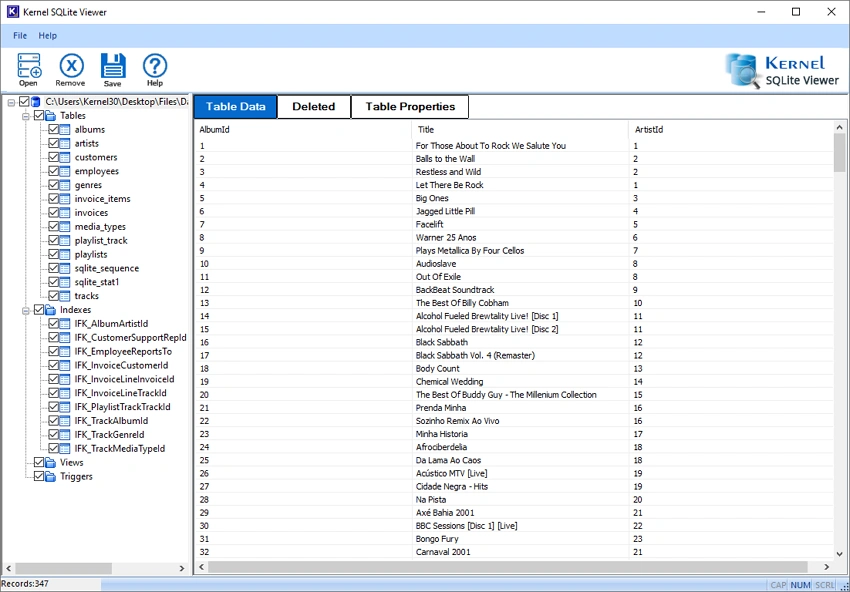
SQLite Viewer software scans corrupted, damaged, or inaccessible database files. Use its quick scanning mode to view and read all tables, indexes, views, triggers, and records from the database.

Preview SQLite database files

Multiple Preview Modes

The SQLite Database Reader offers three preview modes, including Table Data mode to read DB file’s tables, views, triggers, etc., Deleted mode to view lost/deleted tables, and Table Properties mode to preview key information about the tables.

View Journal file data

View Journal file data

Access and analyze SQLite journal files, such as transaction records, Write-Ahead Log (WAL file), and view rollback logs. Also, restore the damaged database after sudden SQLite crashes or interruptions.

Support multiple database file types

Support Multiple Database file Types

The SQLite Viewer software supports all SQLite file formats, including .db, .sqlite, .sqlite3, and .db3 files. Open .db files of any SQLite version and view their content effortlessly.

Show database records

Show Database Records

The SQLite file viewer tool displays all database records (32, 45, etc.) in their original structure. Additionally, previews complete columns and rows with exact numerical values, with the table intact.

No file size limitation

No File Size Limitation

The SQLite viewer supports databases of any size, from small files to large multi-gigabyte database files. Easily add any corrupt or healthy large-sized database files and open SQLite files instantly.

View Deleted Records

View Deleted Records

The SQLite file viewer software recovers the deleted records and allows you to view them with original metadata. With precise data recovery, you can view and read your recovered data exactly as it was before deletion, with no changes.

Access UNICODE characters

Access UNICODE characters

The SQLite file viewer software works with multilingual SQLite data and UNICODE characters. View multilingual data like Asian, Cyrillic, and Arabic, with UNICODE characters like symbols, emojis, and special characters.

Compatible with all Windows platforms

Compatible with all Windows platforms

The SQLite Database Reader tool supports all Windows Operating Systems, including Windows 10, 8.1, 8, 7, Vista, XP, 2000, 98, NT, and 95. Also, easily operates on all Windows Server 2022, 2019, 2016, 2012, and more.

Buy Online SQLite Viewer Tool and Save Database files

Frequently Asked Questions - Free SQLite Viewer Software

What is a DB file?

A DB file is a database file that stores structured information, such as records, settings, or application data. SQLite uses DB files to save and manage data in an organized format.

How can I view my corrupted SQLite database file with this software?

The free SQLite Database Viewer tool can easily read and view database files with the following steps:

Step 1: Download and install the SQLite Viewer software.

Step 2: Run the tool and add database files.

Step 3: The software will easily scan & retrieve all files.

Step 4: Select any specific file to view its content.

Step 5: Get a preview of selected data in hierarchical order.

Is the SQLite database prone to corruption?

An SQLite database is highly resistant to corruption. When accessing the database file after an application crash, operating system crash, or even a power outage, the partially written transaction ought to be automatically rolled back.

Why can't SQLite open the database file?

The SQLite database you are attempting to open may be corrupt, damaged, or inaccessible.

Can I preview my database with this SQLite Database Reader tool?

Yes, you can preview your database with this SQLite Database Reader tool?

Free SQLite File Viewer Software Prerequisites & Recommendations

About SoftwareAbout Software

Version: 25.0

Release Date: 29 Nov, 2023

License Type: Free

Version SupportVersion Support

SQLite: 3.36.0 and older ones

System RequirementsSystem Requirements

Hard Disk: 500 MB of disk space

Memory: 1 GB Minimum

Processor: Intel® Pentium Processor compatible (x86, x64) or equivalent

Operating System: Windows 11, 10, 8.1, 8, 7, Vista, XP, 2000, 98, NT, 95 Windows Server 2022, 2019, 2016, 2012, 2008 R2, 2008, 2003 R2, 2003

What Customers Say about Kernel Free SQLite Viewer

Thanks to help me in tough time

When the SQLite client was not present in the new system, and I had some database files then the SQLite Viewer helped me check some old tables and the content was useful too.

Alina
Lucia Stanley
  • Excellent
    97%
  • Good
    2%
  • Average
    1%
  • Below Average
    0%
  • Poor
    0%
Write a review
↑