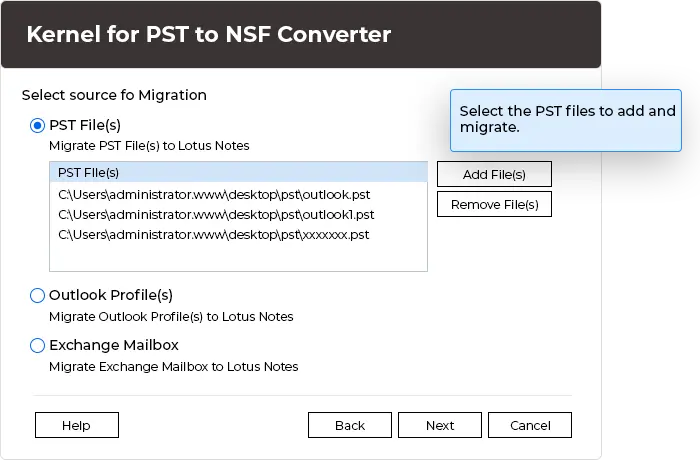
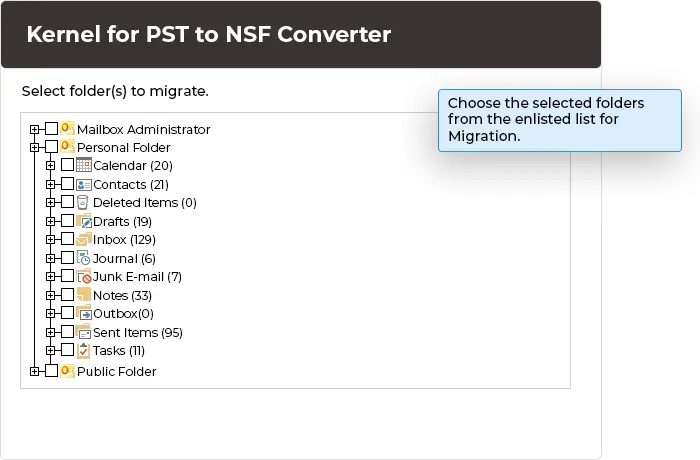
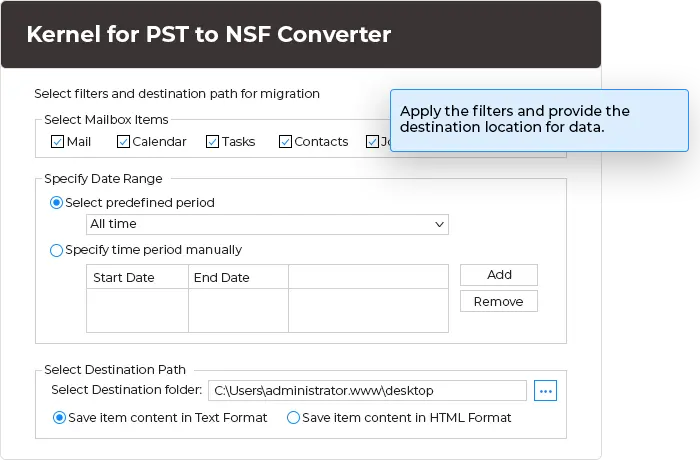
Here’s how to convert PST files to NSF in 3 simple steps using the software:
Get a brief introduction to the integrated features and capabilities of the PST to NSF Converter tool.
Convert an entire Outlook PST file to Lotus Notes NSF with ease. The PST to NSF Converter Tool converts emails, contacts, calendars, tasks, journals, notes, attachments, and other mailbox items to a new or existing NSF file.
Save your precious time with bulk PST to NSF conversion. Export multiple Outlook PST files to NSF in a single process. The Outlook to Notes Converter Tool can easily handle large PST file conversions without any limitation.
Convert Unicode PST files to NSF without any character limitations. The software preserves all languages, emails, symbols, codes, and data in the resultant NSF file.
Export Outlook PST data directly to an existing NSF file by simply providing its location. The PST to NSF Converter tool adds your mailbox data without creating a new NSF file to consolidate data in a single place.
To easily export PST files to NSF, the software requires Microsoft Outlook and Lotus Notes installed on the system. You must have pre-installed Outlook 97, 98, 2000, 2002, 2003, and Lotus Notes 6.5, 7, and 8 for PST conversion.
Save converted NSF files to a preferred location as per your needs. Keep your exported data on local drives, network folders, USB flash drives, or external hard drives accordingly.
No need to convert an entire PST file data, as the software allow you to choose the specific PST folder for conversion. Control your PST to NSF conversion by removing unnecessary folders in the resultant file.
Convert PST files to NSF without hampering the original mailbox structure and formatting. The software makes sure that every converted item remains accurate and accessible in the output file.
The Outlook PST to NSF Converter software comes with a user-friendly interface to export PST files to NSF PST without any hassle. With the software's interactive GUI, both technical and non-technical users can convert PST to NSF with ease.
Yes, the software allows you to convert bulk PST files to NSF in a single process.
No, the PST to NSF Converter software supports large Unicode PST files without any size restrictions.
Yes, the Outlook to Notes Converter tool comes with a folder-selection feature that allows you to convert specific folders to NSF as per your requirements.
Yes, the software lets you save converted PST data into a new as well as an existing NSF file. To save PST data into an existing NSF file, you just need to provide its location.
Yes, you must have a pre-installed Microsoft Outlook and Lotus Notes on your system to convert PST files to NSF.
Yes, our Outlook PST to NSF Converter software allows you to export PST files to NSF while preserving the original mailbox structure with formatting and item properties.
Yes, the software supports both healthy and corrupted PST files. It can easily repair your corrupt PST file first and then convert it into a new NSF file.
Version: 12.01.01
Release Date: Jan 2012
License Type: Free
Hard Disk: 2 GB of disk space
Memory: 4 GB Minimum
Processor: Intel® Pentium Processor compatible (x86, x64) or equivalent
Operating System: Windows 11, 10, 8.1, 8, 7, Vista, XP & Windows Server 2022, 2019, 2016, 2012, 2008 R2, 2008, 2003 R2, 2003.
Our company recently switched from Microsoft Outlook to Lotus Notes, and Kernel PST to NSF Converter securely converts all Outlook PST files to NSF format.