Related Posts
Read time: 9 minutes
PlayStation 4 or PS4 is widely recognized and admired gaming console known for its user-friendly design as well as efficient performance. Whenever a user sees a white light on their PS4 device, they’re often startled considering it White Light of Death.
Well, WLOD on PS4 is actually a serious concern that needs to be considered significantly. It’s been happening to a lot of people lately, and it can be really frustrating when your console just stops working. Well, we are here to assure you that there is hope! We’ve fixed our PS4 with one of these methods, and we are positive that at least one of them will work for you too. So read on, and hopefully, your console will be up & running again in no time.
White light in PlayStation 4 can be of different types and have different meanings. Not every white light you see in your console represents an issue. It is therefore important to understand these light patterns:
There are many causes for the PS4 White Light of Death issue, but the most common one is hardware failure. Other causes include:
There are some solutions that you can give a try before running into a PS4 repair station. This might help you fix PS4 white light of death and restore your console without making a hole in your pocket.
One of the most general causes of the PS4 WLOD is hardware damage. If your PS4 was dropped or otherwise subject to physical trauma, it’s possible that one of the internal components has become dislodged or damaged.
To check for hardware damage, first, make sure that your PS4 is properly plugged into an outlet and that all cables are securely connected. Then, power on your PS4 and listen for any unusual sounds coming from the console. If you hear a grinding noise or see sparks coming from inside the PS4, unplug it immediately and contact Sony for assistance.
If your PS4 appears to be rightly plugged in and there’s no obvious hardware damage, the next thing is to try a power cycle. This simply means turning off your PS4 completely and then unplugging it from the power outlet for at least 30 seconds.
After 30 seconds have passed, plug your PS4 back in and turn it on. In most cases, this will fix the WLOD issue and allow you to continue playing your games.
This issue can be caused by many factors, but most often, it is due to outdated controller drivers. Here, we will see how to update the controller drivers to fix this issue.
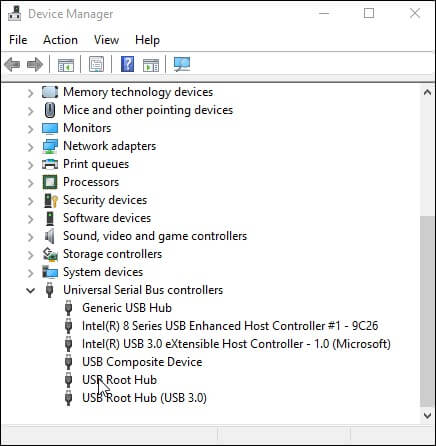
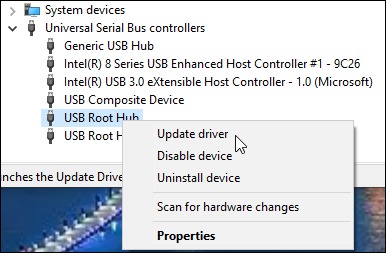
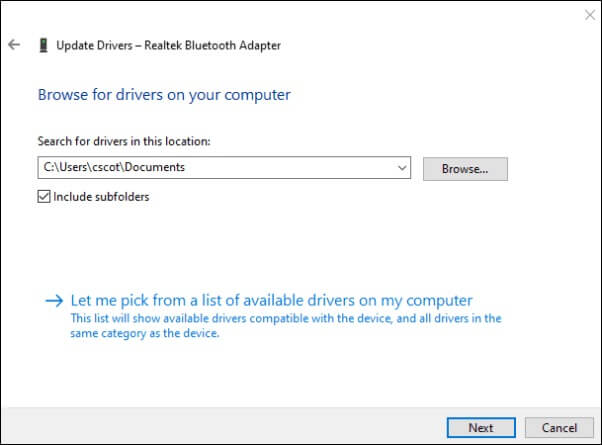
By following the steps above, you should be able to update the controller drivers and fix the PS4 white light of death issue.
PS4’s Safe Mode menu is a great way to solve issues you may be having with your console. The Safe Mode menu allows you to start the console with only the most basic functions activated. This can help if your PS4 is not starting up properly. It can also help if your console is stuck in an infinite loop, or you are experiencing other issues.
To enter Safe Mode on the PS4, follow these steps:
In case you are still stuck with the white light of death error, the controller reset becomes the viable option for you. Go through the steps below.
If neither of the above solutions works, it’s possible that you’re dealing with a software issue. The first thing to try is updating your PS4’s firmware to the latest version. You can perform this by going to Settings > System Software Update and following the prompts on-screen. Once your firmware has been updated, restart your PS4 and see if the WLOD issue has been resolved.
At times, the troubleshooting process of your PS4 can be risky with the risk of losing your important data but do we have an alternate option to escape this problem? Yes, we have an ultimate solution for all such tech needs.
The PS4 data recovery is possible with the help of the Kernel for Windows Data Recovery tool. This tool can recover lost, deleted, or corrupted data from a PS4 hard drive or any other storage device connected to a Windows system. The tool supports all versions of Windows operating systems, such as Windows 365, 11, 10, 8.1, 8, 7, Vista, XP, 2000, 98, NT, and 95.
The tool has a simple and easy-to-use interface. The software also comes with a free trial version. To recover lost or deleted data from PS4, you just need to follow the below- mentioned steps:
This tool is an effective and reliable tool that can be used for recovering lost or deleted data from PS4. This tool offers various features like a preview option, selective recovery, etc., making it a better choice than other tools available in the market.
These are our top ways to fix the PS4 White Light of Death issue. We hope one of these methods works for you and your console! If not, don’t worry – we’ve still got an ultimate troubleshooter for the recovery of your important data. Make sure that you use Kernel Windows Data Recovery solution for once before giving up on your PS4 altogether. It will help you recover your data even if there’s problem with your device.
No, not necessarily. Most of the time a solid white light represents that your console is working fine. The issue is only when the screen stops working and becomes blank.
To fix the error in PS4 device, follow the given practices:
1. Update or reinstall the controller drivers
2. Reset your PS4 console
3. Enter the safe mode on your PS4
4. Update the firmware in your PlayStation