Read time: 6 minutes
Rackspace email is an email hosting service. Businesses (mainly small & medium) that don’t have their own email servers rely on it to create and distribute email addresses to employees. Sometimes, although rare, situations arise when you have to export emails from the Rackspace servers, but you don’t know the right way to do it.
Worry not, I am here to help you. Last month, I was in a similar situation and was looking for legitimate methods to move to Apple Mail from Rackspace. Moving forward, I will share with you all my findings, and we will cover all the available techniques that allow you to export Rackspace email to PST. But before that, let’s look at some of the most common reasons why organizations or individuals move away from Rackspace.
Reasons to Export Rackspace Email to PST
Several reasons can make you export your Rackspace emails. The top ones are as follows:
Backup
It’s the number one reason why anyone searches for ways to save Rackspace email to PST. Emails hold more than just messages; they serve as proof of conversation. Therefore, users export emails from Rackspace to local storage.
Migration
Another common scenario that leads to email export is the need to move emails from Rackspace to PST-supported environments like Exchange On-Premises or Exchange Online (Office 365). The email migration becomes easy when you convert Rackspace email to PST.
Offline Access
Ever faced a situation when you needed to look for a particular bill received as an attachment in an email? But the internet broke down. You can avoid such catastrophes with a simple export operation for anytime offline accessibility.
Compliance
Legal audits and compliance require you to extract a selective list of emails for submission. If you save emails to a portable format like PST, it simplifies the process and saves you both time and manpower.
Methods to Export Rackspace Email to PST
As I said earlier, we will use two native solutions and one advanced tool to export emails. But, before we start, let’s discuss some important things that you must do:
Convert Rackspace Email to PST: The Pre-requisites
Gather IMAP Details
To add the Rackspace email to Outlook or any email client, you need specific IMAP server details for the Rackspace account. You can get the required information on the Rackspace email settings page.
Grant Permissions
To export emails with Archive Manager, you must be the administrator with Administrator permission. You can also use the Archive Manager if you have the Compliance Officer or Search Administrators permission.
Backup Emails
Whether you do a complete mailbox extraction or convert only a few emails, always perform a complete email backup. It’s important to have a fresh copy of all your emails to help in events like data loss or corruption when you save Rackspace email to PST.
Now, let’s get started with the export methods and begin with the fastest one.
Method 1: Use Archive Manager to Export Emails from Rackspace
If you are the admin with complete control over the email of everyone in your organization, email export will be a super-fast job for you. Rackspace has an internal tool, Archive Manager, that allows you to select and archive emails to PST and save them to the location of your choice. The steps to use the tool are:
Step 1: Login to the Rackspace Archive Manager with the admin credentials.
Step 2: Click on the Searches option in the left side pane.
Step 3: Now, click on the +New button on the right-side to create a new search.
Step 4: Click on the Simple or Advanced search tab option and enter a term to search emails.
Step 5: When the search is complete, click Save and fill out the Basic Information section. Click Save again.
Step 6: Now, find the name of the search you created in the last step and click on the Run button (at the extreme right).
Step 7: Select all the emails that you want to export and click on the Export sign on the top-right corner. Click Next to confirm.
Step 8: Select the output file format as PST and give an Export Name. Then, click Request Export
Step 9: Finally, click the Export tab. Find the search and download it.
Method 2: Using Third-Party Email Client (Outlook)
You can also use the Outlook to export Rackspace email to PST. The steps to do that are:
Step 1: Open Outlook (install if needed), select the File tab and click on the Add Account button.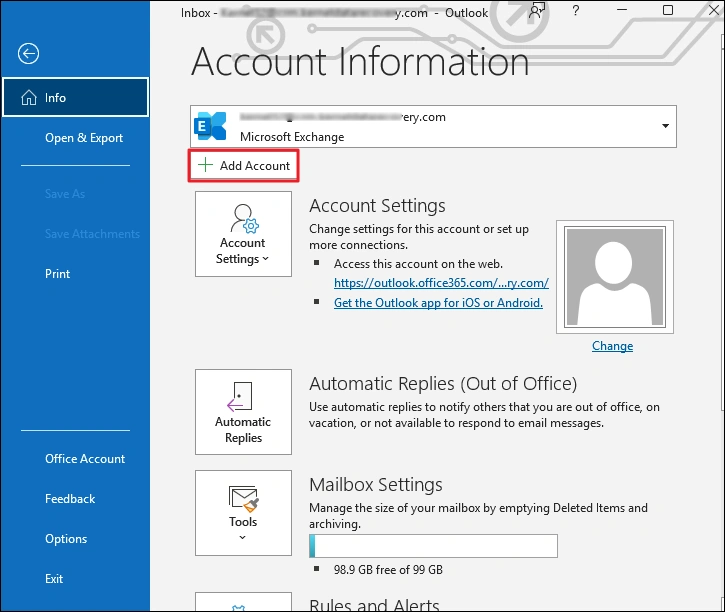
Step 2: Enter the Rackspace email address, click the Advanced options button and tick the “Let me set up my account manually” option. Then, click Connect.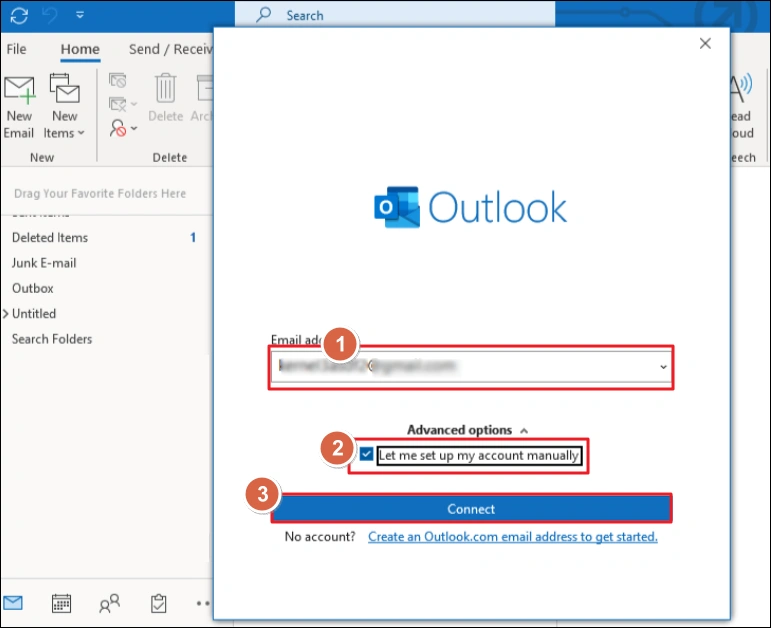
Step 3: Click on the IMAP option.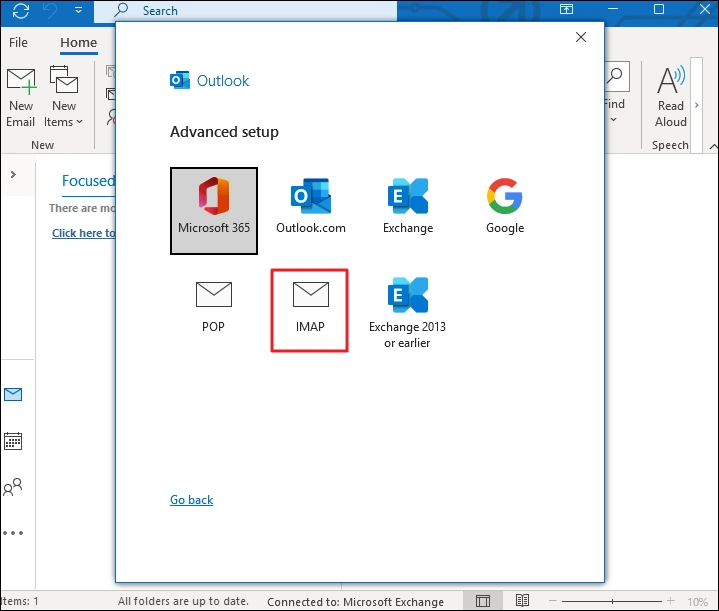
Step 4: Enter the IMAP account details and click Connect.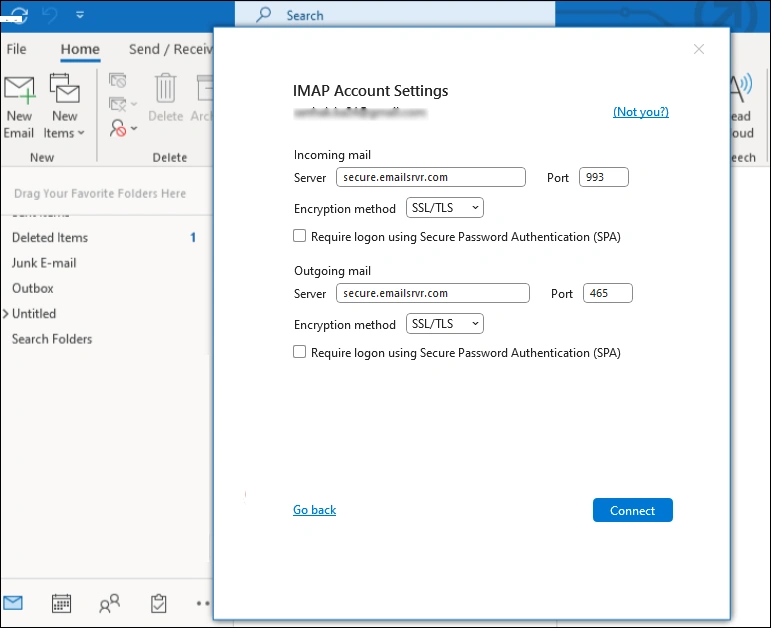
Outlook will synchronize the emails from Rackspace server. The process will take some time. When you can see all the emails and folders, export the Outlook emails to PST using the Import/Export feature.
Method 3: Convert Rackspace Email to PST with an Advanced IMAP Backup Tool
The manual methods work but have certain limitations. It’s not reliable for bulk email export, and you also must have administrator-level permissions. Therefore, admins usually have professional email backup tools like Kernel for IMAP Backup and Restore.
The IMAP Backup tool allows for limitless email extraction and gives you the option to save Rackspace email to PST, EML, MSG, and many other file formats. Extract single or multiple emails easily with the user-friendly interface of our feature-rich tool. Furthermore, you can also use the tool to restore your emails from PST back to the Rackspace email when required.
Conclusion
We discussed all the top working methods (manual & automated) to export Rackspace email to PST. If you are an admin or have the necessary permission, choose the Archive Manager method. Others can use Outlook to export single mailbox data for free.
For a quick and error-free data extraction, you must download and use Kernel for IMAP Backup and Restore. It’s a one-stop solution for all your backup needs. In addition to Rackspace, the tool can backup Gmail, Yahoo, Zoho, and all the IMAP-supported email servers.