Read time 4 minutes
Summary: Does Office 365 have email address policies? No, unfortunately. Unlike On-Prem Exchange and Hybrid environments, admins in Office 365 can’t automatically assign email addresses to users. Office 365 lacks email address policies that make it very easy to assign users with custom domains. Mainly because of SaaS simplification and focusing on Cloud-only features, these UI policies were removed by Microsoft. But alternatives to this exist like PowerShell scripts and Azure AD attribute management.
As of 2023, Microsoft removed email address policies in Office 365 that let users create personalized domain connected to their Outlook mailbox. On-prem Exchange users struggle to settle in Office 365, especially if email address policies were a large part of what feature was useful for them. The lack of this feature in the cloud platform makes it very tricky and tedious for the On-Prem users as they now have to do this task manually.
Most people think that email address policy is a priority for large organizations only, but that’s not the case every time. It could be a primary requirement for any business regardless of the size of the business or IT team.
Today, we are going to talk about the Exchange email address policy and why they are required while performing a migration to the cloud.
What is an Email Address Policy?
As per Microsoft, an email address policy defines the rules that create an email address for recipients in your Exchange organization. Also, email policies for Exchange Server 2010, 2013, 2016, and 2019 are similar from the beginning. Now, you might be curious to know why email address policies are used while migrating to the cloud.
An organization can have single or multiple domains, and users may receive their emails to different addresses. But, with the email address policy, you can easily control this flow. The SMTP domains that can be used in email address policy are defined as accepted domains, and they are already automatically configured after migrations.
An email address policy generally consists of three essential components:
- Email address template – It defines the email address format for the recipients
- Recipient filter – Defines the recipients whose email addresses are configured by the policy
- Priority – Defines the order to apply the email address policies
Email Address Policy Issues in Office 365
In on-premises Exchange Server, you can use email address policies to assign the desired email addresses automatically to users. But this feature is not available in Office 365 (Exchange Online) (however, this feature is visible in EAC, though not functional).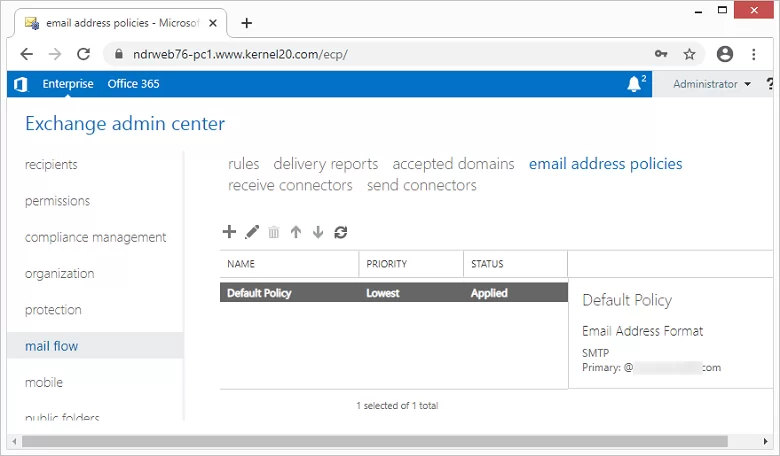
It is believed that this feature has been avoided to ensure security in the cloud environment. However, Office 365 users find it very difficult to update the email address of Exchange Online users when the users have mailboxes only in the cloud. So, many users try to implement it with the help of PowerShell scripts. So, if you are migrating mailboxes to the cloud, you should be aware of these limitations.
Note: When you are using the Hybrid configuration, the address policies are updated automatically for every on-premises user.
Office 365 Data Migration Issues other than Email Address Policy
Office 365 migration is a tedious task that requires a lot of attention and advance planning. The manual migration methods are difficult to perform, and users often make mistakes while migrating to Office 365. There’s also a high chance of data loss during the migration.
Thus, experts recommend using a professional tool like Kernel Office 365 Migration, to bypass many of the difficulties and risks faced during Office 365 migration.
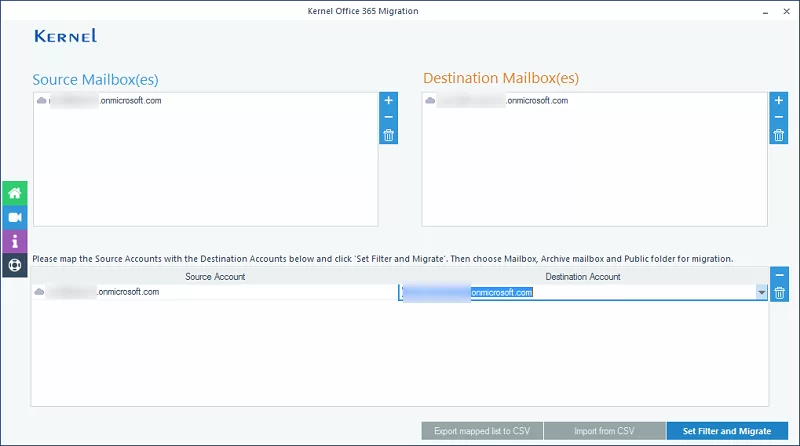
It is a useful utility to migrate Exchange Online or Office 365 mailboxes without any hassles. This tool offers quick Office 365 tenant to tenant migration with multiple features like selective migration, incremental migration, etc. Also, the workflow of the software is simple and straightforward.
Conclusion
Though email address policy in Exchange Server is very helpful at the time of migrations, this feature is not functional in Exchange Online (Office 365). The absence of an email address policy is just one of the difficulties faced during migration of Office 365 data. But many challenges of manual migration can be avoided if you try a professional tool for Office 365 migrations.
Frequently Asked Questions
A. No, it’s not possible to create Email address policies in Office 365 like the ones in On-Prem Exchange Server. Admins must opt for alternatives like PowerShell command scripts, Hybrid Exchange settings, or Azure AD attribute management.
A. PowerShell Scripts are perfect to automate custom email address creation in Office 365. Other workarounds include Azure AD attribute management and Hybrid Exchange setups.