Read time: 6 minutes
Backing up your emails should be a mandatory practice to protect essential emails. Users export Rediffmail emails to PST to back them up in a reliable and easy to access format. It is necessary when shifting email clients and to protect important data. This blog highlights the best practices to export Rediffmail email to PST format and the reasons to do so. Additionally, an automated solution is also given to simplify the export process and transfer Rediffmail emails in bulk without any data loss. Read this blog to know more about this process.
Reasons to Backup Rediffmail Emails
Undoubtedly, Rediffmail is but some scenarios require users to back up their emails to a more reliable format like PST. Specific reasons to backup Rediffmail emails are:
- PST is a widely compatible format that can be viewed and accessed by users globally
- You cannot retrieve your emails if the Rediffmail account gets locked. Backing up your emails helps you access important data, even if you can’t access your account.
- Any users can access your emails if your identity gets lost or miss-interrupted due to any reason
- If you need to migrate your Rediffmail IMAP mailboxes to PST or any other format
- To transfer your Rediffmail mailbox data to any other platform
Manual way to export Rediffmail email to PST
The manual method for an efficient Rediffmail backup involves configuring Rediffmail account in Outlook. The steps for this are given below:
Enable IMAP in Rediffmail
- Sign in to your Rediffmail account and click on Gear icon > Settings.
- Click on Mail Settings/ Account Settings in the settings window.
- Look for IMAP settings and enable IMAP in your Rediffmail account.
Configure Rediffmail account in Outlook
- Open Outlook application and click on File tab.
- Click on Add Account option and enter your Rediffmail Email address.
- Click on Connect.
- Your Rediffmail account is successfully configured with Outlook.
Export Rediffmail email to PST with Import/Export tool - Now, backup all your Rediffmail emails with the help of Import/Export tool of Outlook.
- Export all your emails in PST format and save them at the location of your choice.
Professional IMAP Backup Tool – For Instant and Secure Rediffmail Backup
If you cannot backup Rediffmail emails with the above method, Kernel IMAP Backup and Restore can help you backup all your emails without any errors. This IMAP Server backup tool is designed with intelligent functionalities to offer a secure and scalable email backup. With Kernel IMAP Backup, you can back up your Rediffmail emails to EML, PST, MSG, HTML, DOC, DOCX, and PDF formats. Furthermore, the tool offers a free trial version that enables you to backup 10 items per folder. The tool is integrated with intelligent features that make the backup process easy, such as:
- An advanced tool to backup all your Rediffmail mailboxes to various formats
- Ideal for incremental backup and allows you to skip already backed up items from mailboxes
- Backup multiple mailboxes at once by adding your IMAP email account to the tool in just three simple steps
- Uses a CSV file for the direct addition of multiple IMAP mailboxes for backup
- Integrated with advanced filters like folder selection, date range, include/exclude a folder, and date selection
- It doesn’t affect the hierarchy and structure of mailboxes during and after the backup
- Ideal for all IMAP email servers like Rediffmail, Gmail, G Suite, Amazon WorkMail, Zoho Mail, etc.
Quick steps to export Rediffmail email to PST
Launch Kernel IMAP Backup and Restore tool on your system and select Backup option.
Click on Add to configure the Rediffmail account to the tool.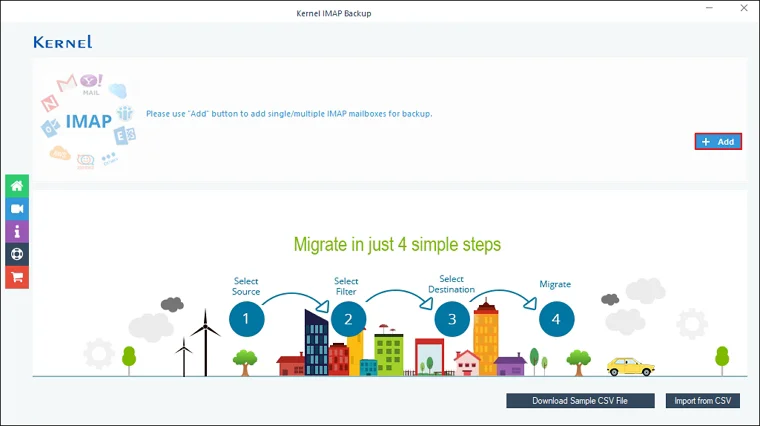
Enter details like Server Name, User Email, Password, and Port Number to configure the account and then click on Add.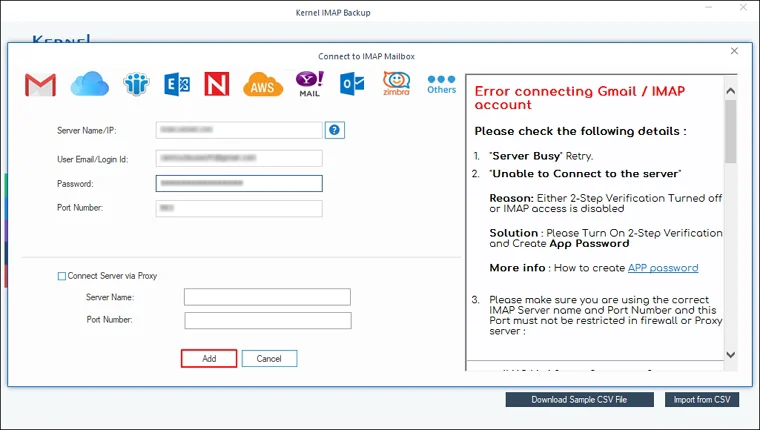
Once the mailbox is added, click on Set Filter and Migrate.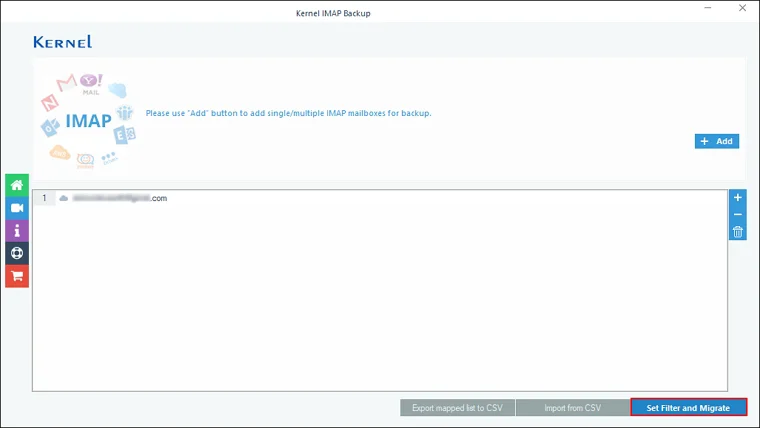
Apply filters like Date Filter, Item Type filter, option to exclude Deleted and Empty folders, and the Incremental migration option. Click on I am OK, Start Migration option.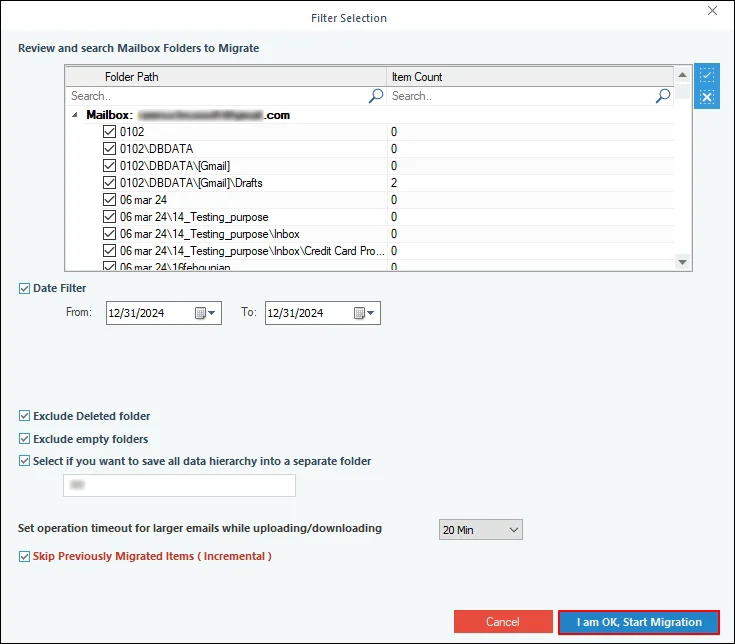
Choose PST as the output format and choose the desired location to save data.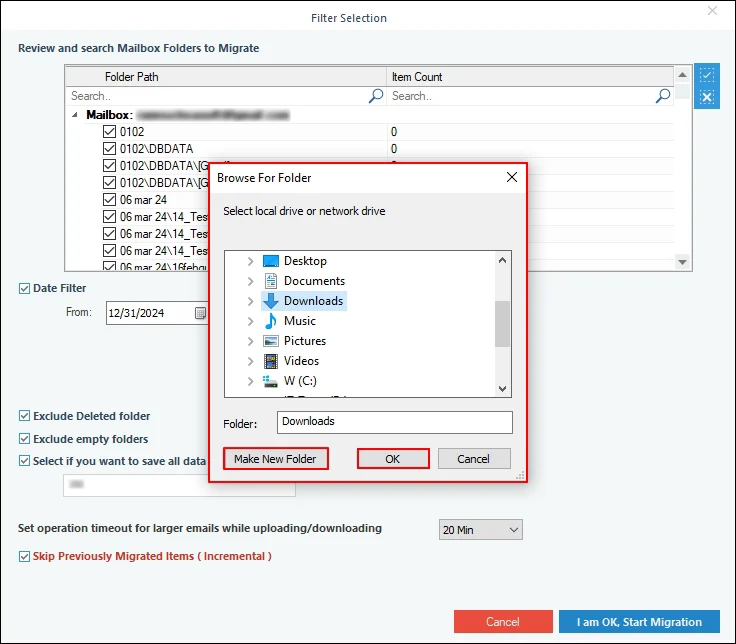
The backup process will start and will get completed shortly. Once it is completed, click on OK to conclude the process.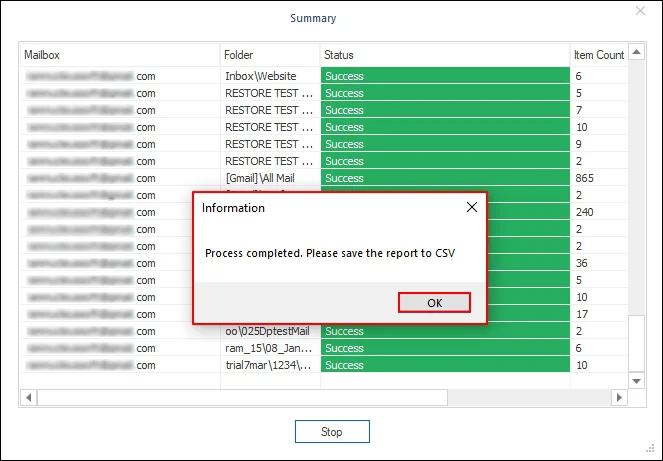
Wrap Up
Rediffmail offers a secure and reliable environment for email communication, ensuring that critical information is safe. But in certain situations, you might need to export your email data to a much more reliable format like PST. Thus, you must shift all your data to Outlook. This article highlights the importance of Rediffmail backup and explains how you can perform it flawlessly with the methods discussed above. However, if you have bulk data to export, it is recommended to use the automated tool. The software provides you with fast processing and high accuracy during Rediffmail backup to PST or any other format.
Frequently Asked Questions
Ans: The given manual method might be too complicated for users with limited technical knowledge. This is precisely why using a reliable IMAP backup tool is necessary for safe backup of all your emails.
Ans: Yes, bulk export of Rediffmail emails to PST format is possible using a tool like Kernel IMAP Backup and Restore. This tool backs up the entire mailbox data and saves it in multiple output formats like PST, EML, DOC, HTML, PDF, etc.
Ans: No, there’s no size limit. Users can backup large sized mailboxes to PST format without losing any essential data. Also, the tool allows users to split the backed-up PST file into the desired size.