Kernel EML Viewer Free
 (4.9/5) 459 Reviews
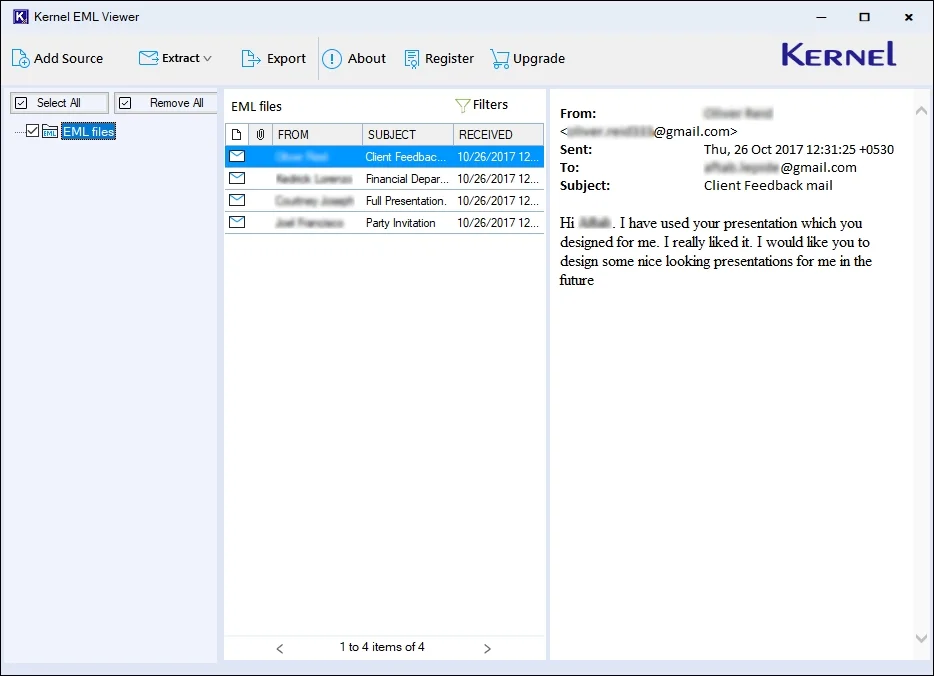
Open and view bulk EML files quickly without needing any email client installation. This free EML Viewer offers a smooth way to access complete email details, making it easy to preview message content, headers, and attachments in a clean and organized interface.
Download the free software and view EML files.- Auto-detect EML files from chosen drives or folders.
- Open Multiple EML files without any size restrictions.
- View EML file content without requiring any email application.
- Support EML file created with all email platforms (Outlook Express, Thunderbird, etc.).
- 100% free tool with fast and accurate preview using Filters.
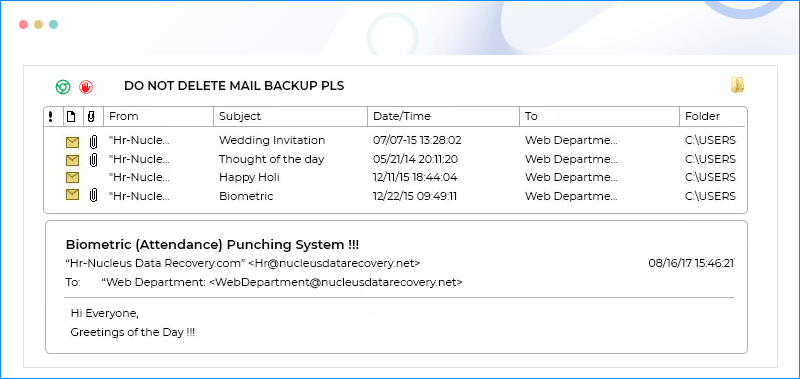
- Updated interface with multiple additional and user-friendly features.

- Advanced filters to search for a specific EML file from multiple ones for preview.
- Optimized tool processing speed to show large email attachments quickly.
- Better preview of non-English and UNICODE characters.
View Entire EML File Data with Advanced Tool
Download free EML viewer software to access all the components of an EML file easily. Here’s what you can view with our software:
It consists of sender’s and receiver’s details and metadata about the email message such as:
- To
- From
- Date
- Subject, etc.
It usually contains the content of the email message in various formats such as:
- Plain text
- HTML
- RTF
It includes all the links of other websites, online source, etc. that EML file contains.
These are the files or data sent along with the email message in different formats such as:
- Image file: PNG, JPG, GIF, etc.
- Document files: PDF, PPT, DOCX, etc.
- Audio files or video files.
EML Viewer Tool Key Capabilities
Check out all the advanced features included in the free EML Viewer software. Explore them and find out how they make the process more convenient.

Access Corrupt EML files
The free EML File Viewer tool allows you to open and view severely corrupt EML files with ease. With its advanced algorithm, fix the corruption and access EML file with complete email details.

Absolutely Free and Reliable Tool
Access and read all your EML file data in the safe and protective environment of Kernel EML Viewer. You can avail all the benefits of this software for free and make your EML file viewing a convenient task.

Easy to Use Interface
The software provides you with an interactive and user-friendly GUI to access your EML file content without any hassle. The free EML Viewer tool doesn’t need any technical expertise to read EML file content.

Auto-Detect EML Files from System
Utilize the Free EML Reader tool’s advanced Search EML Files Automatically feature to find all the EML files from your system. Quickly select any specific drive or folder and get all your EML files in just a few seconds.

Works Independently
Open EML File without Outlook or any other native program (email client) installed on your machine. No need to have an email client to read your EML files. Access your EML files without any third-party app support.

Add Multiple Files without Restriction
The software allows you to add multiple EML files simultaneously to access and preview their complete details without any restrictions. Efficiently process bulk files on the software without any downtime or issues.

Preview Specific Data with Advanced Filters
Easily access and preview the content of a specific EML file with the software's advanced search filters. It offers various parameters, including From, To, CC, BCC, Subject, Body, Read/Unread, Attachment, and Date filters to locate files.

View EML Files with Attachments
The EML Viewer freeware tool lets you view and read EML files along with attachments and other email attributes. It is capable of showing all the email components in their original format and hierarchy.

Save EML File into 9+ Formats (Pro Version)
The Kernel EML Viewer Pro version allows you to add multiple EML files and convert EML to PST, MSG, MBOX, HTML, PDF, etc., formats in their original structure.
How to view an EML file easily?
It is easy-to-use software that allows you to view an EML file without any hassle. Here are the steps to view your EML file data instantly:
- Step 1: Download & install Kernel EML Viewer software.
- Step 2: On the software’s home screen, select EML and click Browse.
- Step 3: Add EML files from the system and click Open.
- Step 4: Now, click on Add Files. The software will start scanning your EML files.
- Step 5: Select a specific EML file and preview complete email details.
Find the Right Plan for You!
Explore our EML Viewer tool with three flexible licensing options. Select the one that perfectly suits your needs.
Freeware
Free $0
- View healthy/corrupted bulk EML files.
- Auto-locate EML files from the system.
- View EML files with attachments and other email details
- Search Filters to preview a specific EML file
- Runs on Any Windows OS
- License Validity – 1 Year
- No. of Machines – 1
- All Free features included.
- Convert bulk EML files into PST, MBOX, PDF, etc.
- Filters for selective EML files conversion
- License Validity – Lifetime
- No. of Machines – Unlimited
- All Free features included.
- All Home License features included.
- Migrate EML files to Office 365.
Kernel EML Viewer FAQs
With the top-notch features of Kernel EML Viewer software, you can view corrupt EML files in just three steps:
- Step 1. Download, install, and run the free EML Viewer tool.
- Step 2. Browse and add corrupted EML files.
- Step 3. Select a specific EML file and view its content for free.
Yes, you can view EML format files created either with Thunderbird or with Windows Live Mail, Outlook Express, The Bat!, Zoho Mail, Roundcube, Apple Mail, etc. There are 20+ email clients that support EML files, and you can open most of them with EML free viewer tool.
No. The EML file viewer software can easily read corrupted EML files without any hassle. You don’t need to fix it before opening it; the tool takes care of it. Just add the file and view EML format with ease using this EML reader tool.
No, the tool can only show you the content of the EML file’s attachment. To save EML files with their attachments, upgrade to the licensed version of this EML document viewer tool.
Yes, the EML reader free tool can work with any version of Windows, from the oldest versions to the newest versions of Windows.
No, you don’t need the native email client installed in your system to view EML format files with the tool. The purpose of the tool is that one doesn’t need to install the email client, which is not currently used for any reason.
Yes, the software will help you to see the EML file's content, including large infographics along with their UNICODE characters, without any difficulties.
Although you can choose an unlimited number of EML files in the software, but you can preview one email at a time.
No, this EML file viewer software is completely safe and reliable for viewing EML file content. It is the best EML viewer with top-notch security features.
No. With free EML file viewer software, you can only view EML files. If you want to save them to PST or some other format, then you need to upgrade to the full licensed version of the EML viewer software.
This EML file reader software comes with an easy-to-use and self-descriptive interface, making it simple for non-technical users as well. Users can rely on this software to read EML format files and view its content effortlessly.
Kernel EML Viewer Prerequisites & recommendations
 About Software
Version: 25.1
Update Date: Mar 2026
Release Date: Nov 2025
License Type: Free
 System Requirements
Hard Disk: 512 MB of disk space
Memory: 1 GB RAM Minimum
Processor: Intel® Pentium Processor compatible (x86, x64) or equivalent
Operating System: Windows 365, 11, 10, 8.1, 8, 7, Vista, XP, 2000, 98, NT, 95, Windows Server 2022, 2019 & older versions
 Installation Guide
What Customers Say About Kernel EML Viewer
 (4.9/5) 459 Reviews
I tried Kernel EML Viewer while sorting old email folders, and it worked surprisingly well. The tool opened every EML file instantly and displayed email details clearly. No setup or extra software installation needed. It made my job much easier, especially with large batches of EML files. Highly recommended tool.
