 (4.9/5) 451 Reviews
Repair Corrupt Excel Files (XLS/XLSX) with Reliable Tool
Repair corrupted, damaged, and inaccessible Excel files with this software. It ensures accurate data recovery from worksheet or workbook corruption, addressing header issues, round-tripping errors, shutdowns, exits, and virus intrusions. It runs with QFSCI algorithm, which extracts XLS and XLSX files quickly.
Download trial version and preview repaired Excel files free.- Recover corrupted Excel files instantly.
- Repair XLSX/XLS files (one or many at a time) and fix Excel error codes.
- Restore Excel data including table, chart, formula, chartsheet, image, cell comment, sort, filter, fields, forms, and reports precisely.
Top use cases for Kernel for Excel Repair

Repair corrupted Microsoft Excel spreadsheets/workbook with ease
When your critical Microsoft Excel files encounter corruption, rely on Kernel for Excel Repair. With its advanced QFSCI algorithms, the software swiftly extracts and recovers damaged spreadsheets and workbooks, regardless of their size. It ensures a seamless recovery journey, maintaining the integrity of your Excel data. Trust our software to fix and restore your corrupted Excel spreadsheets/workbooks with ease.

Efficiently fix Excel files not opening and other related errors
Encountering Excel errors preventing file access? Fear not! Kernel for Excel Repair is your solution. From single worksheets to entire workbooks, this robust software ensures precise Excel document recovery. It also addresses issues, including file header corruption, round-tripping, abrupt system shutdowns, app exits, and virus intrusions, making it your go-to tool for restoring Excel files and conquering data dilemmas.

Resolve inaccessible Excel file content issue effortlessly
Encountering “Excel found unreadable content in filename.xlsx” issues with Excel files across different MS Excel versions? Our Kernel for Excel Repair tool is the solution. It adeptly repairs inaccessible Excel files from MS Excel 2021, 2019, 2016, and earlier versions and recovers the complete content from the file. Its user-friendly interface ensures hassle-free navigation, providing maximum ease in addressing Excel file errors.
How to repair Excel files instantly
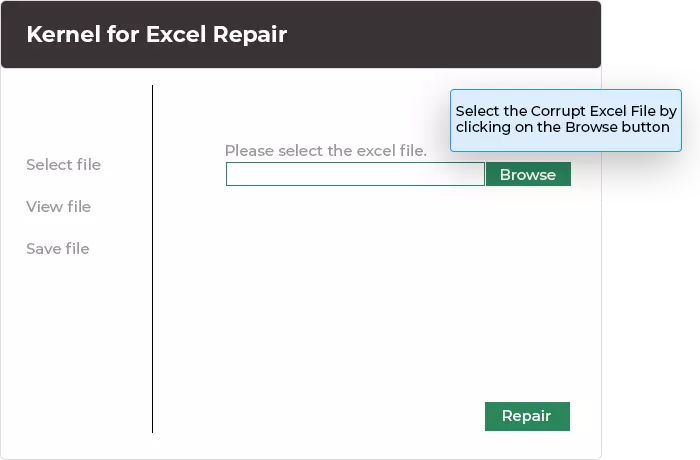
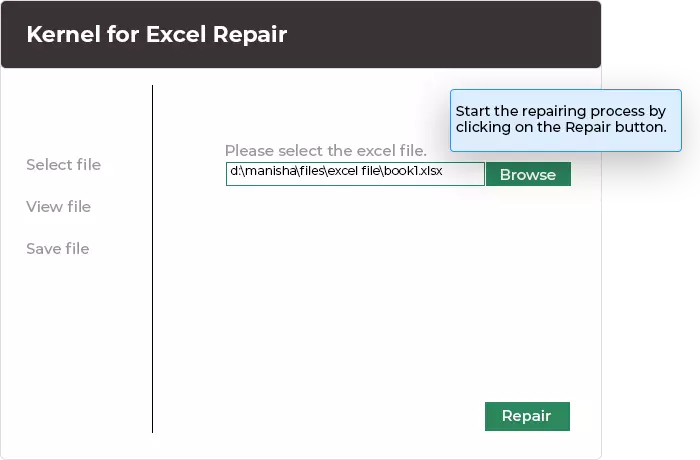
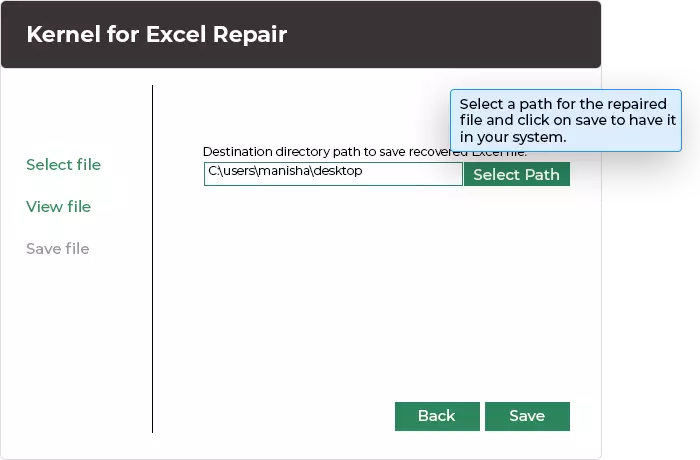
Kernel for Excel Repair software instantly facilitates repair in just 3 simple steps.
Explore software’s key capabilities
Discover Kernel for Excel Repair tool's robust features for seamless XLSX/XLS repairing and beyond.

Fixes all errors in Excel
Repair all error messages in Excel files and open inaccessible Excel files with this tool. Retrieve a single worksheet or entire workbook and perform Excel document recovery with accuracy. Additionally, it deals with the Excel errors that occur due to file header corruption, round-tripping, abrupt system shutdowns, application exit errors, and virus intrusions.

Performs comprehensive Excel recovery
Enhance your recovery process with powerful QFSCI algorithms which help in quick extraction of XLS as well as XLSX files regardless of their size. Restores every bit of data from corrupted Excel file(s), including OLE objects, fields, forms, reports, headers, footnotes, and hyperlinks contained in them, with utmost accuracy and ease.

Restores multiple Excel file data at once
Utilize its two recovery modes, Single File Mode and Multiple File Mode, to recover one or more XLS/XLSX files in a single attempt. With Multiple File mode, the user can take advantage of various options that are available for saving numbers, formulas, book values, text, merged cells, row information, and column information.

Retains the integrity of Excel data
Ensure zero harm to the integrity of data contained in Excel file(s), no matter how severely damaged or how big the file is. Retains original formatting, structure, and properties of the file to maintain consistency. Precisely restore exact replica of the original file without any change to the cells, worksheets, and workbooks.

Advanced preview technology
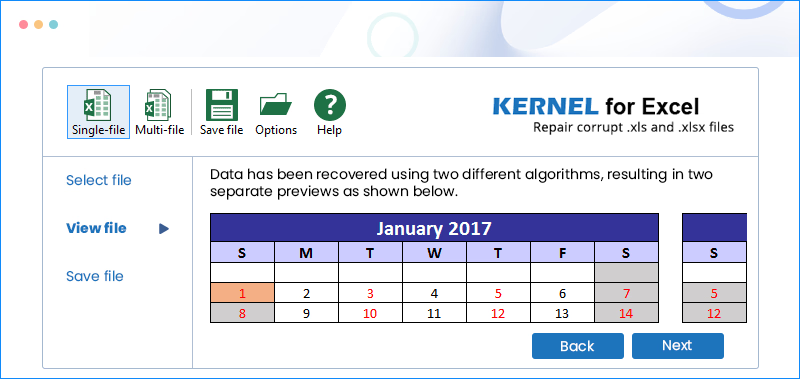
View all your Excel data in the advanced Excel repair tool. It allows you to review entire data through the smart preview technology embedded into it before saving it. The software displays file contents in a spreadsheet format. Using its LIVE preview function, you can verify the recovered Excel file.

Highly interactive interface
Operate software with ease as it comes with an interactive user interface. Moreover, the tool's user-friendly design is embedded with several advanced features that allow you to efficiently deal with different types of errors related to Excel files, that too without any technical training and expert guidance, and offers extensive support towards UNICODE character recovery as well.
Frequently asked questions
- Step 1: Download, install and launch the software Kernel for Excel Repair.
- Step 2: Load single or multiple corrupt Excel files.
- Step 3: Click on Repair and tap on Browse option to choose destination path to save the file.
- Step 4: Preview your healthy Excel files, then proceed to Save.
Video Tutorial
Method to Repair Corrupt Excel XLS and XLSX files

Software Prerequisites & recommendations
 About Software
Version: 19.7
Release Date: Sep 2019
License Type: Home, Corporate & Technician
 Version Support
MS Excel: 2021, 2019, 2016, 2013, 2010, 2007, 2003, XP, 2000, 97, 95 files
 System Requirements
Hard Disk: 50 MB of disk space
Memory: 256 MB minimum
Processor: Intel® Pentium Processor compatible (x86, x64) or equivalent
Operating System: Windows 365, 11, 10, 8.1, and older versions, Windows Server 2022, 2019 & older versions.
 Installation Guide
What customers say about Kernel for Excel Repair
 (4.9/5) 451 Reviews
I had a problem with my Excel File, and when I searched Microsoft Bing, I found this website in a objective way that extracted my file in minutes. Highly recommend to everyone.