A damaged or missing Master Boot Record (MBR) or Super Block can affect access to a Solaris partition and its file system information. Kernel for Unix Data Recovery helps scan supported UNIX partitions and retrieve accessible files when these structures are corrupted.
UNIX systems may use different file system structures and configurations. Kernel for Unix Data Recovery supports recovery from Solaris SPARC, Solaris Intel, and SCO OpenServer environments, as stated in the existing product content. The software scans supported partitions and previews files from UFS, HTFS, and EAFS file systems. Select the required data and save it to a suitable destination after the scan.
Encounter data corruption or deletion in UFS, HTFS, EAFS, or BSD file systems? Our Kernel for Unix Data Recovery tool comes to the rescue. With support for Unix file systems such as UFS, EAFS, BSD, and HTFS, this software excels in extracting lost or corrupted data. Whether dealing with damaged UFS or other file systems, it ensures complete restoration, preserving data integrity and original hierarchy.
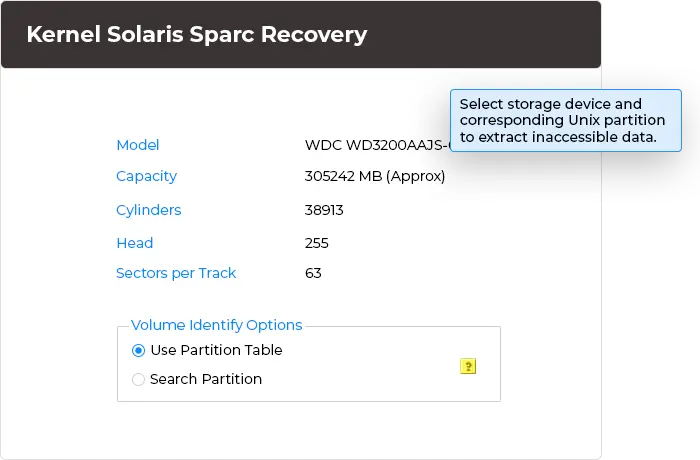
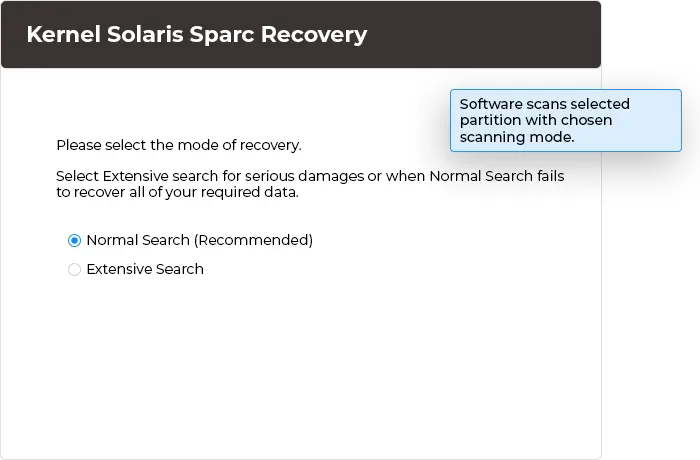
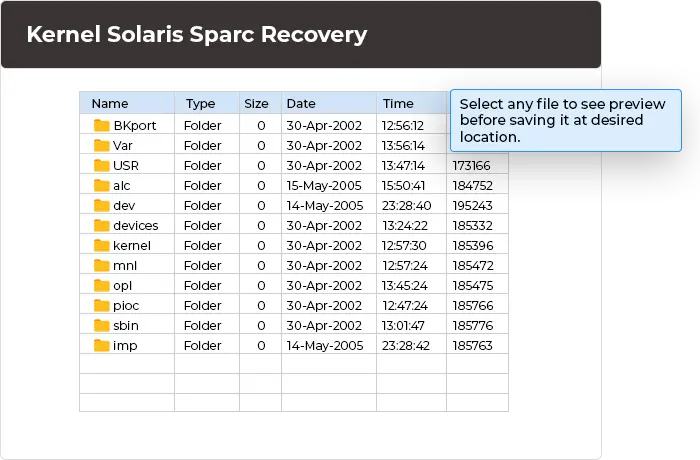
The Sun Solaris Data Recovery tool is specifically designed to repair damaged or corrupted Sun Solaris file systems in just 3 simple steps:
The Sun Solaris SPARC Recovery tool performs advanced recovery due to its exclusive features.
Restore files from supported UNIX file systems, including documents, images, videos, audio files, archives, and other file types. The Sun Solaris Data Recovery software can easily access data from corrupted or inaccessible partitions and recover it.
Choose between Normal Search and Extensive Search based on the level of corruption. Normal Search handles common recovery scenarios, while Extensive Search performs a deeper scan for severe file system issues. Run any searches based on your corruption scenarios of the source partition.
Restore access to valuable data from a corrupted MBR or Super Block of a Solaris partition. Kernel for Unix Data Recovery detects affected UNIX file systems and locates recoverable files, even when normal access to the partition is not possible.
Recover files from UNIX file systems when Inode table damage affects file access. The Sun Solaris Data Recovery tool analyzes available file system information to help identify recoverable data, so users can check important files instead of relying only on the original directory structure.
Restore data from a corrupted VTOC with ease. Repairs damaged volume table, recovers inaccessible datasets, and returns your mainframe storage volume to normal. Simply select the file, perform recovery, and save the recovered file locally.
Recover data from different UNIX file systems through our Sun Solaris Data Recovery tool. It supports UFS, HTFS, and EAFS, so users can select the relevant file system and recover data from required systems.
Identify recovered data through its available folder hierarchy. The structured view helps users locate files within their original directories, making it easier to select specific data instead of searching through an unorganized list.
Retrieve a variety of file types from supported UNIX file systems, including documents, images, audio, video, archives, and database files. The Sun Solaris Data Recovery tool offers a separate option to recover required data as per the user's needs.
Execute the Kernel for Unix data recovery tool across all Windows versions, including Windows 11, 10, 8.1, 8, 7, Vista, XP, 2000, 98, NT, and 95. It is compatible and accessible for users across different Windows machines.
Kernel Sun Solaris Data Recovery software allows users to retrieve files and folders from inaccessible, corrupted, or damaged Solaris file systems. It can recover data from Solaris SPARC and other supported UNIX environments when file system structures, partitions, or essential data components face corruption.
Use the Kernel for Unix data recovery tool to recover Unix data from corrupted or damaged partitions. It can recover Unix data lost due to a corrupted root directory, damaged Super Block, corrupted cylinder group, or damaged VTOC.
The Kernel for Solaris SPARC Recovery software supports multiple file systems, including UFS, HTFS, and EAFS file systems. Additionally supports Solaris SPARC, Solaris Intel, and SCO OpenServer environments.
Yes, it’s easily possible! You can download the free trial version of Kernel for Unix data recovery tool and install it on your Windows PC. Run this tool and get your lost Unix data. From the recovered list of entire data, you can select the required files and have its clear preview before saving it at desired location.
The software includes Inode table corruption as a recovery scenario in the proposed page. Confirm the exact supported Inode recovery capability against the current version before publication. Recovery depends on the file system and the extent of the damage.
If you are satisfied with the delivered output and performance of the Sun Solaris Data Recovery software, then you should buy full version, which allows you to save entire recovered Unix data at the desired location. You can purchase it online from our site, and the payment process is completely secured and protected. Once your payment process is completed, you will be sent an email containing all information about the tool.
Version: 4.01
Release Date: Aug 2006
License Type: Corporate & Technician
Hard Disk: 50 MB of disk space
Memory: 64 MB RAM(Greater than 64 MB is Recommended)
Processor: Intel® Pentium Processor compatible (x86, x64) or equivalent
Operating System: Windows 11, 10, 8.1, 8, 7, Vista, XP, 2000, 98, NT, 95 & Windows Server 2022, 2019 & older versions