Read time: 7 minutes
Each file format has its own way of storing and structuring data. Windows has several file formats developed for storing specific types of data, such as DOC, JPG, PNG, XLS, PDF, EMF, and more. Sometimes, the user must convert these file types from one format to another. However, file conversion of any type is a challenging task. The process of scanning, converting & storing the bits in another file format requires high-level precision and robust computing power.
Suppose you need to edit some diagrams to add in your report, or add graphics in your PowerPoint presentation, or work with Windows-based graphics design tools, but your data is stored in a PDF format. In such cases, you can always convert your PDF file to EMF format.
PDF files are a popular format used to share documents without altering the structure and formatting of the shared document. These files are great for sharing text documents and raster graphics (PNG & JPEG). However, PDF files aren’t the most suitable for applications that need scalable vector graphics.
In this blog, we will discuss how you can securely convert your files using online and desktop-based conversion tools. However,f before jumping directly to the conversion process, let’s get a basic understanding of these two file formats.
What is a PDF File?
PDF is a popular file format created by Adobe Systems. The idea behind its development was to create a file that can store different types of data like text, images, 3D objects, graphics, and more. This portable document file also allows the user to encrypt data, making it a reliable choice for storing and sharing documents.
What is an EMF File?
The EMF (Enhanced Metafile format) file is an enhanced version of WMF (Windows Metafile format). It is an image format primarily used for storing high-quality graphic images and used by graphic designers & printing industry. EMF files are device-independent, unlike its predecessor, WMF. The images stored in EMF file can be accessed on any platform without losing the original quality.
Reasons for PDF to EMF File Conversion
Both PDF & EMF files are commonly used formats serving different needs. Let’s look at the scenarios explaining why we need to transform PDF to EMF file.
- Graphic designing: EMF files can be used as an alternative to the RAW file format by professional graphic designers due to their lower storage consumption.
- Data sharing: EMF files are lightweight, making them efficient for sharing.
- Printing: EMF is highly recommended for high-quality graphic printing.
- Detailed Image: EMF files store more detailed image information, including color details and dimensions
Methods to Convert PDF to EMF File
Now, we have established an understanding of the PDF & EMF files and understood the reasons for the file conversion. Let’s delve into the methods to perform conversion of PDF to EMF file. The only possible way to convert a PDF file into an EMF file is through the use of either online conversion tools or desktop-based conversion tools.
Method 1. Use Online web tools
Several websites or web apps available online offer diverse file type conversions. You can utilize these online tools to convert and save your PDF document into the required EMF file format. These web tools are available for free. However, some websites charge a subscription fee and offer premium services like batch file conversion, fast uploading & downloading speed, no watermark, etc.
You can choose free or paid web tools as per your requirements. The steps to convert a PDF file to EMF using the web apps are given below:
Step 1. Open any web browser and search “PDF to EMF file conversion.”
Step 2. Select and open any reliable website.
Step 3. Upload the target PDF file or files.
Step 4. Select the conversion type as PDF to EMF and start the operation.
Step 5. After the conversion, download the file to your system.
Note: Ensure you have a fast internet bandwidth to prevent any file upload or download errors.
Limitations Associated with Online Web Tools
The above method delivers results but has some constraints. The primary factors that may influence users to avoid using the online web tools are:
- Need fast internet every time you need to convert the PDF file.
- The conversion process requires you to upload the PDF file on the website server. This can be risky if your documents contain confidential information.
- Many free websites label the converted EMF file with a watermark, which may not be acceptable to some users.
- These websites generally make income from ads. Therefore, for the file conversion, you may have to view unnecessary ads. This can be annoying if you convert PDF files very often.
- Many websites will allow you to upload and convert PDF files for free. However, it will demand money when you try to download the converted files.
- If you have encrypted files, then you must unlock the PDF files before uploading them to the web tool.
Method 2. Use Desktop-based PDF to EMF Converter Tool
Desktop-based PDF to EMF converter software offers better control and privacy over PDF to EMF conversion. They are ideal if you have to convert multiple PDF files, want to work with sensitive data, or just want to avoid file limitations or limited free trials that come with online conversion tools.
Look out for Kernel PDF Converter which is a desktop-based tool that converts multiple PDF files to EMF format without altering the original graphics and formatting of the file. Without any particular file size restrictions, this utility can also convert password-protected PDF files to EMF format.
Steps by Step Guide to Convert PDF to EMF Format
Step 1. Download and install the tool.
Step 2. Launch it and add the PDF file for conversion.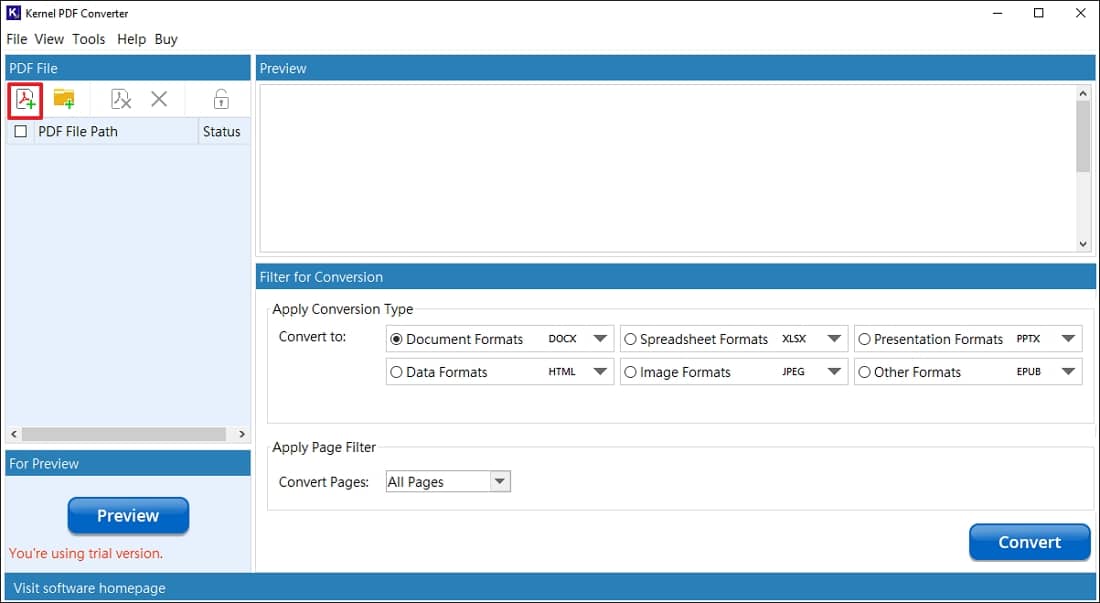
Step 3. Select the added PDF file and set conversion filter to EMF under Image Formats.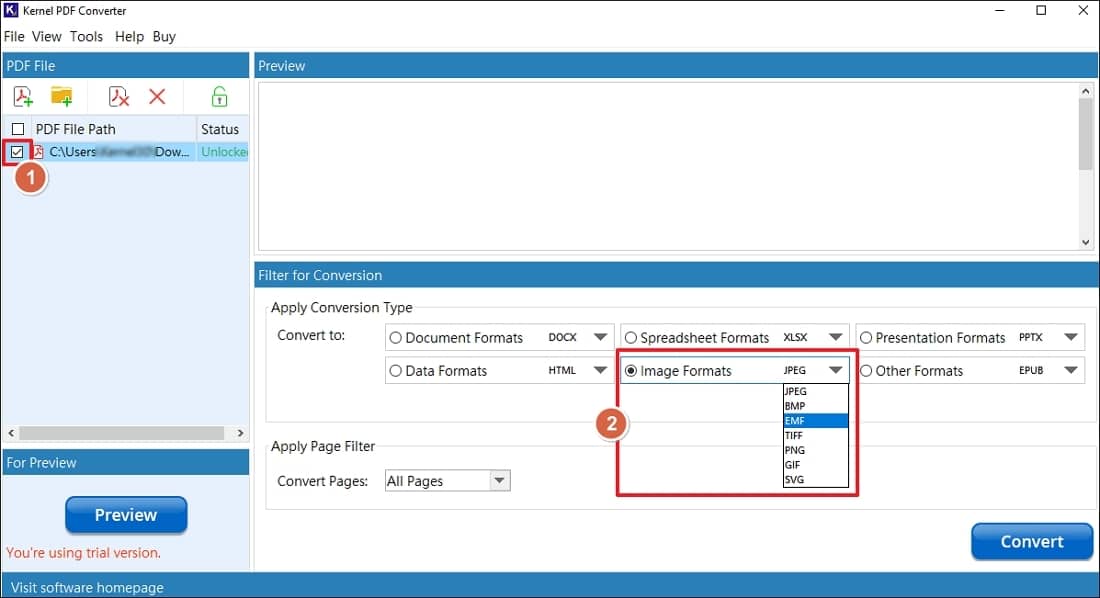
Step 4. Set page filters and hit Convert.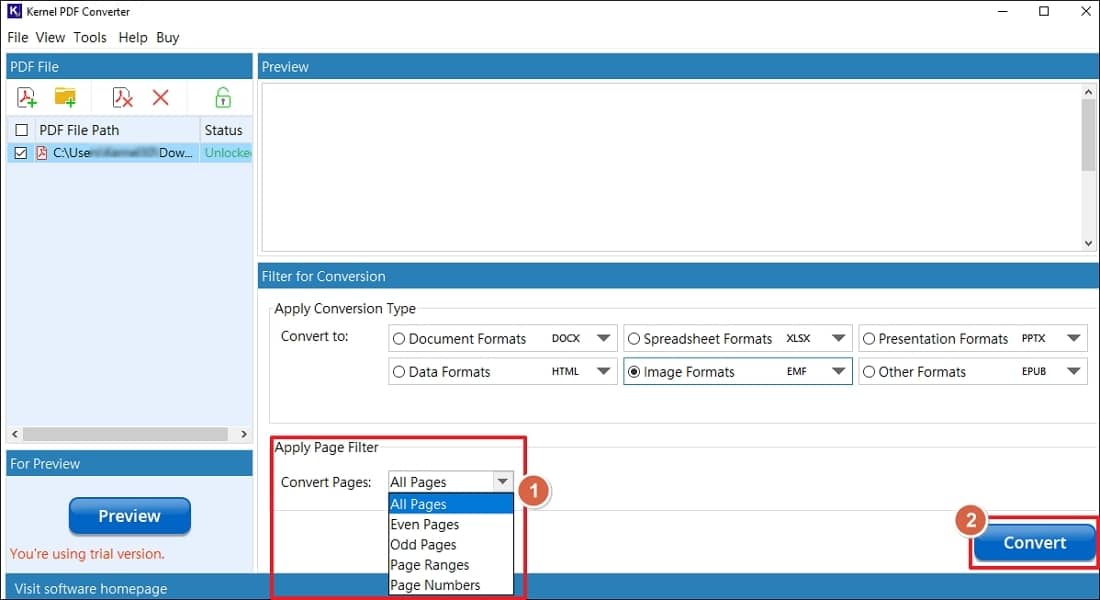
Step 5. Specify a location to save the converted PDF.
Step 6. After conversion you will be provided with a message with a link to navigate to the directory containing your EMF file.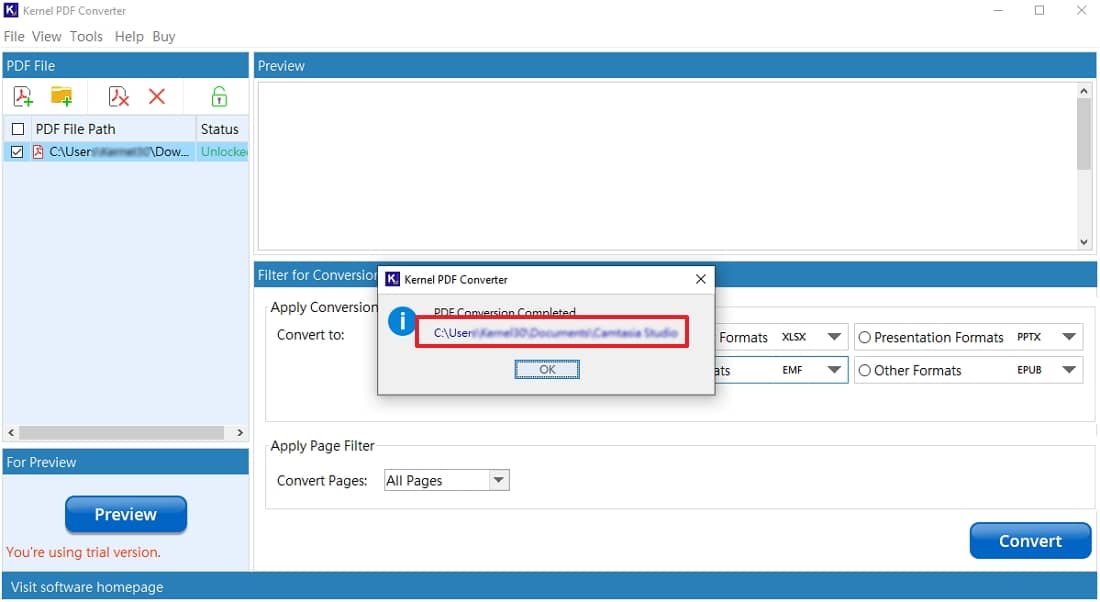
Key Takeaways
- EMF is the most ideal Windows vector graphics format that preserves the original image quality when it’s scaled.
- The ideal PDF to EMF conversion method depends upon whether you want to preserve the output quality, speed of conversion, and if the image contains any confidential information or not.
- Check the converted file to make sure that all the fonts, formatting, and graphics are preserved in the output EMF file.
- Online converters are good for converting one or two PDF files that don’t contain any sensitive data. Desktop converters, on the other hand, are better for security and conversion of multiple files.
Frequently Asked Questions
A. If the original PDF file has vector graphics, then they’re preserved when converting PDF files. But if you’ve a scanned PDF file, then the raster images in it may not produce fully editable vector graphics.
A. Depending upon which conversion method you choose, you may see difference in fonts, layouts, transparency effects, or embedded images in the output EMF file. Another major factor is how complex the original PDF file is.
A. Yes, it’s possible to convert PDF file to EMF format, however the raster image will be wrapped in the original bitmap image.
A. EMF format is a vector format that’s designed to store high quality graphics. On the other hand, PNG is a universal raster format that’s primarily used for web use and photos.