Read time: 5 minutes
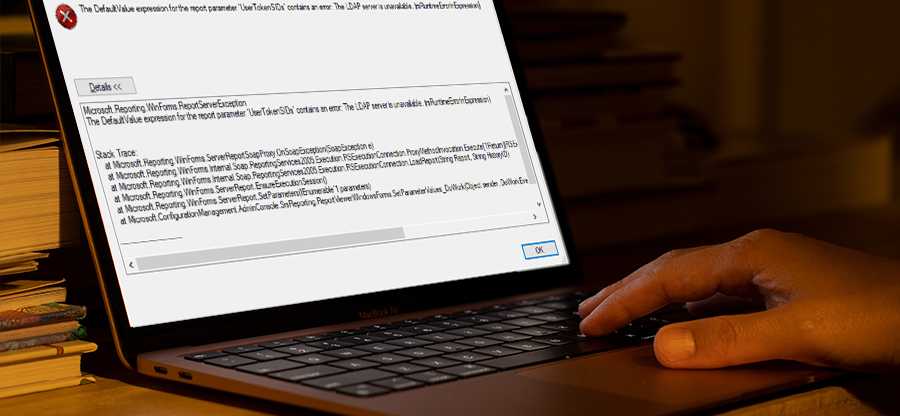
Exchange users often face problems like slow performance, messages stuck in queue, email flow, etc., which drives them to look for the current status of the Exchange database. It is available in the mailbox database details in Exchange Admin Center. Sometimes, the status for the Content index state is displayed as “Unknown”. It happens mostly with the Exchange Server 2016 version, where it displays the database status as Mounted and its content index state as Unknown.
The reasons behind the state could be recent updates to the database, corruption in the database, or hardware issues. Read this blog to find the best working solutions for this common Exchange 2016 error.
Resolve “Exchange 2016 database status unknown” error
There are two native methods to solve the status unknown issue. But before we begin with them, it is highly recommended that you take a complete backup of your mailboxes. You can either use EAC or a dedicated EDB to PST converter for bulk mailbox backup. Now let’s discuss the solutions one by one:
Method 1: Remount the Exchange database using Exchange Admin Center or Exchange Management Shell
Sometimes, Exchange administrators perform modifications to the Exchange database or server (like renaming, updating services, etc.) and then forget to restart the Exchange Server, which can cause the “Exchange Database Status Unknown” error.
So, as an immediate solution, we suggest dismounting the Exchange database and then remounting it. To dismount and then remount the database, administrators can log in to the Exchange Admin Center and follow servers>databases. Select the mailbox database and click on 3 dots (More option). Then click on the Mount option again to remount it.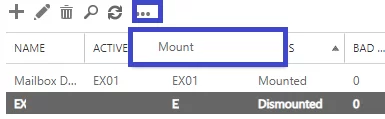
Another way to dismount and mount the Exchange mailbox database is via the Exchange Management Shell.
The commands to dismount and mount the Exchange databases are given below.
Dismount-Database <mailbox database name>
Method 2: Restart the Microsoft Exchange Services from the Server Manager
For the database to run smoothly, some essential Exchange Server services must be running. If the Exchange Services are not in the “Running” state, then users must run them.
On your Exchange Server system, open the Windows Run box by pressing the Windows + R key, type services.msc, and click on OK.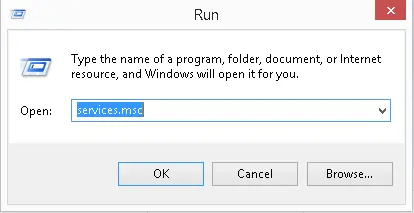
It would open the Services page. Locate the vital Microsoft Exchange Services, select them one by one, and right-click on it to select the Restart option from the drop-down list.
The services will start in a short time. Once all required services are running, restart the Exchange system. Go to Exchange Admin Center and check the status of the mailbox database now. Remount the database if required.
If you fail to remove “Exchange status unknown error” using the two methods above, then your EDB file is damaged. A power failure or virus attack can damage the Exchange database and introduce multiple errors, such as status unknown. In this case, to fix the issue, you must take help from a professional Exchange database recovery tool.
What’s Our Recommendation for Exchange Corruption?
Repairing the Exchange database can be another solution to resolve the “Exchange Database Status Unknown” error. Exchange Server users know about the inbuilt repair utility “Eseutil” to check the database’s integrity and perform the soft & hard repairs as per the requirement. So, users can first try to run Eseutil to repair EDB files. To use this application, the Exchange database first needs to be dismounted. Then pursue this procedure:
- Reach to the location of Microsoft in-built Exchange database repair utility.
<Drive>:\Program Files\Microsoft\Exchange Server\Bin
- Check the database consistency, use this command in the Eseutil application.
eseutil.exe /mh <EDB file path location>
- If it displays “inconsistent state”, attempt the soft repair on the database using this command.
eseutil /r <EDB file path location>
- Now, check the database consistency again; if it still shows the “inconsistent state,” perform the hard repair on the database.
eseutil /p <EDB file path location>
- Perform the database defragmentation using this command.
eseutil /d <EDB file path location>
- Run the consistency check again. This time, the database might show a “consistent” state.
- Finally, remount the Exchange Server database.
The above manual repair of the Exchange database can be performed only if the database is dismounted successfully. Also, it can fix minor corruption issues only.
So, choosing a professional Exchange database recovery solution would be a great idea if the above manual troubleshooting solutions, including manual Exchange database repair, didn’t help you a bit to fix the “Exchange Server 2016 Database Unknown” error. To save your time, we recommend the best Exchange Server recovery tool – Kernel for Exchange Server.
It supports the recovery of corrupted offline EDB files, displays their content for preview, and moves them to live Exchange Server, PST file format, Office 365 Cloud, and more.
Wrapping up
The blog discusses all the possible troubleshooting solutions or procedures for resolving the unfortunate Exchange error “Exchange Database Status Unknown,” which affects the database accessibility. The manual solutions, like remounting the database, restarting services, or repairing the Exchange database are explained with the steps. Furthermore, to repair corrupt Exchange database, a smart tool is given.
Frequently Asked Questions
Ans. To make sure you don’t get database-related issues, perform these operations:
1. Regular update and maintenance of your Exchange Server.
2. Monitor the space on the hard disk on which server is stored.
3. Periodically run the Exchange health checker script.
Ans. Here are the easy troubleshoots that you can follow to resolve the “Exchange Database Status Unknown” error:
1. Check and restart all the Exchange services.
2. Disable your antivirus program.
3. Free up space on your hard disk if it is full.
Ans. When the content index status is unknown in the Exchange Server, it will not be able to correctly index the emails. Therefore, any email search request will fail.