Read time: 9 minutes
In modern digital workflows, email sharing, storage, & long term access are crucial. Microsoft Outlook often saves its individual emails in MSG format, which is exclusively supported in the Microsoft environment.
But if you want to increase your reach or collaboration among different platforms, relying only on the single MSG format can create unavoidable limitations. That’s why professionals recommend using EML files as a better option instead of Outlook MSG.
This write-up will revolve around this topic, like why use EML instead of MSG, along with the best method to convert MSG to EML. Read the blog & get useful insights now!
Note: EML files follow an open email standard & store a single email message in a universally readable structure.
Know the Limitations of Outlook MSG Files
Here, we have summed up basic limitations of MSG files that users usually face with them:
- Works exclusively for Microsoft Outlook.
- Primarily supports the Windows platform.
- Create inaccessibility with other email clients.
- If shared externally, it can raise data security concerns.
Advantages of Using the EML Format
Check out the core advantages of the EML files that make it a preferred format for professionals:
- Universal Email Compatibility
Most of the major email clients, including Thunderbird, Apple Mail, and Windows Mail, support EML files. With its standard formatting, you can open email across clients with EML. As a result, users would not be restricted to a single email application.
- EML Benefits for Email Portability
Sharing EML files is most straightforward, unlike MSG files. You can attach, upload, or transfer them with no compatibility warnings that usually come with the MSG files. Even users can access EML files without any additional tools or configuration.
- Access Data Without Outlook Installation
If you don’t have the Outlook application or have not configured it properly, you cannot access MSG files. On the other hand, EML files can be opened on multiple email clients with no prior Outlook installation. If you are looking for email file formats best for migration, EML can be your first option.
- Better Long-term Email Preservation
EML files follow a standard email formatting, which makes this a good option for long-term storage. Standard formats always prevail over proprietary formats for easy & hassle-free accessibility.
- Offers Cross-platform Compatibility
Unlike MSG files. EML files are not tied to a single operating system. They can be opened on Windows, macOS, & Linux easily with no compatibility barriers. This nature makes the EML file an ideal option for diverse work environments.
- Enhance the Transparency of Email Data
EML files store email headers & message content in a readable structure. It can be helpful in technical analysis, email verification, & troubleshooting tasks or common errors.
- Reduce Security Restrictions
It is seen that some systems block MSG files due to embedded scripts or security policies. Due to the EML file’s standard nature, there are fewer chances of interruptions during the transfer. It can be one of the best advantages of EML for email sharing among other formats.
- Better Integration with Migration & Backup
Many email backup, migration, & archiving workflows are designed around standardized formats. EML files integrate smoothly in this process & reduce the risk of data loss situations.
Want to Convert MSG to EML? The Next Section is for you
Till now, we have discussed how the EML files overpower the MSG files. But the main question is, how can I perform MSG to EML conversion?
There is no direct approach to convert the MSG files into EML format, still, you can go with some manual workarounds like:
- Change the .msg file extension to .eml.
- Add the same account in an EML-supported email client, then drag the desired email.
As you can see, these are adjustments that come with many limitations, including distorted formatting, failed results, or risk of data loss. Also, you need to give a lot of time for bulk conversions, as you can’t convert them in one go.
In these scenarios, it is always recommended to go with the advanced solution. It takes care of everything from bulk conversion to the desired & error-free results.
Our Kernel MSG to EML Converter is the advanced option that comes with all the needed features that make MSG conversion smooth without data loss.
Let’s understand the stepwise approach to get maximum benefits of the tool:
Step 1. Install & launch the software.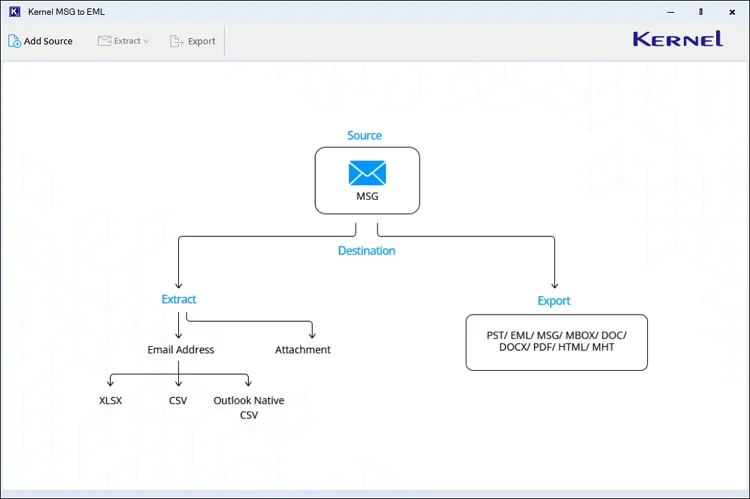
Step 2. Add batch MSG files automatically with the auto-scan feature & click on the Add files option.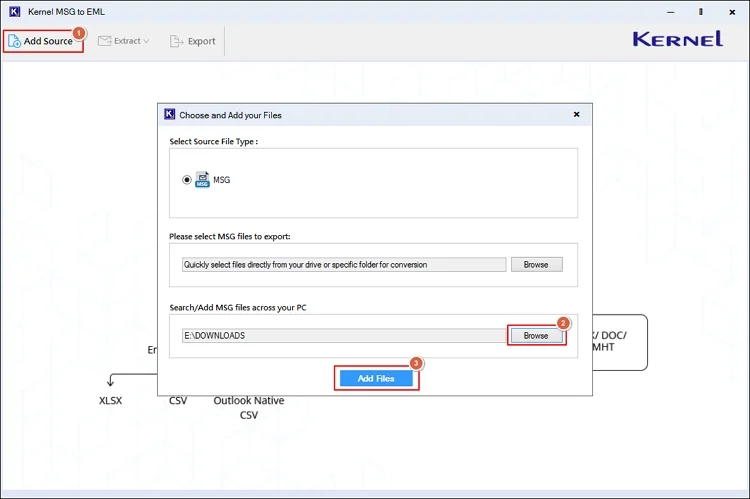
Step 3. Check the MSG attributes like sender, subject, recipient, date, & attachments, etc. before conversion.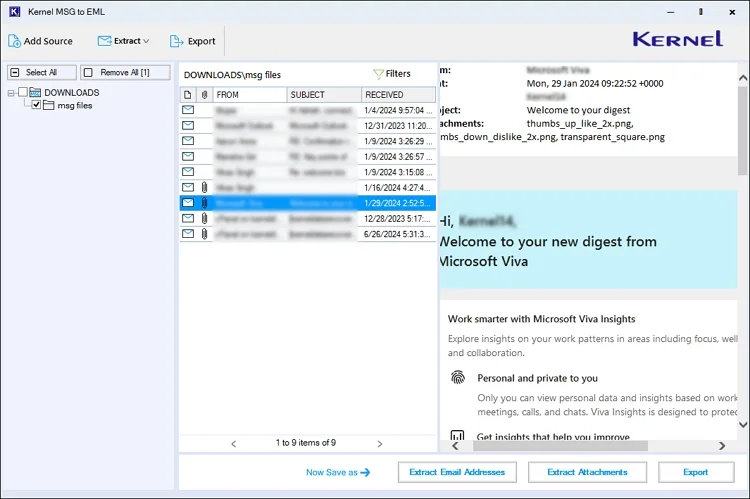
Step 4. Apply filters, like To, CC, BCC, Subject, etc., to choose the desired MSG files. Then, hit the Apply filters> Export option.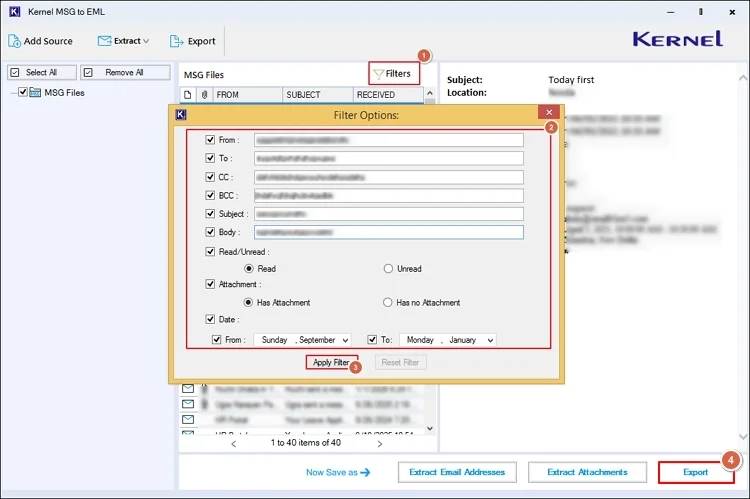
Step 5. Select the EML format, apply the suitable filters, browse the destination, & tap on the Export option. It will start the MSG to EML conversion.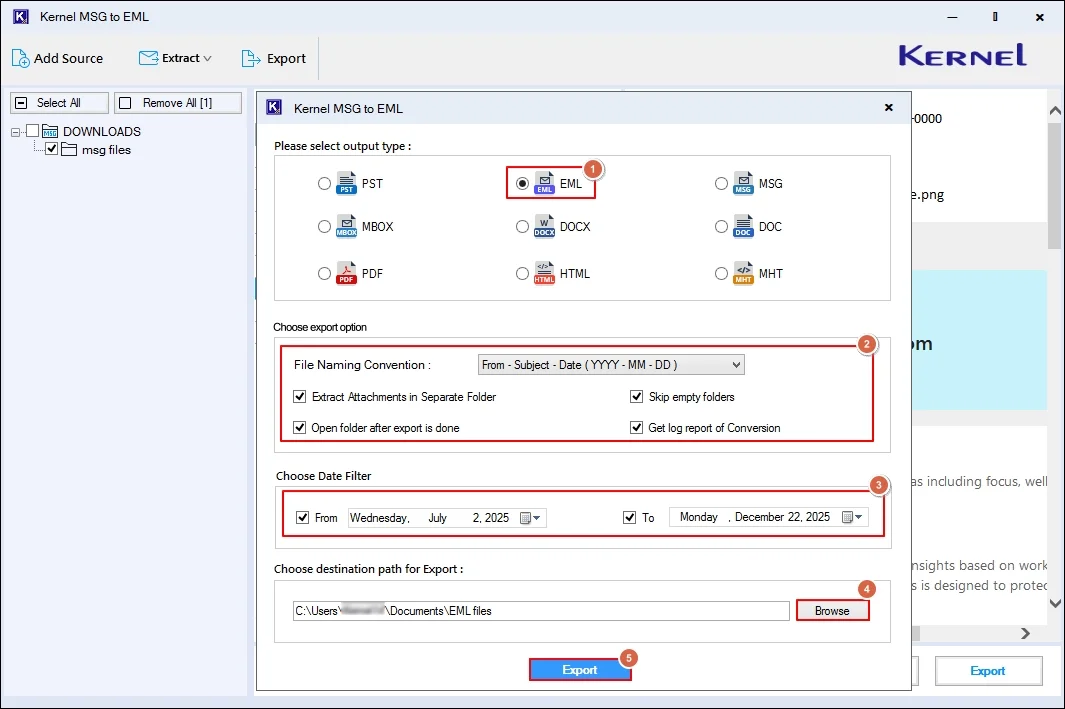
Step 6. Once the process is completed, access it directly in the EML-supported email client with ease.
Top Features of the Advanced Converter
Explore the core functionality of the tool:
- Convert MSG to EML with a zero data loss guarantee.
- Provides filters like CC, To, BCC, etc., to convert specific MSG files.
- Set different naming conventions for EML files to track them easily.
- Run the tool independently without any prior installation of Outlook.
- Extract the email addresses list in different formats: CSV, XLSX, etc.
- Innovative filters, like date, skip empty folders for the desired output.
- Get easy extraction of attachments separately in the same hierarchy.
End Thoughts
With this easy write-up, we have given all the useful insights on why use EML instead of MSG files. It includes limitations of MSG files, advantages of EML files & standard solution to convert MSG to EML. Follow the given steps carefully. For hands-on experience of the tool, you can check out the trial version for free.