Related Posts
Read time: 4 minutes
Every database file in the SQL Server has a page 0, the first page, also referred to as the header file. This header file contains crucial data about the database. File signature, database version, page size, file ID, etc.; details are present in the page 0 file. The SQL Server reads it to understand the database. If this header file is damaged or becomes corrupt, the SQL Server will fail to read it and will give errors when you open the database.
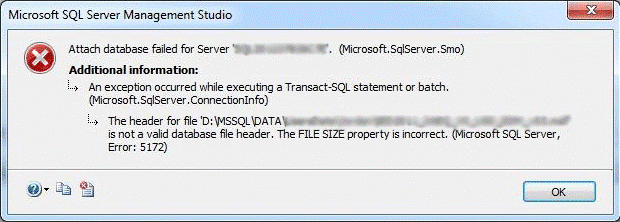
You will get the error when you attach the MDF/LDF database file, restore the database from a backup, or start the SQL Server services. A message window pops up with the MS SQL Server environment saying: “The header for file ‘test.mdf’ is not a valid database file header. The FILE SIZE property is incorrect. (SQL Server Error 5172)”
The possible reasons that can cause file header corruption are mentioned below:
The easiest way to remove this error is to repairing and restoring data back. It will recover all your tables. However, any data written in the database after the creation of the .bak file will be lost. Other than using .bak file, you can solve the file header error 5172 with the help of two methods that solve the error by repairing and restoring data back to the database server from database files.
You can replace the corrupted MDF and LDF files with database files from a healthy database. To do so, you need to follow the given steps:
Step 1: Exit from SQL Server running instance.
Step 2: Now, copy MDF and LDF files to another location on your current machine. Step 3: Simply delete the original MDF and LDF data files and start SQL Server instance once again. Step 4: Create a new database with a similar name and filename. Then, stop the SQL Server. Step 5: Finally, overwrite MDF and NDF file data files for online database recovery.Note: This method will only work if the database file (backup or copy) is healthy. Do not use the corrupt MDF file to restore the database, as it will corrupt the database again
The best and possible solution to repair and recover MDF file data with 100% accuracy and security is using an automated solution. You must consider the professional Kernel for SQL Database Recovery software tool to repair, recover and restore corrupt MDF file back to SQL Database Server.
The tool is specially designed to recover all database objects such as tables, functions, rules, functions, deleted records, and so on. You can recover large data files that are affected by ransomware. The tool is specially designed to recover all database objects such as tables, rules, functions, deleted records, and so on. You can recover large data files that are affected by ransomware. The software supports UNICODE characters; this makes it the best SQL recovery tool.
The manual method to recover the SQL error 5172 is not entirely safe to follow, as it can further damage the tables present in the database of MDF files, if you use a corrupt or older version of MDF file. Whenever you get an SQL error where the manual solutions are harder to follow, try a professional recovery tool like Kernel for SQL Backup Recovery to retrieve the complete database. The tool will restore all the tables to the original location. You can even get a preview of the tables in each database.