Read time: 4 minutes
The “convert MSG to PST” process is a common task for professionals to manage email data. It is due to differences in their functionalities, like MSG files store individual messages, whereas PST files are used for storing entire mailboxes in Outlook.
Hence, it is essential to know how you can perform the conversion efficiently, as it helps with easy backup, migration, or consolidation.
Don’t worry! This straightforward guide will help you with all the simple & effective approaches to execute the process successfully.
Here, in this blog, you will get to know why we need to convert MSG files to PST format and different methods to convert MSG to PST.
Manual conversion can’t provide you with the flexibility & accuracy in the results. Also, they can lead to some unwanted inconsistencies. Hence, it is always suggested to go with the automated Kernel MSG to PST Converter as it will ensure 100% error-free, instant, & desired output with complete data integrity.
Why Convert MSG Files into outlook PST?
There are several reasons to convert MSG files to PST Outlook. Some of them are listed below:
- Quick and Easy Accessibility of Emails: When Outlook has several emails, it is easier to search mails in a PST file than every MSG file.
- Management of Outlook Data: PST format is much easier than managing a large number of MSG files.
Manual Methods to Convert MSG to PST
There are two simple manual methods to convert MSG files to PST format. For your ease, we are providing the steps of each method so that you can quickly convert MSG to PST.
Method 1: Use Drag and Drop Method
Follow the steps given below to drag and drop emails:
- Open the Outlook application on your computer.
- Click Mail on the menu bar.
- Right-click anywhere and select New folder.
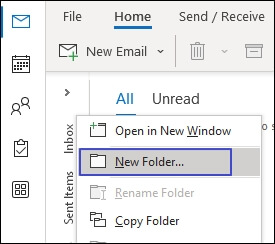
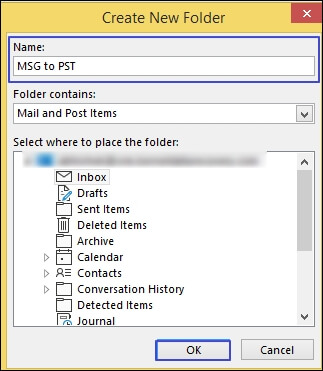
- Name the folder and click OK to create it.
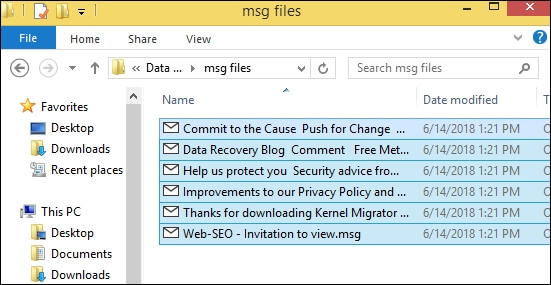
- Go to the MSG files you wish to migrate to the PST file.
- Select the MSG files and click and hold.
- Keeping the click on hold, move the pointer to the new Outlook folder you created.
- Release the click. This will move the MSG files to the Outlook PST file.
Method 2: Copy & Paste Method
You can use this method if you only need to convert a few MSG files to PST format. Follow the steps given below:
- Go to the MSG folder.
- Copy all the MSG files you wish to migrate.
- Open MS Outlook.
- Create a new folder by following steps 1-4 of method 1.
- Paste the copy of the MSG files you created in step 2.
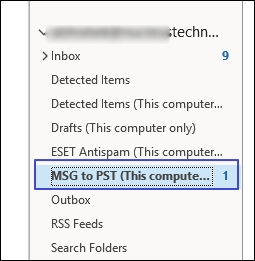
- This will convert all the MSG files to Outlook PST files.
Limitations of the Manual Methods to Convert MSG to PST
These two methods are handy in MSG to PST conversion, but there are some limitations with these methods, which you must be aware of. Some of them are:
- These methods are time-taking processes and only suitable for a few files.
- These methods can cause data inconsistency and might affect data integrity.
- High chances of data loss.
- Sometimes, you are unable to convert old files because they are not compatible with the Outlook latest version.
- Manual methods require Outlook installation on the local system.
Conclusion
The blog has covered all the key insights to convert MSG files to Outlook PST. Be it a brief intro, reasons to know, or practical solutions. Moreover, use the advanced solution that can save hours of work & offers 100% secure environment for hassle-free conversion. With the help of the tool’s innovative features, users can execute other conversions, like MSG to PDF. Take the free trial today to know more.