Read time: 9 minutes
Email files play an important role in record keeping, collaboration, and legal documentation. That’s why it creates a dilemma in the user’s mind about their credibility while using them. Here, the blog will cover one such dilemma among Microsoft Outlook users: Are .msg files safe to open?
Although it is convenient to use, its intrinsic algorithms create doubt among users. Don’t worry! You will get complete information about the MSG file security risks along with the best alternative to free you from these doubts.
Note: MSG files are used to store individual email messages along with their properties. Like email body content, sender & recipient details, date & time metadata, attachments, & embedded elements.
Know MSG File Security Risks with Detailed Info
Since MSG files preserve complete email data, they can also carry the same security risk as the others. This section will help you to reduce all doubts, like is it safe to open MSG file & how dangerous are .msg attachments? Let’s understand it carefully:
1. MSG Attachments’ Malware Concerns
MSG files can include attachments such as documents, scripts, or executable files. If the source is untrusted & the file gets opened, the risk of malware or ransomware practices increases.
Email file security threats are high when:
- Attachments are presented as safe file types.
- File extensions are hidden or opened without verification.
2. Phishing Risk in MSG Files Due to Faulty Data
Intentionally or unintentionally shared phishing emails in MSG files are also one of the major MSG file security risks. It often includes deceptive links or fake sender details designed to trick users’ workflow. Even saved MSG files [Not in the Inbox folder] containing phishing data are at high risk of security threats.
3. Embedding Malicious Links
Malicious links inside MSG files are still fruitful for the hackers. Users welcome them in their system by clicking on these links. They manage the user’s system, like:
- Access login credentials.
- Install a malicious script & track user behaviour.
4. HTML or Script-based Content Risks
It is seen that some MSG files store emails in HTML format. So, if emails contain embedded scripts, tracking pixels, or any unsafe HTML elements, they can trigger unwanted situations & can lead to email file security threats.
5. Spoofed Sender Information
MSG files preserve email headers that users overlook in most situations for verification. But it may contain spoofed sender details. Users usually review saved MSG files based on the sender’s appearance instead of verifying the header authenticity. It increases the chances of impersonation or social engineering attacks.
6. Outdated Outlook or System Vulnerabilities
When users open the MSG file on outdated versions of Outlook or Operating systems, it can increase exposure to different vulnerabilities. Like, attackers can exploit this weakness to execute malicious code.
MSG file security risks increase when:
- Updates are delayed.
- Legacy systems are in use.
- Run-time protection is missing.
7. Ignoring Email Gateway Protections
When emails are transferred using the mail servers, they can bypass security filters. Hence, they can’t go with the same level of inspection when the transfer method is through mail servers. As a result, harmful content inside the MSG files may bypass the standard email security checks, which can also lead to email file security threats.
Important to Know: Users always think that saved MSG files are better than live emails. But it is not until its complete content is reviewed carefully.As you see, dealing with proprietary formats like MSG files can lead to many unsuitable situations if not managed properly. Most importantly, if you have multiple MSG files, then don’t you think professional communication should be in an easy, 100% secure, portable format? If yes, then PDF is the only format that brings all the standard features that any file format should reflect. Like easy sharing, intact formatting across platforms, 100% secure, & easy access without any additional software, unlike MSG files.
Have Multiple MSG Files, What to Do Now?
If you want to make your email communication smooth, you need to go with the MSG file conversion. You can go with the manual methods, but their inherent limitations cannot provide you with satisfactory results. In that case, try our Kernel MSG Viewer Pro tool that professionals use, or IT experts always recommend. It helps users in smooth conversion regardless of the file size within a few steps.
With the tool’s advanced features, you don’t need to worry about the phishing risks in MSG files & MSG attachments malware concerns. Let’s know how:
Step 1. Launch the MSG Viewer Pro software.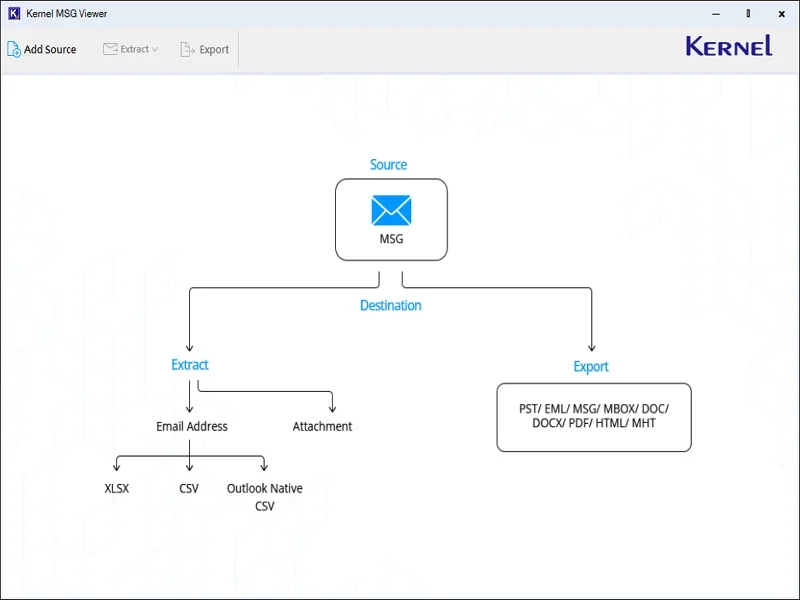
Step 2. Select Add Source, browse the desired MSG files with the tool’s auto-scan feature & hit the Add files option.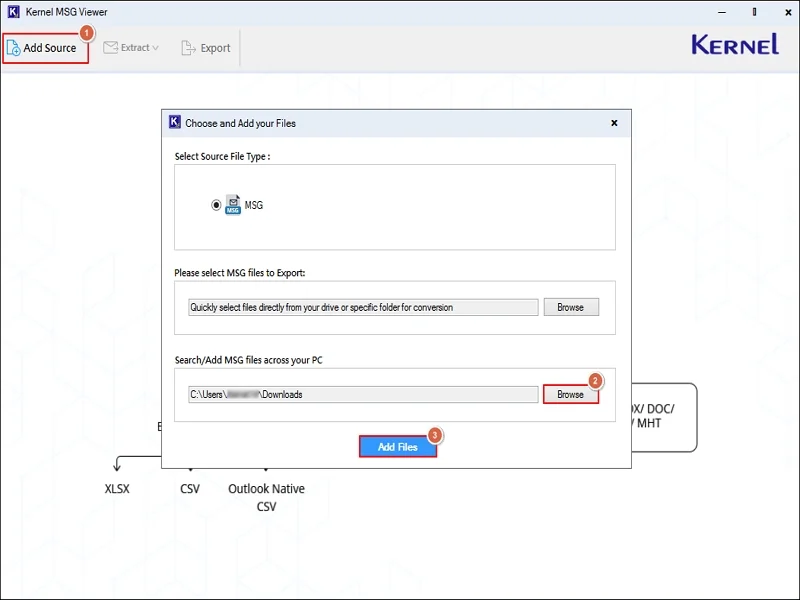
Step 3. Verify the complete content of the MSG file, like sender, recipient, subject, & date, with attachments & categories.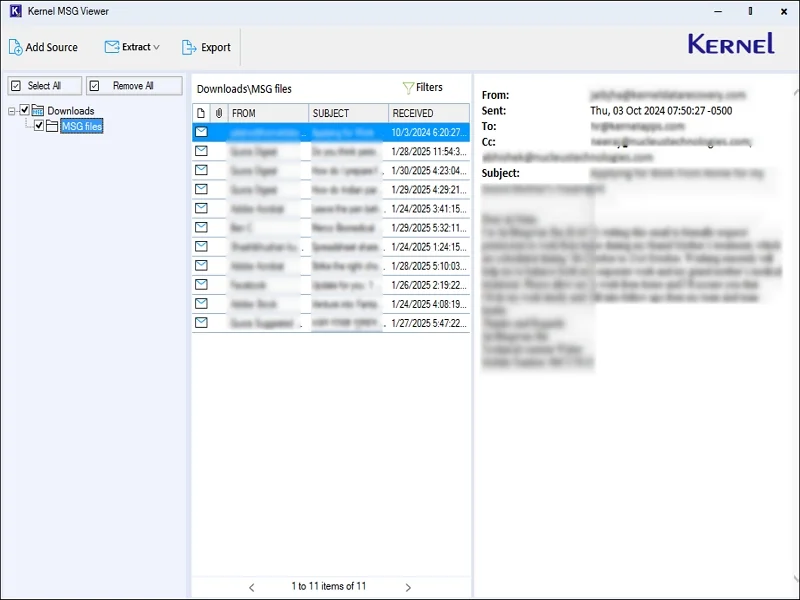
Step 4. Choose the needed MSG files with the filters, like To, CC, BCC, Subject, etc. Then, click on the Export tab.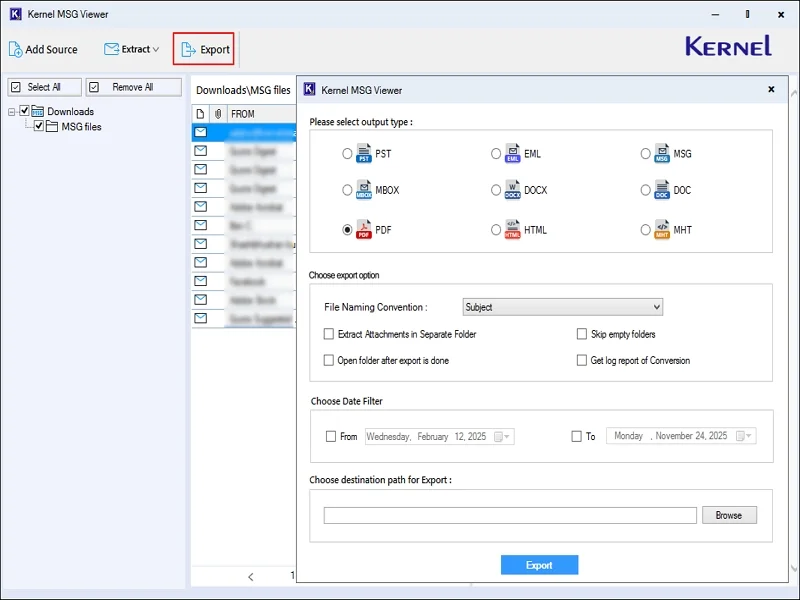
Step 5. Select the PDF option. Use the filters like Date, File Naming Convention, choose the preferred endpoint & tap on the Export option. 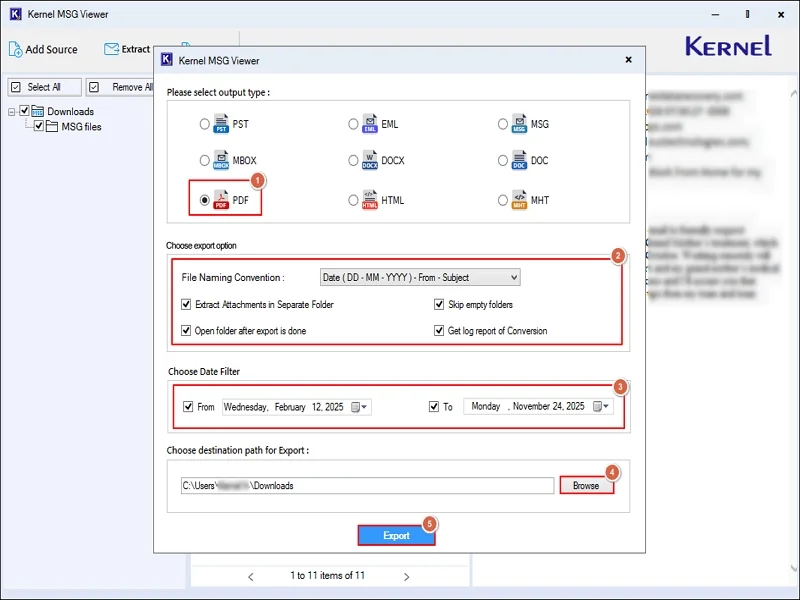
Step 6. Your MSG to PDF conversion will start. Once the process is completed, access the saved PDF file directly.
Important to Know: The tool even permits you to extract email addresses & attachments separately at the desired endpoints.
Best Practices to Reduce MSG File Security Risks
Follow the precautions below to reduce the chances of security threats with the MSG files:
- Keep Outlook & the operating system updated.
- Prefer using the anti-virus or end protection tool.
- Avoid clicking on the links of unknown MSG files.
- Review email headers where authenticity matters.
- Always open the MSG files from a trusted source.
- First, verify, then open the attachments of the MSG files.
Ending Thoughts
Hopefully, the blog has provided a complete clarification to the question “Are MSG files safe to open?” All the notable email file security threats are discussed in brief. Also, we have suggested the best approach to fix these issues, i.e., MSG to PDF conversion. Take the free trial version of the tool to know more.