Related Posts
How to Access Outlook Emails on Different Email Clients?

Written By
Ashish Singh

Published On
January 23, 2026
Read time: 9 minutes
Microsoft Outlook is the most widely used email client among professionals for email communication. But there are situations where users look to access Outlook emails on different email clients like Thunderbird, Apple Mail, Windows Live Mail, or web-based platforms.
Direct sharing from Outlook to other email clients is not always straightforward, as Outlook saves individual emails in MSG format. It is a proprietary file format of Microsoft Outlook.
To make this error-free and straightforward, we have come up with this new write-up. It will help you with all the needed information about the concern, along with the practical approach to open .msg emails in non-Outlook clients.
Important to know: Differences in file formats, operating systems, and email client compatibility often affect how the shared email can be viewed, opened, or preserved.
Want to read Outlook emails in Thunderbird, Apple Mail, or Windows Live Mail? But these email clients use the EML file format to store email messages, whereas Outlook emails are stored in the MSG format. So, we need to convert MSG to EML, then we can open .msg emails in a non-Outlook client.
Free Ways to Convert MSG to EML:
Now, let’s see how to open EML files in the discussed email clients:
After changing the .msg extension to .eml, you can view Outlook email content in the Thunderbird application easily. The first approach is to select the file, drag and drop it in the desired folder of Thunderbird.
The second approach is by using the ImportExportTools NG extension. Understand this approach with our step-by-step guidance:
Step 1. Open Thunderbird, go to the top-right corner, and select the Add-ons & Themes option.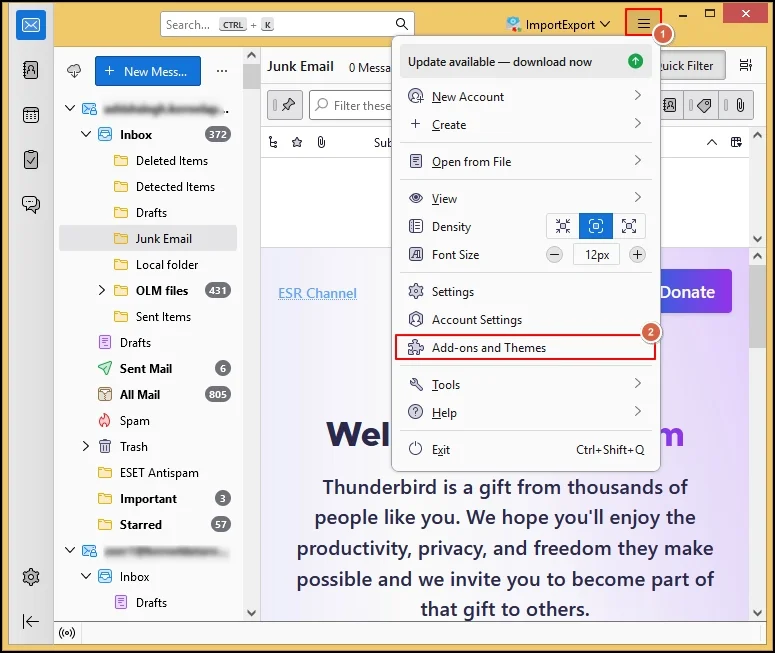
Step 2. Navigate to ImportExportTools NG & add it to Thunderbird.
Step 3. Once added, right-click on the folder where you want to import the converted .eml file, choose the ImportExportTools NG > Import EML Messages > Individual EML Messages.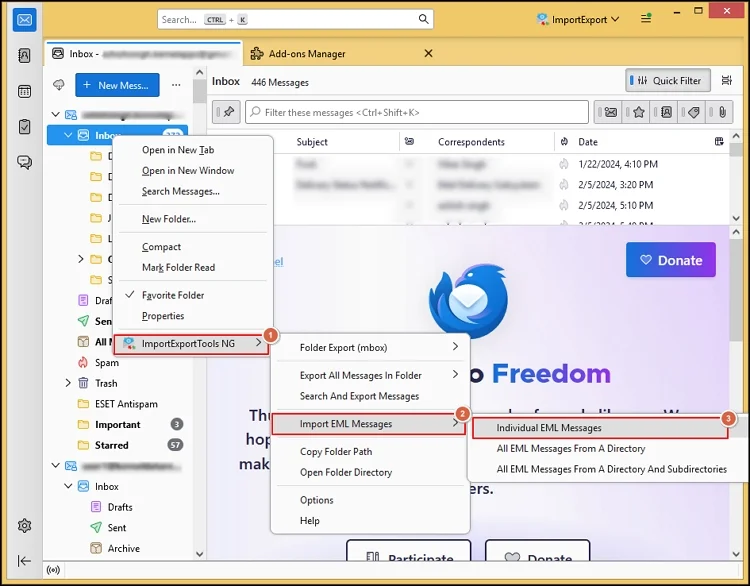
Step 4. Select the file & hit the Open tab to read Outlook emails in Thunderbird email client.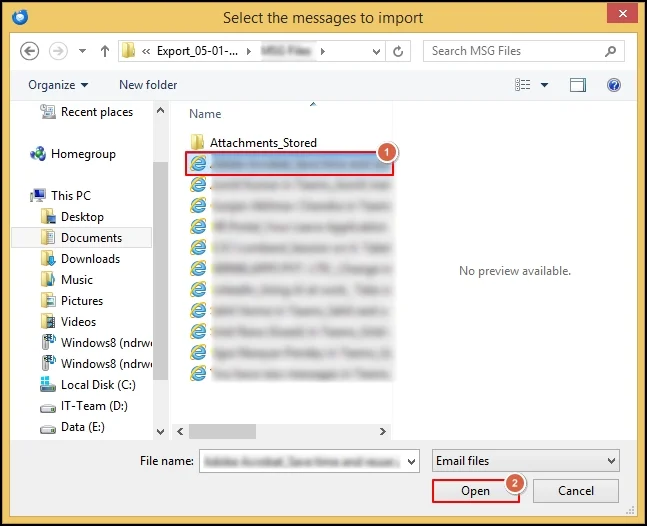
Here, the same pattern needs to be performed. First, open Apple Mail on a Mac, select the desired EML file, drag and drop it in the desired folder of the email client. Now, access the Outlook emails content in Apple Mail hassle-free.
Important to know:
Windows Mail opens EML email easily. So, if you want to view .eml emails in Windows Mail, then follow the same drag & drop process after converting MSG files to EML format.
For web-based email clients like Gmail & Yahoo, compose a new email, add the converted .eml file as an attachment and send it to the intended recipient.
Users usually face the following errors when they try to share Outlook emails on different email clients manually:
Extra Attention is Required When You:
Have you noticed how the manual approaches can become complex or tedious if you want to share bulk emails? Besides, they can’t ensure you 100% successful results and full data security.
Hence, it is always advisable to go with the advanced solution to convert Outlook emails format [i.e., msg] into the standard format [i.e., eml] of the intended email client.
Kernel MSG to EML Converter is the one name that the professionals, or IT experts always suggest. It removes all the confusion & complex steps with its easy-to-perform & straightforward steps for the conversion. Know how:
Step 1. Download & open the MSG to EML converter software.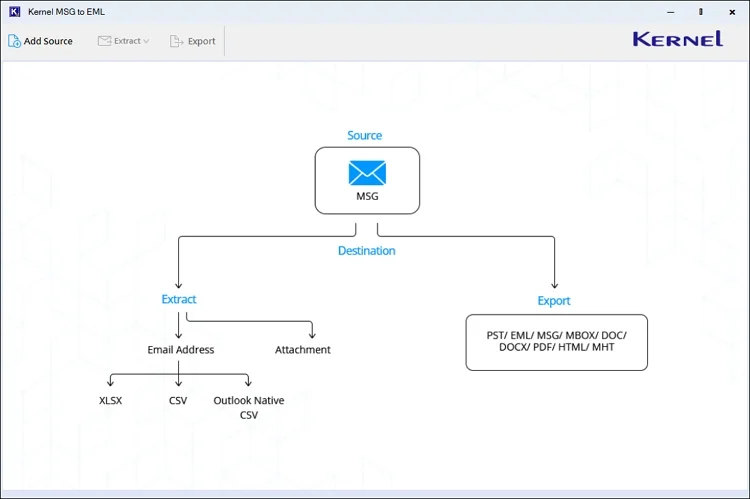
Step 2. Add multiple MSG files at once with the auto-scan feature & hit the Add files option.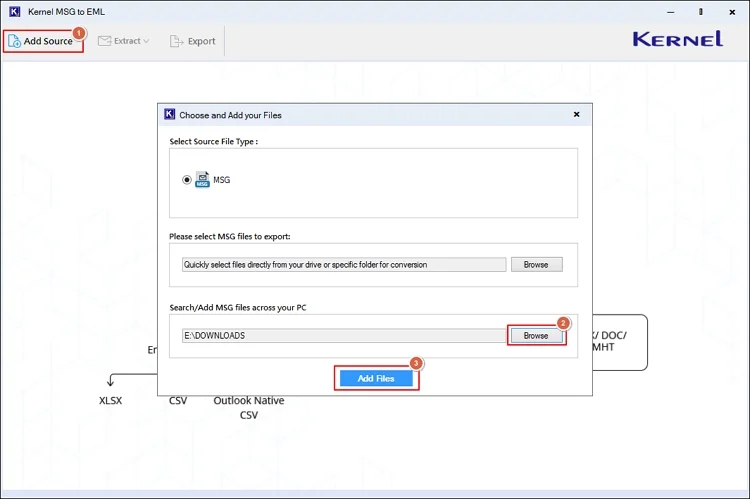
Step 3. Verify the MSG attributes like sender, subject, recipient, date, & attachments, etc.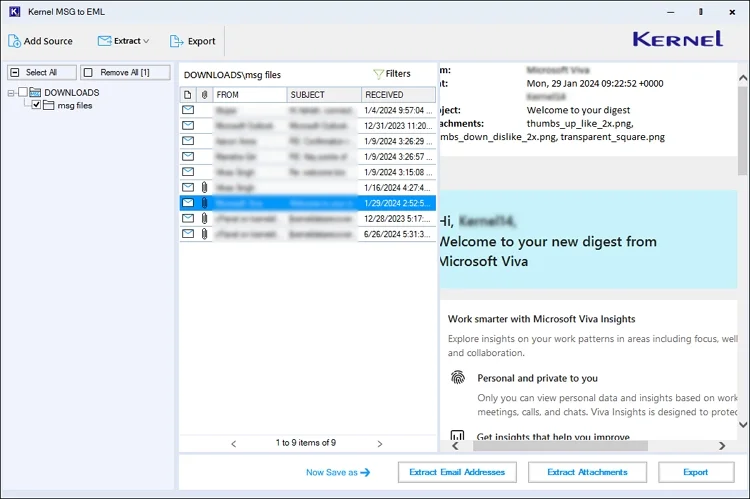
Step 4. Select the desired MSG files with the filters, like To, CC, BCC, Subject, etc., and hit the Apply filters> Export option.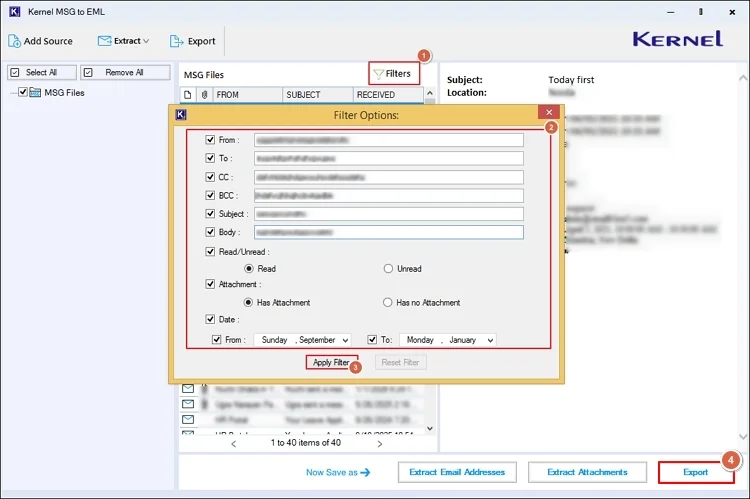
Step 5. Choose the EML format, use suitable filters, browse the destination, & select the Export option to start the conversion process.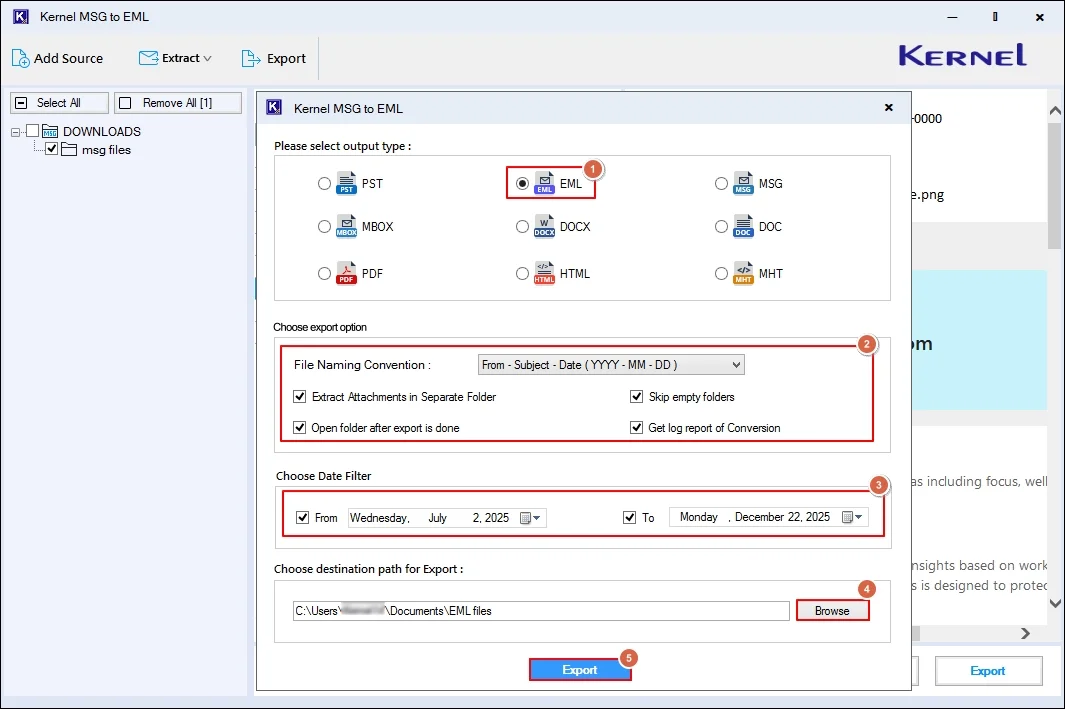
Step 6. Once the MSG file is converted into the EML format, you can access it directly in the EML-supported email client easily.
Note: The tool also allows you to extract email addresses and attachments separately at the desired location.
As per the experts, here are some guidelines that users need to go through before sharing Outlook emails on different email clients:
You need to follow the right approach if you want to share Outlook emails on different email clients. Be it Thunderbird, Apple Mail, Windows Live Mail, or other web-based email clients. Users can go with the described methods accordingly. But for the smooth, error-free, & instant results, considering the recommended advanced solutions can be more suitable.
A. To open the MSG files, you can use Microsoft Outlook. On the other hand, for EML files, consider Thunderbird, Windows Live Mail, Apple Mail, etc.
A. Yes. But you need to share the Outlook emails in the email clients’ compatible formats.