

Read time: 4 min
OXPS (Open XML Paper Specification) documents are similar to PDF files. It is a fixed layout format used by Microsoft to store electronic documents. These files are designed to preserve layout and formatting of a document across different devices and applications. However, viewing OXPS file on Windows system without right tools can be a bit tricky. In this blog, we will explore different methods to view OXPS files on Windows system with standard viewer application and a professional software.
Manual Methods to View OXPS Files on Windows System
There are two manual ways to open and view your OXPS files on Windows system. Both methods are discussed below with detailed steps:
Note: These methods will only work if you have Windows 10 and upper versions.
Method 1. Preview OXPS file data via XPS Viewer
You can easily view your OXPS file using the inbuilt viewer application on a Windows system. Here is how you can do it:
Step 1. In Search bar, type XPS Viewer and click to open it.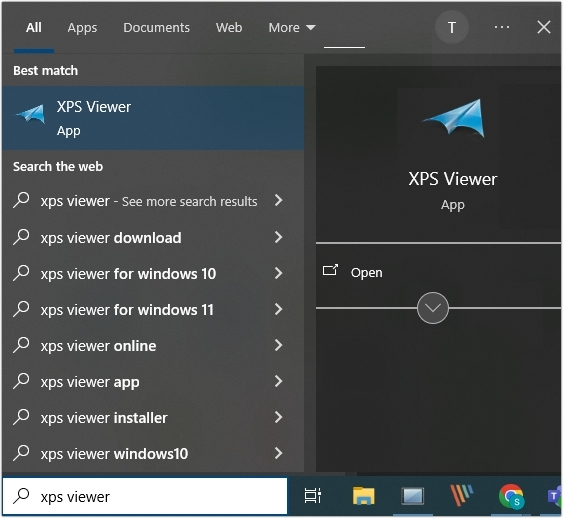
Note: If you do not have Viewer app installed on your system, then you need to install it first.
Step 2. Click the File option, then click Open.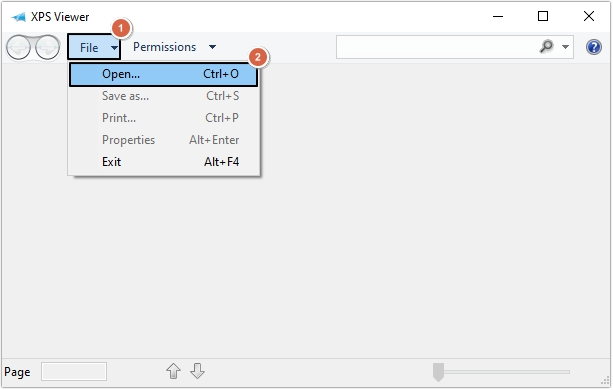
Step 3. Select OXPS file and click on Open button.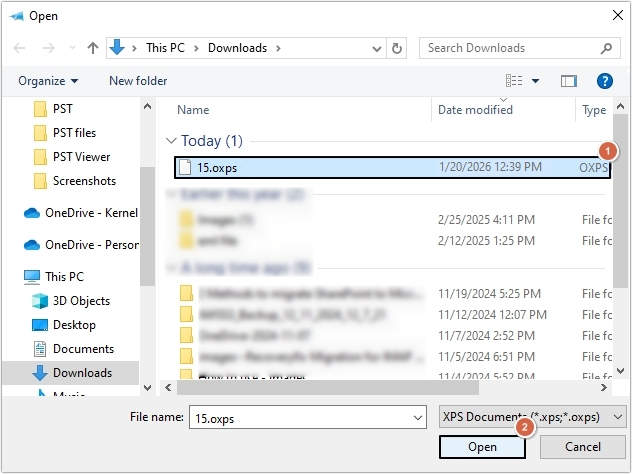
Step 4. In this way, your OXPS file will get open in the OXPS files viewer.
Method 2. View OXPS file using Microsoft Edge
Microsoft Edge allows users to directly open the OXPS file. Here are the steps to view file content:
Step 1. Open the location where OXPS file is present and right-click on it, then select Open with option.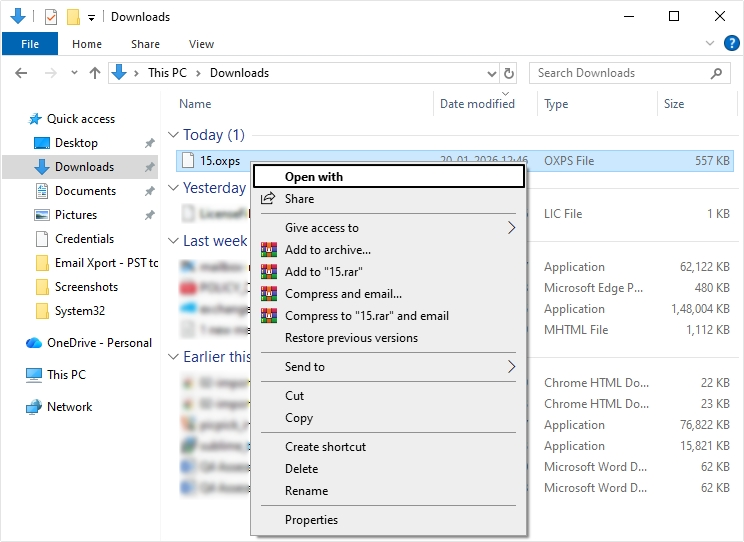
Step 2. Select Microsoft Edge to open and view OXPS file.
Limitations of manual methods
- Standard Windows viewer can face issues in opening large OXPS file, which leads to system crashes.
- Users can’t access OXPS files on Windows 7, Server 2008 R2, and older versions.
- The links, graphics, and media inserted in OXPS file may become non-clickable.
- The Windows OXPS viewer does not support opening bulk files at once.
Professional XPS Document Viewer (Recommended Solution)
The best way to open and view bulk XPS or OXPS files on Windows system without any limitations is using an advanced XPS Viewer tool. Kernel XPS Viewer is a free utility to view OXPS files and helps you out with a detailed preview of the file content, like images and text (in original structure). With this top-quality tool, users can even view password protected OXPS files.
How to use OXPS document viewer to access and view OXPS file?
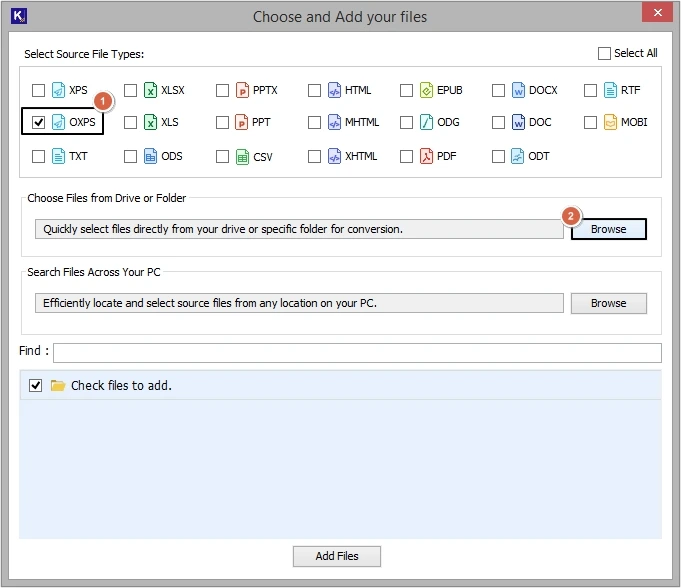
Step 1. Download and install the software. select OXPS as Source File Type and click Browse.
Note: There are two different options available to add OXPS file. Choose as per your convenience:
- Choose Files from Drive or Folder
- Search File Across Your PC
Step 2. Browse OXPS files and choose the required ones, then tap on Select.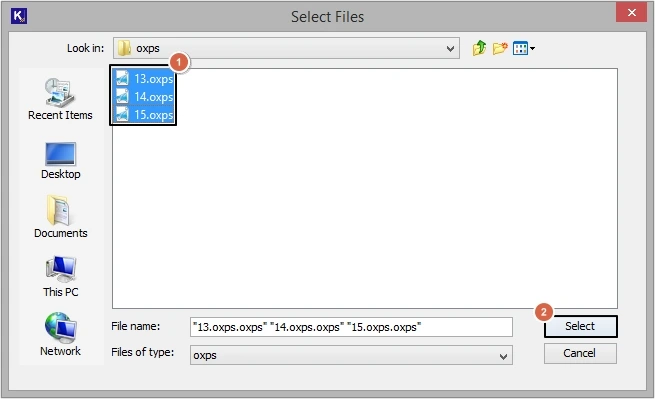
Step 3. Click on the Add Files button to proceed.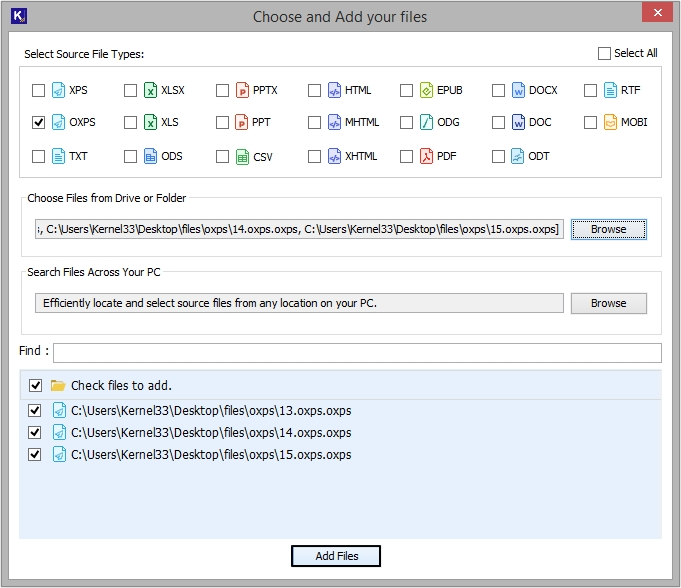
Step 4. Shortly, your OXPS files will get added, and you can click on any file to preview its content.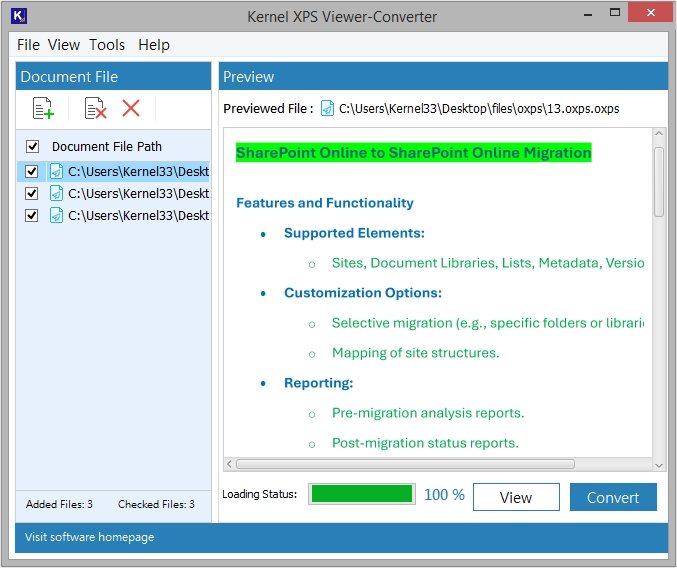
Conclusion
Users can easily view OXPS files on Windows operating system using the right tools like OXPS document viewer or Microsoft Edge. However, with manual solutions, you can only view a single OXPS file at a time. To open and view multiple OXPS files, we have recommended an advanced tool. This OXPS files viewer gives a detailed preview of your source file in the original structure for accurate results.
Frequently Asked Questions
A. No, you cannot view OXPS files in bulk with viewer application available on the Windows system.
A. Yes, you can use the recommended OXPS Viewer tool to view and access content from bulk OXPS files at once.