Read time: 9 minutes
RTF files are easy to create & share, but they are not suitable for modern eBook readers. So, if you are planning to publish, distribute, or read content on devices, including Kindle, Kobo, or mobile eReaders, the RTF to EPUB file conversion becomes essential.
EPUB file format offers flexible layouts, reflowable texts, and compatibility across different platforms. It helps to make reading more comfortable and professional.
This simple guide will help you get a clear, practical approach to convert RTF to EPUB without complexity. Besides, you will get extra insights into the concern with reasons, challenges, & tips.
Know the Reasons to Convert RTF to EPUB Format
Check out the primary reasons to convert RTF file to eBook:
- Provides long-term accessibility with rich content and interactivity.
- EPUB is best known for self-publishing platforms and digital libraries.
- Supports structured content like chapters, navigation, & metadata.
- EPUB offers better eReader compatibility, unlike the RTF file format.
- No need to adjust the text with an EPUB reflowable reading experience.
- Comes with compact sizes that help to load faster than RTF documents.
Common Use Cases to Convert Rich Text File to EPUB
Here, we have provided some common use cases, where users need to convert RTF to EPUB format:
- Sharing long-form documents digitally.
- Looking to convert manuscripts into eBooks.
- In need to publish training materials and guides.
- Archiving documents in a modern and scalable format.
Top Method to Convert RTF File to EPUB Manually
After several hits & trials, using Google Docs can be the best manual method to convert Rich Text File to EPUB. It provides a browser-based & straightforward way to open RTF files and convert them into EPUB format with no prior installation of any software. Besides, it preserves basic formatting like text structure, headings, and paragraphs.
Look at the stepwise approach to use the Google Docs utility to convert RTF to EPUB efficiently:
Step 1. Open the Google Drive, click on File upload to upload the RTF file.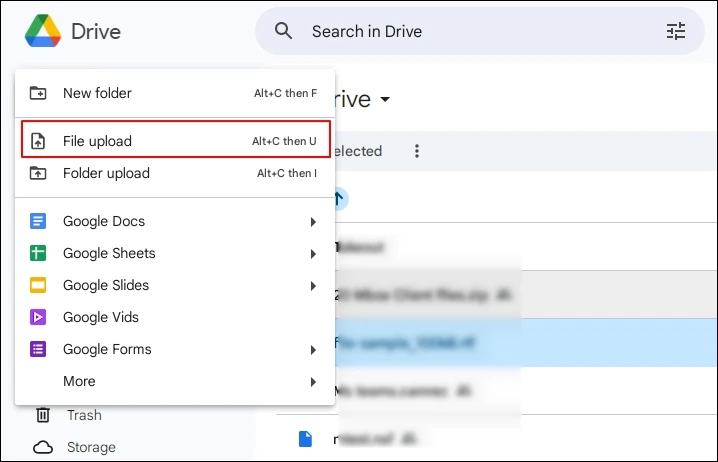
Step 2. Right-click on it, tap on Open with > Google Docs.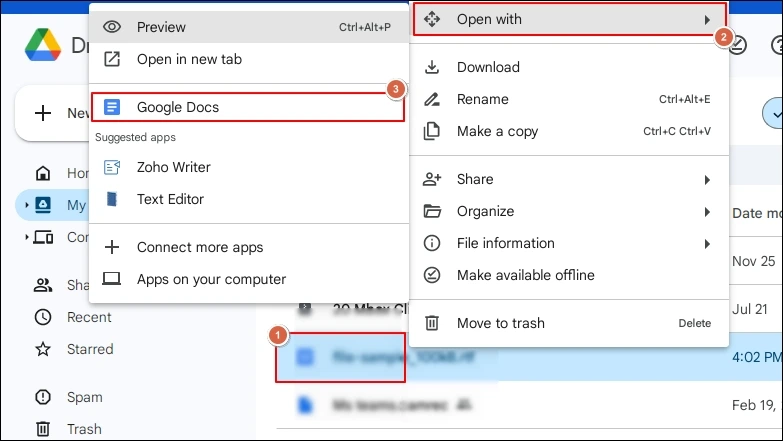
Step 3. Go to the File> Download> EPUB Publication options.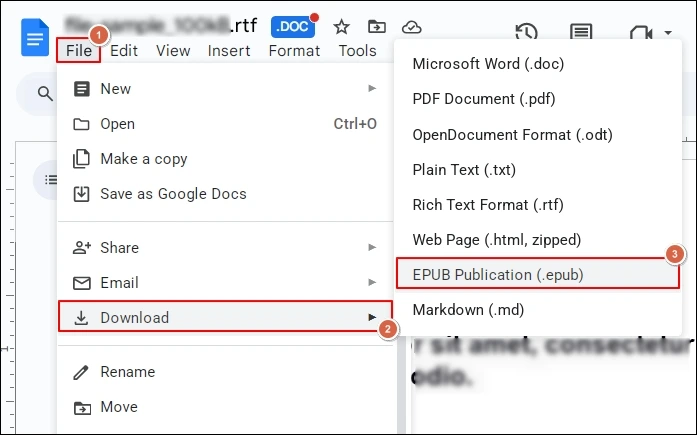
Step 4. Then, save the EPUB file at the desired location.
Note: For an offline solution, you can take the help of different word processors like LibreOffice Writer. But the chances of getting successful results may vary with them.
Major Challenges with the Manual Methods
Here, we will highlight the major challenges incurred in the manual methods:
- Users didn’t get control over EPUB metadata or navigation.
- Chances of getting inconsistent outputs for complex layouts.
- Incorrect heading hierarchy, image resizing issues can occur.
- Handling multiple or large files manually can be time-consuming.
- Manual methods offer limited support for images, tables, and styles.
- Output can be with broken paragraph alignment and missing table formatting.
Smart Advanced Approach to Convert RTF to EPUB
The limited functionalities of the manual method can restrain users from getting the desired results after the RTF to EPUB conversion. Moreover, there is no guarantee for 100% data security and integrity with them.
So, professionals recommend going with a dedicated offline advanced tool that offers 100% security and successful results. Not sure which tool to use?
With the top-quality features and advanced filters, Kernel Document Converter software stands out among others. It is a standalone tool that can help users tackle all document-related concerns effectively, including RTF to EPUB.
Look at the steps to run the tool hassle-free:
Step 1. Install and launch the converter.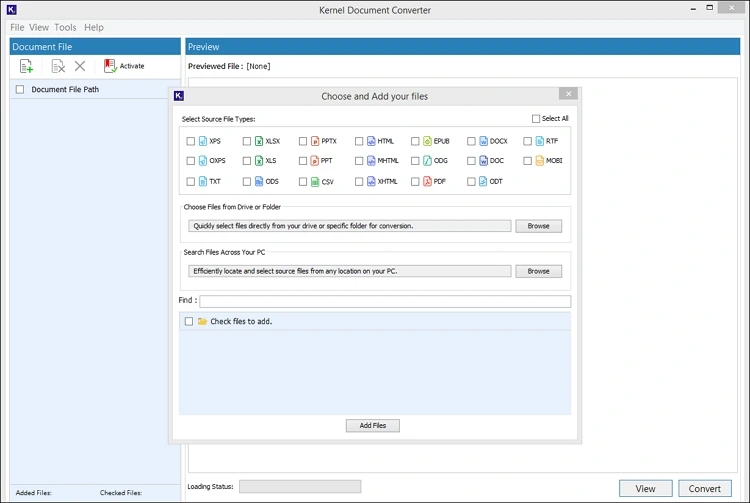
Step 2. Check the RTF format and select the File or folder that contains the RTF file. Hit the Add Files option.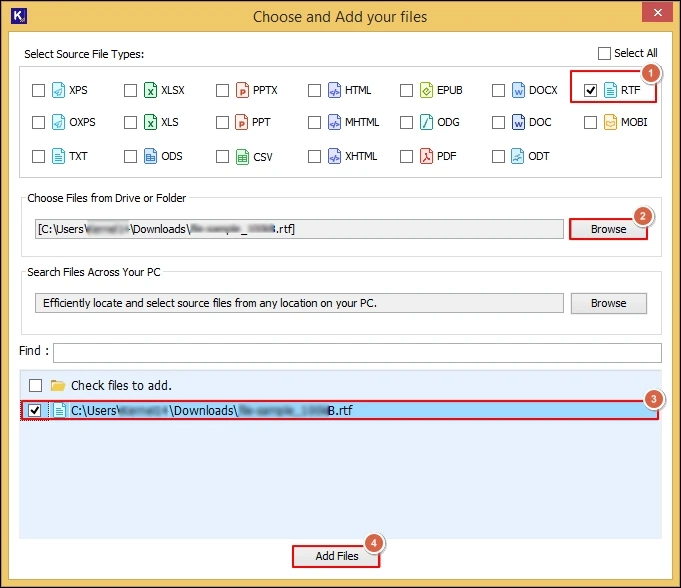
Step 3. Preview the complete RTF file content and choose the needed RTF files to convert into EPUB format. Click on the Convert option.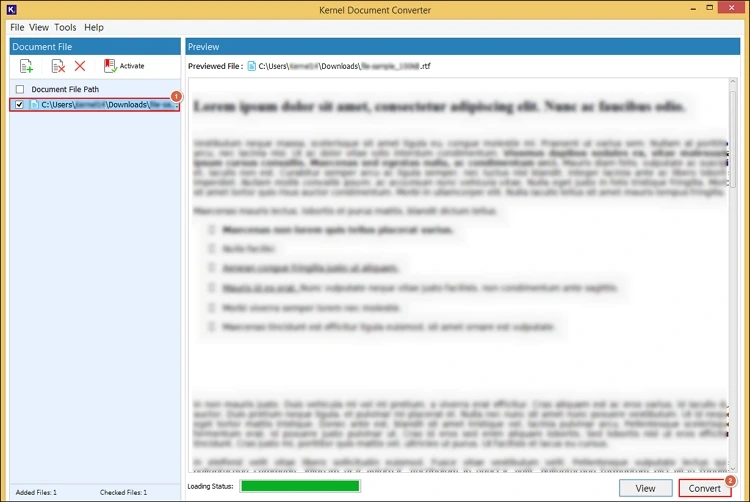
Step 4. Browse the desired destination and choose the resultant format as EPUB with the needed filters. Tap on the Convert option.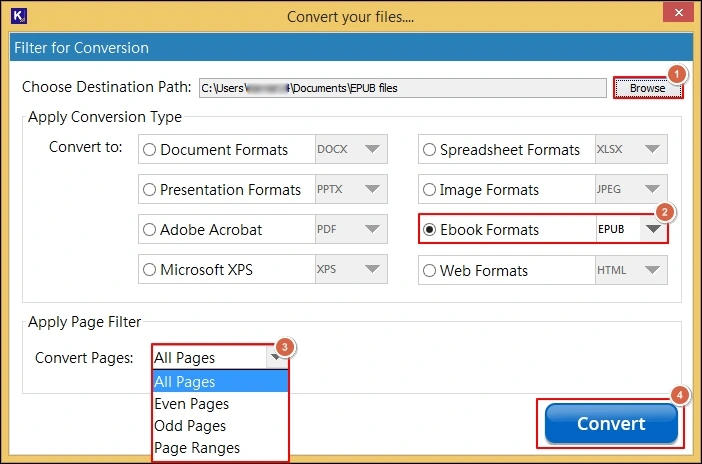
Step 5. It will initiate the “convert RTF to EPUB” process.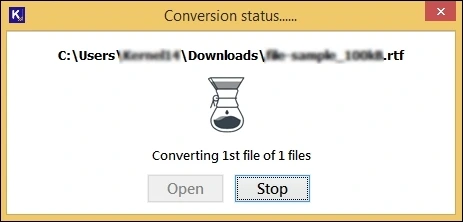
Step 6. After the “Conversion completed “message, click on the Open option to access the saved EPUB file location directly.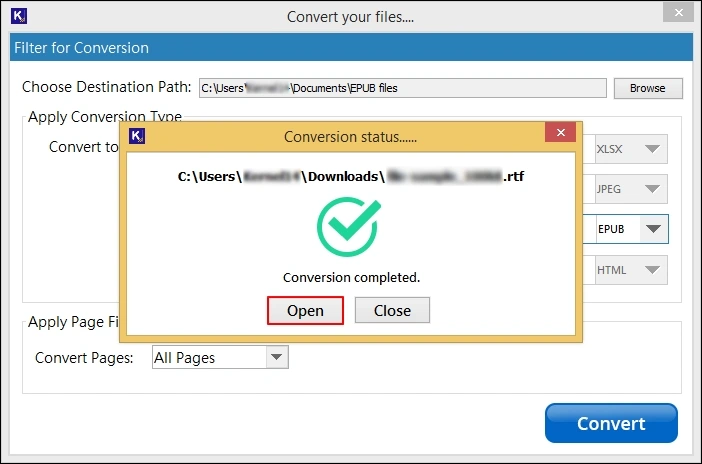
Highlighted Features of the Advanced Converter
Explore the top features of the software that makes it one of the best software in this category:
- Convert RTF file to EPUB in bulk with the same hierarchy.
- Allows for previewing complete RTF data before conversion.
- Permits you to convert the RTF file into more than 20+ formats.
- Helps to load RTF files automatically with its Auto-scan feature.
- Equipped with advanced filters for specific RTF to EPUB conversion.
- Its intelligent framework provides zero data loss and guaranteed results.
- Test the tool’s core features with the free trial version.
Know Tips to Convert RTF to EPUB Error-free
Try to follow the guidelines below for maximum benefits during RTF to EPUB conversion:
- Avoid fixed layout unless necessary.
- Include metadata, including author & title.
- Avoid inconsistent heading styles in the RTF file.
- Insert page breaks carefully to define chapters.
- Use simple fonts for better device compatibility.
- Validate & review resultant EPUB file on multiple devices.
Conclusion
Convert RTF to EPUB format with all the provided methods in this easy-to-understand write-up. Make sure that each step is performed carefully to avoid any unwanted disruptions. Besides, we have also highlighted the other aspects of the conversion, like reason, tips, challenges, & common use cases, for better understanding.


![How to Convert RTF to PDF? [One-Stop Guide]](https://www.nucleustechnologies.com/blog/wp-content/uploads/2025/12/rtf-to-pdf.png)