
Introduction
Outlook OST (Offline Storage Table) files act as an offline copy of your mailbox while keeping everything synced, but it is tied to a specific Outlook profile and can’t be accessed without the original Outlook mail account or the Windows system it was created on.
PDF (Portable Document Format) is a universally accepted, platform-independent, and a highly secure format. A PDF file can be opened on any device, be it Windows, Mac, or mobile, without needing any additional application. That is exactly why converting OST to PDF is such a common need.
User Query:
A user on the Adobe Community ran into the same requirement, asking how to convert Outlook OST files to PDF for easy sharing, since none of the converters they found online gave them the confidence to preserve the data.
In this guide, we will show you how you can convert bulk OST files into PDF format.
Why Convert OST to PDF Format?
Converting OST to a PDF file makes your offline data easily accessible to all users. There are many other reasons to convert OST to PDF, such as:
- PDF files are independent, allowing users to open and view them on mobile phones or operating systems without needing Outlook.
- Ideal for converting old emails to create a long-term, permanent offline backup of important data.
- PDF locks the exact layout at the time of conversion that makes it more reliable for legal, compliance, and audit purposes.
- It preserves original email fonts, margins, tables, and graphic layouts.
But does any manual method exist that can resolve this issue? Take a look at the expert insights with us.
Is There a Manual Way to Convert Outlook OST File to PDF?
Yes, you can convert OST to Adobe PDF manually, but you will be able to convert a single email at once using Outlook. You can either use Outlook’s print option, or you can use Acrobat for Microsoft Outlook.
But there is no direct option to convert bulk emails. If you have thousands of emails, then saving a single email isn’t a practical approach. For bulk OST email conversion, you will need powerful software that is capable of handling multiple files.
Tested OST to PDF Converter Software
We tested Kernel Email Converter with different OST files containing emails, large attachments, folders, contacts, calendar items, and other mailbox data. Take a look at the final results:
| Number of OST files tested | 30+ [small to oversized with attachments] |
| Approximate mailbox data/file size | 70GB+ |
| Outlook version | Microsoft 365, Outlook 2024, 2021, 2019, 2016, and older versions. |
| Number of emails tested | 5,00,000-7,00,000 emails approx. |
| Attachment types tested | All image formats, document formats, compressed/archive formats, calendars (ICS), contacts (VCF), etc. |
| Nested folder structure preserved | Yes |
| Filters worked as expected | Yes |
How to Convert OST to PDF with Kernel Email Converter?
Kernel Email Converter lets you convert entire OST file data into PDF. You can easily add multiple OST files without any file size limitations. Moreover, it allows you to save entire mailbox data such as emails, contacts, calendar events, attachments, tasks, and other items.
- Comes with multiple filter options for selective conversion of OST emails into PDF format.
- Saves deleted data in PDF format while keeping the original hierarchy intact.
- Offers a detailed preview of emails in original format before saving them.
- It allows users to look for a specific message with the help of its ‘Filters’ feature.
- Offers a free trial version to test the software before purchasing the full version.
Detailed Steps to Convert OST to PDF With Attachments
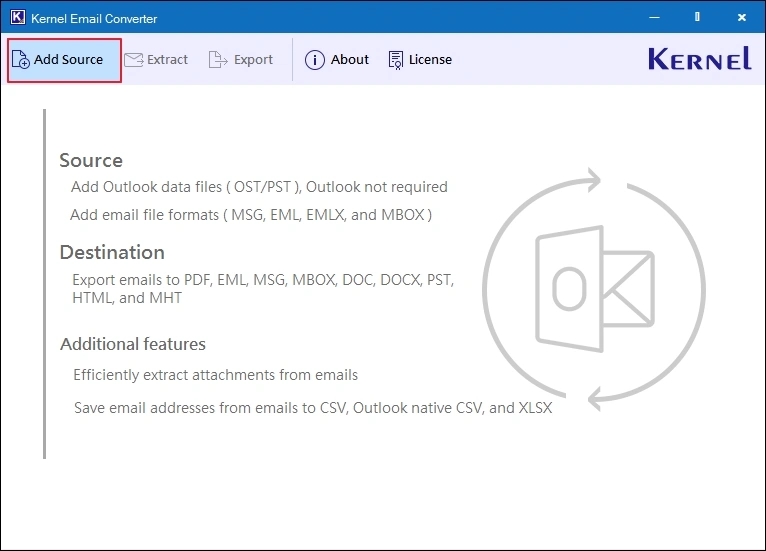
- Install and launch the Kernel Email Converter tool, and click on the Add Source button.
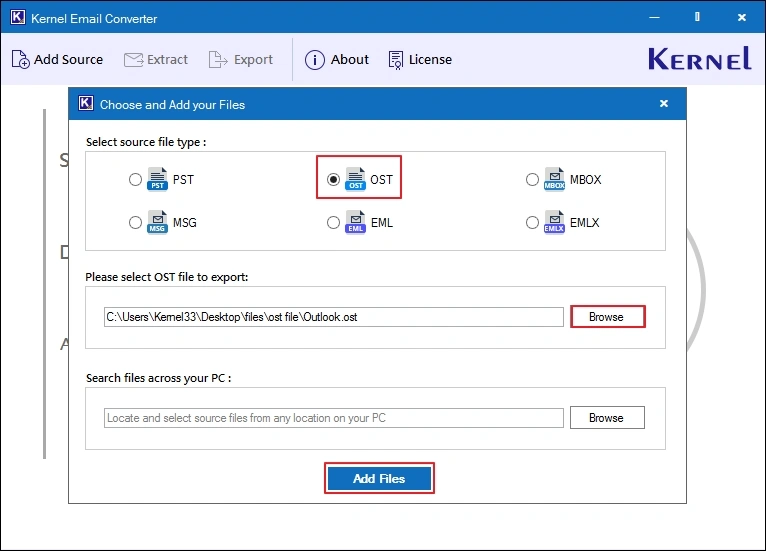
- Select OST as the source file type, then click on the Browse button to upload the OST file. After adding the file, click on the Add File button to move forward.
Note: You can add multiple OST files at once to convert them into PDF format.
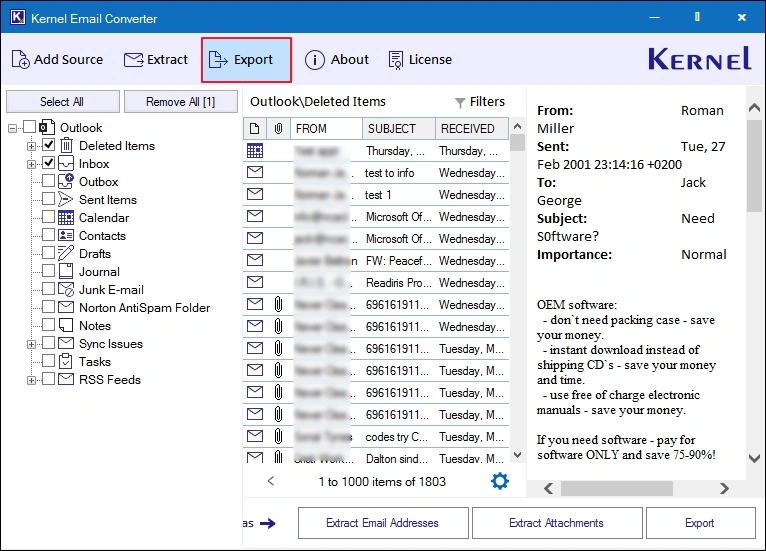
- Click on any folder to get a preview of stored emails, then select the folder(s) you want to convert or select the entire OST folders and click Export.
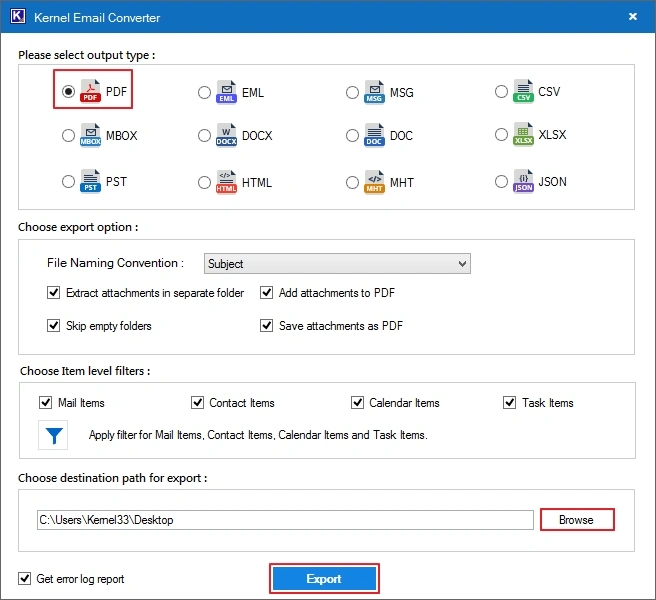
- Here, select PDF as the output type, apply necessary filters, and click the Browse button to provide a location. After specifying the saving location, click on the Export button.
Note: Apply filters like File Naming Convention, Extract attachments in separate folder, Add attachments to PDF, Skip empty folders, Save attachments as PDF, or item level filters.
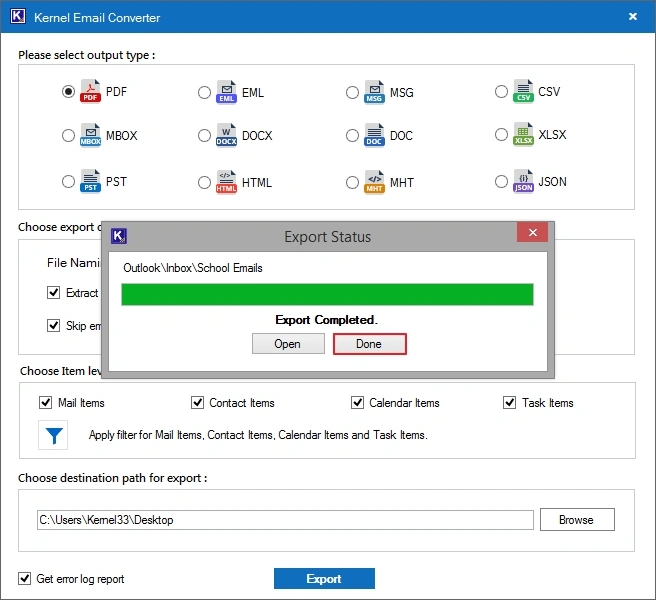
- The software will shortly convert OST to PDF with attachments. Click Done to end the process.
Ending Lines
OST files contain years of important data which can’t be risked with free methods. To avoid the hassle with manual methods, we have provided you with the best way to convert OST to PDF format. This email converter tool converts OST to PST, EML, MSG, DOC, and many other formats along with PDF, keeping everything intact.
Frequently Asked Questions
Here are some common questions and their answers related to OST to PDF conversion:
Is it possible to convert selective folders from OST files?
Yes, selective OST folder conversion is possible with Kernel Email Converter.
Can I convert OST to PDF without Outlook?
Yes, you can convert OST to Adobe PDF without Outlook using the Kernel Email Converter tool.
Can I convert OST file to PDF for free?
Yes, you can convert OST file to PDF for free using Outlook’s Print option.
Can I convert OST File to PDF in Windows?
Yes, you can easily convert OST files to PDF format on Windows systems either using Outlook (single email at a time) or a third-party tool (bulk emails at once).
Can I try Kernel Email Converter for free?
Yes. The software comes with a demo version that allows you to convert and save 25 items per OST folder for free.