Salient features of Kernel PST repair software

For fixing the PST files from any Outlook account, Kernel PST Repair software has numerous features that help and each step of the PST repair process.

tick mark icon

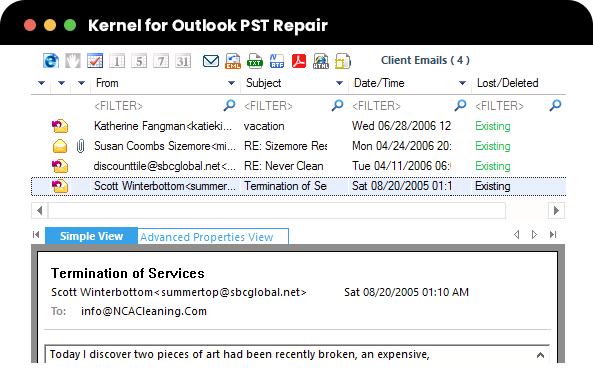
Restore permanently deleted PST emails. Recover permanently deleted PST data with the PST Fix tool. Scan corrupt/damaged PST files, and the tool highlights deleted items in red on the preview pane for easy identification.

tick mark icon

Export PST data to Office 365 Export repaired PST files to Office 365 accounts by selecting Office 365 in the saving options and providing login credentials. Enhance control by applying email filters for selective data migration before saving.

tick mark icon

Save PST emails to Web Mails Transfer the recovered PST data to webmail services such as Yahoo Mail, Gmail, AOL, etc. Input the login credentials for the respective webmail and selectively save specific emails after filtering the PST data.

tick mark icon

Advanced filtering options With the advanced filter option in the PST Fix software, selectively save or migrate PST file data based on subject, folder name, item type, and date. Specify sender or receiver names for efficient item retrieval.

tick mark icon

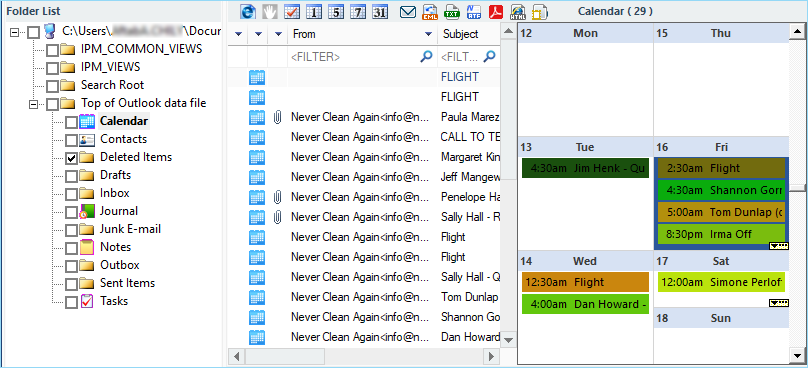
Maintains data hierarchy and integrity Restore all email meta properties, including To, Cc, Bcc, From, Subject, Date, Time, Contacts (company, email id, phone number, etc.), Tasks & Calendars, and Journals, with the PST Repair software.

tick mark icon

Search specific items in the file Locate specific items in the repaired PST file using the software's "Find" feature. Once identified, select and save items to your system in various formats like PST, DBX, PDF, MSG, etc.

tick mark icon

Restore Deleted Attachments Users may lose access to important emails and attachments when they delete them by mistake. Kernel PST Repair recovers the deleted emails and attachments from PST files, along with the other items.

tick mark icon

Save PST data in multiple Formats After completion of the PST files recovery process, you can choose to save specific emails in various file formats as per your requirement. PST Repair software permits its users to save recovered email items in DBX, MBOX, MSG, EML, PDF file formats as well.

*Download trial version and Save 25 items per folder free.

Screenshots
Frequently Asked Questions.
Execute the following steps to repair the corrupt Outlook PST file:
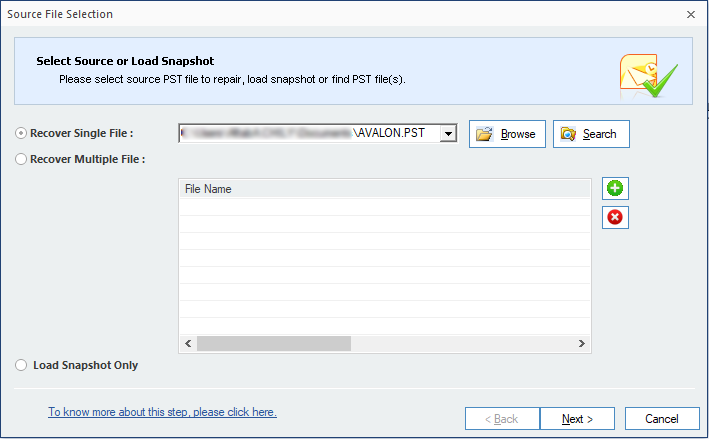
  1. Launch Kernel for Outlook PST Repair software.
  2. Select Source Single/ Multiple PST file(s).
  3. Preview the complete data of the added PST file.
  4. Choose desired Output file format to save the recovered data.
  5. Select from a range of Data filter for selective data saving.
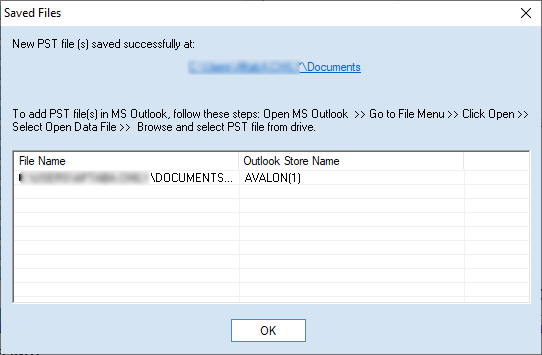
  6. Select Destination path of PST file and save using Finish button.
Yes, using the Kernel PST Fix software, you can fix every corruption error of a pst file, whether it’s due to system shutdown or virus attack.
Yes, Kernel Outlook PST Fix allows you to effortlessly recover lost and deleted emails and items from corrupt PST files. After completing the email recovery process, the tool lets you view the items in detail inside the preview pane.
Yes, it can. Kernel for PST Fix enables you to recover all folders and subfolders of the PST file in a single attempt.
Kernel PST Fix can repair your file from every corruption error, and restore even permanently deleted data. The deleted data will be visible in red color after recovery.
No. Kernel PST Repair specializes in recovering data from password-protected PST files, but it doesn’t recover or remove the PST file password. But, you can use our freeware solution– Kernel for Outlook password recovery tool to recover your lost PST file password immediately and for completely free.
In this case, you are using the trial version of Kernel PST Repair. You can purchase the full version now to save the entire data. Before buying the full version, make sure that you can preview all the required data.
Apart from PST, users can save the data in DBX, MBOX, MSG, EML, TXT, RTF, HTML, MHTML, and PDF formats. Also, they can save emails to Office 365, email servers (MS Exchange Server, GroupWise, IBM/Lotus Domino), and all popular web mails (Gmail, Google Apps, Yahoo, AOL, Hotmail/Live.com/Outlook.com, iCloud, & Company IMAP).
No! In fact, this Outlook PST Recovery software works on read-only mode. It doesn't modify the original PST file. This utility actually creates a new PST file, recovers the data from the original one and finally save it to the new PST file. Therefore, the original PST file remains undamaged.
The trial version allows you to repair corrupt PST files and view the recovered items for free. However, due to the trial limitation, it lets you save only the first 25 items from each folder to PST file. Once you’re satisfied with the Trial version, then you can proceed towards the software purchase.

Software Specifications

About Software

  • Version: 20.3
  • Release Date: April 2020
  • License Type: Personal, Home, Corporate & Technician

Version Support

MS Outlook: Office 365 Outlook, 2021, 2019, 2016, 2013, 2010, 2007, 2003, 2002, 2000, 98 and 97

Operating System

Windows 365, 11, 10, 8.1, and older versions Windows Server 2022, 2019, 2016, 2012, 2008 R2, 2008, 2003 R2, 2003 OS

Software Guides

Why millions
trust our KernelApps products

  • 30 Day Money backGuaranteeMoneyback
  • 2 Million+happy customersHappy customers
  • 18 Years'of experienceYears of experience
  • 100%safe & securesafe & secure
  • 24x7 free supportfree support