Extraordinary benefits of the OST recovery tool

The OST recovery tool can access the OST file directly from its location and apply the repair process instantly. Each feature of the tool is important for effective recovery.

EDB File to PST Conversion without Outlook

Execute OST recovery Execute OST recovery using the advanced OST recovery tool to recover emails, calendar entries, and attachments in a hierarchal structure. With the OST recovery tool, speed up your OST migration process within a few minutes.

Deleted Exchange Mailbox Recovery

Recover OST to Office 365 Mailboxes Migrate email data and restore OST files to Office 365 mailboxes. This OST recovery tool will recover your data into a cloud-based Office 365 mailbox without any interruption or loss of data.

Transfer Office 365 to Office 365

Corrupt OST recovery Restore corrupted and damaged OST files data seamlessly with an OST recovery tool. It will repair your corrupted contacts, attachments, pdf, and existing and deleted email files seamlessly.

Transfer Live Exchange to Live Exchange

Restore OST to Exchange Server Migrate your email servers – such as Exchange Server, Lotus Domino, and Novell GroupWise with this OST recovery tool. Restore OST files to Exchange Server like 2019, 2016, 2013, and older ones

Easy-to-Use Export Options

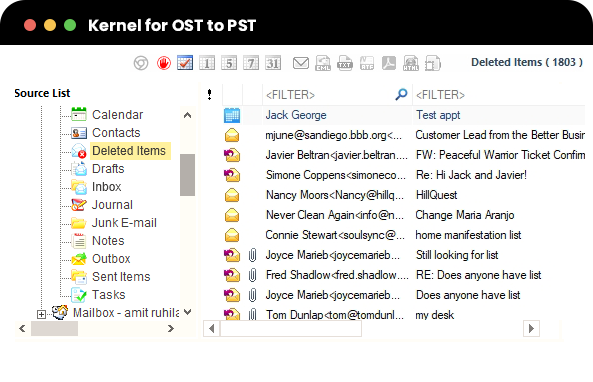
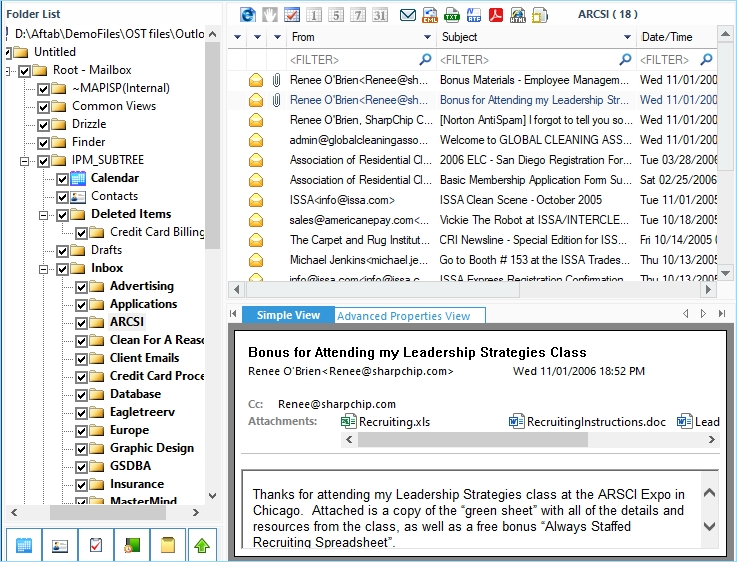
Preview OST mailbox items Preview your OST mailbox items effortlessly using an OST recovery tool. After recovering corrupted and damaged OST files, you can preview your emails, calendars, attachments, etc., on the tool’s page.

Advanced Search within Mailboxes

Migrate OST files into Gmail Migrate your data precisely with the OST recovery tool to migrate OST files into Gmail. Also, it recovers web-based email clients like Gmail, Yahoo, iCloud, Google Apps, Outloook.com, and AOL.

*Download trial version and Save 25 items per folder free.

Screenshots
watch-video Watch Video
Frequently Asked Questions.
Use these steps to recover OST data instantly:
  1. Run the OST recovery tool.
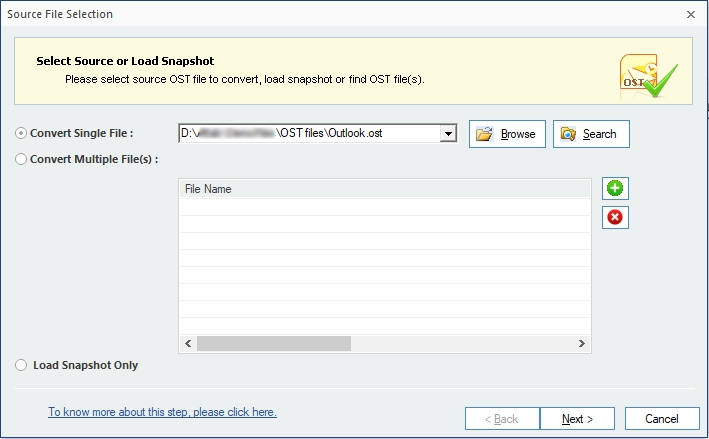
  2. Select a suitable option and add a single/multiple OST file(s).
  3. Preview the recovered OST file content.
  4. Choose PST format for saving the recovered data.
  5. Select data filters to recover data selectively.
  6. Select the option for PST splitting.
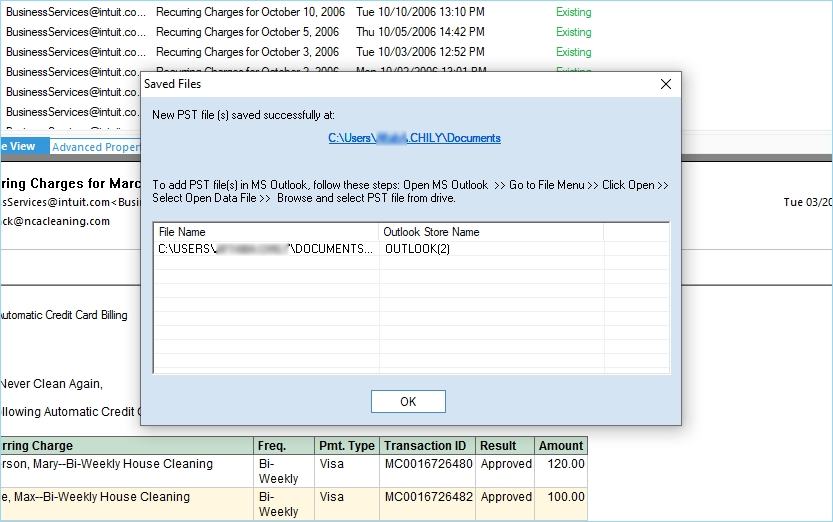
  7. Give the destination and finish the OST recovery.
The offline storage table (OST file) gets created only if you’ve enabled this option: Microsoft Exchange Server’s Cached Exchange Mode.
You can use the default path on your Windows PC to find the OST file:

On Windows 10: C:\Users\user\AppData\Local\Microsoft\Outlook\

On Windows XP: C:\Documents and Settings\user\Local Settings\Application Data\Microsoft\Outlook\
Yes, the tool does. The solution lets you to recover and migrate all mailbox items such as emails, attachments,drafts, contacts, tasks, calendars, etc. from OST file to PST file.
Yes, you can convert items as per your requirement with the Filter option of the tool. This tool allows you to select the mailbox folders and then apply filters like From, To, Subject, Folder Name, Item Type, and Date Range. Also, it has an additional option to exclude deleted items at the time of conversion.
Yes, this tool migrates OST files generated by different webmails like Gmail, Outlook.com, Yahoo, etc. in IMAP configuration. Also, it supports Exchange OST files.
No, it does not. The OST to PST converter simply scans your OST file and recovers the entire data without making any alterations to its data integrity. The tool preserves the full mailbox hierarchy, and properties after the conversion.
Yes, it can. The tool can smoothly convert any size of OST file to PST file, without worry about the file size restriction. Also, the tool lets you to specify the size after which you want to split the PST file, to make it safer and manageable
Yes, the tool comes with a unique feature of splitting a file. You can select a size limit in GB. Once you select the size there, let’s say 2GB, and your file is 6 GB, at the end of the process, your file will be saved in 3 different files with 2GB size each.
OST to PST tool doesn’t need a live Exchange connection for its working. So you can use this tool for OST to PST conversion even without Exchange connection.
You can do this even without buying the tool. The free version of our solution offers the preview of entire OST data. So please try it. You even can save a few emails (25 items from every folder) to some selected formats.

Software Specifications

About Software

  • Version: 26.0
  • License Type: Personal, Home, Corporate & Technician

Version Support

MS Outlook: Office 365, 2019, 2016, 2013, 2010, 2007, 2003, 2002, 2000, 98 and 97

Operating System

Windows 365, 11, 10, 8.1, and older versions, Windows Server 2022, 2019 & older versions.

Software Guides

Why millions
trust our KernelApps products

  • 30 Day Money backGuaranteeMoneyback
  • 2 Million+happy customersHappy customers
  • 18 Years'of experienceYears of experience
  • 100%safe & securesafe & secure
  • 24x7 free supportfree support