Convert OST to PST The solution allows smooth migration of OST items to PST file. It lets you export OST file to all versions of MS Outlook (PST file) like Office 365, 2024, 2019, 2016, 2013, 2010, 2007, 2003 versions.

Export OST to Office 365 Mailbox You can export OST file items directly to a cloud-based Office 365 mailbox without any data loss. The OST recovery or OST preview involves no complex steps to import/export OST file to Office 365.

Recover and View OST files If your OST file is corrupt or inaccessible, Kernel for OST to PST converter helps you to repair it immediately and lets you view the OST file content prior to conversion. It provides a secure mailbox recovery (of existing/deleted emails, attachments, calendar items, etc.) against all OST corruption issues.

Restore OST to Exchange Server The OST to PST converter allows you to migrate your OST file data straight to the connected email server – such as Exchange Server, Lotus Domino, and Novell GroupWise. The solution allows to restore OST to all versions of MS Exchange Server like 2019, 2016, 2013, 2010, 2007, 2003, 2000, 5.5 and 5.0.

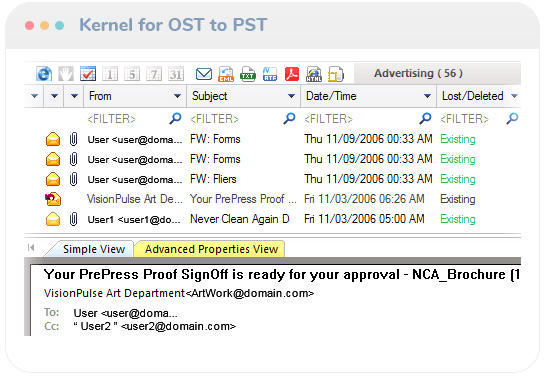
Preview OST Mailbox Items The OST Viewer solution not only provides OST recovery, but also allows full mailbox preview of the contained emails (with attachments), tasks, calendar entries, contacts etc. within the Software Console.

Selected Email Migration You can filter the important emails and items of OST file that you want to migrate, using the Filter option after viewing the OST file items. Refine your data items based on item type, date range, folder name and other provided filter fields.

Save OST Emails to Multiple Formats The OST Viewer tool allows to save OST emails in different messaging formats like PST, DBX, MSG, EML, TXT, RTF, HTML, MHTML, & PDF.

Find Messages You can immediately find any specific message and view it from OST file using ‘Find’ option and enter the desired keyword to search the specific emails based on these search parameters: from, to, subject, message has attachment, and received before/after.

Free OST to PST Converter This tool comes with a trial version which you can download at absolutely no cost. The trial version has all the features, including the OST viewing feature. The limitation with the trial version is that you can save up to 25 items per folder only. Download this free OST to PST Converter now to avail the exciting features of the tool for free.

Runs on all Windows Versions OST to PST converter is designed to run on all Windows platforms including Windows 365, 11, 10, 8.1, and older versions, Windows Server 2022, 2019 & older versions
 (5/5) 690 Reviews
 Download trial version and save 25 items from each OST folder free


 Download Free
 Buy Now
  1-866-348-7872



 Installation Guide