Wider Exchange Migration
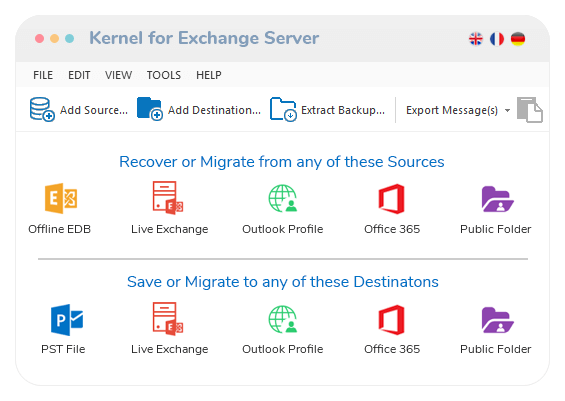
Experience complete migration with a wide range of sources and destinations. The Exchange migration tool migrates from sources like Offline EDB, Live Exchange, to destinations like PST, Live Exchange, Outlook Profile, Office 365 & public folders with no hassle.
Migrate EDB/Live Exchange to Office 365
Perform a smooth migration of EDB files or Live Exchange mailboxes (single & multiple), public folders, and archive mailboxes effectively. The Exchange migrator tool offers migration to and from Microsoft 365 with no data loss.
Migrate the deleted Exchange data
The Exchange migrator extracts your permanently deleted mailboxes, folders, messages, attachments, contacts, calendars, and email properties back within the source and easily migrates them to the destination with full accessibility.
Export EDB to Live Exchange
Easily migrate data between Exchange versions (2019, 2016 & 2013) with Exchange migrator. Migrate all or specific mailboxes, public folders, and archive mailboxes to Live Exchange Server with no server downtime.
Search option to View Mailbox items
The Exchange migrator tool’s search feature allows you to preview your entire mailbox items, like email, attachments, contacts, etc., on various parameters like body, type, size, date range, and more within the selected mailbox/folder.
Automated Exchange File Retrieval
No manual hassle to search the Exchange EDB file within the system as the source. The Exchange migrator tool searches the EDB file from any hard disk directory automatically & facilitates a smooth source/destination addition.
Detailed Migration Report
Get detailed reports to analyze the mailbox data flow based on parameters such as senders, receivers, attachments, dates, and messages. The Exchange migrator software provides operation logs and details once the migration completes.
Support all Windows Server and OS
The tool smoothly supports MS Exchange Server: 2019, 2016, 2013, 2010, 2007, 2003, 2000, 5.5 & 5.0. Also, the Exchange migrator runs on all major Windows OS, like Windows 365, 11, 10, 8.1, and older versions with zero lag or error.
 (4.9/5) 514 Reviews
 The free trial version migrates only 25 items per folder to the destination.


 Download Free
 Buy Now
  1-866-348-7872



 Installation Guide