Employee Monitoring - Myths & Realities
As businesses are struggling to manage their employees' productivity, the concept of monitoring has more importance than we imagine. It involves the use of highly advanced methods to monitor employee productivity, workstation activities, and idle time. Earlier, it wasn't easy to check and monitor the work of employees. With advanced employee monitoring methods, it has become easier for almost every organization to improve the productivity of employees.
What is Employee Monitoring?
The practice of using digital tools to monitor and track employees' performance, work, and other business-related activities. It is majorly used to detect and prevent data breaches, enhance employee engagement, and optimize inefficient workflows. Businesses use various tracking methods to measure productivity, track attendance, ensure security, and collect proof of working hours.
Lately, there has been a huge increase in employee monitoring tools. It shows the need for advanced workforce analytics and productivity measuring tools. Analyzing and tracking employee work behavior can improve workforce productivity and make businesses more profitable. It will deliver you with an overview of how work is done by the employees and provide better insights into employee behavior and potential.
Types of Employee Monitoring
Tracking majorly relies on the tool you use to monitor your employees. You'll get different capabilities with different tools based on your requirements. Earlier, monitoring was done only in the office premises, but things have changed now. Let's have a look at the type of employee monitoring methods you can use to track your employees.
Computer Usage Monitoring
Computer usage tracking involves monitoring all the computer events of your employees, such as USB activity, screenshots, application use, websites visited, and log-on activity. It allows you to see whether the applications work as expected or not, detect high-risk transfers to removable media devices, and verify the active hours of employees and overall employee engagement.
Internet and Email
Internet and email are two major targets of employee monitoring tools. Internet is an essential factor in enhancing productivity if used properly. In contrast, emails help stay in touch with others by offering smooth communication. According to a survey, it is believed that more than 60 percent of employees use the internet for personal matters during work hours, which affects their productivity.
Monitoring the URLs your team members visit can help you address potential productivity concerns. For instance, if you notice that employees are browsing shopping sites and social media sites for a long time and failed to respond to your queries, it means they're not working properly.
Screen Capturing
Screen capturing and video recording are efficient methods of employee tracking and allow organizations to view and monitor every activity of their employees. With screen capturing capability, you can view screenshots of employees' screens and check if they're focused on their work.
Time and Data Tracking
Every organization wants their employees to spend some specific time on their systems for work, but most employees often don't put in actual work hours while working remotely. You can check when your employees are clocking in and out with time tracking functionality. It even allows employees to record the actual work hours on a daily basis. Apart from that, employees can track the working hours for a specific project or task. This time tracking data can later be used by managers to measure employees' performance and growth in the company.
Keylogging
Also known as keystroke logging, this is the process of recording the keys when a user is typing on the keyboard. It intends to make employees focus on their work rather than other tasks. Besides, keystroke programs can also take screenshots of the system is triggered by predefined keywords.
However, keystroking has many drawbacks that can pose a greater risk. For instance, whoever gets access to read the data can also read the employees' passwords. Another disadvantage is that employees cannot tell if the keylogger is recording their keystrokes or not.
GPS Tracking
GPS or location tracking is a form of employee monitoring that is not widely popular, but it is still used for monitoring employees involved in frequent traveling. With GPS tracking, you can recover company-provided mobile devices if lost or stolen, improve productivity by tracking the mileage and routes taken by company vehicles, and more.
Monitoring Benefits for Employers and Employees
It can be very beneficial for your organization. Some of the most standard benefits of employee monitoring include:
- Enhances employee productivity and efficiency by analyzing business processes
- Allows you to make a more engaged team and productive employees
- Offers transparency and accuracy for better management
- Will enable you to discover unrealized revenue from a fully-engaged team
- Provides useful employee insights to understand their effectiveness
- Protects against data loss with advanced security parameters
Monitoring Disadvantages of for Employers and Employees
No doubt the advantages of employee monitoring are endless, but there are some drawbacks as well. But, you can mitigate these risks both as an employer and employee.
- Increases the concern of employee privacy, so you need to ensure they're not being monitored
- Employees can have feelings of anger or dissatisfaction if they perceive you're spying on them
- If employees' realize that they're being monitored, they might work harder, take fewer breaks, and worry about their productivity, which can increase the stress levels
- If you don't use a reliable and secure monitoring tool, it can lead to data leakage, increasing privacy concerns
Legal Considerations for Employee Monitoring
Most organizations are worried about the legal aspects of tracking. Unfortunately, there are several misconceptions as well that can turn you off. But is employee monitoring even legal?
The answer is yes! According to Workplace Laws, it is completely legal. This doesn't mean you can play with the privacy of your employees. For instance, you can read what the emails on your server say. However, the only restriction for employee monitoring is phone calls. As an employer, you cannot monitor employee personal phone calls without employees' consent. For all other activities, no permissions are required from the employees if they're using the company-owned equipment.
However, in some areas like Delaware and Connecticut, employers must provide a notice to employees before monitoring them. So, if you're planning to install any software, make sure you check for any state-specific laws. The European Union nations give you the right to privacy at work. So, all individuals in the EU must consent to personal data collection, and they must be notified of how and why it is being collected.
Selecting Monitoring System
Now that you know the pros and cons of monitoring, it's time to select the best employee monitoring software. Although there are many software available online, choosing the best one can be challenging. So, how can you choose the best software for your company?
Before you decide to invest in any software, make a checklist of tracking requirements. For example, you can consider the following features, such as:
- Real-time monitoring
- Screenshot capture and export
- Website blocking
- Keystroke logging
- Data leak prevention
- Full access to SQL data
- USB-use alerts
- Measure the time spent on tasks
- Freedom to categorize activities as productive or unproductive
Another thing to consider is the way the system operates. For example, some employee monitoring software gives the employee the control to keep track of their tasks. Others gather data based on computer usage while providing employees the freedom to work without having to think about logging in.
So, you need to consider what type of features and software you need for your company. Once you narrow down the features, you can look at the tools available in the market. Furthermore, you also need to consider the price of the tool, as it shouldn't affect your budget.
How to Use Monitoring System in Your Organization?
When it comes to using employee monitoring software, it entirely depends on the type of tool you choose for your organization. Generally, there are two categories of software – User Input and Always-On/Scheduled.
The user input employee tracking software allows employees to keep track of each activity. They can use an application to record when they begin, stop, or pause the project. So, all the data is collected during this period only. Other monitoring software gathers information as long as the computer is in use, allowing employees to work without worrying about logging in to the system.
You can select any of these tools in your organization to keep track of your employees. However, the best way to use the employee tracking tool is to install the application on employees' systems and track their activities on a different server without their knowing. Besides, the software might require experts to install and track the activities.
Preparing for Success
If you have decided to choose an employee monitoring tool for your business, it's time to take the next steps for success. Implemention of tool is easy, but the process can be challenging. There are some points that you need to take care of, such as:
- Make sure you involve your team members in the process by informing them about the employee monitoring activity
- Inform your employees about how the tool works, why it is needed, company benefits, etc.
- Be thoughtful about the websites you're going to block in your organization, as websites like YouTube can be very beneficial for employees to learn
- Don't expect employees to work for eight hours continuously, as employees also need breaks
- Tailor the tool to your needs, as many tools give you the flexibility to customize your settings
How Can Employee Monitoring Help You?
Employee Monitoring is an effective software designed for remote employee tracking, recording their activities, and viewing real-time. It lets you monitor employee desktop activities during working hours to identify careless and idle workers. It enhances employee productivity, ensures data security, and eliminates security risks.
Monitor work-from-home employees
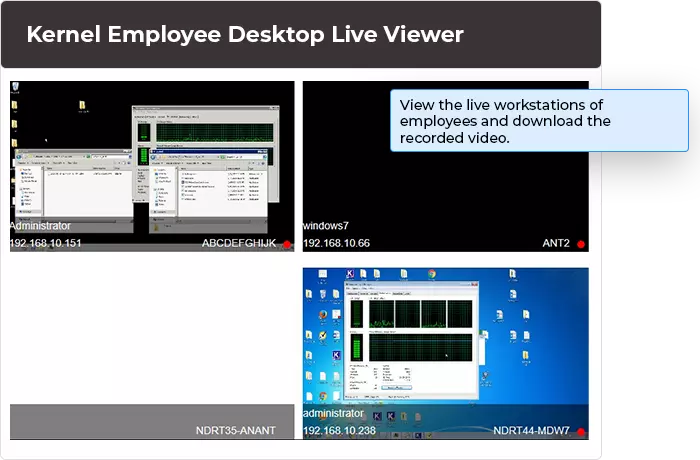
The tool allows you to monitor employee desktops and see their activities on remote employee desktops. It records employee activities anytime and saves the video for offline viewing.
Offers invisible monitoring
This tool offers invisible Monitoring of all computers, which means it'll not be visible in the Start Menu, Task Manager, Control Panel, or anywhere else. So, employees will not be aware of its installation or desktop tracking. Besides, employees cannot uninstall the tool from Control Panel.
Multi-system Monitoring
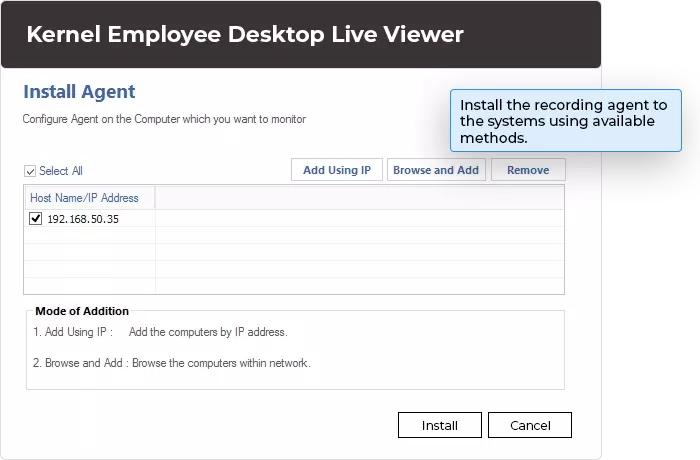
The best part about the Employee Monitoring tool is that there is no limitation on the number of systems on which you can install the tool. Therefore, the tool can be installed on any number of systems in the same domain, different domain, or workgroup.
Un-interrupted surveillance
The software offers uninterrupted surveillance on all computers. It starts monitoring activities automatically as soon as the computer starts. Furthermore, it records all the activities performed on the system without stopping/pausing.
Dual-screen monitoring
The tool facilitates dual-screen Monitoring, which means that even if the employee works on two monitors, you can monitor them efficiently. In addition, you can monitor floating devices like laptops using this tool.
Offline monitoring
This tool feature allows you to monitor the employees' activities without staying on the monitoring system. Even if you're offline, the tool will continue monitoring employee systems.
Find & download videos
With the search and download functionality, you can easily download recorded videos of employee activities to the desired location. You can search for videos based on the date range and then select and download them to your system.
Delegate viewing rights
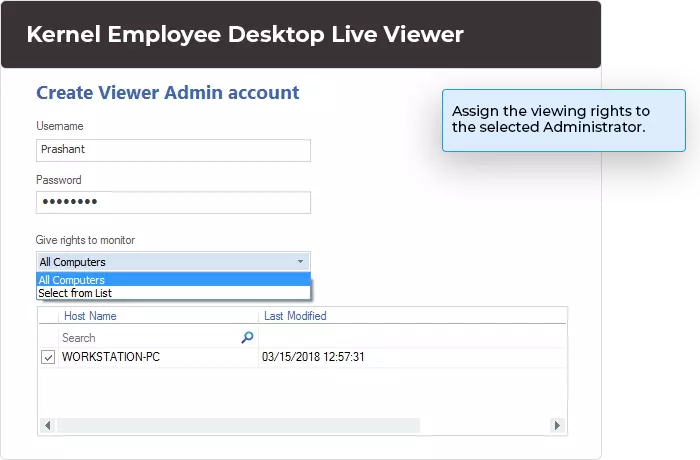
Employee Monitoring comes with a viewer console application installed on any system. As an administrator, you can delegate viewing rights to other users to monitor specific computers.
Advanced settings
The tool also offers advanced settings for individuals to specify the recording location, video retention settings, Pop-up notifications, picture quality settings, etc. It allows you to tailor the monitoring to suitable settings and options.
Warn, Shutdown, or Restart in Emergency
Although it is not feasible to change the data on employee desktops, you can restart, turn off, or shut down the computer anytime. Besides, you can immediately warn the employee if they're doing something else.
 (4.9/5) 954 Reviews




 Installation Guide
 (4.9/5) 954 Reviews